
1. Johdanto
Thank you for choosing the Ctronics RBX-F20 2.5K 4MP Solar WiFi PTZ Outdoor Security Camera. This advanced security camera offers high-resolution surveillance, flexible pan and tilt capabilities, and sustainable solar power. This manual will guide you through the installation, setup, and operation of your camera to ensure optimal performance and security for your property.

Image: The Ctronics RBX-F20 camera with its integrated solar panel, designed for outdoor use.
2. Tärkeimmät ominaisuudet
- 2.5K 4MP Resolution & Color Night Vision: Experience clear 2560x1440 resolution. Equipped with 10 built-in spotlights, the camera provides full-color night vision up to 30 meters, illuminating a wider area.
- 100 % langaton ja aurinkovoimalla toimiva: Features a 7800mAh rechargeable battery for extended operation. The integrated solar panel continuously recharges the battery, ensuring uninterrupted power and true wireless functionality.
- PIR Sensor & Human Detection: Utilizes a PIR sensor for accurate human shape detection with a rapid 0.2-second wake-up time. Adjustable alarm sensitivity (low, medium, high) sends precise real-time notifications to your smartphone upon human motion detection.
- 355° panorointi ja 95° kallistus: Control the camera's rotation remotely via your smartphone, covering a wide area with 355° horizontal pan and 95° vertical tilt.
- Kaksisuuntainen ääni: Built-in microphone and speaker allow for real-time communication with family, visitors, or to deter intruders from anywhere.
- IP66 Säänkestävä: Designed with a robust IP66-certified weatherproof casing, ensuring reliable operation in various extreme weather conditions.

Image: Comparison of day and color night vision footage from the 2.5K 4MP camera, showing clarity and detail.
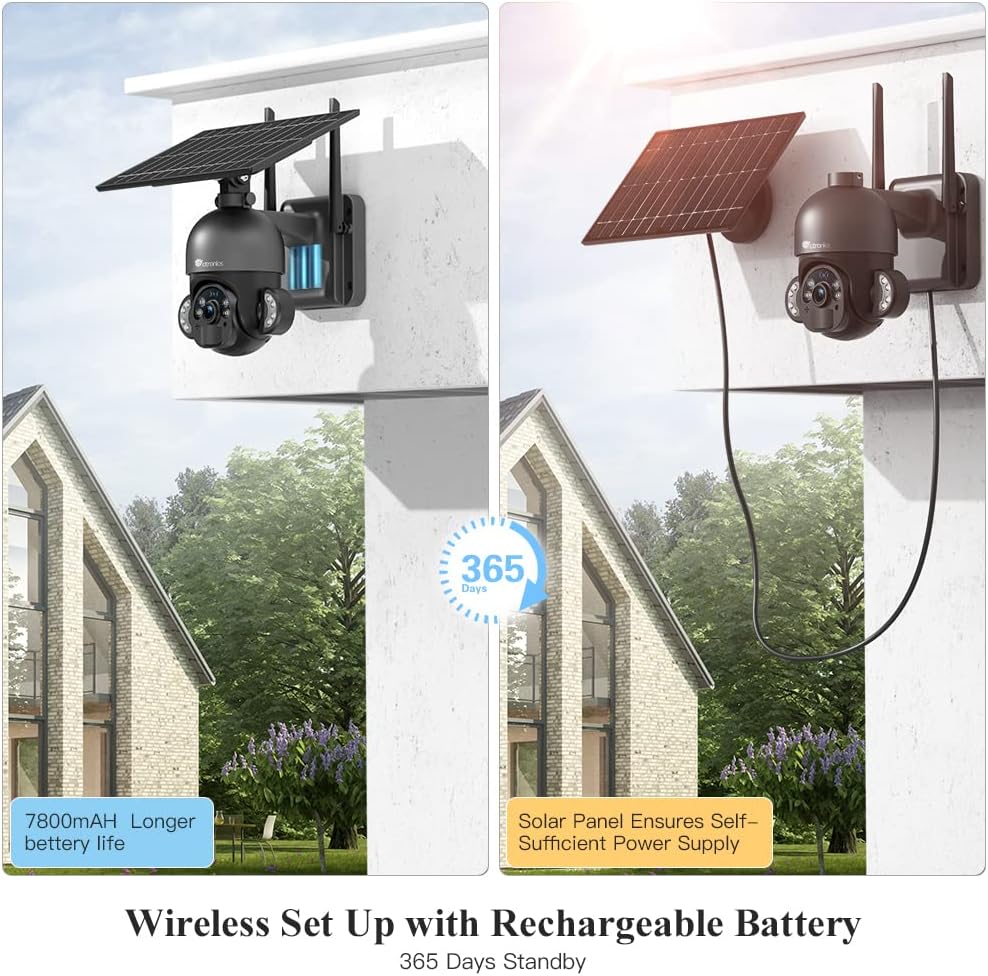
Image: The camera highlighting its 7800mAh battery and the solar panel providing continuous power, indicating 365 days of standby.

Image: A person and a dog in the camera's view, demonstrating the human detection feature distinguishing between human and non-human movement.

Image: The camera mounted on a wall, illustrating its 355-degree pan and 95-degree tilt capabilities for comprehensive coverage.

Image: A person interacting with a delivery driver via the camera's two-way audio feature, shown on a smartphone screen.

Image: The camera mounted outdoors, with rain and clouds indicating its IP66 weatherproof design.
3. Pakkauksen sisältö
Tarkista pakkauksen sisältö vastaanotettuasi sen. Jos jokin puuttuu tai on vaurioitunut, ota yhteyttä asiakaspalveluun.
- Ctronics RBX-F20 PTZ Camera with Solar Panel
- Asennusteline
- Kiinnitysruuvit ja seinätulpat
- USB-latauskaapeli
- Käyttöopas
- Pika-aloitusopas
4. Asennus ja asennus
4.1 Ensimmäinen lataus
Before installation, fully charge the camera's built-in 7800mAh battery using the provided USB cable. Connect the cable to a 5V/2A power adapter (not included) and the camera's charging port. The charging indicator will show the status.
4.2 Sovelluksen asennus ja tilin luominen
- Download the "Ctronics" app from the App Store (iOS) or Google Play Store (Android).
- Open the app and register a new account, or log in if you already have one.
4.3 Kameran pariliitos sovelluksen kanssa
- Ensure your smartphone is connected to a 2.4GHz Wi-Fi network. (5GHz Wi-Fi is not supported).
- Kytke kameraan virta.
- Lisää uusi laite napauttamalla Ctronics-sovelluksessa "+"-kuvaketta.
- Follow the on-screen instructions to scan the QR code on the camera or manually enter the device ID.
- Valitse Wi-Fi-verkkosi ja anna salasana.
- The camera will attempt to connect. Once connected, you can name your camera and complete the setup.
4.4 Kameran asennus
The camera offers two installation methods: all-in-one (camera and solar panel together) or separated (solar panel mounted separately for optimal sunlight exposure).
- Valitse sijainti: Select a location with good Wi-Fi signal and sufficient sunlight exposure for the solar panel. Ensure the camera has a clear view alueelta, jota haluat seurata.
- Merkitse porausreiät: Käytä asennuskiinnikettä mallina porareikien merkitsemiseen seinään.
- Poraa reikiä: Poraa reiät merkittyihin kohtiin ja aseta seinätulpat niihin.
- Kiinnitä teline: Kiinnitä kiinnitysteline seinään mukana toimitetuilla ruuveilla.
- Kiinnitä kamera/aurinkopaneeli:
- Kaikki yhdessä: Attach the camera unit (with the solar panel already connected) to the mounting bracket.
- Erotettu: Mount the solar panel in a location with maximum sunlight, then connect it to the camera using the extension cable (if needed, not included). Attach the camera to its mounting bracket.
- Säädä kulmaa: Adjust the camera and solar panel angles for optimal coverage and charging efficiency.

Image: Illustrates two installation methods for the camera: integrated solar panel and separate solar panel for flexible placement.
5. Käyttö
5.1 Livenä View ja PTZ-ohjaus
Open the Ctronics app and select your camera to access the live view. Use the on-screen controls to pan (355° horizontally) and tilt (95° vertically) the camera lens to monitor different areas.
5.2 Kaksisuuntainen ääni
Livenä view interface, tap the microphone icon to speak through the camera's speaker. Tap the speaker icon to listen to audio from the camera's surroundings.
5.3 Liiketunnistus ja hälytykset
The camera uses a PIR sensor for human detection. You can adjust the sensitivity (low, medium, high) in the app settings. When motion is detected, the camera will record and send a push notification to your smartphone.
5.4 Yönäkötilat
The camera supports color night vision up to 30 meters using its built-in spotlights. You can configure night vision settings (e.g., automatic, black & white, color) within the app.
5.5 Tallennus ja toisto
The camera supports local storage via a Micro TF card (not included). Recorded footage can be accessed and played back through the Ctronics app. The camera also supports saving to an FTP server.
6. Huolto
- Puhdistus: Puhdista kameran linssi ja aurinkopaneeli säännöllisesti pehmeällä, kuivalla liinalla.amp kangasta selkeiden kuvien ja tehokkaan aurinkolatauksen varmistamiseksi. Älä käytä voimakkaita kemikaaleja.
- Akun hoito: While the solar panel provides continuous charging, ensure the camera receives adequate sunlight. If the camera is installed in a shaded area or during prolonged cloudy periods, occasional manual charging via USB may be necessary.
- Laiteohjelmistopäivitykset: Check the Ctronics app periodically for firmware updates. Keeping your camera's firmware up-to-date ensures optimal performance and security.
- Ympäristönsuojelu: The IP66 rating protects against dust and water jets. Avoid submerging the camera in water or exposing it to extreme physical impact.
7. Vianmääritys
| Ongelma | Mahdollinen syy | Ratkaisu |
|---|---|---|
| Kamera ei muodosta yhteyttä Wi-Fi-verkkoon. | Incorrect Wi-Fi password, 5GHz network, weak signal, or MAC address filtering on router. |
|
| False alarms or too many notifications. | High PIR sensitivity, environmental factors (e.g., moving branches, pets). |
|
| Battery not charging or low battery. | Insufficient sunlight, dirty solar panel, faulty connection. |
|
| Heikko kuvanlaatu. | Likainen linssi, hämärät olosuhteet, verkon kaistanleveysongelmat. |
|
8. Tekniset tiedot
| Mallin nimi | RBX-F20 |
| Merkki | Ctronics |
| Resoluutio | 2.5K 4MP (2560x1440) |
| Yhteystekniikka | Wireless (Wi-Fi 2.4GHz), Wired (Ethernet, ONVIF, RTSP) |
| Virtalähde | Solar Powered / Rechargeable Battery (7800mAh) |
| Panorointi- / kallistuskulma | Panorointi 355 °, kallistus 95 ° |
| Night Vision | Color Night Vision up to 30 meters (with 10 spotlights) |
| Ihmisen havaitseminen | PIR Sensor with adjustable sensitivity |
| Audio | Kaksisuuntainen ääni (sisäänrakennettu mikrofoni ja kaiutin) |
| Säänkestävyys | IP66 sertifioitu |
| Varastointi | Micro TF Card Slot (up to 128GB, not included), FTP Storage |
| Yhteensopivat laitteet | Älypuhelin (Android/iOS) |
| Suositeltu käyttö | Ulkoinen turvallisuus |
9. Takuu ja tuki
Ctronicsin tuotteilla on vakiotakuu. Katso tarkemmat takuutiedot pakkaukseen sisältyvästä takuukortista tai käy Ctronicsin virallisella verkkosivustolla. website. If you encounter any issues or have questions regarding your camera, please contact Ctronics customer support. Our team is dedicated to providing prompt and helpful assistance.
Yhteystiedot: Please refer to the contact details provided on the Ctronics official websivustolta tai tuotepakkauksesta löydät ajantasaisimmat tukikanavat.