
1. Johdanto
The Changingtouch F16S Smart Display is a versatile 15.6-inch device designed to streamline your daily life. It functions as a digital calendar, photo frame, music player, voice assistant, and smart home hub. This manual provides essential information for setting up, operating, and maintaining your device.
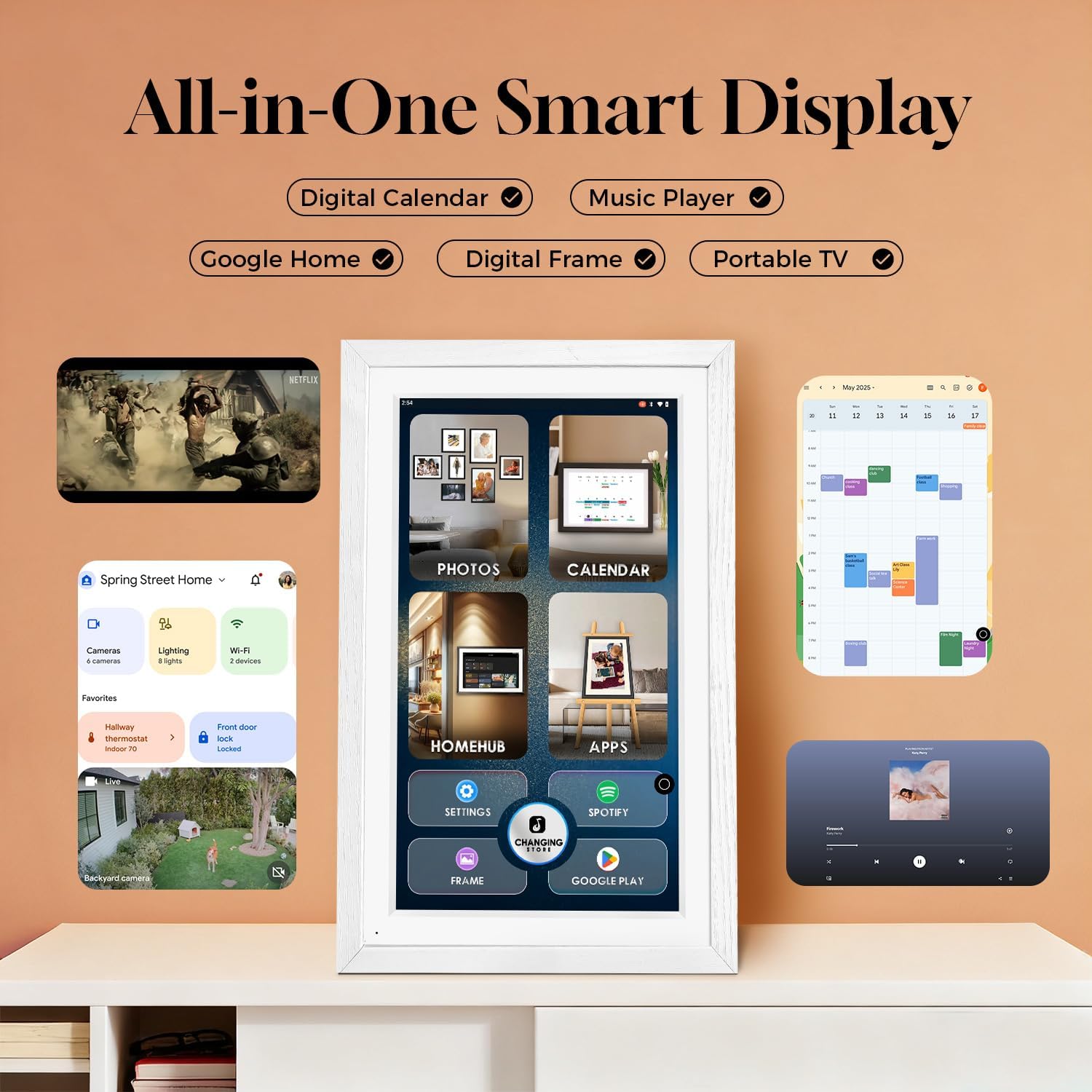
Kuva 1: Päättynytview of the Changingtouch F16S Smart Display's multi-functional interface.
2. Asennus
2.1 Laatikon purkaminen ja ensimmäinen käynnistys
Carefully remove all components from the packaging. The box contains the F16S Smart Display, a charging cable, and a power adapter. Connect the charging cable to the device and the adapter, then plug it into a power outlet to begin charging.
Video 1: Demonstrates how to start up your new Changingtouch F16S Smart Display.
2.2 Asennus ja sijoittelu
The F16S Smart Display can be placed on a desk using its integrated stand or mounted on a wall. The device supports both horizontal and vertical orientations, automatically adjusting the display.
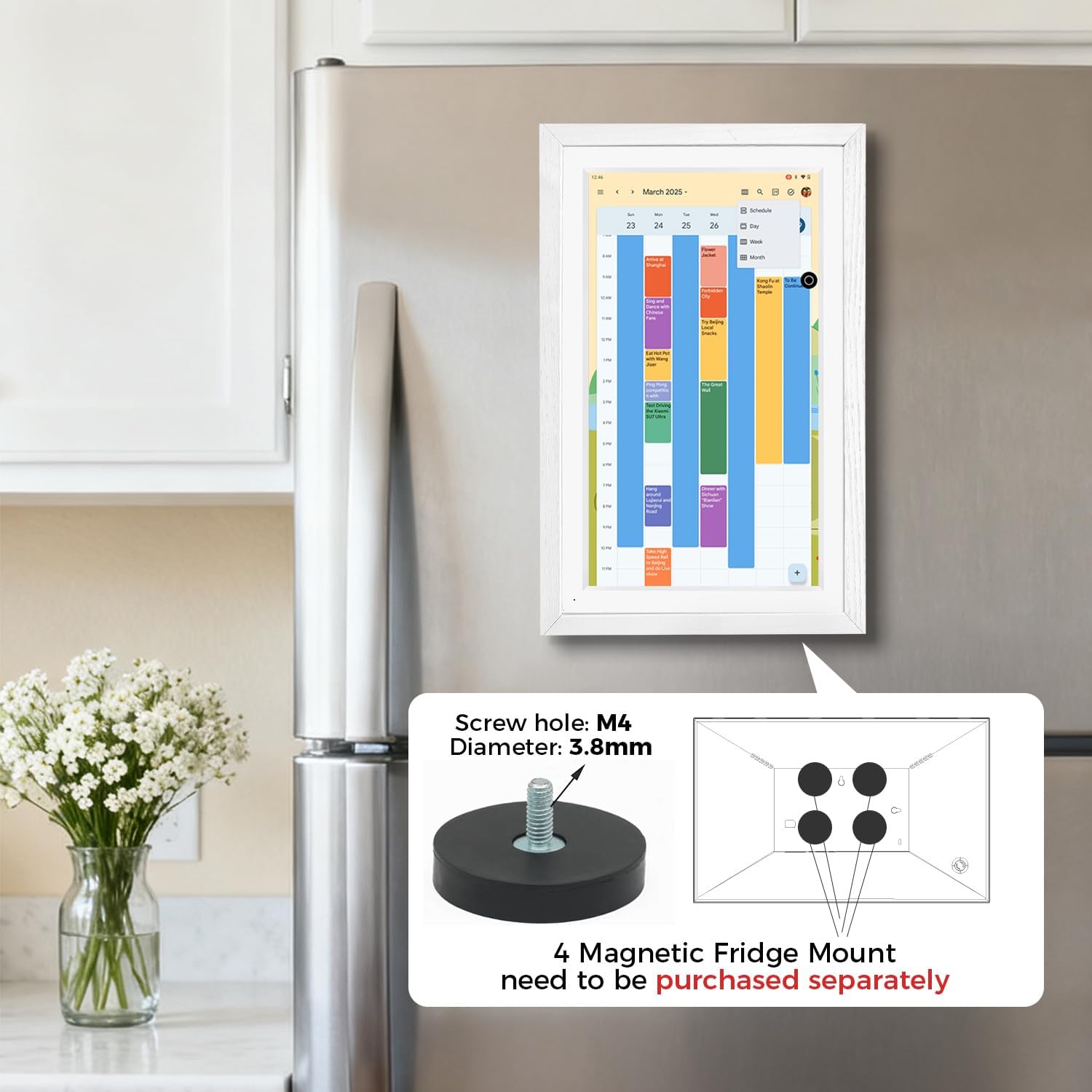
Figure 2: The F16S Smart Display mounted on a refrigerator, illustrating the magnetic mount option (purchased separately).
2.3 Wi-Fi-yhteyden muodostaminen
Follow the on-screen prompts during initial setup to connect your device to a Wi-Fi network. A stable internet connection is required for most smart features.
2.4 Syncing Calendars
The F16S supports syncing with various third-party calendars. Log in with your existing Google account or create a new one to easily share and sync calendar data. For Apple Calendar, install the Google Calendar app (using the same account) on your iPhone to sync iCloud calendar data.
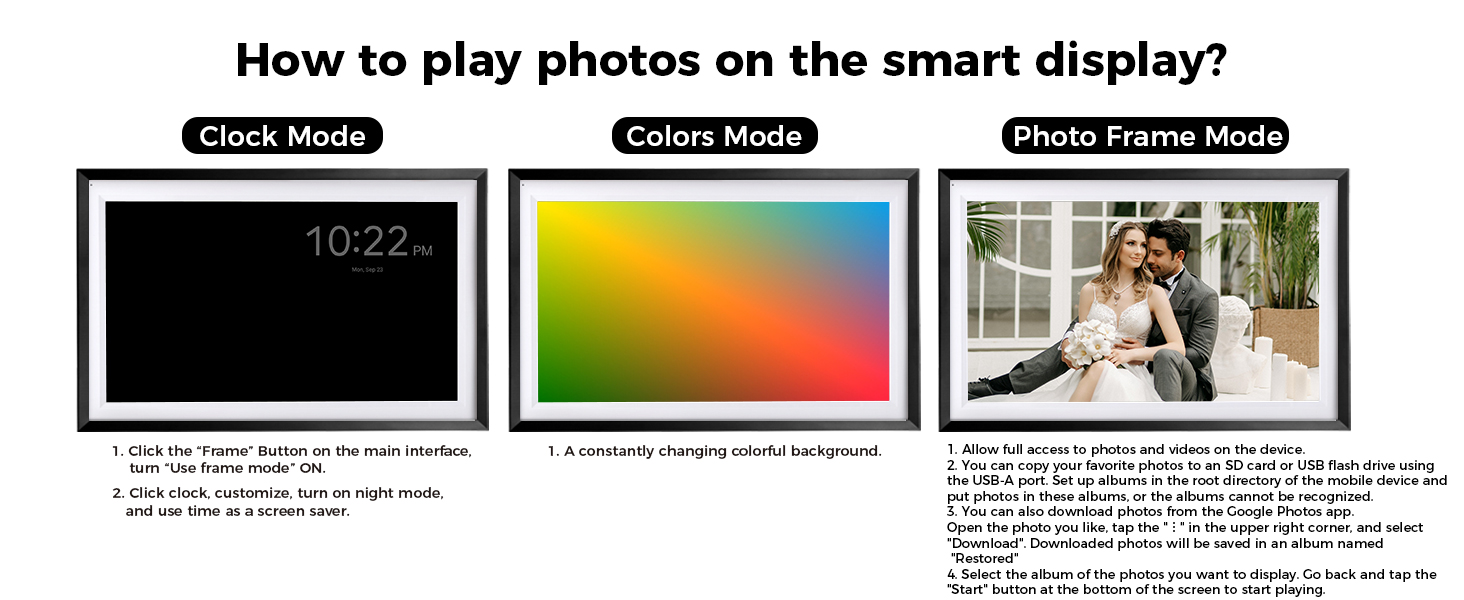
Figure 3: Visual guide for synchronizing your iPhone Calendar with Google Calendar for display on the F16S.
3. Käyttö
3.1 Navigointi ja käyttöliittymä
The F16S features an intuitive touchscreen interface. Navigate through different functions like Photo, Calendar, Home Hub, and Apps directly from the main screen. Adjust brightness and use the home button as needed.
Video 2: Guide on using the home button and adjusting brightness on the F16S Smart Display.
3.2 Kalenteritoiminnot
Access your synced calendars to view events, appointments, and tasks. The display allows for easy sharing and syncing of data among family members. You can install various calendar apps via Google Play.
Video 3: Demonstrates how to stay organized using the digital calendar feature of the F16S.
3.3 Photo Frame Mode
Turn your smart display into a digital photo frame. Upload cherished photos and videos via Google Photos or USB/SD card. The anti-glare screen enhances photo viewing.

Figure 4: Instructions for playing photos on the smart display in Photo Table Mode and Photos Mode.
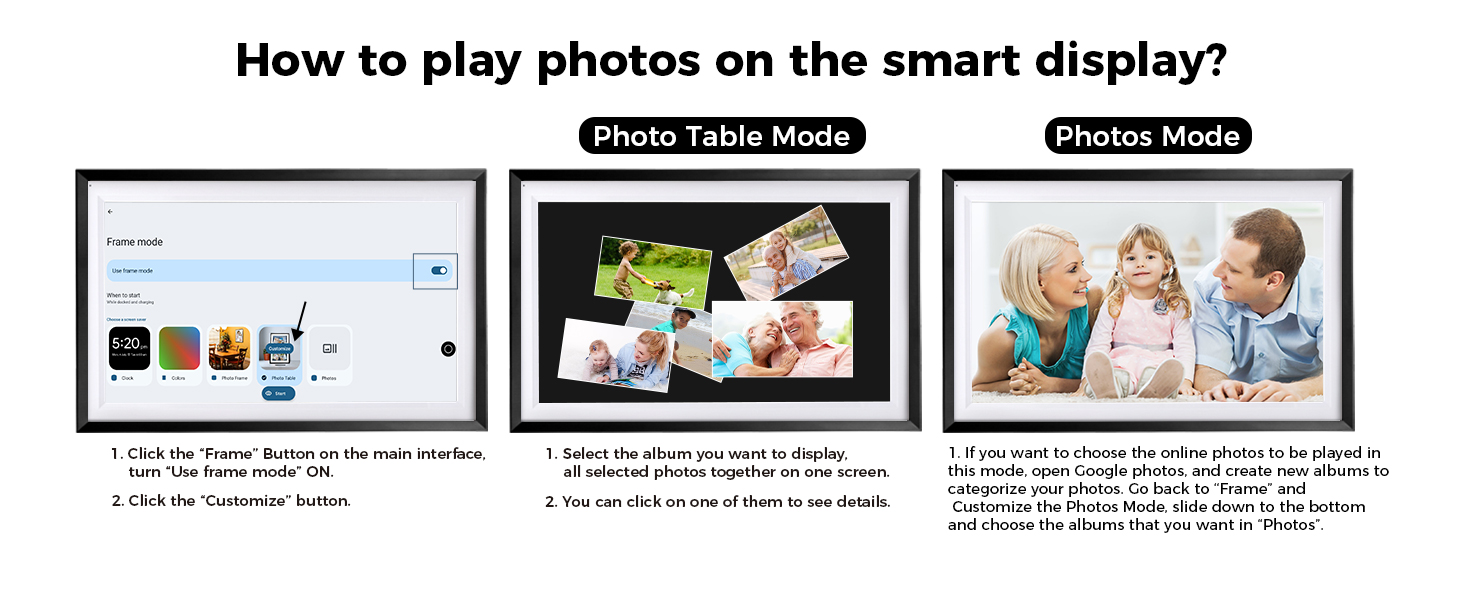
Figure 5: Instructions for playing photos on the smart display in Clock Mode, Colors Mode, and Photo Frame Mode.
Video 4: Tutorial on how to upload photos to your F16S Smart Display via Google Photos.
3.4 Ääni-avustaja
Activate the Google Assistant by saying "Hey Google" to control smart home devices, set reminders, play music, and more.
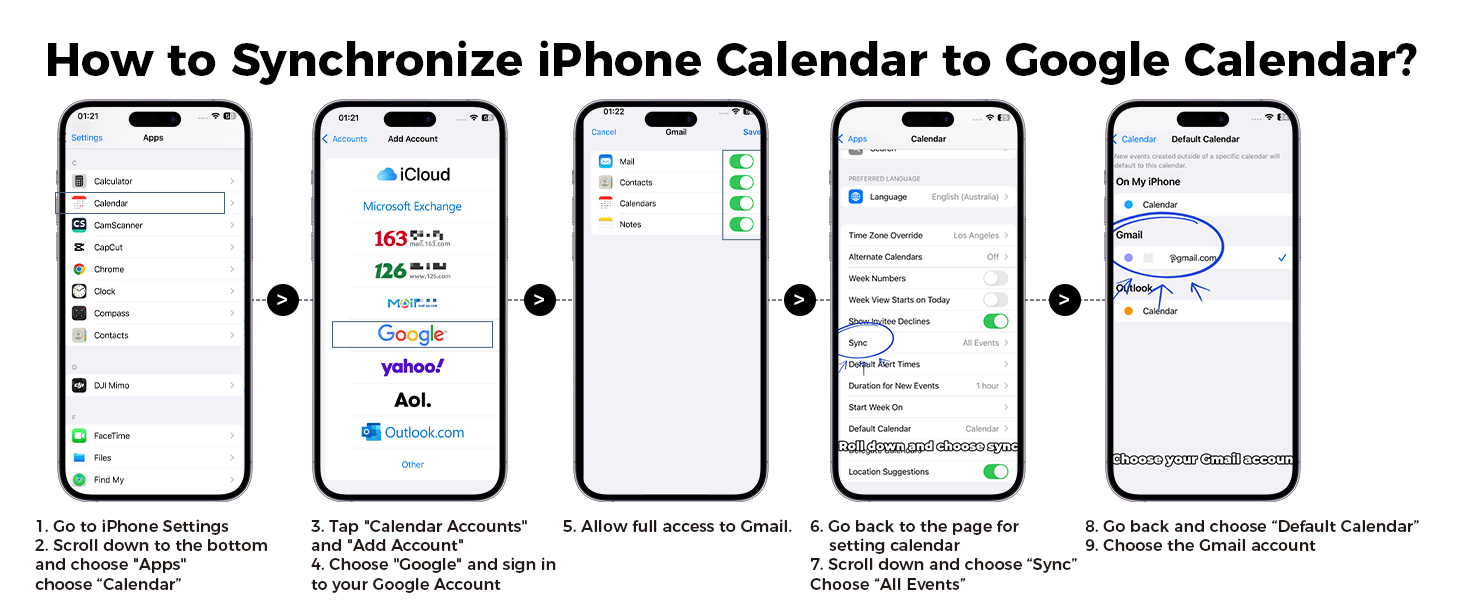
Figure 6: Visual instructions for activating the 'Hey Google' voice assistant feature.
Video 5: Demonstrates how to use the "Hey Google" command to wake up and interact with your F16S Smart Display.
3.5 Chore Chart & Meal Planner
Utilize the chore chart to manage household tasks and the meal planner to organize your family's diet. These features help in creating routines and tracking responsibilities.
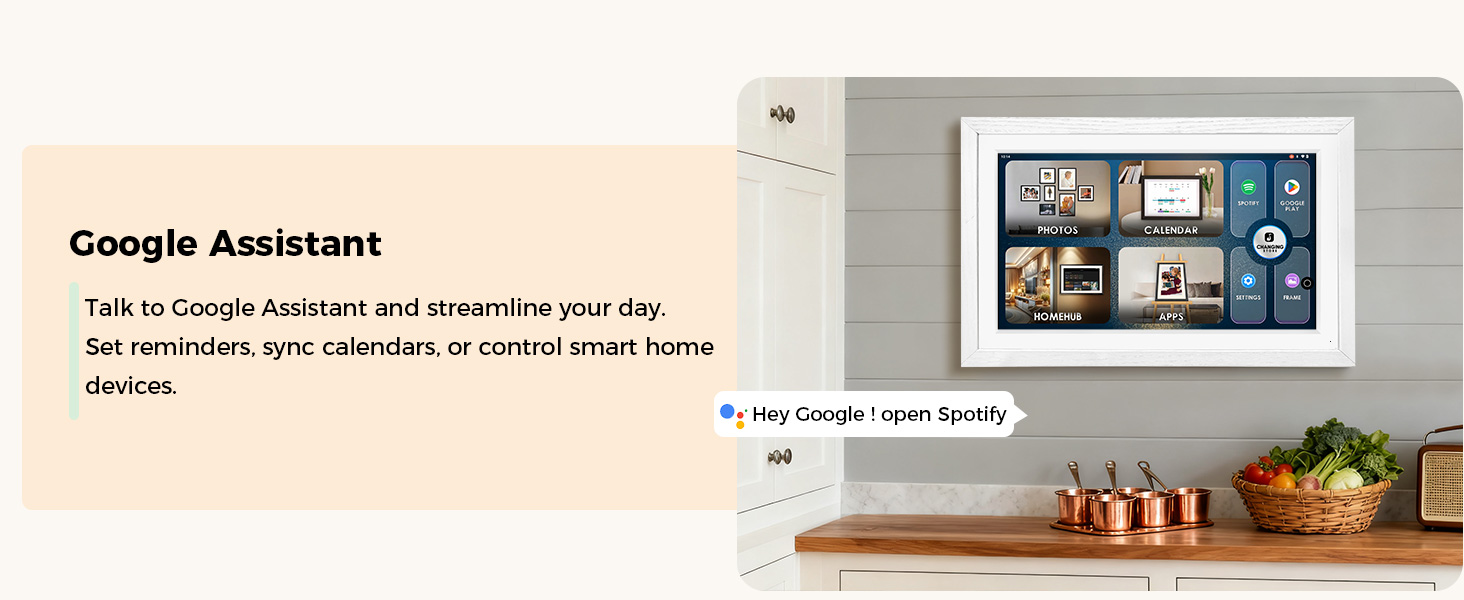
Figure 7: The Chore Chart feature helps turn routine chores into achievable goals for the family.

Figure 8: The Meal Planner allows you to download apps like Cozi from Google Play for shared calendars, grocery lists, and recipes.
4. Huolto
4.1 Laitteen puhdistaminen
Puhdista näyttö pehmeällä, nukkaamattomalla liinalla. Pinttyneisiin tahroihin hankaa kevyesti.ampKostuta liina vedellä tai näytönpuhdistusaineella. Vältä hankaavia materiaaleja tai voimakkaita kemikaaleja.
4.2 Ohjelmistopäivitykset
Ensure your device is connected to Wi-Fi to receive automatic software updates. Regular updates provide new features, security enhancements, and performance improvements.
5. Vianmääritys
5.1 Laite ei käynnisty
- Varmista, että virtalähde on kytketty kunnolla sekä laitteeseen että toimivaan pistorasiaan.
- Tarkista pistorasian toiminta kytkemällä siihen toinen laite.
- If the device has a built-in battery, ensure it is sufficiently charged.
5.2 Wi-Fi-yhteysongelmat
- Verify that your Wi-Fi router is on and broadcasting a signal.
- Check if the Wi-Fi password entered on the device is correct.
- Try restarting your Wi-Fi router and the F16S Smart Display.
5.3 Calendar Sync Problems
- Ensure your F16S is connected to the internet.
- Verify that you are logged into the correct Google account on both your device and the F16S.
- Check the sync settings within the calendar application on the F16S to ensure two-way sync is enabled if desired.
6. Tekniset tiedot
| Ominaisuus | Yksityiskohta |
|---|---|
| Tuotteen mitat | 12.05 x 18.35 x 0.99 tuumaa |
| Tuotteen paino | 4.69 kiloa |
| Näytön koko | 15.6 tuumaa |
| Resoluutio | 1080p (FHD 1920x1080) |
| Näytön tyyppi | Anti-Glare Touchscreen, 130% sRGB |
| Yhteensopivat laitteet | Personal Computer (for certain functions) |
| Akku | 1 12 V paristo (mukana) |
| Mallinumero | F16S |
7. Takuu ja tuki
For warranty information and customer support, please refer to the documentation included in your product packaging or visit the official Changingtouch website. Protection plans are available for purchase separately to extend coverage.
Typical return policy allows for refund/replacement within 30 days of purchase.