
1. Johdanto
This manual provides detailed instructions for the setup, operation, and maintenance of your KECAG 10.1 Inch Digital Picture Frame. Please read this manual thoroughly before using the device to ensure proper functionality and to maximize your user experience. Keep this manual for future reference.
2. Tuote ohiview
2.1 Tärkeimmät ominaisuudet
- 10.1 Inch 1080P HD IPS Screen: Features a 1920x1080 resolution with a 180° wide-angle IPS display for clear vieweri kulmista.
- Multimedian toisto: Supports photo slideshows, video playback, and music playback.
- Liiketunnistin: Automatically turns the frame on/off based on detected movement to conserve energy.
- Timing On/Off Function: Allows scheduled power on and off times.
- Versatile Media Support: Compatible with SD cards and USB flash drives.
- Käyttäjäystävällinen käyttöliittymä: Simple main menu for easy navigation.
- Kaukosäädin: Provides convenient operation from a distance.
- Lisätoiminnot: Includes calendar and alarm features.
2.2 Pakkauksen sisältö
- KECAG 10.1 Inch Digital Picture Frame
- 32GB USB-muistitikku
- Kaukosäädin
- Virtalähde
- Käyttöopas

Kuva 2.2.1: The KECAG 10.1 Inch Digital Picture Frame displaying a family photo, accompanied by its remote control.
3. Asennus
3.1 Virtaliitäntä
- Locate the power adapter included in the package.
- Connect the small end of the power adapter cable to the DC IN port on the back of the digital picture frame.
- Kytke virtalähteen toinen pää tavalliseen pistorasiaan.
- Kehys käynnistyy automaattisesti tai siirtyy valmiustilaan.
3.2 Inserting Media (USB Drive or SD Card)
The digital picture frame supports both USB flash drives and SD cards for media playback.
- Identify the USB port and SD card slot on the side or back of the frame.
- For a USB drive: Carefully insert the USB flash drive into the USB port.
- For an SD card: Insert the SD card into the SD card slot with the metal contacts facing down, until it clicks into place.
- Ensure the media is inserted correctly to avoid damage.

Kuva 3.2.1: Illustrated steps for connecting media (USB/SD card) and power to the digital picture frame.
3.3 Alkuperäinen käynnistys ja kieliasetukset
- Once powered on, the frame may display a language selection screen.
- Use the remote control's navigation buttons (Up/Down/Left/Right) to select your preferred language.
- Paina ENTER -painiketta vahvistaaksesi valintasi.
4. Käyttöohjeet
4.1 Kaukosäätimen toiminnot
The remote control allows for convenient navigation and setting adjustments. Ensure the remote is aligned with the infrared sensor on the frame during use.
- VALIKKO: Access the main menu or return to the previous menu.
- KUVA: Directly enter photo playback mode.
- MUSIIKKI: Directly enter music playback mode.
- ELOKUVA: Directly enter video playback mode.
- EXIT: Poistu nykyisestä toiminnosta tai valikosta.
- TULLA SISÄÄN: Confirm selection or play/pause media.
- PERUSTAA: Pääsy järjestelmän asetuksiin.
- Navigointipainikkeet (ylös/alas/vasemmalle/oikealle): Selaa valikoissa ja vaihtoehdoissa.
- VOL+/VOL-: Adjust volume during video or music playback.
4.2 Navigointi päävalikossa
From the main menu, you can select different functions:
- Kuva: View photos in a slideshow.
- Musiikki: Toista ääni files.
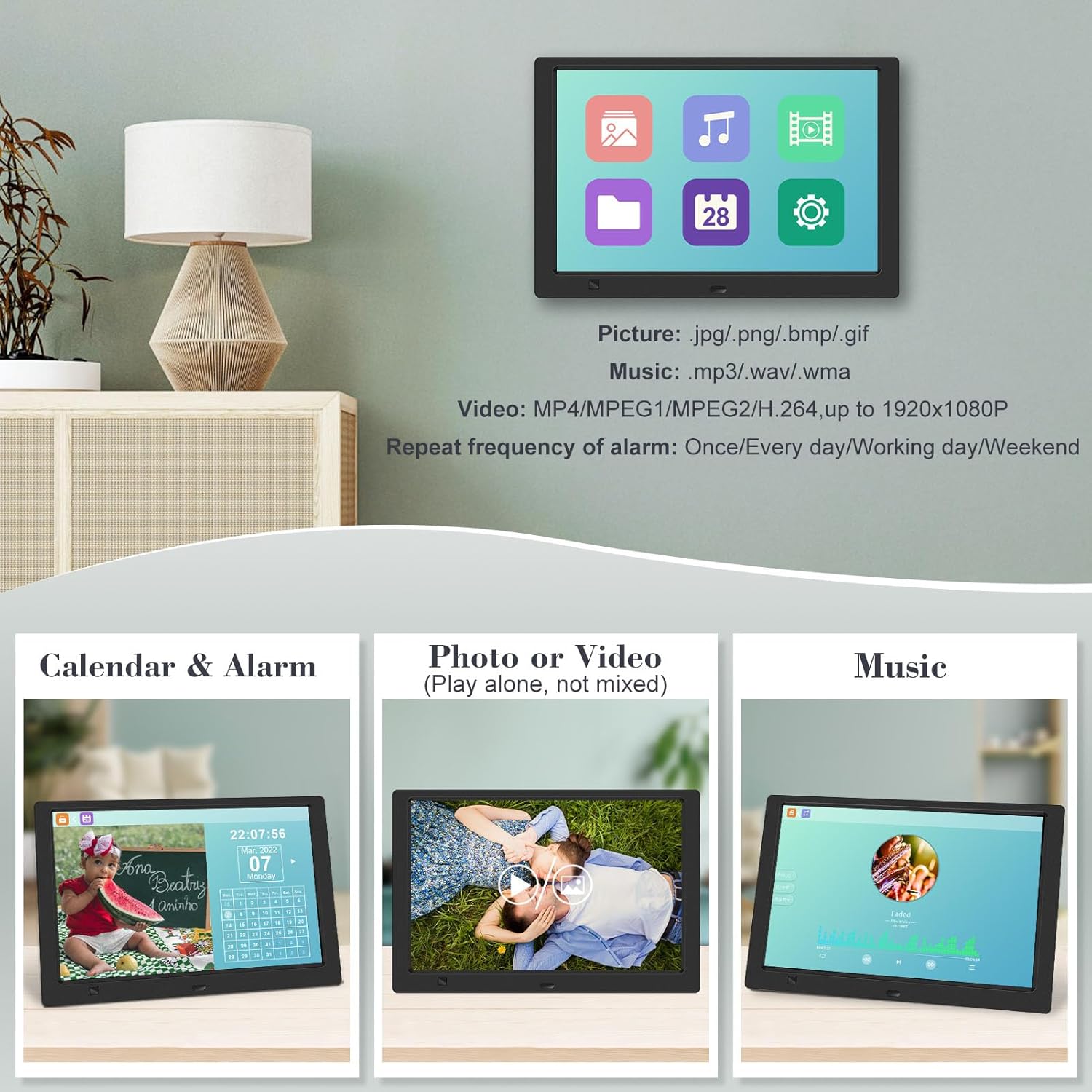
- Kalenteri: Display calendar and set alarms.
- Asetukset: Määritä laitteen asetukset.

Kuva 4.2.1: The digital picture frame's interface showing options for Calendar, Photo/Video, and Music playback.
4.3 Valokuvien toisto
- Valitse päävalikosta Kuva tai paina KUVA kaukosäätimen painiketta.
- The frame will automatically start a slideshow of photos found on the inserted media.
- Toistojärjestys: In settings, you can choose between Shuffle, Sequential, or Repeat All.
- Siirtymävaikutukset: Select from various effects like Up/Down, Mosaic, Left/Right, or Random.
- Kuva Preview: Access a thumbnail view of your photos.
- Kuvan kierto: Adjust the orientation of images (vertical/horizontal).
- Näytön kirkkaus: Adjust the display brightness in the settings menu.
Kuva 4.3.1: The digital picture frame displaying a photo slideshow with background music and various image transition options.

Kuva 4.3.2: Visual representation of slideshow and image preview options, including settings for playback order, display scale, picture rotation, time window, and screen brightness adjustment.
4.4 Videoiden ja musiikin toisto
- Valitse päävalikosta Elokuva or Musiikki, or use the corresponding buttons on the remote.
- Siirry haluttuun kohtaan file using the remote control and press ENTER pelata.
- Supported video formats: MP4/MPEG1/MPEG2/H.264 up to 1920x1080.
- Supported music formats: MP3/WAV/WMA.
4.5 Liiketunnistimen toiminto
The motion sensor helps save energy by automatically turning the frame on or off.
- To enable/disable the motion sensor, go to the Asetukset valikosta.
- Select the motion sensor option and toggle it On or Off.
- When enabled, the frame will power on when movement is detected and turn off after a period of inactivity.
4.6 Timing On/Off Function
Set specific times for the frame to automatically power on and off.
- Käytä Asetukset valikosta.
- Locate the Timing On/Off function.
- Set your desired power-on time and power-off time. You can also configure this for specific days (e.g., weekdays, weekends, every day).

Kuva 4.6.1: Demonstrates the smart motion sensor turning on the frame when movement is detected and the timing on/off function for scheduled operation.
5. Huolto
5.1 Näytön puhdistaminen
Puhdista näyttö pyyhkimällä se varovasti pehmeällä, kuivalla ja nukkaamattomalla liinalla. Pinttyneisiin tahroihin pyyhi kevyestiampKostuta liina vedellä tai näytönpuhdistusaineella. Vältä voimakkaiden kemikaalien tai hankaavien materiaalien käyttöä.
5.2 Yleishoito
- Keep the frame away from direct sunlight, heat sources, and excessive moisture.
- Vältä laitteen pudottamista tai sen altistamista voimakkaille iskuille.
- Älä yritä purkaa runkoa; se mitätöi takuun.
- Varmista riittävä ilmanvaihto laitteen ympärillä.
6. Vianmääritys
If you encounter issues with your digital picture frame, please refer to the following common problems and solutions:
| Ongelma | Mahdollinen syy | Ratkaisu |
|---|---|---|
| Kehys ei käynnisty. | Virtasovitin ei ole kytketty tai pistorasia on viallinen. | Varmista, että virtalähde on kytketty kunnolla runkoon ja toimivaan pistorasiaan. Kokeile toista pistorasiaa. |
| No photos/videos/music displayed. | No media inserted, media not recognized, or unsupported file muoto. | Ensure a USB drive or SD card is properly inserted. Check if files are in supported formats (JPG/PNG/BMP/GIF for photos; MP4/MPEG1/MPEG2/H.264 for video; MP3/WAV/WMA for music). Try reformatting the media (backup data first). |
| Kaukosäädin ei toimi. | Battery depleted, remote not aimed correctly, or sensor obstructed. | Replace the remote control battery. Ensure the remote is pointed directly at the frame's infrared sensor. Remove any obstructions between the remote and the frame. |
| Näyttö on tyhjä tai jumiutunut. | Väliaikainen ohjelmistohäiriö. | Irrota virtalähde, odota 10 sekuntia ja kytke se sitten takaisin käynnistääksesi kehyksen uudelleen. |
7. Tekniset tiedot
| Ominaisuus | Erittely |
|---|---|
| Näytön koko | 10.1 tuumaa |
| Resoluutio | 1920 x 1080 (1080p HD IPS) |
| Kuvasuhde | 16:9 |
| Viewkulma | 180° |
| Yhteensopivat laitteet | SD-kortti, USB-muistitikku |
| Tuetut valokuvamuodot | JPG, PNG, BMP, GIF |
| Tuetut videomuodot | MP4, MPEG1, MPEG2, H.264 (up to 1920x1080) |
| Tuetut musiikkiformaatit | MP3, WAV, WMA |
| Liiketunnistin | Kyllä |
| Tuotteen mallinumero | KECAG-CA-001 |
| Tuotteen mitat | 6.4 x 9.7 x 0.99 tuumaa |
| Tuotteen paino | 1.59 kiloa |
| Paristot (kaukosäädin) | 1 litiummetalliparisto (mukana) |
| Valmistaja | KECAG |
8. Takuu ja tuki
For warranty information, please refer to the documentation included with your product packaging. KECAG provides 24-hour customer service to assist with any issues or questions you may have regarding your digital picture frame. Please contact customer support for assistance.