
Ysametp M10
Ysametp Mini Projector M10 User Manual
1080P Full HD Supported Portable Video Projector
Johdanto
Kiitos ostoksestasiasing the Ysametp Mini Projector M10. This portable video projector is designed to provide a high-quality home theater experience with its 1080P Full HD support and 10000 Lux LED light source. It features dual built-in stereo speakers with an SRS sound system for immersive audio. Its compact size and multi-connection capabilities make it ideal for various entertainment and presentation needs. Please read this manual thoroughly before operating the projector to ensure proper use and maintenance.
Turvallisuustiedot
To ensure safe operation and prolong the lifespan of your projector, please observe the following safety precautions:
- Älä tuki tuuletusaukkoja. Varmista riittävä ilmankierto projektorin ympärillä ylikuumenemisen estämiseksi.
- Älä altista projektoria sateelle tai kosteudelle sähköiskun tai tulipalon välttämiseksi.
- Älä avaa projektorin koteloa.asing. Anna kaikki huoltotoimenpiteet pätevän huoltohenkilöstön tehtäväksi.
- Käytä ainoastaan projektorin mukana toimitettua virtalähdettä.
- Place the projector on a stable, flat surface to prevent it from falling.
- Vältä projektorin linssin suoraa altistumista silmille, kunamp on päällä.
- Irrota projektori pistorasiasta ukkosmyrskyjen aikana tai jos sitä ei käytetä pitkään aikaan.
Pakkauksen sisältö
Tarkista pakkauksen sisältö purkamisen yhteydessä:
- 1 x Ysametp Mini Projector M10
- 1 x HDMI kaapeli
- 1 x 3-in-1 AV Line
- 1 x virtajohto
- 1 x kolmijalka
- 1 x Drawstring Backpack
- 1 x kaukosäädin (paristot eivät sisälly)
- 1 x Käyttöohje

Tuote loppuview
Tutustu projektorin osiin ja liitäntäportteihin.

Tulo/lähtöportit:
- HDMI-portti: Connect to devices like TV sticks, laptops, gaming consoles.
- USB-portti: Liitä USB-asemat mediatoistoa varten.
- TF-korttipaikka: Insert TF cards for media playback.
- VGA-portti: Connect to computers or laptops.
- AV-portti: Connect to older devices like DVD players using the 3-in-1 AV cable.
- 3.5 mm ääniliitäntä: Liitä ulkoiset kuulokkeet tai kaiuttimet.
Asennus
1. Sijoittelu ja näytön koko
Position the projector on a flat, stable surface. The projection size can range from 32 inches to 200 inches, with an optimal projection distance between 3.6 feet and 16.4 feet.

2. Virtaliitäntä
Connect the supplied power cord to the projector's power input and then plug it into a power outlet.
3. Tarkennuksen ja trapetsivääristymän säätö
After powering on, adjust the focus and keystone knobs located on top of the projector to achieve a clear and rectangular image. The focus ring adjusts image sharpness, while the keystone correction corrects trapezoidal distortion if the projector is not perfectly perpendicular to the screen.
Käyttöohjeet
1. Kytkeminen päälle/pois
- Käynnistää: Paina projektorin tai kaukosäätimen virtapainiketta.
- Sammuttaa: Press the power button again. The projector will go through a shutdown sequence.
2. Tulolähteen valinta
Use the "Source" button on the remote control or the projector's control panel to select the desired input source (HDMI, USB, TF, VGA, AV).
3. Laitteiden liittäminen
- HDMI: Liitä HDMI-kaapeli laitteestasi (esim. TV Stick, kannettava tietokone, pelikonsoli) projektorin HDMI-porttiin.
- USB/TF-kortti: Insert a USB drive or TF card into the respective port. The projector will automatically detect the media or prompt you to select it.
- VGA: Connect a VGA cable from your PC/laptop to the projector's VGA port.
- AV: Use the provided 3-in-1 AV cable to connect to devices with AV output.
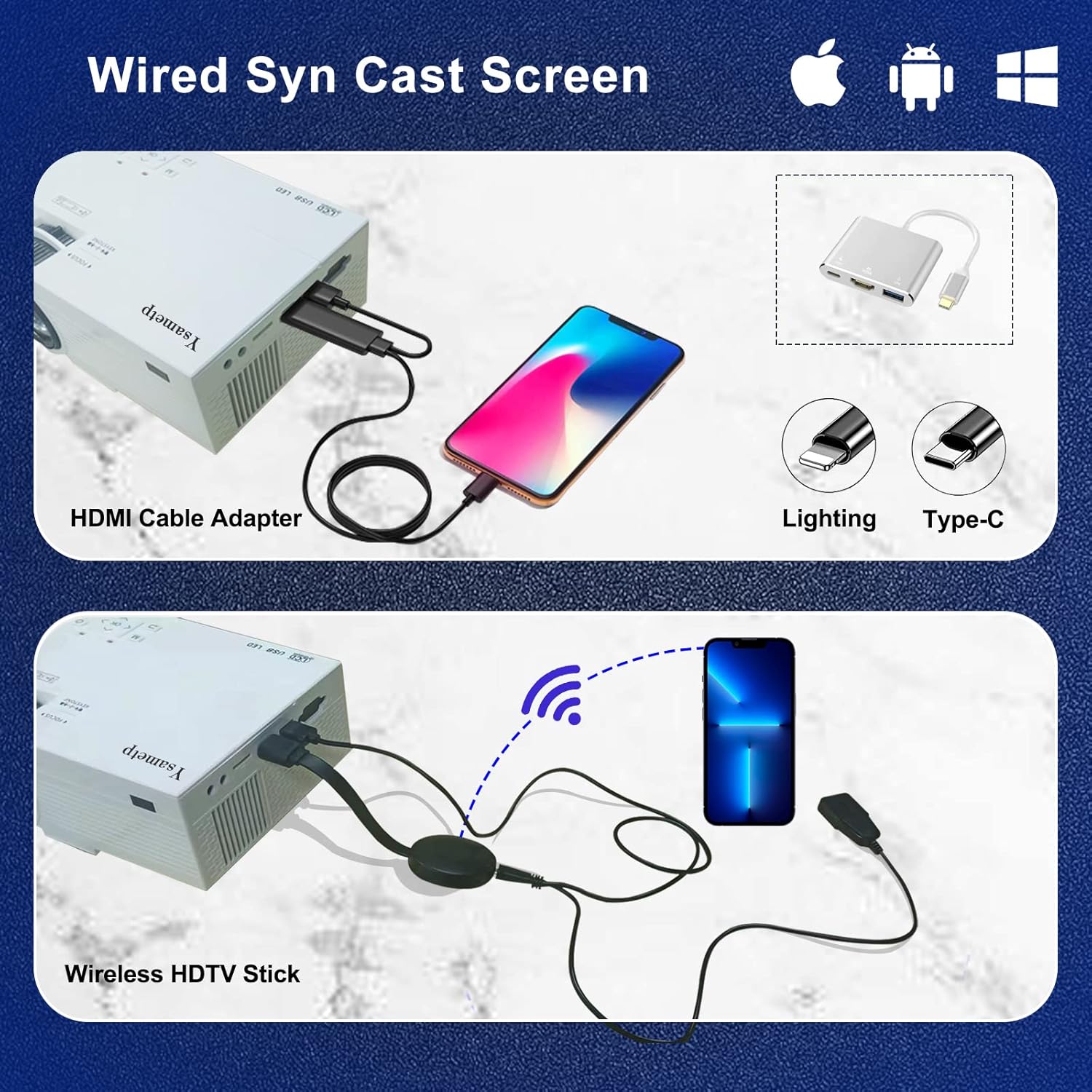
4. Wired Screen Mirroring (for Smartphones)
To mirror your smartphone screen, you will need an HDMI adapter (e.g., Lightning to HDMI for iPhone, USB-C to HDMI for Android) or a Miracast dongle/TV stick (like Roku, Fire TV Stick).

5. Äänilähtö
The projector has dual built-in stereo speakers. For external audio, connect headphones or external speakers to the 3.5mm audio jack.

Huolto
1. Puhdistus
- Linssi: Käytä pehmeää, nukkaamatonta liinaa, joka on erityisesti suunniteltu optisille linsseille. Älä käytä hankaavia puhdistusaineita.
- Casing: Wipe the projector's exterior with a soft, dry cloth. Do not use liquid or aerosol cleaners.
- Ilmanvaihto: Regularly check and clean the ventilation openings to prevent dust buildup, which can affect cooling performance.
2. Varastointi
When not in use, store the projector in a cool, dry place, away from direct sunlight and extreme temperatures. Use the provided drawstring backpack for protection during storage or transport.
3. LED Lifespan
The built-in LED light source is designed to support up to 55,000 hours of use, providing long-lasting performance.
Vianetsintä
| Ongelma | Mahdollinen syy / Ratkaisu |
|---|---|
| Ei kuvaa näytöllä. |
|
| Kuva on epäselvä. |
|
| Kuva on puolisuunnikkaan muotoinen. |
|
| Ei ääntä. |
|
| Kaukosäädin ei toimi. |
|
Tekniset tiedot
| Ominaisuus | Yksityiskohta |
|---|---|
| Merkki | Ysametp |
| Malli | M10 |
| Näyttötekniikka | LCD |
| Alkuperäinen resoluutio | 1920 x 1080 Pixels (Full HD Supported) |
| Kuvan kirkkaus | 11000 luksia |
| Kuvan kontrastisuhde | 10000:1 |
| Kuvasuhde | 4:3 |
| Projektion koko | 32–200 cm |
| Projektioetäisyys | 3.6ft - 16.4ft |
| LEDin käyttöikä | 55,000 tuntia |
| Melutaso | 31 dB |
| Wattage | 60 wattia |
| Laitteistorajapinta | VGA, USB, HDMI, 3.5mm Audio, TF Card |
| Mitat (P x L x K) | 23.88 x 15.49 x 8.13 cm |
| Paino | 975.22 g (noin 2.15 pauna) |
Takuu ja tuki
Ysametp provides a 3 vuoden tuotetakuu for the Mini Projector M10.
If you encounter any problems or have questions regarding your projector, please do not hesitate to contact our customer support. Refer to the contact information provided on the product packaging or the official Ysametp webavun sivusto.
Ask a question about this manual
Ask about setup, troubleshooting, compatibility, parts, safety, or missing instructions. Manuals+ will review the question and use this page’s manual context to help answer it.