
1. Johdanto ja loppuview
The Cooler Master XG650 Plus Platinum ARGB is a fully modular 650W power supply unit designed for high-performance computing systems. It features an 80 PLUS Platinum certification for high efficiency, a 135mm silent fan, and a built-in digital display panel for real-time monitoring of performance data. This unit incorporates 100% Japanese capacitors for enhanced reliability and meets Intel ATX 12V version 2.53 guidelines.
Tärkeimmät ominaisuudet:
- In-House Platform Design: Engineered for high-end performance with reduced temperature requirements.
- ARGB Fans with Digital Side Panel: Monitor real-time performance data including fan speed, temperature, power load, and customize ARGB lighting.
- 80 PLUS Platinum -sertifioitu: Guarantees a minimum typical efficiency of 92% under normal operating conditions.
- Quiet 135mm Fan: Fluid dynamic fan bearing for low RPM operations and quiet cooling performance.
- Smart Thermal Control Mode: Fan remains inactive until the unit reaches 50% load, ensuring silent operation during normal use.
- 100 % japanilaisia kondensaattoreita: Used in both the platform and cables for increased efficiency and reduced ripple noise.
- Täysin modulaarinen kaapelointi: Reduces cable clutter, improves airflow, and enhances overall efficiency and thermal performance.
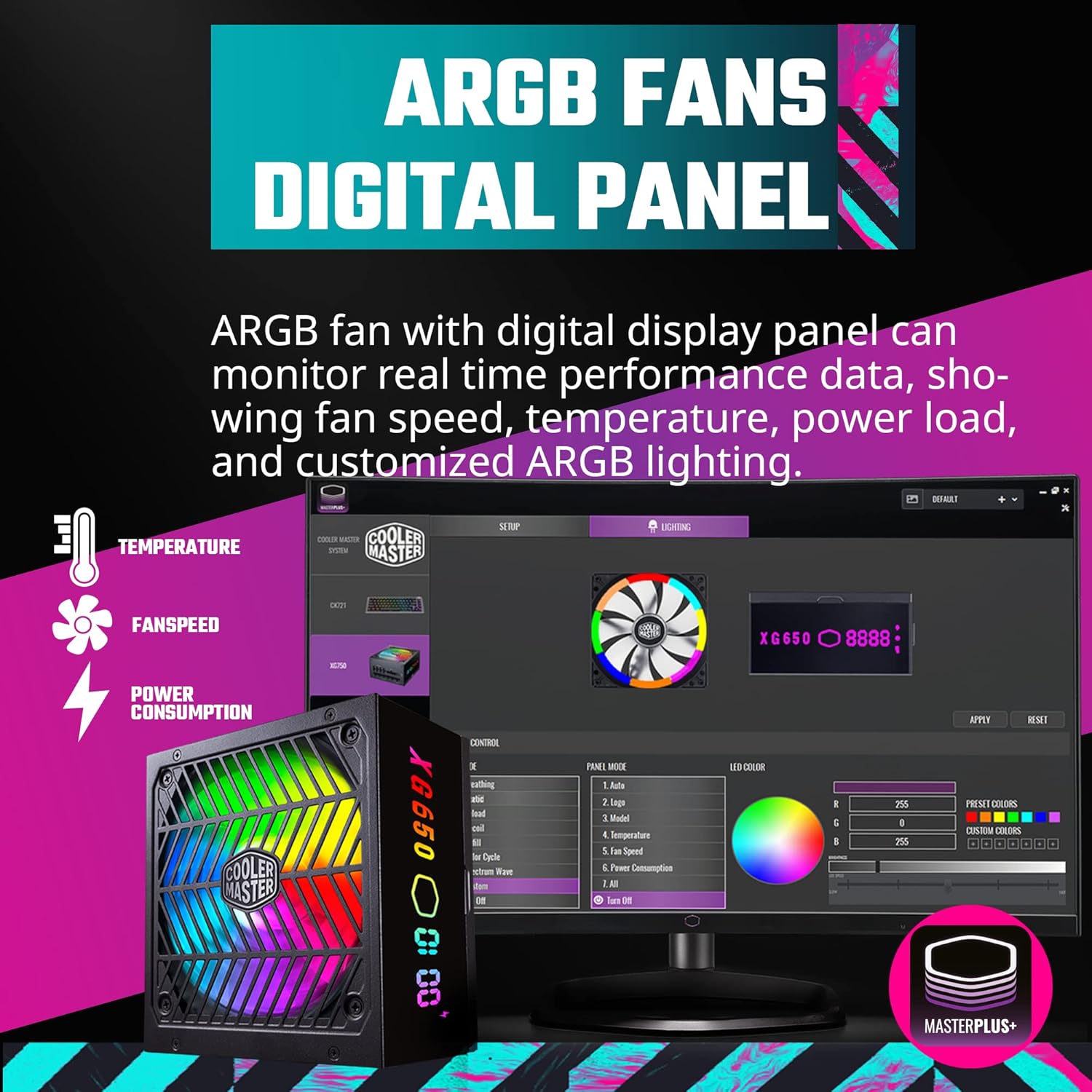
Figure 1.1: The Cooler Master XG650 Plus Platinum ARGB 650W Power Supply Unit.
2. Asennus ja asennus
2.1 Turvaohjeet
- Always disconnect the power cord from the wall outlet before installing or removing the power supply.
- Varmista oikea maadoitus sähköiskun välttämiseksi.
- Do not open the power supply unit casing. Suuri tilavuustagovat läsnä sisällä.
- Asenna virtalähde hyvin ilmastoituun tilaan.
2.2 Pakkauksen sisältö
Varmista, että kaikki osat ovat mukana:
- Cooler Master XG650 Plus Platinum ARGB PSU
- Modular Cable Set (ATX 24-pin, EPS 4+4 pin, EPS 8 pin, PCIe 6+2 pin, SATA, Peripheral 4 pin)
- AC virtajohto
- Kiinnitysruuvit
- Käyttöopas (tämä asiakirja)
2.3 Fyysinen asennus
- Virtalähteen asentaminen: Secure the power supply into the designated PSU bay in your computer case using the provided mounting screws. Ensure the fan is oriented correctly for optimal airflow (typically facing downwards or upwards depending on case design).
- Modulaaristen kaapeleiden kytkeminen: Identify the necessary cables for your motherboard, CPU, graphics card(s), and storage devices. Connect these cables to the corresponding ports on the PSU.

Figure 2.1: Modular cable connection ports on the PSU.
- Emolevyn liitännät: Connect the 24-pin ATX power cable to your motherboard. Connect the 4+4 pin or 8-pin EPS cable(s) to the CPU power connector(s) on your motherboard.
- Graphics Card Connections: Connect the appropriate PCIe 6+2 pin cables to your graphics card(s).
- Storage and Peripherals: Connect SATA power cables to your SSDs/HDDs and other SATA-powered devices. Use Peripheral 4-pin cables for other compatible devices.
- USB Protocol Cable: Connect the included USB protocol cable from the PSU to an available USB 2.0 header on your motherboard. This enables software control and display panel functionality.
- Vaihtovirta: Once all internal connections are made, connect the AC power cord to the PSU and then to a wall outlet.

Kuva 2.2: Päättynytview of included modular cables and their lengths.
3. Käyttöohjeet
3.1 Virran kytkeminen päälle
After completing the installation, ensure the power switch on the back of the PSU is in the 'ON' position. Power on your computer system as usual.
3.2 Digital Display Panel
The XG650 Plus Platinum features a built-in digital display panel that provides real-time information about the PSU's operation. This display can show:
- Tuulettimen nopeus (RPM)
- Lämpötila (°C)
- Power Load (W)
- Customized ARGB Lighting effects

Figure 3.1: The ARGB digital display panel on the PSU.
3.3 MasterPlus+ Software Control
For advanced monitoring and customization of the ARGB lighting and fan behavior, install the Cooler Master MasterPlus+ software. This software allows you to:
- Monitor PSU performance data in detail.
- Adjust ARGB lighting effects and colors.
- Configure fan curves or activate Smart Thermal Control Mode.
Download the latest MasterPlus+ software from the official Cooler Master websivusto: www.coolermaster.com/downloads/

Figure 3.2: MasterPlus+ software interface for monitoring and control.
3.4 Smart Thermal Control Mode
The PSU features a Smart Thermal Control Mode where the 135mm fan will remain inactive (0 RPM) until the power load reaches 50%. This ensures silent operation during low to moderate system usage. Once the load exceeds 50%, the fan will automatically activate and adjust its speed to maintain optimal temperatures.

Figure 3.3: The quiet 135mm fan with ARGB lighting.
4. Huolto
Proper maintenance ensures the longevity and optimal performance of your power supply unit.
- Pidä se puhtaana: Periodically clean the exterior of the PSU and the fan grille to prevent dust buildup. Use compressed air to gently remove dust from the fan blades and internal components (do not open the casing).
- Varmista ilmavirtaus: Make sure there is adequate airflow around the PSU. Avoid blocking the intake or exhaust vents.
- Kaapelin hallinta: Good cable management not only improves aesthetics but also enhances airflow within your PC case, contributing to better cooling for all components, including the PSU.
5. Vianmääritys
If you encounter issues with your Cooler Master XG650 Plus Platinum ARGB PSU, refer to the following troubleshooting steps:
5.1 Ei virtaa
- Tarkista virtaliitännät: Ensure the AC power cord is securely plugged into both the PSU and the wall outlet. Verify the power switch on the PSU is in the 'ON' position.
- Sisäiset liitännät: Double-check all modular cables are firmly connected to both the PSU and your components (motherboard, CPU, GPU).
- Pistorasia: Testaa pistorasiaa toisella laitteella varmistaaksesi, että se syöttää virtaa.
- Motherboard Power Button: Ensure your case's power button is correctly connected to the motherboard.
5.2 Tuuletin ei pyöri
- Älykäs lämmönsäätö: Remember that the fan operates in Smart Thermal Control Mode and will not spin until the PSU load reaches 50%. This is normal behavior for silent operation.
- Ohjelmistoasetukset: If the fan is not spinning under load, check the fan settings in the MasterPlus+ software.
- Esteet: Ensure there are no physical obstructions preventing the fan from spinning.
5.3 Digital Display Panel Not Working / ARGB Issues
- USB-liitäntä: Verify that the USB protocol cable is correctly connected from the PSU to a USB 2.0 header on your motherboard.
- MasterPlus+ Software: Ensure the MasterPlus+ software is installed and running. Check for any error messages or update the software to the latest version.
- Kuljettajaongelmat: Reinstall the MasterPlus+ software and any associated drivers.
6. Tekniset tiedot

Figure 6.1: Power supply rating label.
| Ominaisuus | Erittely |
|---|---|
| Merkki | Viileämpi mestari |
| Sarja | XG650 Plus Platinum ARGB |
| Mallinumero | MPG-6501-AFBAP-XUS |
| Wattage | 650 wattia |
| 80 PLUS -sertifikaatti | Platina |
| Muototekijä | ATX |
| Modulaarisuus | Täysin modulaarinen |
| Tuulettimen koko | 135 mm |
| Jäähdytysmenetelmä | ilmaa |
| Kondensaattorit | 100% japanilaiset kondensaattorit |
| Mitat (P x L x K) | 6.3 x 5.91 x 3.39 tuumaa (160 x 150 x 86 mm) |
| Paino | 6.54 puntaa (2.97 kg) |
| Tulo Voltage | 100-240V~ |
| Tulotaajuus | 50-60 Hz |
| Lähtö Voltage | +5V, +3.3V, +12V, -12V, +5VSB |
| Yhteensopivat laitteet | Henkilökohtainen tietokone |
7. Takuu ja tuki
7.1 Takuutiedot
The Cooler Master XG650 Plus Platinum ARGB PSU comes with a standard limited manufacturing warranty:
- Core Operating Products: 10 vuoden takuu ostopäivästä.
- ARGB LED: 3 vuoden takuu ostopäivästä.
Please retain your proof of purchase for warranty claims. The warranty covers defects in materials and workmanship under normal use. It does not cover damage caused by improper installation, accidents, misuse, abuse, natural disasters, or unauthorized modifications.
7.2 Tekninen tuki
For technical assistance, product inquiries, or warranty claims, please visit the official Cooler Master support websivustolla tai ottamalla yhteyttä heidän asiakaspalveluunsa:
- Cooler Master -tuki Websivusto: www.coolermaster.com/support/
- Refer to the Cooler Master websivusto alueellisille yhteystiedoille.