
Johdanto
Kiitos ostoksestasiasing the Naxa NT-1400 Portable 14.1-inch TV and Digital Multimedia Player. This device is designed to provide portable entertainment, featuring a built-in ATSC tuner for over-the-air HD TV reception and multimedia playback capabilities via USB. This manual provides essential information for the proper setup, operation, and maintenance of your device. Please read it thoroughly before use and retain it for future reference.
Turvallisuustiedot
- Virtalähde: Use only the provided AC adapter or DC car cord. Ensure the voltage vastaa laitevaatimuksia.
- Akun turvallisuus: The device contains a rechargeable lithium battery. Do not expose to extreme temperatures, puncture, or disassemble. Dispose of batteries according to local regulations.
- Vesi ja kosteus: Älä altista laitetta sateelle, kosteudelle äläkä upota sitä veteen.
- Ilmanvaihto: Varmista laitteen ympärillä oleva asianmukainen ilmanvaihto. Älä tuki tuuletusaukkoja.
- Puhdistus: Katkaise virta ennen puhdistamista. Käytä pehmeää, kuivaa liinaa. Vältä nestemäisiä puhdistusaineita.
- Huolto: Älä yritä huoltaa laitetta itse. Jätä kaikki huoltotyöt pätevän henkilöstön tehtäväksi.
Pakkauksen sisältö
Varmista, että pakkauksessasi on kaikki alla luetellut tuotteet:
- Naxa NT-1400 Portable TV Unit
- Kaukosäädin
- ETL AC Adapter
- DC Car Cord
- Ulkoinen antenni
- A/V-kaapeli
- Pöytäteline
- Käyttöopas (tämä asiakirja)

Image: Included accessories for the Naxa NT-1400.
Tuote loppuview
The Naxa NT-1400 features a 14.1-inch LCD screen with 1280 x 800 resolution, a built-in ATSC tuner for digital TV, and various input options for multimedia playback.

Kuva: Edessä view of the Naxa NT-1400 Portable TV.

Image: Naxa NT-1400 in a portable setting, such as an RV.
Portit ja säätimet
Familiarize yourself with the various ports and controls located on the unit:
- MUURAHAINEN: Connect the external antenna for TV reception.
- HD-IN: HDMI input for connecting external high-definition devices.
- VGA: VGA input for connecting to computers or other compatible devices.
- AV-IN/AV-OUT: Audio/Video input and output for connecting to older devices or external displays.
- Kuulokeliitäntä (3.5 mm): Yksityiseen kuunteluun.
- USB-portti: Multimedian toistamiseen files USB-asemalta.
- DC 12V ON/OFF: Power input for the AC adapter or DC car cord, with a power switch.
- Etupaneelin säätimet: Volume, Channel, Menu, Input Source, Power.

Kuva: Sivu view of the Naxa NT-1400 showing input/output ports.
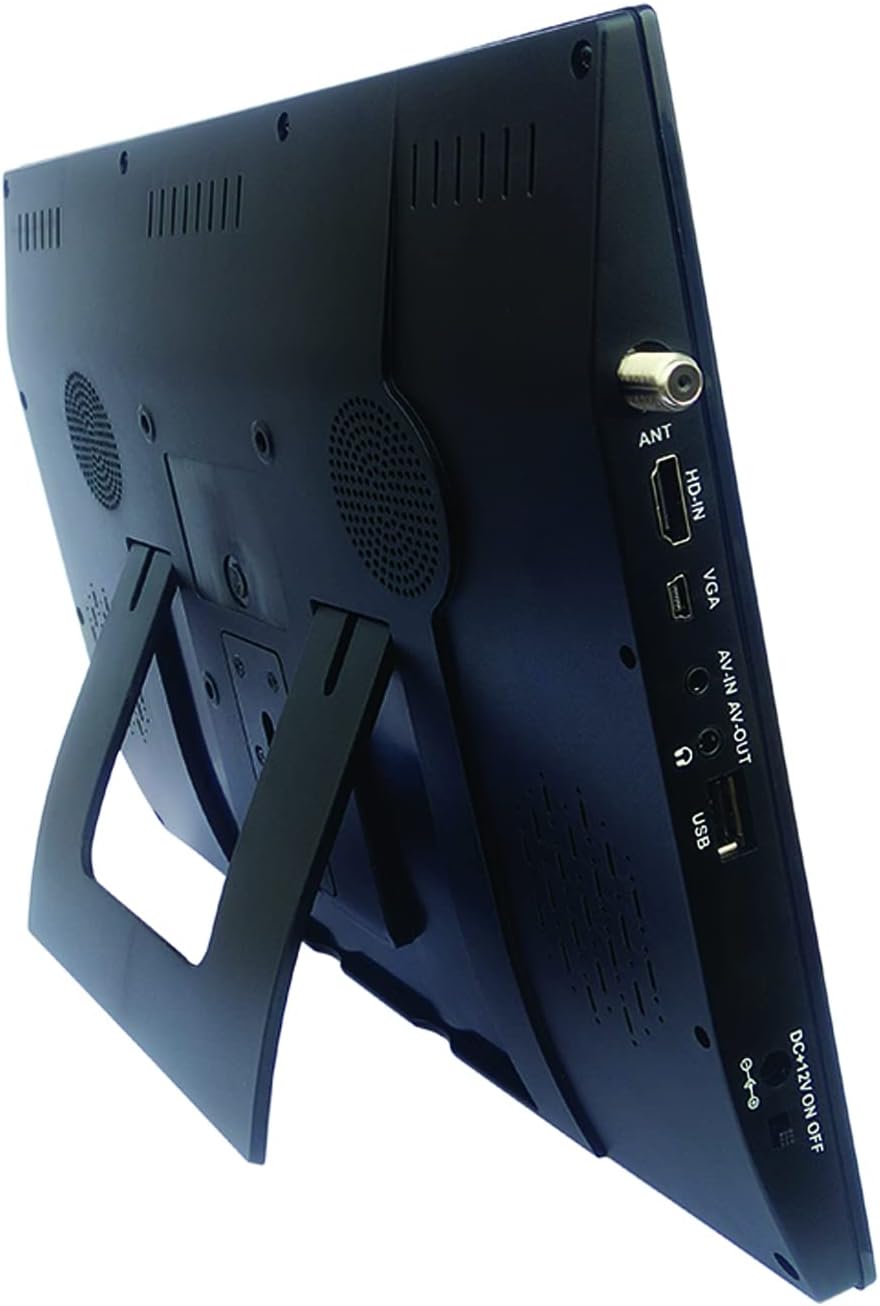
Image: Naxa NT-1400 with the integrated kickstand.
Asennus
1. Laitteen virran kytkeminen
- Vaihtovirta: Connect the ETL AC adapter to the DC 12V input on the unit and plug it into a standard wall outlet.
- Auton tasavirta: Connect the DC car cord to the DC 12V input on the unit and plug it into your vehicle's 12V accessory socket.
- Sisäinen akku: The unit has a built-in rechargeable lithium battery. Ensure it is charged before portable use. The battery charges automatically when connected to AC or DC power.
2. Jalustan kiinnittäminen
- The unit includes an integrated flip-out kickstand for quick setup.
- For more stable placement, attach the provided tabletop stand to the back of the unit using the designated mounting points.
3 Antennin liittäminen
For optimal over-the-air TV reception, connect the external antenna to the ANT port on the side of the unit. Position the antenna in an area with good signal strength.
4. Alustava kanavahaku
After powering on the device for the first time, navigate to the 'Channel Setup' or 'Auto Scan' option in the main menu to scan for available digital TV channels. This process may take several minutes.
Käyttöohjeet
1. Virta päälle/pois
Press the 'POWER' button on the unit or the remote control to turn the device on or off.
2. Tulolähteen valitseminen
Press the 'MODE' or 'INPUT' button on the unit or remote control to cycle through available input sources: TV, USB, HDMI, VGA, AV.
3. Television käyttö
- Kanavan valinta: Use the 'CH+' / 'CH-' buttons on the unit or the remote control to change channels. You can also enter channel numbers directly using the remote's numeric keypad.
- Äänenvoimakkuuden säätö: Use the 'VOL+' / 'VOL-' buttons on the unit or the remote control to adjust the volume.
- Valikon navigointi: Press the 'MENU' button to access settings. Use arrow keys and 'OK' on the remote to navigate and confirm selections.
4. Kuulokkeiden käyttö
Plug standard 3.5mm headphones into the headphone jack for private audio listening. The internal speakers will automatically mute.
Multimediatoisto
The Naxa NT-1400 supports playback of various multimedia files USB-asemalta.
1 USB-aseman liittäminen
Insert your USB flash drive into the USB port on the side of the unit.
2. Accessing USB Media
Switch the input source to 'USB'. The device will display a file browser. Navigate through your folders and select the desired media file.
3. Tuettu File Muodot
- Video: MPEG, XVID, AVC, MP4, H.264, HEVC (H.265), FLV, MKV
- Audio: MP3
- Kuva: JPEG
- Teksti: TXT
Huolto
Puhdistus
Ensure the unit is powered off and unplugged before cleaning. Use a soft, dry, lint-free cloth to wipe the screen and exterior surfaces. Do not use liquid cleaners, aerosols, or abrasive materials.
Akun hoito
To prolong battery life, avoid fully discharging the battery frequently. If storing the unit for an extended period, charge the battery to approximately 50% and store in a cool, dry place.
Varastointi
Kun laitetta ei käytetä, säilytä sitä puhtaassa, kuivassa paikassa, poissa suorasta auringonvalosta ja äärimmäisistä lämpötiloista.
Vianetsintä
- Ei virtaa: Ensure the AC adapter or DC car cord is securely connected and the power switch is in the 'ON' position. Check if the internal battery is charged.
- Ei TV-signaalia: Verify the external antenna is properly connected and positioned. Perform an 'Auto Scan' for channels. Signal strength can vary by location.
- Ei ääntä: Check the volume level. Ensure headphones are not plugged in unless intended. Verify the audio settings in the menu.
- USB-toisto-ongelmat: Ensure the USB drive is formatted correctly (FAT32 is generally recommended). Verify that the media files ovat tuetuissa muodoissa.
- Kaukosäädin ei toimi: Check the battery in the remote control. Ensure there are no obstructions between the remote and the unit's IR sensor.
Tekniset tiedot
| Ominaisuus | Erittely |
|---|---|
| Merkki | Naxa |
| Mallinumero | NT-1400 |
| Näytön koko | 14.1 tuumaa |
| Näyttötekniikka | LCD |
| Resoluutio | 1280 x 800 |
| Kuvasuhde | 16:9 |
| Päivitystaajuus | 50/60 Hz |
| Virittimen tyyppi | Built-in Digital ATSC TV Tuner |
| Yhteydet | HDMI, USB, VGA, AV-IN/AV-OUT |
| Kaiuttimen tyyppi | Sisäänrakennettu |
| Akku | 1 litiumioni (mukana) |
| Virtalähde | AC Adapter, DC Car Cord, Internal Battery |
| Tuotteen mitat | 1.5" S x 13.45" L x 9.2" K |
| Tuotteen paino | 2.2 puntaa |
Takuu ja tuki
For warranty information, technical support, or service inquiries, please visit the official Naxa Electronics websivustolta tai ota yhteyttä heidän asiakaspalveluunsa. Säilytä ostokuitti ostotodistuksena takuuvaatimuksia varten.
Naxa Electronics: Visit the Naxa Store on Amazon


