
1. Johdanto
Kiitos ostoksestasiasing the Muse MT-106 BT Stereo Turntable. This manual provides essential information for the safe and efficient operation of your new device. Please read it thoroughly before use and retain it for future reference.
The Muse MT-106 BT is a versatile 3-speed (33/45/78 RPM) stereo turntable featuring a Bluetooth receiver, a USB port for playback and encoding, and two integrated speakers. It is designed to play vinyl records and can also stream music from any Bluetooth-compatible device such as a tablet, smartphone, or laptop.
2. Turvallisuusohjeet
- Virtalähde: Varmista virtalähteen voltage vastaa laitteessa ilmoitettua luokitusta.
- Vesi ja kosteus: Do not expose the unit to rain, moisture, or dripping water. Do not place objects filled with liquids, such as vases, on the unit.
- Ilmanvaihto: Varmista riittävä ilmanvaihto. Älä tuki tuuletusaukkoja.
- Lämpö: Pidä laite poissa lämmönlähteistä, kuten pattereista, lämmitysvastuksista, liesistä tai muista lämpöä tuottavista laitteista.
- Puhdistus: Irrota laite pistorasiasta ennen puhdistamista. Käytä pehmeää, kuivaa liinaa. Älä käytä nestemäisiä puhdistusaineita tai aerosolipuhdistusaineita.
- Huolto: Älä yritä huoltaa tätä tuotetta itse. Anna kaikki huoltotoimenpiteet pätevän huoltohenkilöstön tehtäväksi.
- Sijoitus: Aseta laite vakaalle ja tasaiselle alustalle, jotta se ei putoa ja vaurioidu.
3. Pakkauksen sisältö
Tarkista, että pakkauksessasi on seuraavat tuotteet:
- Muse MT-106 BT Stereo Turntable
- Käyttöopas
- Virtalähde
- 45 RPM -sovitin
4. Tuote ohiview
Familiarize yourself with the components and controls of your Muse MT-106 BT Turntable.

Kuva 4.1: Kaiken kaikkiaan view of the Muse MT-106 BT Stereo Turntable. This image displays the turntable from an angled perspective, with its transparent dust cover lifted. The wooden base and integrated speakers are visible, along with the black platter, tonearm, and control knobs on the right side.
4.1 Front and Top Components
- Pölysuoja: Suojaa levylautasta ja äänivartta pölyltä.
- Vati: Pyörivä alusta, jolle levyt asetetaan.
- Kara: Holds the record in place on the platter.
- 45 RPM sovitin: Käytetään 7-tuumaisten levyjen soittamiseen, joissa on suuret keskireiät.
- Äänivarsi: Pitelee neulaa ja seuraa levyn uria.
- Kynä (neula): The part that reads the record grooves.
- Kippivipu: Nostaa ja laskee äänivartta.
- Nopeuden valitsin: Valitse 33, 45 tai 78 kierrosta minuutissa (rpm).
- Integroidut kaiuttimet: Sisäänrakennetut kaiuttimet äänen ulostuloa varten.

Kuva 4.2: Ohjauspaneeli. Tämä kuva näyttää yksityiskohtaisen view of the control panel located on the right side of the turntable. It shows three rotary knobs for volume and function selection, along with several buttons for playback control and mode switching.
4.2 Ohjauspaneeli
- Virta/äänenvoimakkuuden säädin: Kytkee laitteen päälle/pois ja säätää äänenvoimakkuutta.
- Toimintovalitsin: Switches between Phono, Bluetooth, USB, and Aux-in modes.
- Toiston ohjauspainikkeet: Play/Pause, Skip Forward, Skip Backward (for USB mode).
- Automaattinen pysäytyskytkin: Enables or disables the automatic stop function for vinyl playback.
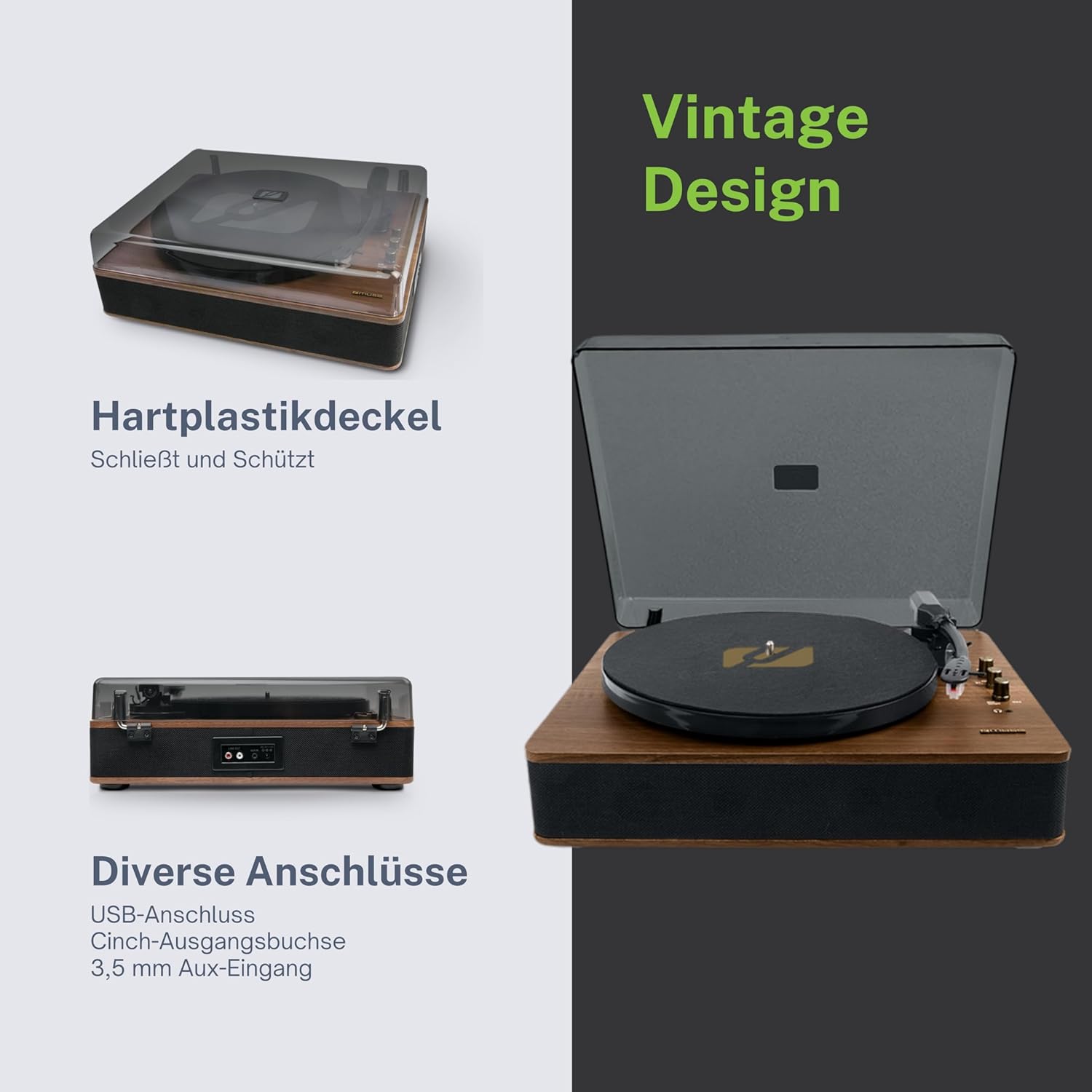
Figure 4.3: Rear Connections. The rear panel of the turntable is shown, featuring various connection ports including RCA audio outputs, a USB port, and an auxiliary input jack, allowing connection to external audio systems or devices.
4.3 Taka- ja sivuliitännät
- RCA-lähtöliittimet (V/O): Yhdistä ulkoiseen ampnostin tai teholliset kaiuttimet.
- USB-portti: MP3-tiedostojen toistamiseen fileUSB-asemasta tai vinyylin koodaamisesta USB:lle.
- AUX-tuloliitäntä (3.5 mm): Liitä ulkoiset äänilaitteet.
- DC IN -liitin: Liitä virtalähde.
- Kuulokeliitäntä (3.5 mm): Yksityiseen kuunteluun.

Kuva 4.4: Keskeiset toiminnotview. An illustrative graphic highlighting the key functions and connectivity options of the turntable. Icons represent features such as USB encoding, MP3 playback via USB, RCA output, auto-stop, integrated speakers, headphone jack, auxiliary input, and AC power input.
5. Asennus
5.1 Pakkauksesta purkaminen
- Poista laite varovasti pakkauksestaan.
- Poista kaikki pakkausmateriaalit ja suojakalvot.
- Keep the packaging for future transport or storage.
5.2 Sijoitus
- Place the turntable on a flat, stable, and level surface.
- Avoid placing it near strong magnetic fields, direct sunlight, or heat sources.
- Varmista, että laitteen ympärillä on riittävästi tilaa kunnollista ilmanvaihtoa varten.
5.3 Virtaliitäntä
- Connect the supplied power adapter to the DC IN jack on the rear of the turntable.
- Kytke virtalähde sopivaan pistorasiaan.
5.4 Pölysuojuksen asennus
- Kiinnitä pölysuoja varovasti levysoittimen takana oleviin saranoihin.
- The dust cover protects the unit when not in use. Remove it or lift it fully when playing records.
6. Käyttöohjeet
6.1 Vinyylilevyjen soittaminen
- Nosta pölysuoja.
- Rotate the Power/Volume knob clockwise to turn on the unit.
- Set the Function Selector knob to 'Phono'.
- Aseta levy levylautaselle. Jos soitat 45 RPM:n singleä, aseta ensin 45 RPM:n sovitin levylautasen karalle.
- Select the correct speed (33, 45, or 78 RPM) using the Speed Selector switch.
- Irrota kynän suojus kynästä.
- Nosta äänivarsi cue-vivulla.
- Move the tonearm over the desired starting point of the record.
- Gently lower the tonearm onto the record using the cue lever. The music will begin to play.
- Säädä äänenvoimakkuutta virta-/äänenvoimakkuusnupilla.
- At the end of the record, if the Auto Stop switch is ON, the platter will stop rotating. If OFF, the platter will continue to rotate. Manually lift the tonearm and return it to its rest.
6.2 Bluetooth-tila
- Rotate the Power/Volume knob clockwise to turn on the unit.
- Set the Function Selector knob to 'BT' (Bluetooth). The Bluetooth indicator will flash, indicating pairing mode.
- Ota Bluetooth käyttöön ulkoisessa laitteessasi (älypuhelin, tabletti jne.) ja hae käytettävissä olevia laitteita.
- Select 'MUSE MT-106 BT' from the list of devices. Once connected, the Bluetooth indicator will stop flashing and remain solid.
- You can now play music from your external device through the turntable's speakers. Adjust volume using both the turntable's knob and your external device.
6.3 USB-toisto ja -koodaus
6.3.1 USB-toisto
- Rotate the Power/Volume knob clockwise to turn on the unit.
- Set the Function Selector knob to 'USB'.
- Insert a USB flash drive into the USB port. The unit will automatically detect and begin playing MP3 files.
- Use the Playback Control Buttons (Play/Pause, Skip Forward, Skip Backward) to navigate tracks.
6.3.2 USB-koodaus (vinyylin tallennus USB:lle)
The MT-106 BT allows you to convert your vinyl records into digital MP3 files on a USB drive.
- Varmista, että USB-muistitikku on asetettu USB-porttiin.
- Set the Function Selector knob to 'Phono'.
- Start playing your vinyl record as described in section 6.1.
- Press the 'Record' button (refer to Figure 4.2 for button location, typically indicated by a circle or 'REC' label). The recording indicator will illuminate.
- To stop recording, press the 'Record' button again. The recording indicator will turn off.
- The recorded audio will be saved as an MP3 file USB-asemallasi.
6.4 Lisälaitetulo (AUX IN)
- Rotate the Power/Volume knob clockwise to turn on the unit.
- Set the Function Selector knob to 'AUX'.
- Connect an external audio device (e.g., MP3 player, CD player) to the AUX IN jack (3.5mm) on the rear of the turntable using an audio cable (not supplied).
- Play audio from your external device. The sound will be output through the turntable's speakers.
6.5 RCA-lähtö
To connect your turntable to an external amplifier- tai aktiivikaiuttimet:
- Ensure the turntable and the external audio system are turned off.
- Connect an RCA audio cable (not supplied) from the RCA Output Jacks (L/R) on the rear of the turntable to the corresponding audio input jacks on your ampnostin tai teholliset kaiuttimet.
- Turn on both the turntable and your external audio system.
- Valitse sopiva tuloliitäntä ulkoisesta äänijärjestelmästäsi.
7. Huolto
7.1 Kynän puhdistaminen
- Use a soft brush, specifically designed for stylus cleaning, to gently brush the stylus from back to front.
- Do not use excessive force or brush from side to side, as this can damage the stylus.
- Replace the stylus approximately every 300-500 hours of playback, or if you notice a degradation in sound quality.
7.2 Laitteen puhdistaminen
- Wipe the exterior of the turntable with a soft, dry, lint-free cloth.
- Älä käytä hankaavia puhdistusaineita, vahoja tai liuottimia, sillä ne voivat vahingoittaa pintaa.
- Käytä pölysuojan puhdistamiseen pehmeää liinaa ja tarvittaessa mietoa, hankaamatonta puhdistusainetta.
8. Vianmääritys
If you experience issues with your turntable, please consult the following table before contacting support.
| Ongelma | Mahdollinen syy | Ratkaisu |
|---|---|---|
| Ei virtaa | Virtasovitin ei ole kytketty tai pistorasia on viallinen. | Varmista, että virtalähde on kytketty kunnolla ja että pistorasia toimii. |
| Ei ääntä | Volume too low; incorrect function mode; external speakers not connected/powered. | Increase volume; select correct function (Phono, BT, USB, AUX); check external speaker connections and power. |
| Huono äänenlaatu (vinyyli) | Dirty or worn stylus; dirty record; incorrect speed selected. | Clean or replace stylus; clean record; select correct RPM. |
| Bluetooth ei muodosta yhteyttä | Turntable not in pairing mode; device too far; already connected to another device. | Ensure turntable is in BT mode and flashing; move device closer; disconnect from other devices. |
| USB-toisto ei toimi | USB-asemaa ei ole asetettu oikein; ei tuettu file alustus; USB-asema viallinen. | Reinsert USB drive; ensure files are MP3 format; try a different USB drive. |
9. Tekniset tiedot
| Merkki | MUUSA |
| Mallin nimi | MT-106 BT |
| Väri | Puu |
| Materiaali | Puu |
| Tuotteen paino | 4.3 kiloa |
| Pyörimisnopeudet | 33, 45, 78 RPM |
| Yhteydet | Bluetooth, USB, RCA Output, 3.5mm AUX Input, 3.5mm Headphone Jack |
| Erikoisominaisuudet | Integrated Speaker, Dust Protection, Adjustable Speed, USB Encoding |
| Yhteensopivat laitteet | Älypuhelin, tabletti |
| Virtalähde | AC Adapter (1 AAAA battery required for unspecified function, likely remote or internal clock) |
| Alkuperämaa | Kiina |
10. Takuu ja tuki
This product is covered by a manufacturer's warranty. Please refer to the warranty card included with your purchase or visit the official MUSE websivustolta tarkemmat takuuehdot.
For technical support, troubleshooting assistance, or inquiries regarding spare parts, please contact MUSE customer service through their official channels. Information regarding spare parts availability is currently not available.