
1. Johdanto
The goCoax MoCA 2.5 Adapter (Model MA2500D) allows you to extend your home network using existing coaxial cables. This technology provides a high-bandwidth, low-latency connection, ideal for streaming 4K/8K video, online gaming, and large file transfers, leveraging the robust nature of coaxial wiring to minimize interference compared to Wi-Fi.
2. Mitä laatikossa on
Varmista, että pakkauksessasi on kaikki tarvittavat osat:
- goCoax MoCA 2.5 Adapter (MA2500D) - 2 units
- Power Adapter - 2 units
- Ethernet Cable - 2 units
- Coaxial Cable - 2 units
- Pika-aloitusopas
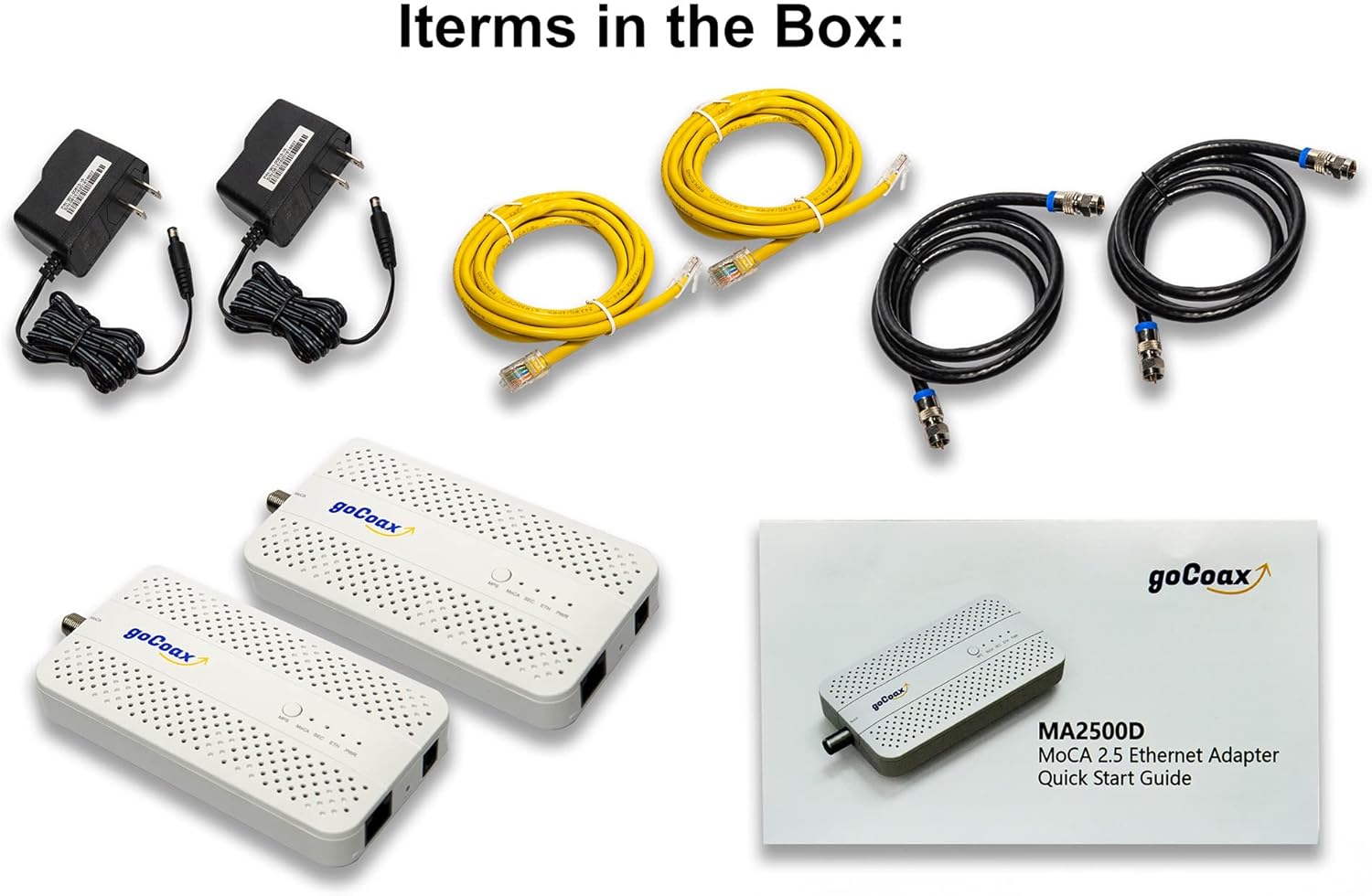
Figure 1: Items included in the goCoax MoCA 2.5 Adapter (MA2500D) package.
3. Tuote ohiview
Familiarize yourself with the ports and indicators on your goCoax MoCA 2.5 Adapter.

Kuva 2: Etuosa view of the goCoax MoCA 2.5 Adapter with LED indicators.
LED-ilmaisimet:
- MPS (MoCA Protected Setup): Indicates the status of MoCA encryption.
- MoCA: Indicates MoCA network connection status. Solid green means connection is up, blinking green means traffic is over MoCA.
- SEC (Security): Indicates if MoCA encryption is enabled. Solid green means encryption is enabled.
- ETH (Ethernet): Indicates Ethernet link status. Solid green means link is up, blinking green means traffic is over Ethernet.
- PWR (teho): Indicates power status. Solid green means the adapter is powered up.

Kuva 3: Takaosa view of the goCoax MoCA 2.5 Adapter with ports.
Portit ja painikkeet:
- MoCA Coaxial Port: Connects to the coaxial cable from your wall outlet.
- TV Coaxial Port: (If available) Connects to your TV or set-top box.
- 2.5GbE Ethernet Port: Connects to your router, computer, or other network device.
- Virtaportti: Liitetään virtalähteeseen.
- Reset-painike: Short press reboots the adapter. Press for more than 5 seconds to clear user configuration. Hold and power on for more than 10 seconds to revert to previous firmware.
- MPS Button: Short press copies encryption configuration from another encryption-enabled adapter.
4. Asennus
To establish a MoCA network, you need at least two goCoax MoCA 2.5 Adapters. Ensure all coaxial splitters in your home are MoCA compatible (covering 1125-1675MHz frequency band).
Basic Setup Steps:
- Connect the First Adapter (Near Router/Modem):
- Connect one end of an Ethernet cable to an available LAN port on your router/modem.
- Liitä Ethernet-kaapelin toinen pää tietokoneeseen. ETH port on the first goCoax MoCA 2.5 Adapter.
- Connect a coaxial cable from your wall outlet to the MoCA port on the adapter.
- Liitä virtalähde PWR port on the MoCA adapter and plug it into a power outlet.
- Connect the Second Adapter (Near Device):
- In the room where you want to extend your network, connect a coaxial cable from the wall outlet to the MoCA port on the second goCoax MoCA 2.5 Adapter.
- Liitä Ethernet-kaapeli ETH port on this adapter to your network device (e.g., PC, gaming console, access point).
- Liitä virtalähde PWR port on this MoCA adapter and plug it into a power outlet.
- Tarkista yhteys:
- Odota PWR, ETH, ja MoCA LEDs on both adapters to turn solid green. This indicates a successful connection and data transfer.
Video 1: This video demonstrates the setup process for the goCoax MA2500D MoCA adapter, showing how to connect the devices to create a MoCA network.

Kuva 4: Esimample network diagram using goCoax MoCA 2.5 Adapters.
5. Käyttöohjeet
Once set up, the goCoax MoCA 2.5 Adapters operate automatically. The LEDs provide visual feedback on the network status:
- Solid Green MoCA LED: Indicates a stable MoCA network connection.
- Blinking Green MoCA LED: Indicates active data traffic over the MoCA network.
- Solid Green ETH LED: Indicates a live Ethernet link to the connected device.
- Blinking Green ETH LED: Indicates active data traffic over the Ethernet connection.
- SEC LED: Solid green indicates that MoCA encryption is active, securing your network traffic.
For enhanced security, you can enable MoCA Protected Setup (MPS) by pressing the MPS button on one adapter and then on the other within two minutes. This will encrypt the traffic between the paired adapters.
6. Huolto
- Puhdistus: Use a soft, dry cloth to clean the adapter. Do not use liquid cleaners or aerosol sprays.
- Ilmanvaihto: Ensure the adapter has adequate ventilation. Do not block the ventilation holes.
- Ympäristö: Avoid placing the adapter in areas with high humidity, extreme temperatures, or direct sunlight.
- Kaapeliliitännät: Periodically check all cable connections (coaxial and Ethernet) to ensure they are secure.
7. Vianmääritys
No MoCA Link (MoCA LED Off):
- Ensure both MoCA adapters are powered on and the PWR LED is solid green.
- Verify that coaxial cables are securely connected to the MoCA ports on both adapters and the wall outlets.
- Check all coaxial splitters in your home. They must be MoCA compatible (supporting frequencies up to 1675MHz or higher). Older splitters may filter out MoCA signals.
- Ensure there are no filters on the coaxial line that block MoCA frequencies, except for a Point of Entry (PoE) filter at your home's service entrance to prevent MoCA signals from leaving your home.
- If you have Satellite TV or DOCSIS 3.1 modems/routers, be aware of potential frequency overlap. You may need to adjust MoCA operating frequency bands in the adapter's settings (if accessible) or physically separate networks.
Hidas verkkonopeus:
- Confirm all coaxial cables are in good condition and securely connected. Damaged cables can degrade performance.
- Ensure your Ethernet cables are Cat5e or higher to support 2.5GbE speeds.
- Check the quality and compatibility of your coaxial splitters. Non-MoCA compatible splitters or those with high signal loss can severely impact performance.
- If using older MoCA devices (e.g., WCB6200Q, ECB6000), they may have compliance issues with MoCA 2.5. Consider upgrading all MoCA devices to 2.5 for optimal performance.
No Ethernet Connection (ETH LED Off):
- Ensure the Ethernet cable is properly connected between the MoCA adapter and your network device/router.
- Kokeile toista Ethernet-kaapelia sulkeaksesi pois kaapelivian.
- Reboot the MoCA adapter and the connected network device.
Sovittimen nollaus:
- To reboot, short press the RESET button.
- To clear user configuration, press and hold the RESET button for more than 5 seconds.
- To revert to previous firmware, hold the RESET button while powering on the adapter, and continue holding for more than 10 seconds.
8. Tekniset tiedot
- Malli: MA2500D
- Laitteiston käyttöliittymä: Ethernet
- Tiedonsiirtoprotokolla: MoCA 2.5, Ethernet
- Tiedonsiirtonopeus: Up to 2.5 Gigabits Per Second (MoCA 2.5)
- Ethernet-portti: 1x 2.5GbE Ethernet Port
- Coaxial Ports: MoCA IN, TV OUT (Pass-through)
- Väri: Valkoinen
- Yhteensopivat laitteet: Desktop computers, routers, gaming consoles, streaming devices, access points, etc.
- Paketin mitat: 9.8 x 6.14 x 2.83 tuumaa
- Tuotteen paino: 1.58 paunaa (2 kappaleen pakkaus)
- Valmistaja: goCoax
9. Takuu ja tuki
The goCoax MoCA 2.5 Adapter (MA2500D) comes with a manufacturer's warranty. Please refer to the warranty card included in your product packaging or visit the official goCoax websivustolta tarkemmat takuuehdot.
For technical support, troubleshooting assistance, or any product-related inquiries, please contact goCoax customer support through their official websivustolla tai pikaoppaassa annetuissa yhteystiedoissa.