
Johdanto
This manual provides detailed instructions for the setup, operation, and maintenance of your Acogedor Bluetooth 5.0 Receiver Wireless Audio Adapter. Please read this manual thoroughly before using the product to ensure proper function and to prevent damage.

Image: The Acogedor Bluetooth 5.0 Receiver, highlighting its NFC capability.
Turvallisuustiedot
- Älä altista laitetta vedelle tai kosteudelle.
- Vältä äärimmäisiä lämpötiloja.
- Älä pura laitetta. Tämä mitätöi takuun.
- Use only the provided or recommended power adapter (DC 5V).
- Pidä poissa lasten ulottuvilta.
Pakkauksen sisältö
Varmista, että pakkauksessa on kaikki tarvittavat osat:
- Acogedor Bluetooth 5.0 Receiver
- 3.5 mm audiokaapeli
- RCA-audiokaapeli
- USB-virtakaapeli
- Käyttöopas (tämä asiakirja)
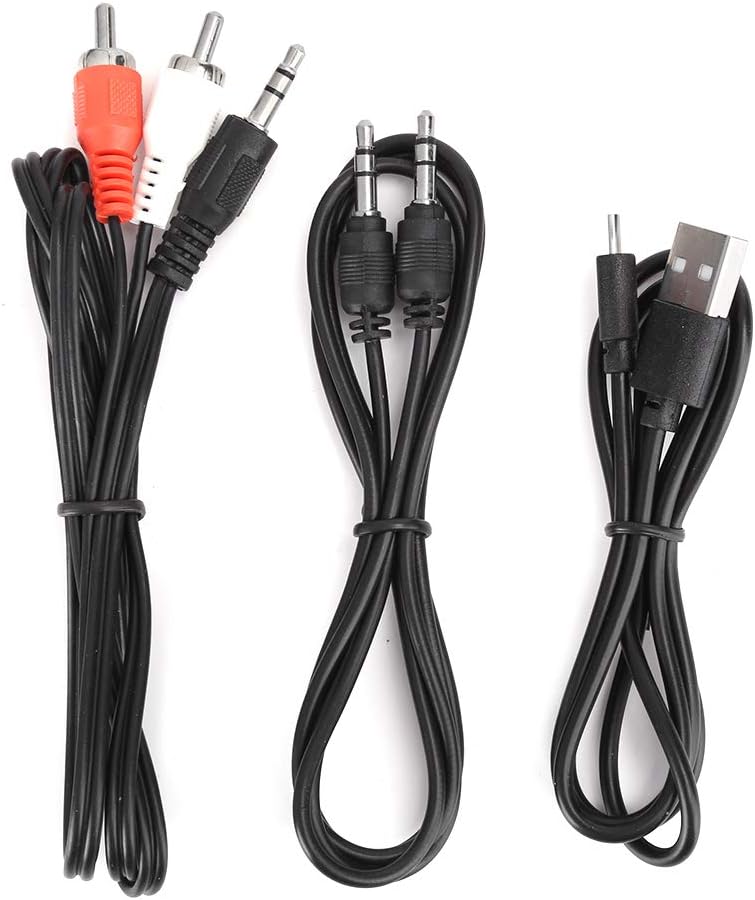
Image: The various audio and power cables included with the receiver.
Tuote loppuview
Familiarize yourself with the ports and controls of the Acogedor Bluetooth 5.0 Receiver.

Image: Rear panel with power input, USB port, RCA audio output, and 3.5mm AUX output.

Image: Top panel with playback control buttons (Previous, Play/Pause, Next).
- DC 5V tulo: Power connection port (Micro USB).
- USB-portti: U-levyn toistoa varten.
- Äänilähtö (RCA): Punaiset ja valkoiset RCA-liittimet äänilähtöä varten ampnostimet tai kaiuttimet.
- AUX-lähtö: 3.5mm jack for audio output to speakers or headphones.
- Ohjauspainikkeet: Edellinen kappale, Toista/tauko, Seuraava kappale.
- NFC-alue: For near-field pairing with compatible devices.
Asennus
1. Virtaliitäntä
- Liitä toimitettu USB-virtajohto DC 5V -sisääntulo vastaanottimen portti.
- Plug the other end of the USB cable into a 5V USB power adapter (not included) or a USB port on your audio equipment.
- The indicator light on the receiver will illuminate, indicating it is powered on.
2. Äänilähtöliitäntä
Valitse jokin seuraavista tavoista liittääksesi vastaanottimen äänentoistojärjestelmääsi:
- RCA-kaapeleiden käyttö: Connect one end of the RCA audio cable to the Äänilähtö (RCA) ports (red to red, white to white) on the receiver. Connect the other end to the corresponding RCA input ports on your ampnostin tai aktiivikaiuttimet.
- 3.5 mm:n AUX-kaapelin käyttö: Liitä 3.5 mm:n äänikaapelin toinen pää liitäntään AUX-lähtö port on the receiver. Connect the other end to the 3.5mm AUX input port on your speaker, headphones, or ampelävämpi.

Image: The receiver connected to an external speaker and a smartphone, demonstrating a typical setup.
3. Bluetooth-pariliitos
The receiver will automatically enter pairing mode when powered on. The indicator light will flash.
- NFC Pairing (Recommended for NFC-enabled devices):
- Ensure NFC is enabled on your smartphone or other NFC-enabled device.
- Tap your NFC-enabled device gently against the NFC-alue on the top of the receiver.
- Confirm the pairing request on your device. The receiver will connect automatically.

Image: A smartphone being used to initiate NFC pairing with the receiver.
- Manuaalinen Bluetooth-pariliitos:
- Siirry älypuhelimellasi tai Bluetooth-yhteensopivalla laitteellasi Bluetooth-asetuksiin.
- Etsi available devices. The receiver will appear as "Acogedor Bluetooth Receiver" or similar.
- Select the receiver from the list to connect.
- Once connected, the indicator light will become solid blue.
Käyttöohjeet
Bluetooth-äänentoisto
- Ensure the receiver is powered on and successfully paired with your device.
- Start playing audio on your paired device. The sound will be transmitted wirelessly to the receiver and output through your connected speakers.
- Käytä Ohjauspainikkeet on the receiver or your paired device to manage playback:
- Toista/tauko: Paina keskipainiketta.
- Seuraava kappale: Paina oikeaa painiketta.
- Edellinen kappale: Paina vasenta painiketta.
U Levyn toisto
The receiver supports playing audio files suoraan USB-muistitikulta.
- Aseta ääntä sisältävä USB-muistitikku files osaksi USB-portti vastaanottimessa.
- The receiver will automatically detect the U disk and begin playing audio.
- Käytä Ohjauspainikkeet to navigate tracks.

Image: The receiver demonstrating connections for both Bluetooth audio from a smartphone and direct playback from a USB flash drive.
Huolto
- Puhdista laite pehmeällä, kuivalla liinalla. Älä käytä nestemäisiä puhdistusaineita tai aerosoleja.
- Pidä portit vapaina pölystä ja roskista.
- Store the receiver in a cool, dry place when not in use.
Vianetsintä
| Ongelma | Mahdollinen syy | Ratkaisu |
|---|---|---|
| Ei virran merkkivaloa. | Power cable not connected or faulty power source. | Ensure the USB power cable is securely connected to both the receiver and a working 5V power source. Try a different USB port or adapter. |
| Pariliitos Bluetoothin kautta ei onnistu. | Receiver not in pairing mode; Bluetooth disabled on source device; too many paired devices. | Ensure the receiver is powered on and the indicator light is flashing (pairing mode). Enable Bluetooth on your source device. Forget previous pairings on your device and try again. Move closer to the receiver. |
| Ei äänilähtöä. | Incorrect audio cable connection; volume too low; wrong input selected on ampnostin/kaiutin. | Verify audio cables are correctly connected to the Äänilähtö ports on the receiver and the correct input on your speaker/amplifier. Increase volume on both the source device and the connected audio system. Ensure the correct input source is selected on your ampnostin/kaiutin. |
| U Disk playback not working. | U disk not inserted correctly; unsupported file format; U disk corrupted. | Ensure the U disk is fully inserted into the USB-portti. Check if audio files are in a supported format (e.g., MP3). Try a different U disk. |
Tekniset tiedot
| Ominaisuus | Yksityiskohta |
|---|---|
| Malli | Acogedordebyv7h1rw1035 |
| Bluetooth-versio | 5.0 |
| Yhteystekniikka | Auxiliary, Bluetooth, NFC, RCA, USB |
| Äänilähtötila | Stereot |
| Liittimen tyyppi | 3.5 mm liitin, RCA, USB |
| Yhteensopivat laitteet | Smartphone, Speaker, Ampelävämpi |
| Virransyöttö | DC 5V (via Micro USB) |
| Tuotteen mitat | 6.3 x 5.12 x 1.57 tuumaa |
| Tuotteen paino | 5.3 unssia (0.15 kiloa) |
| Wireless Range | Up to 15 meters / 49.2 feet (barrier-free) |

Image: Key features of the receiver including Bluetooth reception, signal transmission range, USB playback, and decoding chip.
Takuu ja tuki
Acogedor products are designed for reliability and performance. For any questions, technical support, or warranty claims, please contact Acogedor customer service through the retailer where the product was purchased.
Säilytä ostokuittisi takuun voimassaoloa varten.