
Johdanto
This manual provides detailed instructions for the setup, operation, and maintenance of your Monkey Loop WS-10 Wireless Guitar System. This system is designed to offer musicians a cable-free solution for their instruments, maintaining sound quality and signal integrity.
Tuote loppuview
The Monkey Loop WS-10 system consists of a transmitter and a receiver unit. Both units are compact, lightweight, and feature a rotatable design for compatibility with various instruments.
Text description: An image showing the Monkey Loop WS-10 wireless guitar system, featuring both the transmitter and receiver units side-by-side, highlighting their compact design and the 'Monkey Loop WS-10' branding.

Tärkeimmät ominaisuudet:
- Wireless UHF System: Utilizes UHF technology for clear audio transmission and reduced interference.
- Pidentynyt akun käyttöikä: Integrated rechargeable battery provides approximately 5 to 6 hours of operation.
- Kompakti ja kannettava: Lightweight design for easy transport and use.
- Pyörivä pistoke: Ensures compatibility with most electric guitars and basses.
- Laaja yhteensopivuus: Suitable for various 6.35mm audio devices.
Asennusohjeet
1. Yksiköiden lataaminen
Before initial use, fully charge both the transmitter and receiver units. Use the included dual USB charging cable to connect both units to a USB power source (e.g., computer USB port, USB wall adapter).
Text description: An image showing the transmitter and receiver units connected to a dual USB charging cable, with a charging LED indicator visible on each unit, illustrating the charging process.

The charging indicator light will illuminate during charging and turn off or change color when fully charged (refer to the specific LED behavior in the operating section).
2. Lähettimen kytkeminen
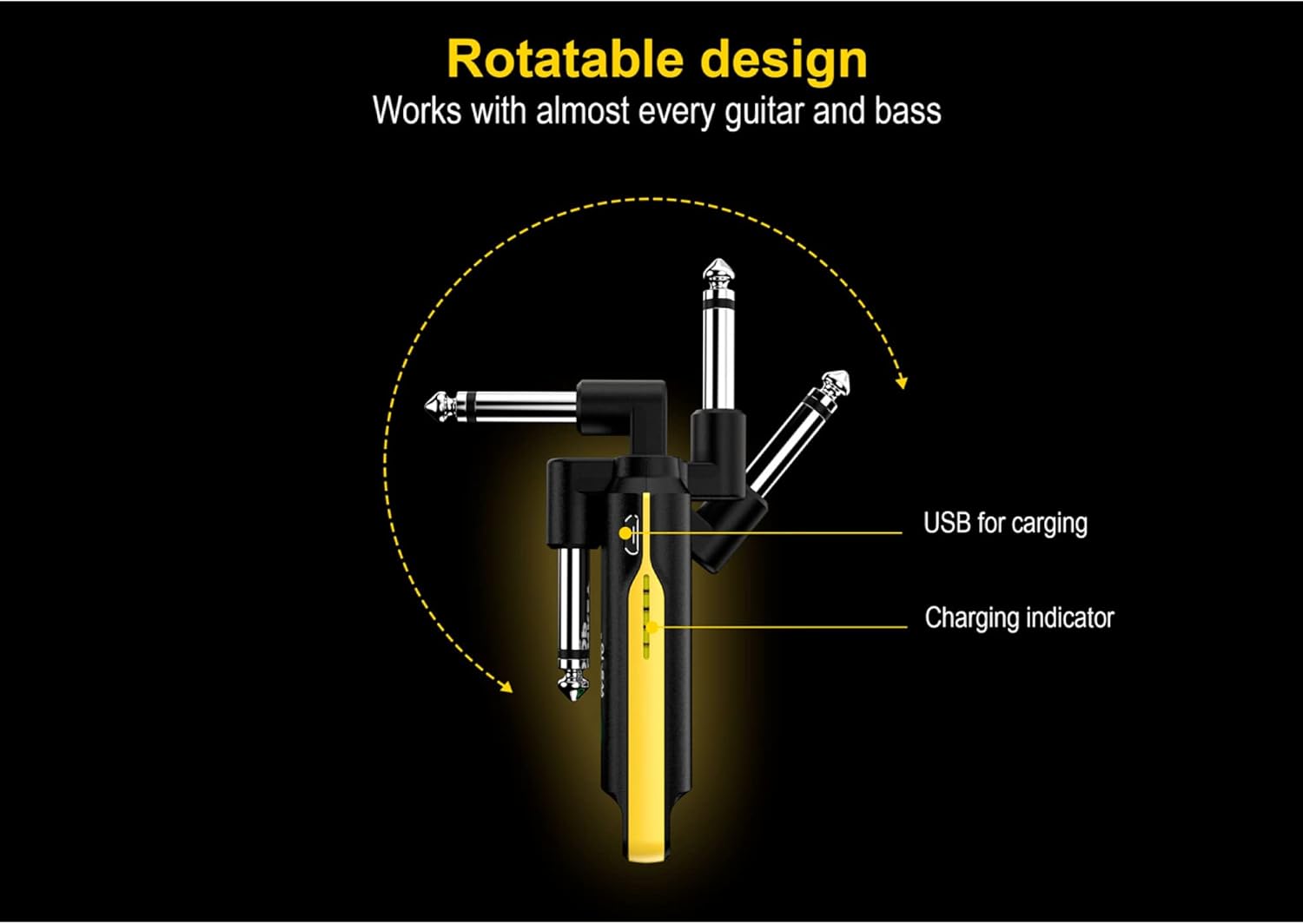
Plug the transmitter unit into your instrument's 6.35mm output jack. The rotatable plug allows for optimal positioning on various guitar and bass body types.
Text description: An image illustrating the rotatable design of the Monkey Loop WS-10 unit, showing how the 6.35mm jack can pivot to different angles for flexible connection to an instrument, ensuring compatibility.
3. Vastaanottimen liittäminen
Kytke vastaanotinyksikkö televisiosi tuloliittimeen. amplifier, audio interface, or other audio device.
Text description: An image showing the Monkey Loop WS-10 receiver connected to an amplifier, with a guitar connected to the transmitter, demonstrating a typical wireless setup for an instrument.

Käyttöohjeet
1. Virta päälle / pois
Press and hold the power button on both the transmitter and receiver units to turn them on. Repeat the action to power them off.
2. Pariliitos
The units are typically pre-paired from the factory. If they do not connect automatically, ensure both units are powered on and within range. If issues persist, consult the troubleshooting section.
3. Käyttö
Once both units are powered on and paired, your instrument's signal will be transmitted wirelessly to your audio device. The system offers a maximum transmission range of 50 meters (approximately 164 feet) in an open environment.
Text description: An image displaying the Monkey Loop WS-10 transmitter and receiver units side-by-side, highlighting their compact form factor and indicating their roles as transmitter and receiver.
4. Multi-Unit Operation
Up to 99 sets of Monkey Loop WS-10 systems can be used simultaneously in the same environment without interference, provided they are on different channels (if channel selection is available, refer to advanced settings, otherwise, they should auto-select).
Huolto
- Puhdistus: Pyyhi yksiköt pehmeällä, kuivalla liinalla. Älä käytä hankaavia puhdistusaineita tai liuottimia.
- Varastointi: Säilytä yksiköitä viileässä, kuivassa paikassa, poissa suorasta auringonvalosta ja äärimmäisistä lämpötiloista.
- Akun hoito: Akun käyttöiän pidentämiseksi vältä laitteiden jatkuvaa tyhjentämistä kokonaan. Lataa ne säännöllisesti, vaikka niitä ei käytettäisi pitkään aikaan.
Vianetsintä
- No Sound or Intermittent Signal:
- Ensure both transmitter and receiver are fully charged and powered on.
- Verify that both units are within the operational range (up to 50 meters).
- Tarkista mahdolliset häiriölähteet (esim. Wi-Fi-reitittimet, muut langattomat laitteet).
- Confirm that the transmitter is securely plugged into the instrument and the receiver into the audio input.
- Test with a standard cable to rule out issues with the instrument or ampelävämpi.
- Poor Sound Quality or Noise:
- Siirry pois mahdollisten sähkömagneettisten häiriölähteiden läheltä.
- Ensure the units are not too close to other electronic devices.
- Tarkista laitteen lähtöteho ja amplifier's input for proper function.
- The UHF system is designed for clarity; if noise persists, it might indicate environmental interference or a faulty unit.
- Yksiköt, jotka eivät muodosta paritusta:
- Power off and then power on both units.
- Ensure they are close to each other during the pairing process.
- If there's a reset function (not explicitly mentioned, but common), perform a factory reset.
Tekniset tiedot
| Ominaisuus | Yksityiskohta |
|---|---|
| Merkki | MONKEY LOOP |
| Mallinumero | 10194525 (WS-10) |
| Langaton tekniikka | UHF |
| Akun kesto | Noin 5-6 tuntia |
| Lataus | USB (dual USB charging cable included) |
| Vaihteisto | Jopa 50 metriä (avoin ympäristö) |
| Mitat (noin) | 120 x 29 x 18 mm |
| Yhteensopivuus | Most electric guitars, basses, and 6.35mm audio devices |
Text description: An image detailing the physical dimensions of the Monkey Loop WS-10 unit, showing measurements for length, width, and thickness in millimeters for precise understanding of its size.

Takuu ja tuki
Information regarding specific warranty terms and support contacts is not available in the provided product data. Please refer to the product packaging or the manufacturer's official website for detailed warranty information and customer support options.