
BTMETER BT-570T-APP
BTMETER BT-570T-APP Clamp Yleismittarin käyttöohje
Kattava käyttö- ja huolto-opas
1. Johdanto
The BTMETER BT-570T-APP is a versatile AC/DC 1000A Clamp Multimeter designed for accurate electrical measurements. It features 4000 counts digital display, data logging capabilities, and Bluetooth connectivity for remote monitoring via a smartphone or tablet application. This manual provides detailed instructions for the safe and effective use of your device.
Key functionalities include measuring AC/DC current, AC/DC voltage, resistance, capacitance, frequency, temperature, and continuity. It is suitable for various applications including HVAC, household electrical work, and commercial troubleshooting.
2. Turvallisuustiedot
Noudata aina seuraavia turvaohjeita henkilövahinkojen ja mittarin vaurioitumisen välttämiseksi:
- Älä ylitä minkään mittausalueen enimmäistulorajoja.
- Noudata äärimmäistä varovaisuutta työskennellessäsi jännitteisten virtapiirien kanssa.
- Varmista, että mittari on asetettu oikealle toiminnolle ja mittausalueelle ennen mittausten tekemistä.
- Tarkista mittausjohdot vaurioiden varalta ennen jokaista käyttökertaa. Vaihda, jos eristys on vaurioitunut.
- Älä käytä mittaria, jos se näyttää vaurioituneelta tai ei toimi kunnolla.
- Adhere to IEC 61010-1, CAT IV 600V, CAT III 1000V safety standards.
- When measuring current, ensure only the LIVE conductor is clamped for accurate readings. Clamping both hot and neutral conductors will result in a zero reading.
3. Tuote ohiview
The BTMETER BT-570T-APP is designed for ease of use and durability. Familiarize yourself with its components:

Figure 3.1: Key Components of the BT-570T-APP
- AC/DC Clamp: For non-contact current measurement. Jaw caliber size is 1.77 inches (45mm).
- Laukaista: Avaa ja sulkee clamp leuka.
- Toimintovalinta: Selects measurement modes (Voltage, virta, vastus jne.).
- Taustavalaistu LCD -näyttö: Shows measurement readings clearly, even in low light.
- Tuloliittimet: Mittausjohtojen ja lämpötila-anturin kytkemiseen.
- Painikkeet: HOLD, SELECT RANGE, REL/Duty, Max/Min/Average.
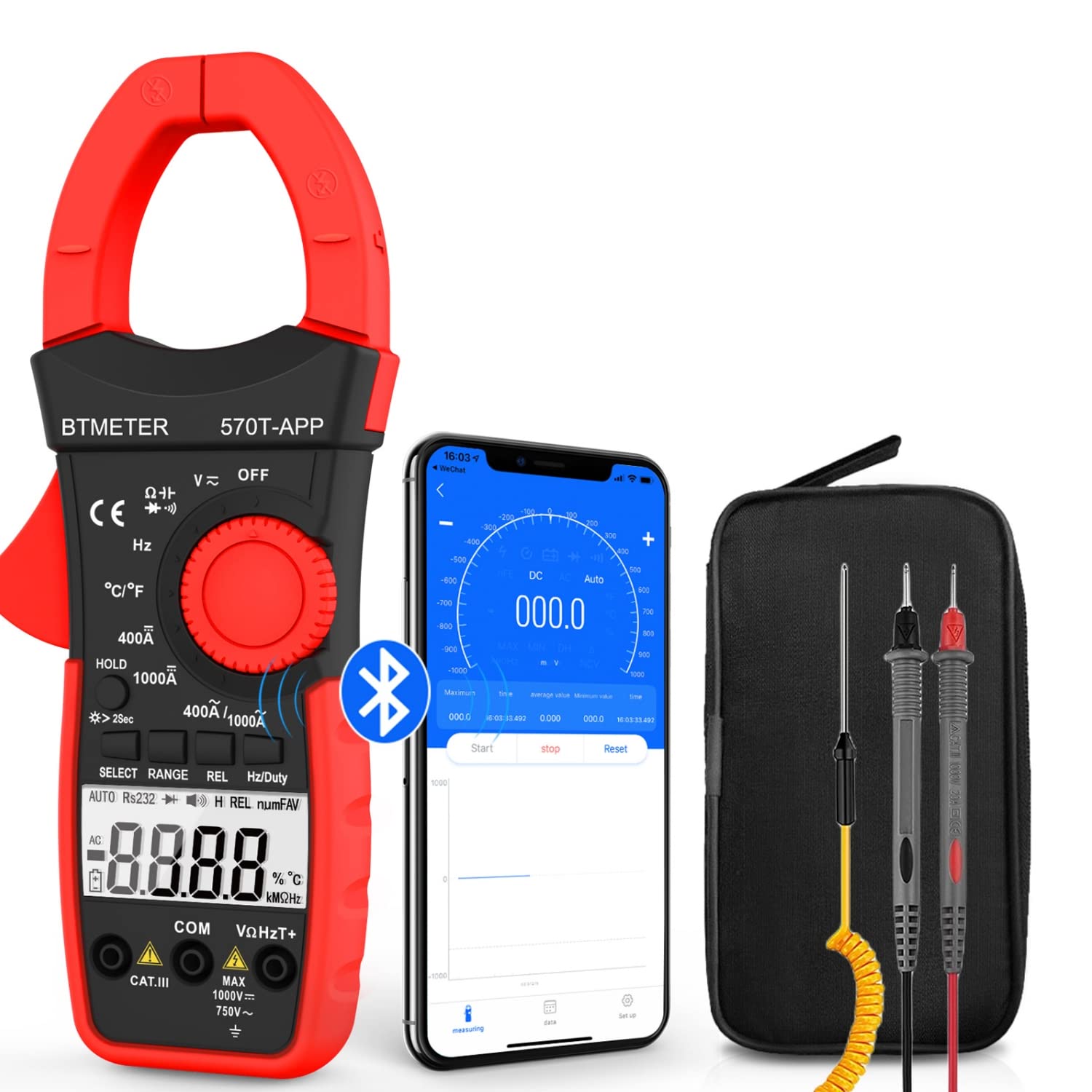
Figure 3.2: Product Contents and Bluetooth Connectivity
The package includes the BT-570T-APP clamp multimeter, test leads, a thermocouple probe, and a carrying case for convenient storage and transport.
4. Asennus
4.1 Akun asennus
The meter requires batteries for operation. Open the battery compartment on the back of the device, insert the batteries according to the polarity indicators, and secure the cover.
4.2 Sovelluksen asennus ja Bluetooth-yhteys
The BT-570T-APP supports remote control and data logging via a mobile application. Follow these steps to connect:
- Download the "Intelligent Clamp Meter" app from the App Store (iOS) or Google Play (Android).
- Varmista, että Bluetooth on käytössä älypuhelimellasi tai tabletillasi.
- Turn on the BT-570T-APP multimeter.
- Open the app on your device. It should automatically detect and connect to the multimeter.
- Kun olet muodostanut yhteyden, voit view measurements, graph data, and save readings in Excel or TXT format.
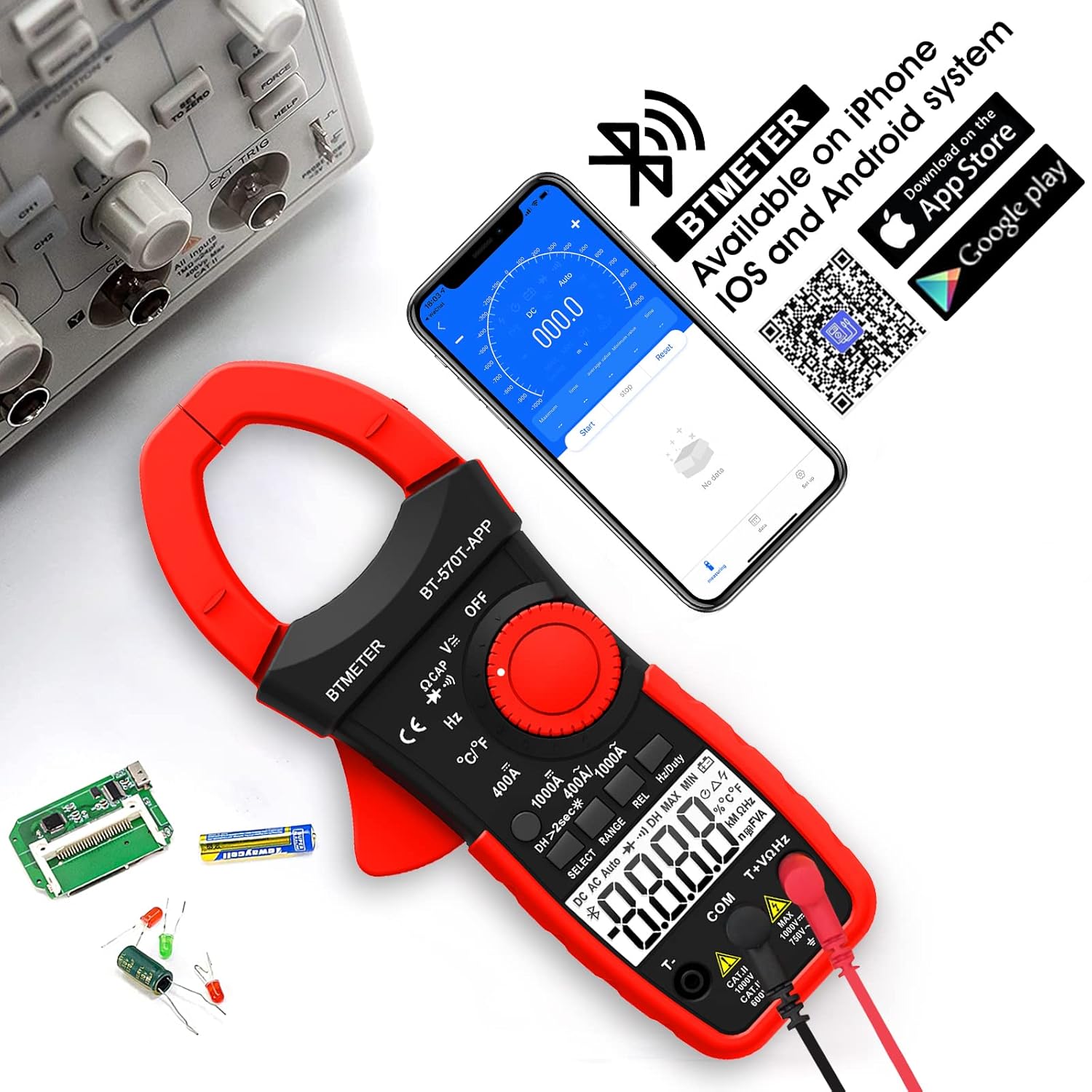
Figure 4.1: App Download and Bluetooth Pairing
5. Käyttöohjeet
5.1 AC/DC-virran mittaus (Clamp)
To measure AC or DC current up to 1000A:
- Turn the function dial to the "400A" or "1000A" AC/DC current range.
- Press the SELECT button to toggle between AC and DC current if necessary.
- Avaa clamp leuka liipaisimella.
- Enclose only one conductor (e.g., the live wire) within the clamp. Älä clamp multiple wires as this will result in inaccurate readings.
- Lue nykyinen arvo LCD-näytöltä.

Figure 5.1: Measuring AC/DC Current with the Clamp
5.2 VuosikertatagMittaus (AC/DC)
AC tai DC voltage up to 1000V:
- Insert the red test lead into the VΩHzT+ jack and the black test lead into the COM jack.
- Turn the function dial to the "V~" (AC Voltage) tai "V-" (DC Voltage) alue.
- Kytke mittausjohdot rinnan testattavan piirin tai komponentin kanssa.
- Lue voltage -arvo nestekidenäytössä.
5.3 Resistanssin mittaus
To measure resistance up to 60M ohms:
- Insert the red test lead into the VΩHzT+ jack and the black test lead into the COM jack.
- Turn the function dial to the "Ω" (Resistance) range.
- Varmista, että virtapiiri on jännitteetön ennen kuin kytket mittausjohdot komponenttiin.
- Lue vastusarvo LCD-näytöltä.
5.4 Kapasiteetin mittaus
To measure capacitance up to 200µF:
- Insert the red test lead into the VΩHzT+ jack and the black test lead into the COM jack.
- Turn the function dial to the "CAP" (Capacitance) range.
- Discharge the capacitor completely before connecting the test leads.
- Kytke mittausjohdot kondensaattorin liittimiin.
- Lue kapasitanssiarvo LCD-näytöltä.
5.5 Taajuusmittaus
To measure frequency up to 9.999MHz:
- Insert the red test lead into the VΩHzT+ jack and the black test lead into the COM jack.
- Turn the function dial to the "Hz" (Frequency) range.
- Kytke mittausjohdot signaalilähteeseen.
- Lue taajuusarvo LCD-näytöltä.
5.6 Lämpötilan mittaus
To measure temperature from -4°F to 1832°F (-20°C to 1000°C):
- Insert the thermocouple probe into the T+ and COM jacks, observing polarity.
- Turn the function dial to the "°C/°F" (Temperature) range.
- Press the SELECT button to switch between Celsius and Fahrenheit.
- Aseta termoelementtianturin kärki mitattavan kohteen päälle tai sisään.
- Lue lämpötila-arvo LCD-näytöltä.

Kuva 5.2: Lämpötilan mittaus
5.7 Jatkuvuustesti
To test for circuit continuity:
- Insert the red test lead into the VΩHzT+ jack and the black test lead into the COM jack.
- Turn the function dial to the "Diode/Continuity" range.
- Kytke mittausjohdot piiriin tai komponenttiin.
- The buzzer will sound if the resistance is less than 50Ω, indicating continuity.

Figure 5.3: Auditory Continuity Test
5.8 Data Logging and Bluetooth Features
The BT-570T-APP offers advanced data logging capabilities via its mobile application:
- Etävalvonta: View real-time measurements on your phone or tablet from a distance.
- Trend Chart: The app automatically graphs measurement trends over time.
- Tietojen vienti: Export logged data in Excel (.xlsx) or TXT (.txt) formats for analysis.
- Tietojen pito: Paina "HOLD"-painiketta jäädyttääksesi nykyisen lukeman näytössä.
- REL (suhteellinen mittaus): Press "REL" to zero out the current reading, useful for measuring changes relative to a reference point.
- Max/Min/Keskiarvo: Record the maximum, minimum, and average values during a measurement session.

Figure 5.4: Remote Control and Data Download via App
6. Huolto
- Puhdistus: Wipe the meter with a dry, clean cloth. Do not use abrasive cleaners or solvents.
- Akun vaihto: Replace batteries when the low battery indicator appears on the display. Ensure proper polarity.
- Varastointi: If storing for extended periods, remove the batteries to prevent leakage. Store in a cool, dry place away from direct sunlight.
- Kalibrointi: Ammattikäytössä suositellaan säännöllistä kalibrointia pätevän teknikon toimesta tarkkuuden ylläpitämiseksi.
7. Vianmääritys
| Ongelma | Mahdollinen syy | Ratkaisu |
|---|---|---|
| Mittari ei käynnisty. | Tyhjät tai väärin asennetut paristot. | Vaihda paristot ja varmista oikea napaisuus. |
| Inaccurate current reading (e.g., zero reading). | Clamping multiple conductors (hot and neutral). | Ensure only a single live conductor is clamptoim. |
| Bluetooth-yhteys epäonnistuu. | Bluetooth disabled on phone/tablet; app issue; meter too far. | Ensure Bluetooth is on, restart app/meter, move closer, check app permissions. |
| Data not saving/exporting from app. | App bug; insufficient storage; incorrect save location. | Ensure app is updated. Check phone storage. Refer to app's help section for data export paths. Some users report issues with iOS data saving, try Android if available. |
| Näytössä näkyy "OL" (ylikuormitus). | Measurement exceeds the selected range. | Select a higher range or ensure the input is within the meter's capabilities. |
8. Tekniset tiedot
| Parametri | Arvo |
|---|---|
| Mallinumero | BT-570T-APP |
| AC/DC-virta-alue | 400A / 1000A (100mA / 1A resolution) |
| AC/DC Voitage Alue | 1000V asti |
| Resistanssialue | Jopa 60 MΩ |
| kapasitanssi Range | Up to 200µF |
| Taajuusalue | Jopa 9.999 MHz |
| Lämpötila-alue | -4 °F - 1832 °F (-20 °C - 1000 °C) |
| Näyttömäärät | 4000 laskentaa |
| Jaw Caliber Size | 1.77 tuumaa (45 mm) |
| Turvallisuusluokitus | IEC 61010-1, CAT IV 600V, CAT III 1000V, Class 2, Double insulation |
| Virtalähde | Paristokäyttöinen |
| Tuotteen paino | 11.68 unssia |
| Pakkauksen mitat | 10.2 x 5 x 2.28 tuumaa |
9. Takuu ja tuki
BTMETER provides a 12-month quality warranty for the BT-570T-APP Clamp Multimeter. Life-time technical support is also available.
For technical assistance, warranty claims, or any inquiries, please contact BTMETER customer support through their official websivustoa tai ostoksesi yhteydessä annettuja yhteystietoja.
Saatavilla on valinnaisia suojaussuunnitelmia laajennetulle kattavuudelle:
- 3 vuoden suojaussuunnitelma
- 4 vuoden suojaussuunnitelma
- Complete Protect Plan (monthly billing)
Katso tarkemmat tiedot näiden suojaussuunnitelmien erityisistä ehdoista.
Ask a question about this manual
Ask about setup, troubleshooting, compatibility, parts, safety, or missing instructions. Manuals+ will review the question and use this page’s manual context to help answer it.