
Johdanto
This user manual provides detailed instructions for the safe and efficient operation of your Powerextra 4-Channel LCD Battery Charger. Please read this manual thoroughly before use and retain it for future reference.

Image: The Powerextra 4-Channel LCD Battery Charger, designed for Sony NP-F series batteries.
Turvallisuustiedot
Turvallisen käytön varmistamiseksi ja vaurioiden välttämiseksi noudata seuraavia varotoimia:
- Do not disassemble the charger. Servicing should only be performed by qualified personnel.
- Pidä laturi poissa vedestä ja kosteudesta.
- Käytä ainoastaan tässä käyttöoppaassa määriteltyjen yhteensopivien akkujen kanssa.
- Avoid extreme temperatures. Operate and store the charger in a dry, well-ventilated area.
- Irrota laturi pistorasiasta, kun sitä ei käytetä tai ukkosmyrskyn aikana.
- This charger incorporates multiple protection features including over-charging, short-circuit, high-temperature, and surge protection.

Image: Visual representation of the charger's six protection features: short circuit, over-charge, over-voltage, over-discharge, over-current, and no memory effect.
Pakkauksen sisältö
Varmista, että pakkauksessasi on kaikki tarvittavat osat:
- 1x Powerextra 4-Channel Battery Charger
- 1x AC virtajohto
- 1x Microfiber Cleaning Cloth

Image: The charger, AC cable, and cleaning cloth neatly arranged next to the product box.
Asennus
- Kytke verkkovirtajohto: Insert one end of the provided AC power cable into the charger's power input port.

Image: Close-up of the charger's power input port.
- Liitä pistorasiaan: Plug the other end of the AC power cable into a standard wall outlet (100-240V, 50/60Hz). The charger's LCD display will illuminate.
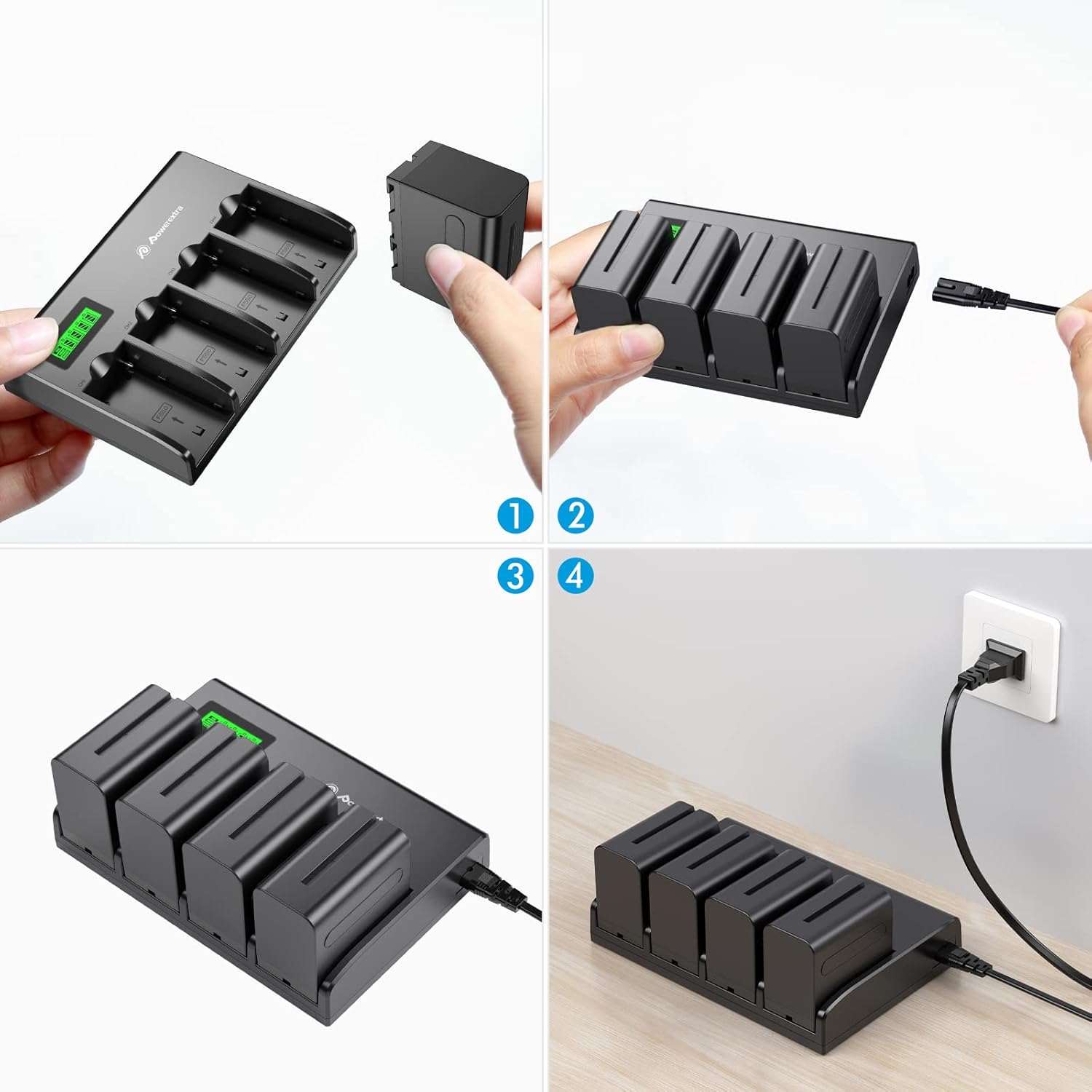
Image: Visual steps showing how to insert batteries and connect the charger to a power source.
Käyttöohjeet
- Aseta paristot: Carefully insert up to four compatible Sony NP-F series batteries into the charging slots. Ensure the battery is oriented correctly according to the arrows on the charger.

Image: A hand inserting a battery into one of the charger's slots.
- Näytön lataustila: The LCD display will show the charging status for each battery individually.
- The display indicates the current charge level (0-25%, 25-50%, 50-75%, 75-100%).
- "CHG" indicates charging in progress.
- "ERROR" indicates a charging error.
- "DISCHG" indicates discharging (if applicable, though this model primarily charges).

Image: The charger's LCD screen displaying the charge status of four batteries.

Image: An animated GIF demonstrating the real-time battery power display on the LCD screen.
- Latauksen valmistuminen: Once a battery is fully charged, its indicator on the LCD will show 100% and stop flashing.
- Poista paristot: Gently remove the charged batteries from the slots.
Virallinen tuotevideo
Video: An official product video demonstrating the features and operation of the Powerextra 4-Channel Battery Charger with LCD Display.
Yhteensopivuus
This charger is compatible with the following Sony NP-F series batteries:
- NP-F550
- NP-F570
- NP-F750
- NP-F770
- NP-F930
- NP-F950
- NP-F960
- NP-F970
- NP-F975
It is suitable for use with Sony Handycams, LED video lights, and field monitors that utilize these battery types.

Image: The charger displayed alongside various compatible Sony NP-F series batteries, illustrating its broad compatibility.
Tärkeimmät ominaisuudet
- 4-Channel Simultaneous Charging: Efficiently charges up to four batteries at once.
- Älykäs LCD-näyttö: Provides real-time battery power status and charging indication for each slot.
- Edistyneet turvallisuussuojaukset: Built-in safeguards against over-charging, short-circuiting, high temperatures, and power surges.
- Wide Voltage Tulo: Supports 100-240V, 50/60Hz power input for global use.
- Kompakti muotoilu: Designed for portability and convenience.

Image: The charger with four batteries inserted, highlighting its innovative design for simultaneous charging.
Tekniset tiedot
| Ominaisuus | Yksityiskohta |
|---|---|
| Mallinumero | NP-F970 |
| Syöte | 100-240V, 50/60Hz, 60W Max |
| Lähtö | DC 8.4V 1000mA x 4 |
| Tuotteen mitat | 7.28 x 5.03 x 1.25 tuumaa (18.49 x 12.78 x 3.18 cm) |
| Tuotteen paino | 10.6 unssia (300 grammaa) |
| Valmistaja | Virta ylimääräistä |

Image: The charger with its dimensions (5.03 in, 7.28 in, 1.25 in) highlighted, showing its compact size.
Vianetsintä
- Laturi ei käynnisty: Ensure the AC power cable is securely connected to both the charger and a working wall outlet.
- Akku ei lataudu:
- Verify the battery is correctly inserted into the slot.
- Check if the battery is compatible with the charger.
- If the LCD shows "ERROR", the battery might be faulty or severely discharged. Try another battery.
- Hidas lataus: Ensure the power source is stable and meets the input specifications.
Huolto
- Puhdistus: Use the provided microfiber cleaning cloth to gently wipe the charger's surface. Do not use liquid cleaners or solvents.
- Varastointi: Säilytä laturia viileässä, kuivassa paikassa, poissa suorasta auringonvalosta ja äärimmäisistä lämpötiloista, kun sitä ei käytetä.
- Akun hoito: For optimal battery life, avoid fully discharging batteries frequently.
Takuu ja tuki
Powerextra is committed to customer satisfaction. If you encounter any issues or have questions regarding your product, please contact Powerextra customer service for assistance. Refer to the product packaging or the official Powerextra websivustolta tarkemmat takuutiedot ja yhteystiedot.
Customer Service: Powerextra is a trustworthy brand that focuses on the customer experience. If you have any questions about the product or it is not clear, please feel free to contact us, we are at your service 24 hours. We listen to every feedback and fine-tune every detail to ensure quality.