
OKAI Neon Series (ES20)
OKAI Neon Electric Scooter käyttöohje
Model: Neon Series (ES20)
1. Johdanto
Welcome to the OKAI Neon Electric Scooter user manual. This guide provides essential information for the safe assembly, operation, maintenance, and troubleshooting of your new electric scooter. Please read this manual thoroughly before your first ride to ensure optimal performance and safety.
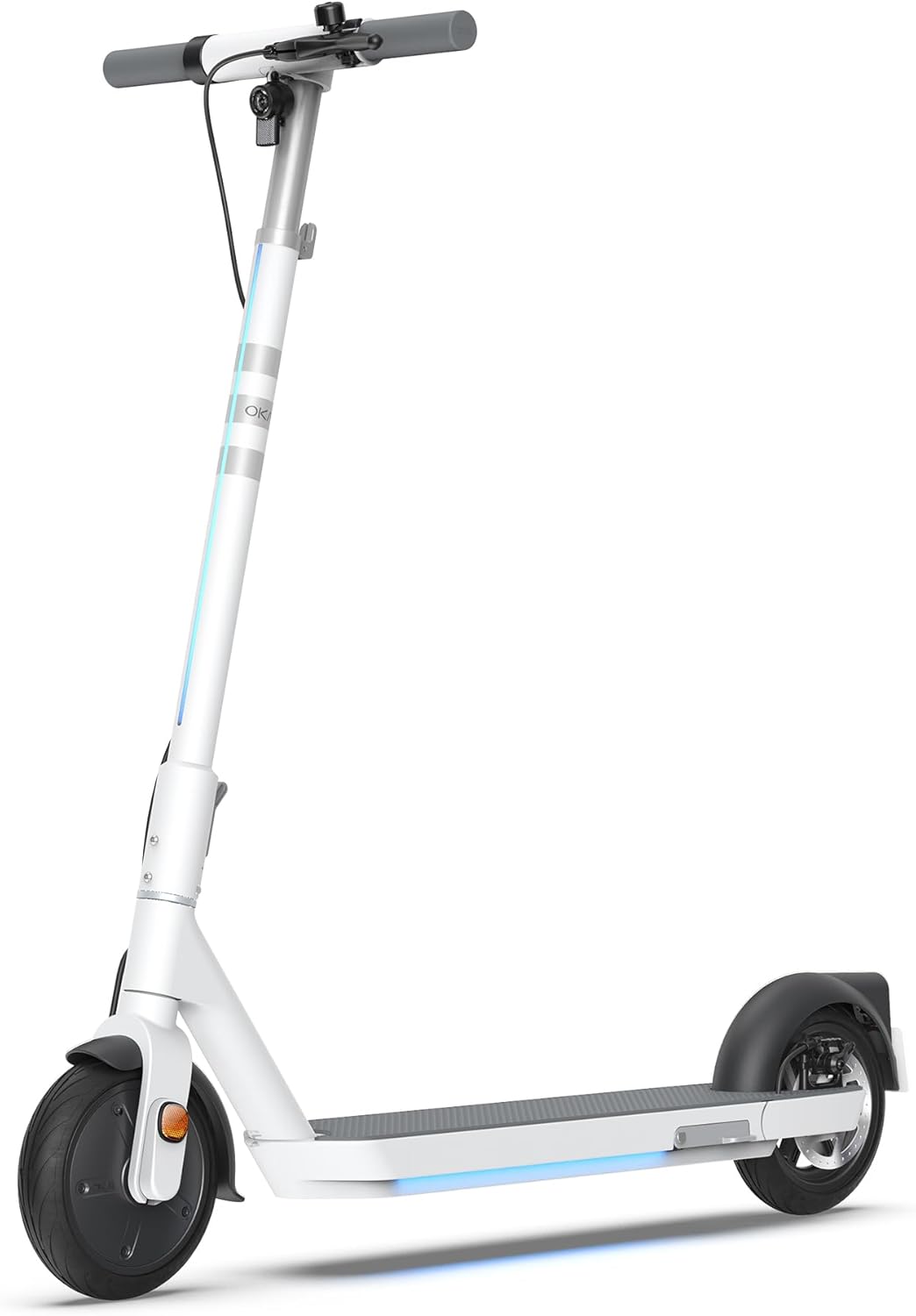
Figure 1: The OKAI Neon Electric Scooter, showcasing its sleek white design and integrated lighting.
2. Turvallisuustiedot
Riding an electric scooter carries inherent risks. To minimize these risks, always adhere to the following safety guidelines:
- Käytä aina kypärää ja asianmukaisia suojavarusteita (polvisuojat, kyynärpääsuojat) pyöräillessäsi.
- Varmista ennen jokaista ajoa, että kaikki osat on kiinnitetty kunnolla.
- Älä aja märällä kelillä, rankkasateella tai lätäköiden läpi.
- Noudata paikallisia liikennelakeja ja -määräyksiä.
- Pidä turvallinen nopeus ja etäisyys muihin ajoneuvoihin ja jalankulkijoihin.
- Vältä ajamista alkoholin tai huumeiden vaikutuksen alaisena.
- Tämän potkulaudan enimmäispainoraja on 100 kg. Älä ylitä tätä rajaa.
- Tämä skootteri on suunniteltu aikuisten käyttöön.
3. Pakkauksen sisältö
Varmista, että kaikki osat ovat mukana ja hyvässä kunnossa pakkauksen avaamisen yhteydessä:
- OKAI Neon Electric Scooter
- Lataussovitin
- Käyttöopas (tämä asiakirja)
- Asennustyökalut (tarvittaessa)
- NFC-avainkortti
4. Asennus ja alkulataus
4.1 Pakkauksen purkaminen ja kokoaminen
Carefully remove the scooter and all accessories from the packaging. The OKAI Neon Electric Scooter typically comes pre-assembled with minimal setup required. Follow these steps:
- Nosta ohjaustankoa, kunnes se napsahtaa paikalleen. Varmista, että taittomekanismi on lukittu kunnolla.
- Attach the handlebars to the stem, ensuring all cables are properly connected and not pinched. Tighten any screws as instructed in the quick start guide (if provided separately).
4.2 Ensimmäinen lataus
Before your first ride, fully charge the scooter's battery. This helps prolong battery life.
- Paikanna skootterin latausportti.
- Connect the charging adapter to the scooter's charging port, then plug the adapter into a standard wall outlet.
- The scooter's display will indicate charging status. A full charge typically takes approximately 5.5 hours.
- Kun lataus on täynnä, irrota laturi.
5. Käyttöohjeet
5.1 Virran kytkeminen päälle/pois
- To power on: Press and hold the power button on the handlebar until the display illuminates.
- Virran katkaiseminen: Pidä virtapainiketta painettuna, kunnes näyttö sammuu.
5.2 Riding Basics
To begin riding, place one foot on the deck and push off with the other foot to gain some initial momentum. Once moving, gently press the accelerator lever to engage the motor. For braking, use the hand levers for the electric brake (front) and disc brake (rear).

Figure 2: Key features including the smart display, disc brake, 300W power motor, and hidden rear suspension.
5.3 Nopeustilat
The OKAI Neon Electric Scooter features multiple speed modes to suit different riding conditions and rider preferences. Refer to the scooter's display or the OKAI app to switch between modes. The maximum speed is approximately 15.5 MPH (25 km/h).
5.4 Taittomekanismi
The scooter features a one-click folding design for easy storage and transport. To fold, locate the folding latch near the base of the handlebar stem, release it, and carefully fold the stem down until it locks into place with the rear fender.
5.5 App Connectivity and Customization
Enhance your riding experience by connecting your OKAI Neon Electric Scooter to the OKAI app. The app allows for:
- Adjusting ambient light settings.
- Monitoring real-time ride updates and battery status.
- Customizing dashboard settings.
- Locking/unlocking the scooter (using the NFC key card or app).
Download the official OKAI app from your device's app store and follow the in-app instructions to pair your scooter.
6. Huolto
Regular maintenance ensures the longevity and safe operation of your OKAI Neon Electric Scooter.
6.1 Akun hoito
- Lataa akku täyteen ennen ensimmäistä käyttöä.
- Avoid completely draining the battery. Recharge after each use, or at least once a month if not used regularly.
- Säilytä skootteria viileässä, kuivassa paikassa, poissa suorasta auringonvalosta ja äärimmäisistä lämpötiloista.
- Use only the official OKAI charging adapter.
6.2 Rengaspaineet
The front tire is pneumatic, and maintaining correct tire pressure is crucial for ride comfort, range, and safety. Check tire pressure regularly. While specific recommended PSI is not provided in this manual, generally, electric scooters require tire pressure between 30-50 PSI. Consult a professional if unsure or if you experience frequent deflation.
6.3 Puhdistus ja varastointi
- Puhdista skootteri mainoksellaamp Älä käytä korkeapaineruiskua tai syövyttäviä puhdistusaineita.
- Varmista ennen puhdistamista, että latausportin kansi on kunnolla kiinni.
- Säilytä skootteria sisätiloissa kuivassa paikassa, kun sitä ei käytetä.
6.4 Jarrujen tarkastus
Regularly inspect the front electric brake and rear disc brake for proper function. Ensure brake levers are responsive and brake pads are not excessively worn. Adjust or replace components as needed, or seek professional assistance.
7. Vianmääritys
This section addresses common issues you might encounter with your OKAI Neon Electric Scooter.
| Ongelma | Mahdollinen syy | Ratkaisu |
|---|---|---|
| Skootteri ei käynnisty. | Akku vähissä; löysät liitännät; virtapainikkeen ongelma. | Charge the battery fully. Check all visible cable connections. Ensure the power button is not stuck. |
| Moottori ei kytkeydy. | Low battery; kick-start not performed; faulty accelerator. | Ensure battery is charged. Push off to gain initial speed before pressing accelerator. Contact support if issue persists. |
| Lyhennetty kantama tai nopeus. | Alhainen rengaspaine; raskas kuorma; ylämäkeen ajaminen; kylmä sää; akun heikkeneminen | Check and inflate tires to recommended pressure. Reduce load. Battery performance can be affected by temperature. |
| Jarrut tuntuvat heikoilta tai eivät reagoi. | Worn brake pads; loose brake cable; air in hydraulic system (disc brake). | Inspect brake pads for wear and replace if necessary. Adjust brake cable tension. For hydraulic issues, seek professional service. |
| Error codes on display (e.g., E3). | Sensor malfunction; motor issue; controller issue. | Refer to the OKAI app or contact customer support with the specific error code for diagnosis. |
If you encounter an issue not listed here or if the suggested solutions do not resolve the problem, please contact OKAI customer support.
8. Tekniset tiedot
| Ominaisuus | Yksityiskohta |
|---|---|
| Merkki | OKAI |
| Mallin nimi | Neon Series (ES20) |
| Väri | Valkoinen |
| Max nopeus | Jopa 25 km/h |
| Suurin alue | Jopa 40 km |
| Painorajoitus | 220 puntaa (100 kg) |
| Latausaika | Noin 5.5 tuntia |
| Tuotteen mitat (P x L x K) | 45" x 17.7" x 44.5" (114.3 cm x 44.9 cm x 113 cm) |
| Tuotteen paino | 35.2 puntaa (16 kg) |
| Rungon materiaali | Alumiini |
| Pyörän koko | 9 tuumaa |
| Jarru Tyyli | Front: Electric Brake, Rear: Disc Brake |
| Jousituksen tyyppi | Takajousitus |
| Erikoisominaisuudet | Dual Braking System, Cruise Control, Wide Platform, Lockable, Foldable, Ambient Light |

Figure 3: Dimensions of the OKAI Neon Electric Scooter.
9. Takuu ja asiakastuki
9.1 Takuutiedot
The OKAI Neon Electric Scooter comes with a 1 Year Limited Warranty. This warranty covers manufacturing defects under normal use. Please retain your proof of purchase for warranty claims. For full warranty terms and conditions, refer to the official OKAI websivustolla tai ota yhteyttä asiakastukeen.
9.2 Asiakastuki
For technical assistance, warranty claims, or any other inquiries, please contact OKAI customer support. You can find contact information on the official OKAI website or through the OKAI app. OKAI offers 100% local customer support.
Visit the official OKAI Store on Amazon: OKAI Store
Ask a question about this manual
Ask about setup, troubleshooting, compatibility, parts, safety, or missing instructions. Manuals+ will review the question and use this page’s manual context to help answer it.