
ELEFOCUS RC-815S, TX-8030, RC-816S, RC-903S, RC-904S, TX-8160, TX-8050, TX-8140
ELEFOCUS Replacement Remote Control User Manual
For Onkyo RC-815S, TX-8030, RC-816S, RC-903S, RC-904S, TX-8160, TX-8050, TX-8140 Network Audio/Video AV Stereo Receivers
Johdanto
This manual provides essential information for the proper use and maintenance of your ELEFOCUS replacement remote control. This remote is designed as a direct replacement for various Onkyo Network Audio/Video AV Stereo Receivers, including models RC-815S, TX-8030, RC-816S, RC-903S, RC-904S, TX-8160, TX-8050, and TX-8140.
Please note that this is a replacement item and while it functions out of the box with compatible models, some advanced or specific functions of your original remote may not be fully supported. No complex programming is required; simply insert batteries to begin use.
Asennus
1. Akun asennus
Kaukosäädin vaatii kaksi (2) AAA-paristoa (eivät sisälly toimitukseen). Asenna ne seuraavasti:
- Paikanna paristolokero kaukosäätimen takana.
- Paina kielekettä alas ja liu'uta akkukotelon kantta alaspäin avataksesi sen.
- Aseta kaksi AAA-paristoa paikoilleen varmistaen, että positiiviset (+) ja negatiiviset (-) navat ovat oikein lokeron sisällä olevien merkintöjen kanssa.
- Liu'uta akun kansi takaisin paikalleen, kunnes se napsahtaa tukevasti.
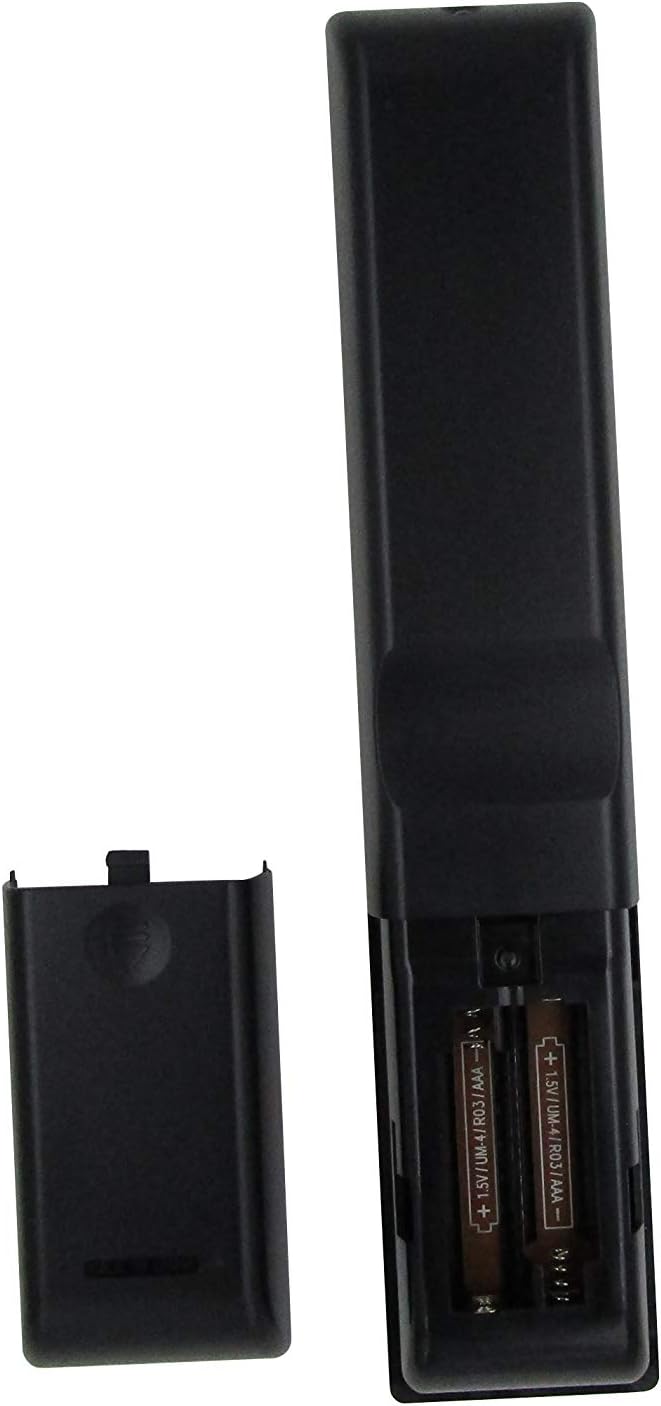
Kuva 1: Battery compartment with AAA batteries. Ensure correct polarity when inserting batteries.
Once batteries are installed, the remote is ready for use. No additional programming or setup is typically required for compatible Onkyo receiver models.
Käyttöohjeet
This replacement remote control provides essential functions for your Onkyo receiver. Point the remote directly at the receiver's infrared (IR) sensor for optimal performance.

Kuva 2: Yliview of the remote control layout.
Tärkeimmät toiminnot:
- Virtanappi (⏻): Kytkee vastaanottimen päälle tai pois päältä.
- Input Selector Buttons (BD/DVD, CBL/SAT, PC, Game, TV/Tape, CD, Phono, Tuner, NET, Bluetooth): Valitsee halutun ääni-/videotulolähteen.
- Äänenvoimakkuus ylös/alas (▲ / ▼): Säätää äänenvoimakkuuden päätasoa.
- Mykistys: Mykistää tai poistaa mykistyksen äänilähdön.
- Navigointinäppäimistö (Ylös, Alas, Vasen, Oikea, Enter): Käytetään valikoissa navigointiin ja vastaanottimen näytöllä tehtyjen valintojen vahvistamiseen.
- Menu: Avaa vastaanottimen päävalikon.
- Asennus: Enters the setup menu for configuration.
- Palata: Palaa edelliseen valikkoon tai näyttöön.
- Audio: Cycles through audio modes or settings.
- Playback Controls (Rewind, Play/Pause, Fast Forward, Stop, Previous Track, Play, Next Track): Controls media playback for connected devices.
- Toistaa: Vaihtaa toistuvan toiston tilan.
- Satunnainen: Toggles random/shuffle playback mode.
- Kaiutin A/B: Selects speaker output groups.
- Numeronäppäimistö (0-9): Numeroiden, kuten radiotaajuuksien tai kappalenumeroiden, suoraan syöttämiseen.
- Caps: Functionality may vary by receiver model.
- > 10: For entering numbers greater than 9 on some systems.
- D.TUN: Direct tuning for radio.
- Näyttö: Changes display information on the receiver.
- himmennin: Säätää vastaanottimen näytön kirkkautta.
- Nukkua: Asettaa vastaanottimen uniajastimen.
- CLR: Tyhjentää nykyisen syötteen tai valinnan.
Tärkeä huomautus:
As a replacement remote, some advanced or specific functions present on your original Onkyo remote may not be replicated or fully functional. This remote is designed to cover the primary and most commonly used features.
Huolto
1. Pariston vaihto
Vaihda paristot, kun kaukosäätimen vaste hidastuu tai se lakkaa toimimasta. Vaihda aina molemmat paristot samanaikaisesti uusiin AAA-paristoihin. Älä sekoita vanhoja ja uusia paristoja tai erityyppisiä paristoja.
2. Puhdistus
Puhdista kaukosäädin pehmeällä, kuivalla liinalla. Pinttyneeseen likaan, hankaa kevyesti.ampPyyhi liina vedellä tai miedolla, hankaamattomalla puhdistusaineella. Älä käytä voimakkaita kemikaaleja, liuottimia tai hankaavia puhdistustyynyjä, sillä ne voivat vahingoittaa kaukosäätimen pintaa tai sisäisiä komponentteja.
3. Varastointi
When not in use for extended periods, it is recommended to remove the batteries to prevent leakage, which can damage the remote. Store the remote in a cool, dry place away from direct sunlight and extreme temperatures.
Vianetsintä
| Ongelma | Mahdollinen syy | Ratkaisu |
|---|---|---|
| Kaukosäädin ei toimi ollenkaan. |
|
|
| Jotkut toiminnot eivät toimi. |
|
|
| Etäkäyttö toimii ajoittain. |
|
|
If your specific Onkyo receiver model is not listed in the product title (RC-815S, TX-8030, RC-816S, RC-903S, RC-904S, TX-8160, TX-8050, TX-8140), this remote may not be compatible. Please verify compatibility before purchase.
Tekniset tiedot
- Merkki: ELEFOCUS
- Yhteensopivat laitteet: Onkyo Network Audio/Video AV Stereo Receivers (Models: RC-815S, TX-8030, RC-816S, RC-903S, RC-904S, TX-8160, TX-8050, TX-8140)
- Yhteystekniikka: Infrapuna (IR)
- Virtalähde: 2 x AAA paristot (ei mukana)
- Erikoisominaisuus: Ergonominen muotoilu
- Tuettujen laitteiden enimmäismäärä: 1 (specific Onkyo receiver)
Takuutiedot
Specific warranty details for this ELEFOCUS replacement remote control are not provided in the product information. Please refer to the seller's return policy or contact the seller directly for information regarding warranty coverage and terms.
Asiakastuki
For further assistance or inquiries regarding your ELEFOCUS replacement remote control, please contact the seller directly through the platform where the purchase was made. As this is a third-party replacement product, direct manufacturer support may not be available.
For general information about your Onkyo receiver, please refer to the original user manual provided with your receiver or visit the official Onkyo support websivusto.
Lisätuote Views

Kuva 3: Kulma view kaukosäätimestä.

Kuva 4: Close-up of the upper section of the remote, showing input and media controls.
Viralliset tuotevideot
No official product videos from the seller were provided for this item.