
1. Johdanto
This manual provides essential information for the safe and effective use of your Canon PowerShot G1 X Mark III Digital Camera. Please read this manual thoroughly before using the camera and retain it for future reference.

Kuva 1.1: Etuosa view of the Canon PowerShot G1 X Mark III Digital Camera with the lens extended. This image displays the camera's compact body, the integrated zoom lens, and the Canon branding.
The PowerShot G1 X Mark III is an advanced compact camera featuring a 24.2MP APS-C CMOS sensor and a DIGIC 7 image processor. It is designed for high-quality still photography and Full HD video recording, offering a versatile 3x optical zoom lens and Dual Pixel CMOS AF for precise focusing.
2. Mitä laatikossa on
Varmista, että pakkauksessasi on kaikki seuraavat osat:
- Canon PowerShot G1 X Mark III -digikamera
- Canon NB-13L Lithium-Ion Battery Pack (3.6V, 1250mAh)
- Canon CB-2LH Battery Charger for NB-13L Li-Ion Batteries
- Linssinsuojus
- Linssinsuojuksen string
- NS-DC12 Neck Strap
- Strap Adapter for NS-DC12
- Mikro HDMI-kaapeli
3. Asennus
3.1. Akun lataaminen ja asentaminen
- Insert the NB-13L battery into the CB-2LH charger.
- Kytke laturi pistorasiaan. Latauksen merkkivalo syttyy.
- Kun lataus on valmis, merkkivalo muuttuu tai sammuu. Poista akku.
- Avaa kameran paristolokeron kansi.
- Insert the charged battery into the camera, ensuring correct orientation. Close the cover securely.
3.2. Muistikortin asettaminen
The camera supports SD, SDHC, and SDXC memory cards. For optimal performance, especially with video recording and continuous shooting, use a UHS Speed Class 3 (U3) card.
- Avaa muistikorttipaikan kansi.
- Aseta muistikortti kameraan siten, että etiketti on etuosaa kohti, kunnes se napsahtaa paikalleen.
- Sulje muistikorttipaikan kansi tiiviisti.
3.3. Kaulahihnan kiinnittäminen
Thread the NS-DC12 neck strap through the strap adapters and then through the camera's strap mounts. Ensure both ends are securely fastened to prevent accidental drops.
3.4. Ensimmäinen käynnistys ja perusasetukset
Paina ON/OFF button to power on the camera. Follow the on-screen prompts to set the date, time, and language. These settings are crucial for proper image file hallinta.
4. Kameran käyttö
4.1. Kameran säätimetview

Kuva 4.1: Yläosa view of the camera, illustrating the mode dial, hot shoe, and various control dials for quick adjustments.

Kuva 4.2: Takaosa view of the camera, highlighting the LCD screen, electronic viewfinder, and the arrangement of control buttons for menu navigation and settings.
Familiarize yourself with the camera's buttons and dials. The mode dial on the top allows selection of various shooting modes, including Program AE, Shutter-priority AE, Aperture-priority AE, Manual, and Automatic modes. Dedicated dials provide direct adjustment of exposure compensation and other settings.
4.2. Perusvalokuvaus
Ottaakseen valokuvan:
- Turn the mode dial to your desired shooting mode (e.g., AUTO for automatic settings).
- Frame your subject using the electronic viewetsintä tai LCD-näyttö.
- Press the shutter button halfway down to focus. The camera uses Dual Pixel CMOS AF for fast and accurate phase-detection autofocus.
- Ota kuva painamalla laukaisinta pohjaan.
4.3. Videotallennus
The camera supports Full HD 1080p video recording at up to 60 frames per second in MP4 format.
- Set the camera to video recording mode (if applicable, or press the dedicated video record button).
- Aloita tallennus painamalla videon tallennuspainiketta.
- Lopeta tallennus painamalla painiketta uudelleen.
4.4. Using the LCD Monitor and Electronic Viewetsijä

Kuva 4.3: Sivu view of the camera with the vari-angle touchscreen LCD extended, demonstrating its flexibility for various shooting angles.
The camera features a 3.0-inch vari-angle touchscreen LCD, allowing for flexible shooting angles and intuitive control. You can also use the built-in 2.36m-dot OLED electronic viewfinder for a clear view, especially in bright conditions.
4.5. Sisäänrakennettu salama
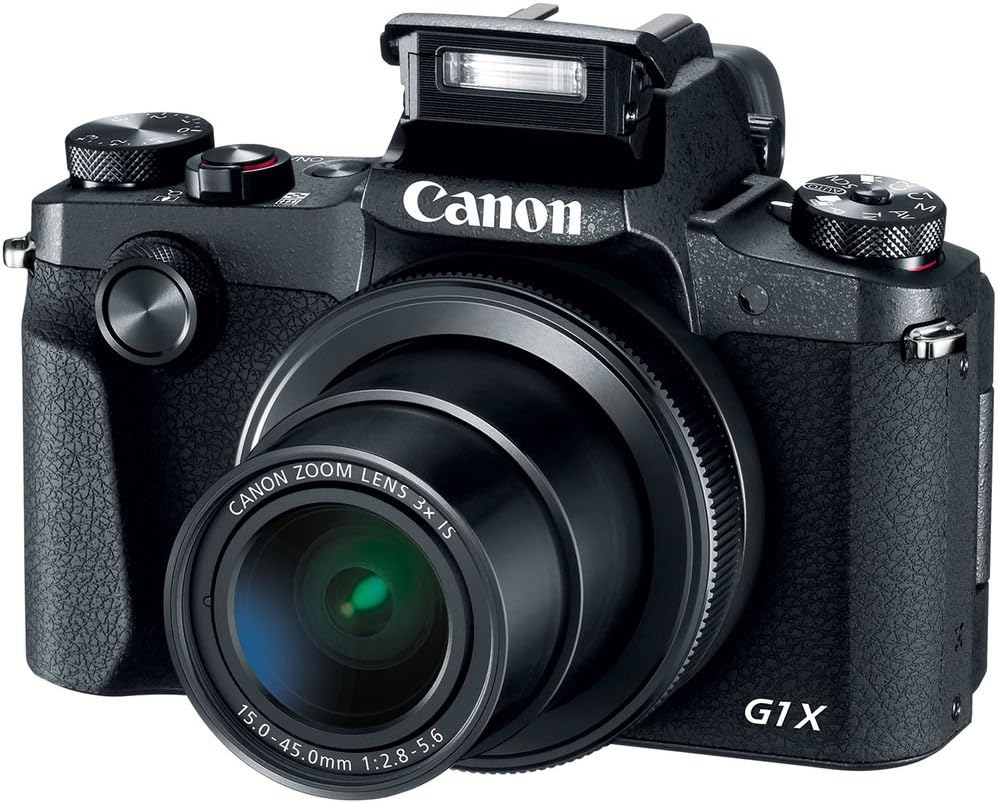
Kuva 4.4: Etuosa view of the camera with the pop-up flash in the raised position, ready for use in low-light conditions.
The camera includes a built-in pop-up flash. To activate it, press the flash release button. Flash modes include Auto, On, Slow Synch, and Off. The hot shoe allows for external flash units.
4.6. Yhteydet
The PowerShot G1 X Mark III offers Wi-Fi, NFC, and Bluetooth connectivity for transferring images to smart devices and remote control. Refer to the camera's menu for pairing instructions.
5. Huolto
5.1. Kameran puhdistaminen
- Puhdista kameran runko pehmeällä, nukkaamattomalla liinalla.
- Käytä linssin ja LCD-näytön puhdistukseen erityistä linssinpuhdistusliinaa ja -liuosta. Vältä voimakkaita kemikaaleja.
- Use a blower brush to remove dust from the lens and sensor area (when exposed).
5.2. Akun hoito
- Lataa akku täyteen ennen jokaista käyttöä.
- Säilytä akkuja viileässä ja kuivassa paikassa, kun niitä ei käytetä.
- Vältä altistamasta akkuja äärimmäisille lämpötiloille.
5.3. Varastointi
When storing the camera for extended periods, remove the battery and memory card. Store the camera in a dry, dust-free environment, preferably in a camera bag.
6. Vianmääritys
| Ongelma | Mahdollinen syy / Ratkaisu |
|---|---|
| Kamera ei käynnisty. | Battery may be depleted or incorrectly inserted. Ensure battery is charged and properly seated. |
| Kuvia ei voi ottaa. | Memory card may be full, locked, or not inserted. Check card status and free space. |
| Kuvat ovat epäselviä. | Check focus settings. Ensure sufficient light. Use image stabilization or a tripod if necessary. |
| Salama ei välähdä. | Flash may be set to 'Off' or in a mode where it does not fire automatically. Check flash settings. |
7. Tekniset tiedot
- Anturi: 24.2 MP APS-C CMOS Sensor
- Kuvaprosessori: DIGIC 7
- Linssi: 24-72mm (35mm Equivalent) 3x Optical Zoom, f/2.8-5.6
- Kuvanvakautus: Optinen
- Automaattitarkennus: Dual Pixel CMOS AF (Phase Detection)
- ISO-alue: 100-25600 (laajennettu)
- Jatkuva kuvaus: Jopa 9 fps
- Videotallennus: Full HD 1080p at 60 fps (MP4)
- Viewetsijä: 2.36m-dot OLED Electronic Viewetsijä
- LCD: 3.0" Vari-Angle Touchscreen LCD (1280 x 720 resolution)
- Liitettävyys: Built-In Wi-Fi, NFC, Bluetooth, Micro HDMI
- Tallennusvälineet: SD, SDHC, SDXC (UHS-I-yhteensopiva)
- Akku: NB-13L Lithium-Ion
- Mitat (noin): 4.53 x 3.00 x 2.36 tuumaa (115 x 76 x 60 mm)
- Paino (noin): 14.0 oz (399 g) with battery and memory card
- Rakenne: Dust- and Water-Resistant
8. Takuu ja tuki
This product is covered by a 90-day limited warranty. For warranty claims or technical support, please refer to the official Canon support channels or contact your retailer.