
SYNCO P2L
SYNCO P2L Wireless Lavalier Microphone User Manual
Malli: P2L
1. Johdanto
The SYNCO P2L is a compact wireless lavalier microphone system designed for use with iOS devices. It features two transmitters (TX) and one receiver (RX), enabling two-person recording with high-fidelity audio transmission. This manual provides detailed instructions for setup, operation, maintenance, and troubleshooting to ensure optimal performance of your device.
2. Pakkauksen sisältö
Varmista, että pakkauksessasi on kaikki alla luetellut tuotteet:
- Wireless Charging Storage Case x1
- Lähetin (TX) x2
- Receiver (RX) with Lightning Connector x1
- Latauskaapeli x1
- Type-C to 3.5mm Adapter x1
- Käyttöohje x1
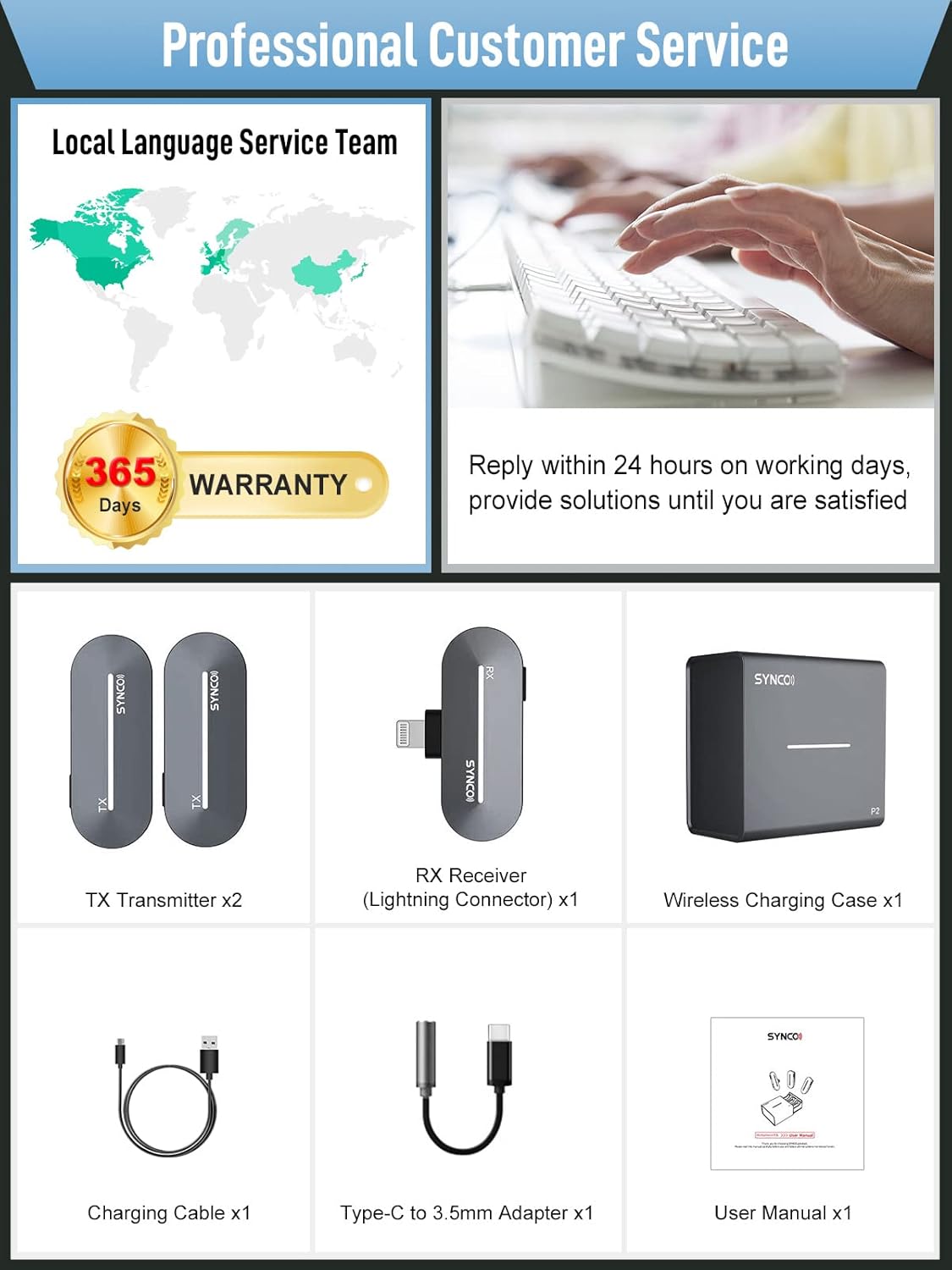
Image: Contents of the SYNCO P2L Wireless Microphone package, including the charging case, two transmitters, one receiver, charging cable, Type-C to 3.5mm adapter, and user manual.
3. Tuote ohiview
The SYNCO P2L system consists of a charging case, two transmitters (TX), and one receiver (RX).
3.1. Lähetin (TX)
- Integrated microphone for audio capture.
- Clip for attachment to clothing.
- Indicator lights for battery status and pairing.
3.2. Vastaanotin (RX)
- Lightning connector for direct connection to iOS devices.
- Type-C port for real-time monitoring and phone charging.
- Button for activating vocal effects.
- Indicator lights for battery status and pairing.
3.3. Latauskotelo
- Stores and charges the TX and RX units.
- Provides additional charges for extended use.
- Features a drawer design for easy access and contact pairing.

Kuva: Yliview of the SYNCO P2L wireless microphone system, showing the charging case, two transmitters, and one receiver, along with a smartphone.
4. Asennusopas
Noudata näitä ohjeita nopeaa ja helppoa asennusta varten:
- Step 1: Open the Charging Case. Press the front of the charging case to release the drawer.
- Step 2: Remove Transmitters and Receiver. Take out the two TX units and one RX unit from the charging drawer. They will automatically power on and attempt to pair.
- Step 3: Connect the Receiver. Plug the RX unit directly into the Lightning port of your iOS device.
- Step 4: Begin Recording. Open your camera or recording application. The system is now ready for use.

Animation: A hand pressing the front of the SYNCO P2L charging case to open its drawer.

Animation: The two transmitters and one receiver being lifted out of the open charging case drawer.

Animation: The receiver unit being plugged into the Lightning port of a smartphone.

Animation: A smartphone screen displaying a recording interface with a checkmark, indicating successful connection and readiness to record.
5. Käyttöohjeet
5.1. Recording Modes (Mono/Stereo)
The SYNCO P2L supports both mono and stereo recording when using two transmitters. The system automatically detects the number of active transmitters and adjusts the recording mode. Stereo mode provides a richer and more immersive audio experience, suitable for interviews or performances with two speakers.
5.2. Vocal Effects
The P2L receiver integrates nine distinct vocal effects. These effects can be activated by pressing a dedicated button on the receiver. The available effects include:
- Alkuperäinen
- Studio TX
- KTV FX
- Ääni Amplifiointi
- EDM
- Baby FX
- Miehestä Naiselle
- Nainen mieheksi
- Monster FX

Image: Illustration of the nine vocal effects available on the SYNCO P2L receiver, shown with various visual representations of sound modification.
5.3. Reaaliaikainen seuranta
The Type-C port on the RX unit allows for real-time audio monitoring. Connect a 3.5mm headphone (using the included Type-C to 3.5mm adapter) to this port to listen to the audio being recorded. This port also supports simultaneous charging of your phone while the microphone is in use.
5.4. Lataus ja akunkesto
The charging case provides convenient storage and charging for the TX and RX units. A 10-minute charge can provide approximately 45 minutes of recording time for the transmitters. A full charge of the transmitters offers up to 5 hours of recording. The charging case itself holds enough power for two full charges of both transmitters.

Image: Visual representation of the SYNCO P2L's fast charging capabilities and battery life, showing the charging case and individual units.
6. Tärkeimmät ominaisuudet
6.1. Obstacle-Free and High-Fidelity Transmission
Utilizing Syncoder 3.0 technology and an intelligent DSP chip, the SYNCO P2L ensures stable and clear sound transmission up to 150 meters (492 feet) in Line-of-Sight (LOS) areas. It effectively filters out low-frequency noises, reproducing clear voices even with minor obstructions.

Image: Diagram illustrating the transmission range of the SYNCO P2L wireless microphone, showing 150m (LOS) and 50m (N LOS) distances over a mountainous landscape.
6.2. Laaja yhteensopivuus
The P2L receiver with its Lightning connector is compatible with a wide range of iOS devices, including various models of iPhone (14/13/12/11/X/XR/XS/8/7/6/6s/5/5s/5c, Pro Max, Pro, mini, SE) and iPad (Air, Pro). It is suitable for use with popular applications for live streaming, video recording, and social media content creation.

Image: Visual showing the SYNCO P2L's compatibility with various iOS devices and popular social media and video recording applications.
7. Huolto
- Pidä laite puhtaana ja kuivana. Vältä altistumista kosteudelle tai äärimmäisille lämpötiloille.
- Käytä puhdistamiseen pehmeää, kuivaa liinaa. Älä käytä voimakkaita kemikaaleja tai hankaavia materiaaleja.
- Store the transmitters and receiver in the charging case when not in use to protect them and ensure they remain charged.
- Vältä laitteen pudottamista tai sen altistamista voimakkaille iskuille.
8. Vianmääritys
| Antaa | Mahdollinen syy | Ratkaisu |
|---|---|---|
| Transmitters/Receiver not pairing | Units are out of range, low battery, or pairing error. | Ensure units are fully charged and within close proximity. Place units back in the charging case, close it, then reopen to re-initiate pairing. If issues persist, try holding down the power button on both TX and RX for 3 seconds to force a re-pairing. |
| Alhainen äänenvoimakkuus | Microphone too far from source, recording app settings, or device volume. | Ensure the transmitter is clipped close to the speaker's mouth. Check the audio input settings in your recording application and adjust the device's volume levels. |
| Intermittent recording or noise | Interference, loose connection, or faulty unit. | Avoid environments with strong electromagnetic interference. Ensure the RX is securely plugged into your device. Check for physical damage to the units or charging contacts. If charging issues occur, ensure contacts are clean. |
| Puhelin ei tunnista laitetta | Loose connection, phone software issue, or incompatible device. | Ensure the RX is firmly plugged into the Lightning port. Restart your phone. Verify your iOS device model is listed as compatible. If using an older iOS version, ensure it is updated. |
9. Tekniset tiedot
| Ominaisuus | Yksityiskohta |
|---|---|
| Mallinumero | P2L |
| Mikrofonin muototekijä | Lavalier |
| Yhteystekniikka | Auxiliary (Wireless 2.4GHz) |
| Liittimen tyyppi | Salama |
| Yhteensopivat laitteet | iPhone 14/13/12/11/X/XR/XS/8/7/6/6s/5/5s/5c, iPhone Pro Max 14/13/12/11/XS; iPad Air 3/2/1, iPhone Plus 14/8/7/6/6s; iPad Pro 10.5 in/9.7 in, iPhone Pro 14/13/12/11; iPhone mini 13/12, iPhone SE 1st Gen/2nd Gen/3rd Gen |
| Napainen kuvio | Monisuuntainen |
| Taajuusvaste | 20 kHz |
| Signaali-kohinasuhde | 75 dB |
| Audio Herkkyys | 26 desibeliä |
| Virtalähde | Paristokäyttöinen (1 litiumioniakku mukana) |
| Materiaali | Akryylinitriilibutadieenistyreeni |
| Tuotteen paino | 0.176 unssia (5 grammaa) |
| Pakkauksen mitat | 4.69 x 4.65 x 1.89 tuumaa |
| Päivämäärä ensimmäinen saatavilla | 20. lokakuuta 2021 |
10. Takuu ja tuki
SYNCO provides a 365-day warranty for this product. For technical assistance, troubleshooting, or warranty claims, please contact SYNCO customer service. Support is typically available within 24 hours on working days.
Image: Information regarding SYNCO's professional customer service and 365-day warranty.
Ask a question about this manual
Ask about setup, troubleshooting, compatibility, parts, safety, or missing instructions. Manuals+ will review the question and use this page’s manual context to help answer it.