
TAOPON smartwatch zl02
TAOPON-älykellon käyttöohje
Model: smartwatch zl02
Johdanto
Thank you for choosing the TAOPON Smart Watch. This device is designed to enhance your daily life with its comprehensive features, including fitness tracking, health monitoring, and smart notifications. This manual provides detailed instructions to help you set up, operate, and maintain your smartwatch for optimal performance.

Figure 1: TAOPON Smart Watch Overview
Mitä laatikossa on
- TAOPON Smart Watch (with Watch Band)
- Latauskaapeli
- Käyttöopas
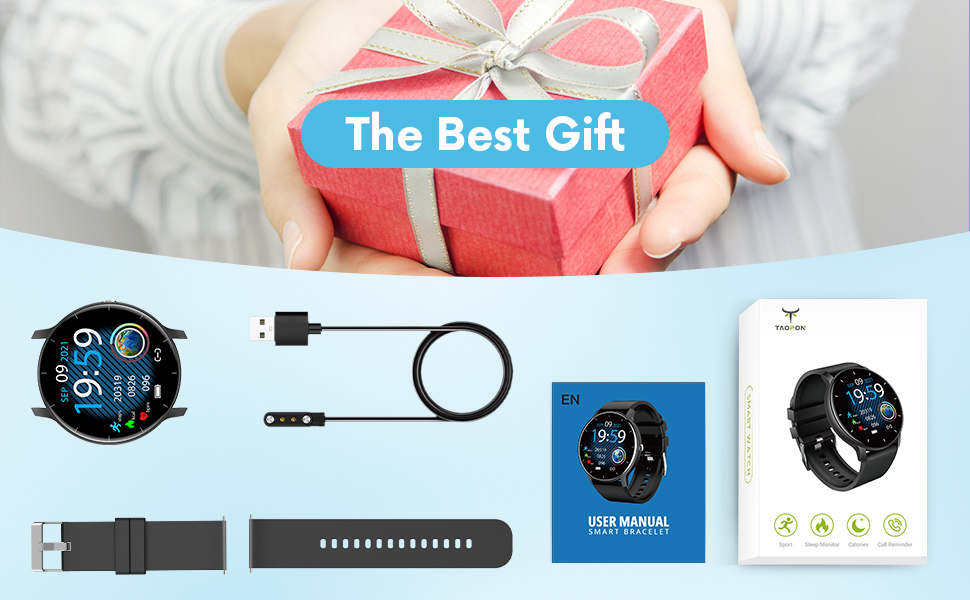
Kuva 2: Pakkauksen sisältö
Asennusopas
1. Älykellon lataaminen
Before first use, fully charge your smartwatch. Connect the magnetic charging cable to the charging points on the back of the watch and plug the USB end into a power adapter (not included) or a computer's USB port. A full charge typically takes about 2 hours and provides up to 7 days of typical use or 30 days of standby time.

Kuva 3: Älykellon lataaminen
2. Sovelluksen asennus ja pariliitos
To unlock the full potential of your TAOPON Smart Watch, download and install the "Da Fit" app on your smartphone. The app is compatible with iOS 9.0 & Android 5.0 or higher.
- Scan the QR code in the manual or search for "Da Fit" in your phone's app store (App Store for iOS, Google Play Store for Android).
- Asenna "Da Fit" -sovellus.
- Avaa sovellus ja luo tili tai kirjaudu sisään noudattamalla näytön ohjeita.
- Ota Bluetooth käyttöön älypuhelimellasi.
- In the "Da Fit" app, navigate to the device section and search for your smartwatch. Select "smartwatch zl02" to pair.
- Vahvista pariliitospyyntö sekä puhelimellasi että älykellolla.
Kun pariliitos on muodostettu, kello synkronoi ajan ja tiedot puhelimesi kanssa.
Käyttöohjeet
Perusnavigointi
- Kosketusnäyttö: Swipe left/right or up/down to navigate through menus and features.
- Sivupainike: Press to quickly return to the home screen or turn the screen on/off.
- Nosta herätä: The display will automatically light up when you raise your wrist.
Customizing Watch Dials
Your smartwatch offers a variety of pre-installed dials. You can also personalize your watch face by setting your favorite photo as the dial through the "Da Fit" app.

Figure 4: Watch Dial Customization
Kuntoilun seuranta
The watch supports 8 sports modes to track your activities:
- Kävely
- Juoksemassa
- Pyöräily
- Hyppynaru
- Sulkapallo
- Koripallo
- Jalkapallo
- Swimming (IP67 waterproof, suitable for hand washing or rainy days, not for prolonged submersion or hot water)
During exercise, the watch tracks calorie consumption, steps, distance, minutes of activity, and heart rate. Connect to your mobile phone's GPS via the app to record your movement track.

Figure 5: Multiple Sports Modes Tracking
Terveyden seuranta
The smartwatch accurately tracks real-time health data:
- Sykemittaus: Records your heart rate throughout the day. You can also measure it in real-time by tapping the heart rate icon on the watch.
- Veren hapen seuranta: Provides SpO2 readings.
- Verenpaineen seuranta: Measures blood pressure levels.
- Univalvonta: Tracks deep sleep, light sleep, and overall sleep duration, showing trends in sleep quality over a week.

Kuva 6: Kattava terveydentilan seuranta
Älykkäät ominaisuudet ja työkalut
The TAOPON Smart Watch offers various convenient tools:
- Viesti-ilmoitukset: Receive call reminders, SMS, Facebook, Twitter, LinkedIn, WhatsApp, Line, Instagram, etc., by connecting to the "Da Fit" APP. You can reject calls directly from the watch.
- Etäkamera: Ohjaa puhelimesi kameraa etänä kellostasi.
- Musiikin hallinta: Toista, keskeytä ja ohita kappaleita puhelimesi musiikkisoittimella.
- Sääennuste: Hanki reaaliaikaisia sääpäivityksiä.
- askelmittari: Laskee päivittäiset askeleesi.
- Muistutus istumisesta: Hälyttää sinua liikkumaan taukojen jälkeen.
- Ajastin: Built-in timer function.
- Deep Breathing Guide: Assists with guided breathing exercises.
- Hälytykset: Set up to 3 alarms directly on the watch.
- Säädettävä kirkkaus: Mukauta näytön kirkkautta optimaaliseksi viewing.
- Teatteritila: Reduces screen brightness and disables vibrations for undisturbed viewing.

Figure 7: Remote Camera

Kuva 8: Musiikin hallinta
Huolto
- Puhdistus: Regularly wipe your smartwatch and band with a soft, damp liinalla. Vältä voimakkaita kemikaaleja tai hankaavia materiaaleja.
- Vedenkestävyys: The watch is IP67 waterproof, meaning it is effective against splashes and can be worn during hand washing or rainy days. It is not recommended for showering with hot water, diving, or prolonged submersion.
- Akun hoito: To prolong battery life, avoid extreme temperatures and do not allow the battery to fully drain frequently. Charge the watch regularly.
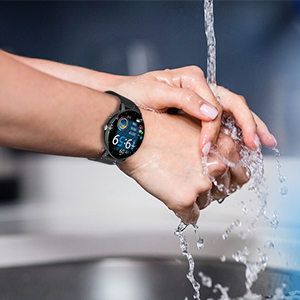
Kuva 9: IP67-vedenkestävyys
Vianetsintä
- Kello ei käynnisty: Varmista, että kello on ladattu täyteen. Liitä se latauskaapeliin ja virtalähteeseen vähintään 30 minuutiksi.
- Pariliitos puhelimen kanssa ei onnistu:
- Varmista, että Bluetooth on käytössä puhelimessasi ja että kello on kantaman sisällä.
- Käynnistä uudelleen sekä puhelin että älykello.
- Check if the "Da Fit" app is updated to the latest version.
- Jos laite on aiemmin yhdistetty, yritä poistaa pariliitos puhelimesi Bluetooth-asetuksista ja muodostaa pariliitos uudelleen sovelluksen kautta.
- Epätarkat terveystiedot:
- Varmista, että kello on tiukasti ranteessasi, noin sormen leveyden päässä ranneluusta.
- Pidä anturi puhtaana ja vapaana roskista.
- Note that health monitoring features are for reference only and should not be used for medical diagnosis.
- Ilmoituksia ei vastaanotettu:
- Tarkista sovellusten käyttöoikeudet puhelimesi asetuksista varmistaaksesi, että "Da Fitillä" on pääsy ilmoituksiin.
- Verify that notification settings are enabled within the "Da Fit" app for specific applications.
- Varmista, että kello on yhdistetty puhelimeesi Bluetoothin kautta.
Tekniset tiedot
| Ominaisuus | Yksityiskohta |
|---|---|
| Mallinumero | smartwatch zl02 |
| Näytön koko | 1.28 tuumaa (näkyvän näytön diagonaali: 2" / 4 cm) |
| Resoluutio | 240*240 pikseliä |
| Akun kapasiteetti | 200mAh litiumpolymeeriakku (sisältyy pakkaukseen) |
| Akun kesto | 7 days (typical use), 30 days (standby) |
| Vesitiivis luokitus | IP67 |
| Yhteensopivuus | iOS 9.0 & Android 5.0 or higher |
| Yhteydet | Bluetooth |
| Tuotteen paino | 110 grammaa (3.88 unssia) |
| Tuotteen mitat | 6.18 x 4.02 x 1.06 tuumaa |
| Valmistaja | TAOPON |
Tärkeitä turvallisuustietoja
- Älä yritä purkaa, korjata tai muokata laitetta.
- Pidä laite poissa äärimmäisistä lämpötiloista, suorasta auringonvalosta ja avotulesta.
- Vältä voimakkaita iskuja tai laitteen pudottamista.
- Pidä poissa lasten ulottuvilta.
- Dispose of the device and its battery according to local regulations. Do not dispose of with household waste.
- Consult a medical professional before starting any new exercise regimen or if you have any health concerns. The health monitoring data is for reference only.
Takuu ja tuki
For warranty information, technical support, or customer service inquiries, please refer to the contact details provided on the product packaging or the official TAOPON websivusto. Säilytä ostokuitti takuuvaatimuksia varten.
Ask a question about this manual
Ask about setup, troubleshooting, compatibility, parts, safety, or missing instructions. Manuals+ will review the question and use this page’s manual context to help answer it.