
1. Johdanto
Thank you for choosing the Andoer W200RGB LED Video Light. This manual provides detailed instructions for the proper setup, operation, and maintenance of your device. Please read this manual thoroughly before use to ensure optimal performance and longevity of the product. Keep this manual for future reference.
2. Tuote ohiview
2.1 Pakkauksen sisältö
Avattuasi paketin tarkista, että kaikki alla luetellut osat ovat mukana ja hyvässä kunnossa:
- Andoer W200RGB LED Video Light
- USB Type-C -latauskaapeli
- Mini kolmijalka
- Rannehihna
- User Manual (English and Chinese)

Image: Contents of the Andoer W200RGB LED Video Light package, showing the light, USB cable, mini tripod, and wrist strap.
2.2 Tärkeimmät ominaisuudet
- Kompakti ja kannettava muotoilu: Rod-shaped design, 20cm in length, lightweight for easy transport.
- Suuri kirkkaus: Equipped with 184 high-quality LED beads (69 white, 69 yellow, 46 RGB) with 7W output and CRI 95+.
- RGB Colored Light Mode: 360° adjustable HUE and 0%-100% adjustable brightness for diverse colorful lighting effects.
- CCT Cold & Warm Light Mode: Wide adjustable color temperature range from 2500K to 9000K.
- 20 Special Lighting Effects: Includes ambulance, fireworks, TV, candle, party, strobe, RGB strobe, red flash, green flash, blue flash, slow HSI, fast HSI, and more.
- Sisäänrakennettu ladattava akku: Integrated 3.7V 3000mAh lithium battery for extended working time, rechargeable via Type-C port.
- Magneettinen takaosa: Built-in magnets at both ends allow for easy attachment to magnetic surfaces.
2.3 Ohjauslaitteet ja näyttö
The Andoer W200RGB features intuitive controls and an LCD screen for easy operation.

Image: The control panel of the Andoer W200RGB LED Video Light, showing the power button, mode button, adjustment buttons, and LCD screen.
- Virtapainike: Press and hold to turn the light on or off. Short press to switch between modes.
- Tilapainike (M): Short press to cycle through CCT, HSI (RGB), and Scene modes.
- Ylös/Alas-painikkeet (▲/▼): Adjust parameters such as brightness, color temperature, HUE, or saturation depending on the selected mode.
- LCD-näyttö: Displays current settings including mode, brightness, color temperature, HUE, and battery level.
- Type-C latausportti: Located at one end for charging the internal battery.
3. Asennus
3.1 Akun lataaminen
The Andoer W200RGB LED Video Light comes with a built-in rechargeable lithium battery. Before first use, it is recommended to fully charge the device.
- Connect the supplied USB Type-C cable to the charging port on the light.
- Liitä USB-kaapelin toinen pää tavalliseen USB-virtalähteeseen (ei sisälly toimitukseen) tai tietokoneen USB-porttiin.
- The LCD screen will indicate the charging status. A full charge typically takes a few hours.

Image: The Andoer W200RGB LED Video Light highlighting its internal 3.7V 3000mAh battery and Type-C charging capability.
3.2 Minijalustan kiinnittäminen
The included mini tripod can be attached to the 1/4-inch screw hole at the bottom of the light for stable placement.
- Locate the 1/4-inch screw hole on the bottom of the LED light.
- Screw the mini tripod securely into the screw hole.
- Säädä jalustan jalat haluttuun korkeuteen ja vakauteen.
4. Käyttöohjeet
4.1 Virta päälle/pois
- To turn on the light, press and hold the Power button (labeled with a circle and vertical line) for a few seconds.
- To turn off the light, press and hold the Power button again for a few seconds.
4.2 vaihtotilaa
After powering on, short press the Mode button (M) to cycle through the available lighting modes:
- CCT Mode (Color Correlated Temperature): For adjusting white light from warm to cool.
- HSI-tila (sävy, kylläisyys, intensiteetti): For adjusting RGB colored light.
- Kohtaustila: For selecting special lighting effects.
4.3 CCT Mode Operation
In CCT mode, you can adjust the color temperature and brightness.
- Use the Up/Down buttons (▲/▼) to adjust the brightness from 0% to 100%.
- Short press the Power button to switch to color temperature adjustment. Use the Up/Down buttons (▲/▼) to adjust the color temperature from 2500K (warm) to 9000K (cool).

Image: Visual representation of brightness adjustments (0%, 50%, 100%) and color temperature settings (6000K, 5000K, 2800K) in CCT mode.
4.4 HSI Mode (RGB) Operation
In HSI mode, you can adjust the HUE (color), saturation, and brightness.
- Use the Up/Down buttons (▲/▼) to adjust the HUE (360° color spectrum).
- Short press the Power button to switch to saturation adjustment. Use the Up/Down buttons (▲/▼) to adjust saturation.
- Short press the Power button again to switch to brightness adjustment. Use the Up/Down buttons (▲/▼) to adjust brightness from 0% to 100%.
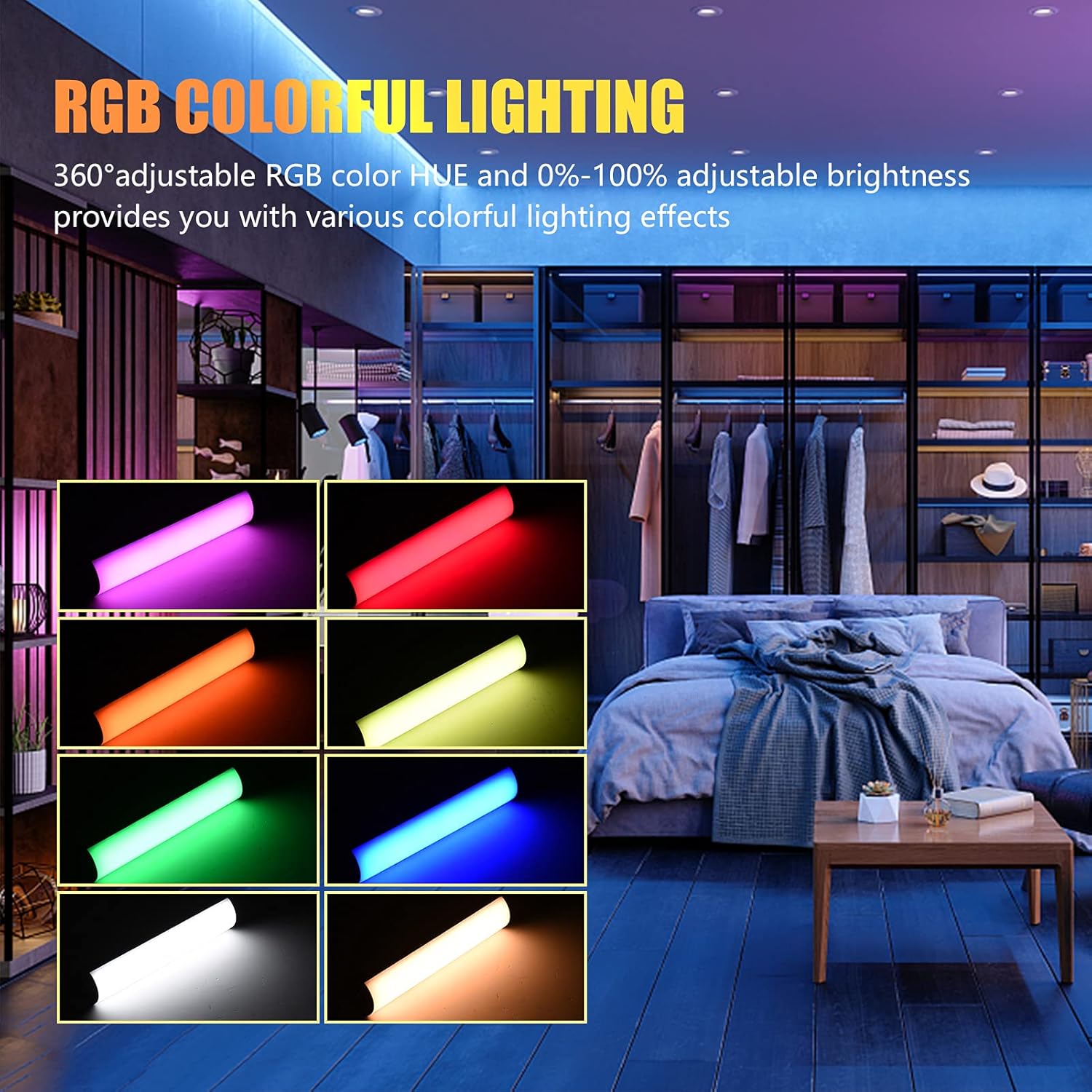
Image: The Andoer W200RGB LED Video Light demonstrating its RGB colorful lighting capabilities, showing different hues and brightness levels.

Image: Several Andoer W200RGB LED Video Lights illuminated in various solid RGB colors, showcasing the rod-shaped design.
4.5 Scene Mode Operation (Special Effects)
In Scene mode, you can select from 20 pre-programmed special lighting effects.
- Use the Up/Down buttons (▲/▼) to cycle through the 20 special effects.
- Some effects may have adjustable parameters (e.g., speed or intensity), which can be adjusted by short pressing the Power button and then using the Up/Down buttons.

Image: A visual guide to the 20 dynamic scene light effects, such as police car, ambulance, fireworks, TV, candle, party, strobe, and various color flashes.
4.6 Using the Magnetic Back
The Andoer W200RGB LED Video Light features built-in magnets at both ends, allowing it to be easily attached to metallic surfaces for flexible lighting setups.
- Simply place either end of the light onto a suitable magnetic surface.
- Ensure the surface is stable and can support the weight of the light.

Image: The Andoer W200RGB LED Video Light highlighting its magnetic ends, demonstrating how it can be attached to metal surfaces.
4.7 Käytännön sovellukset

Image: A comparison of scenes before and after using the Andoer W200RGB LED Video Light, illustrating its effectiveness in enhancing illumination for various activities.
5. Huolto
5.1 Puhdistus
- Varmista, että laite on sammutettu ja irrotettu kaikista virtalähteistä ennen puhdistamista.
- Pyyhi valaisimen pinta pehmeällä, kuivalla liinalla.
- Pinttyneeseen likaan, kevyesti dampKostuta liina vedellä. Vältä voimakkaiden kemikaalien, liuottimien tai hankaavien puhdistusaineiden käyttöä.
- Do not allow water or liquids to enter the device.
5.2 Varastointi
- Säilytä valoa viileässä, kuivassa paikassa, poissa suorasta auringonvalosta ja äärimmäisistä lämpötiloista.
- Jos akkua säilytetään pitkään, lataa se noin 50-prosenttisesti kolmen kuukauden välein akun kunnon ylläpitämiseksi.
5.3 Akun hoito
- Vältä akun usein toistuvaa täydellistä tyhjentymistä.
- Älä altista akkua korkeille lämpötiloille tai puhkaise sitä.
- If the battery shows signs of swelling or leakage, discontinue use immediately and dispose of it properly according to local regulations.
6. Vianmääritys
If you encounter any issues with your Andoer W200RGB LED Video Light, please refer to the following common problems and solutions:
- Valo ei syty:
- Ensure the battery is charged. Connect the light to a power source using the USB Type-C cable.
- Pidä virtapainiketta painettuna muutaman sekunnin ajan varmistaaksesi, ettei se ole vain lyhyt painallus.
- Light flickers or output is unstable:
- Check the battery level; low battery can cause unstable performance. Recharge if necessary.
- Ensure the light is not exposed to extreme temperatures.
- Cannot change modes or adjust parameters:
- Ensure you are pressing the correct buttons (Mode button for mode changes, Power button to cycle through adjustable parameters within a mode, Up/Down buttons for value adjustment).
- Käynnistä laite uudelleen sammuttamalla se ja käynnistämällä se uudelleen.
- Akku ei lataudu:
- Varmista, että USB Type-C -kaapeli on kytketty kunnolla sekä valoon että virtalähteeseen.
- Kokeile toista USB-kaapelia tai virtalähdettä sulkeaksesi pois vialliset lisävarusteet.
- Varmista, että virtalähde on toimiva.
Jos ongelma jatkuu näiden ratkaisujen kokeilemisen jälkeen, ota yhteyttä asiakastukeen saadaksesi lisäapua.
7. Tekniset tiedot
| Ominaisuus | Erittely |
|---|---|
| Merkki | Andoer |
| Malli | W200RGB |
| LED-helmet | 69pcs White + 69pcs Yellow + 46pcs RGB |
| Värilämpötila | 2500K-9000K |
| CRI (värintoistoindeksi) | 95+ |
| Suurin lähtöteho | 7W |
| Valovirta | 800 luksia / 0.3 m |
| Säteen kulma | 120° |
| Akun tyyppi | Sisäänrakennettu 3.7 V 3000 mAh litiumakku |
| Latausportti | USB Type-C |
| Tuotteen koko | 20 x 4 x 3.5 cm (7.9 x 1.6 x 1.4 tuumaa) |
| Tuotteen paino | 11.3 unssia (noin 320 g) |
| Tripod (folded length) | 7.5cm (use height 4.5cm) |
| Mallinumero (ASIN) | QEX6686347803069PL (B09F8RLMSY) |
8. Turvallisuustiedot
Varoitus:
Jos huomaat tuotteen vaurioituneen, epämuodostuneen tai toimivan epänormaalisti, lopeta sen käyttö välittömästi ja ota meihin yhteyttä.
Always handle the device with care. Do not disassemble or modify the product. Keep out of reach of children.
9. Takuu ja tuki
Andoer products are designed for reliability and performance. This product is covered by a standard manufacturer's warranty against defects in materials and workmanship. For specific warranty terms and conditions, please refer to the documentation provided at the time of purchase or contact your retailer.
For technical support, troubleshooting assistance, or warranty claims, please contact Andoer customer service through the retailer's platform or the official Andoer websivusto. Pidä tuotteen malli ja ostotiedot käsillä, kun otat yhteyttä tukeen.
Vieraile osoitteessa Andoer Store on Amazon lisätietoja ja tuotteita varten.