
Johdanto
This manual provides essential information for setting up, operating, maintaining, and troubleshooting your Microsoft Surface Pro 8. Please read this guide thoroughly to ensure optimal performance and longevity of your device.
Mitä laatikossa on:
- Surface Pro 8 Device
- Virtalähde
- AC johto
- Pikaopas (QSG)
- Sääntelyasiakirjat
Asennus
Follow these steps to set up your Surface Pro 8 for the first time.
- Lataa laite: Connect the power supply to your Surface Pro 8 and a power outlet. Allow the device to charge for at least 30 minutes before initial use.
- Virta päälle: Press the power button located on the top edge of the device. The Microsoft logo will appear, followed by the Windows 11 setup screen.
- Initial Windows 11 Setup: Follow the on-screen prompts to select your language, region, connect to a Wi-Fi network, and set up your Microsoft account.
- Connect Accessories (Sold Separately): If you have a Surface Pro Signature Keyboard or Surface Slim Pen 2, attach the keyboard to the magnetic port at the bottom edge of the Surface Pro 8. The pen can be paired via Bluetooth or stored in the keyboard's charging slot.
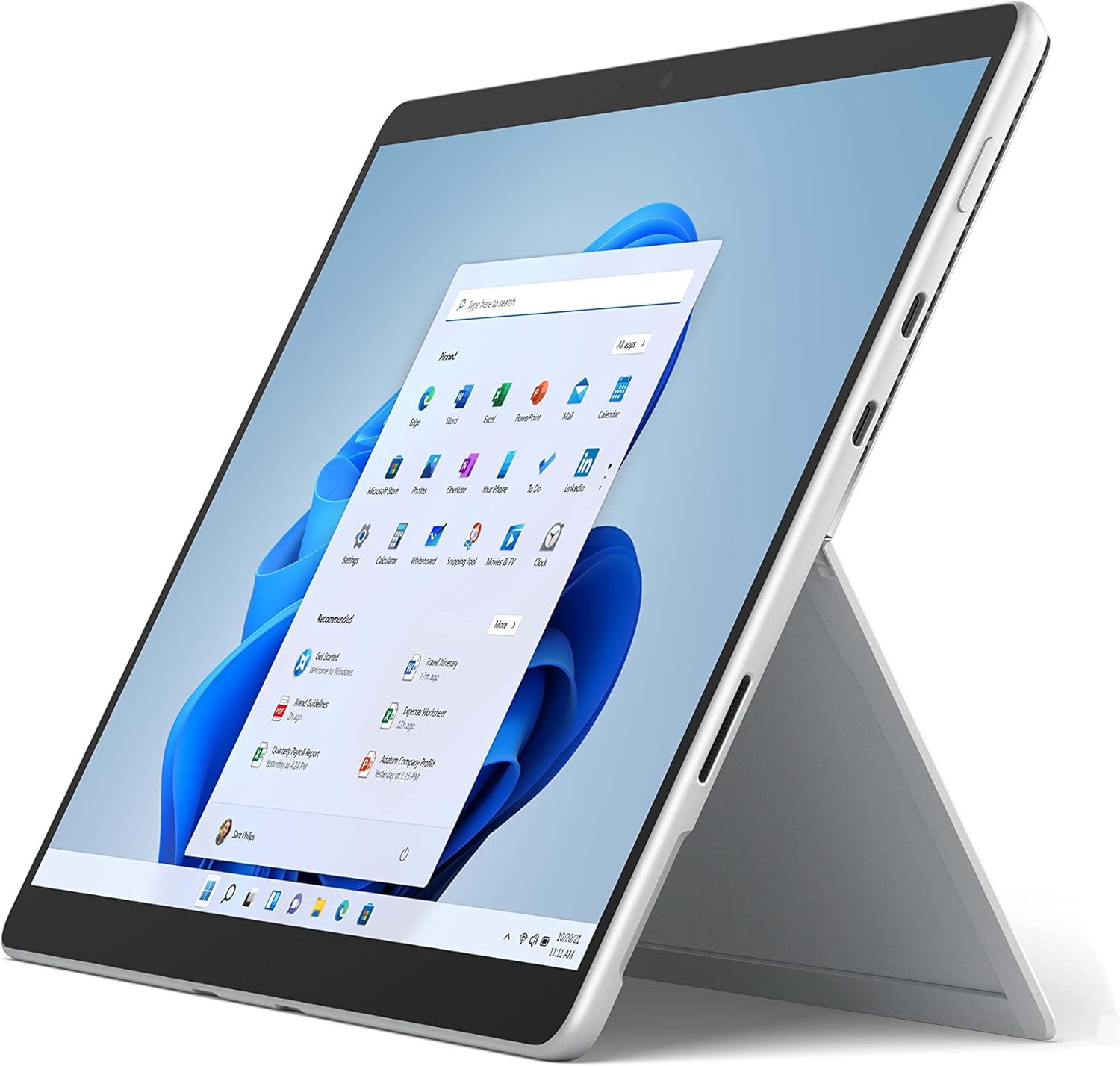
The image above shows the Microsoft Surface Pro 8 in tablet mode, with its 13-inch touchscreen displaying the Windows 11 Start menu. The device is silver with a black bezel, showcasing its sleek design and the intuitive user interface of Windows 11.

This image illustrates the Microsoft Surface Pro 8 alongside its optional accessories: the Surface Slim Pen 2 and the Surface Pro Signature Keyboard. The tablet is shown in a horizontal orientation, with the pen and keyboard positioned below it, highlighting the device's versatility and ecosystem.
Käyttöohjeet
The Surface Pro 8 offers flexible usage modes to suit various tasks.
Tablettitila:
Use the Surface Pro 8 as a standalone tablet for touch-based interactions. The 13-inch touchscreen supports multi-touch gestures for navigation and app control.
Kannettava tietokone -tila:
Attach the Surface Pro Signature Keyboard (sold separately) to transform your device into a laptop. The integrated kickstand allows for adjustable viewkulmat.

The image displays a side profile of the Microsoft Surface Pro 8 with its integrated kickstand fully extended, supporting the device at an angle. This view highlights the thin design and the functionality of the kickstand for hands-free use.

This image shows the Microsoft Surface Pro 8 with the Surface Pro Signature Keyboard attached, viewed from the side. The device is propped up by its kickstand, demonstrating its laptop configuration, ready for typing and productivity.
Using the Surface Slim Pen 2 (Sold Separately):
The Surface Slim Pen 2 provides a natural writing and drawing experience. It can be used for note-taking, sketching, and navigating the interface. Tactile signals enhance the pen-on-paper feel in supported applications.

The image depicts a hand holding a black Surface Slim Pen 2, actively writing or drawing on the screen of the Microsoft Surface Pro 8. This illustrates the precision and natural feel of using the pen for creative or productive tasks on the device.
Windows 11:n ominaisuudet:
- Snap Layouts: Organize your open windows efficiently.
- widgetit: Access personalized information at a glance.
- Microsoft Store: Download and install applications.
Huolto
Proper care ensures the longevity and performance of your Surface Pro 8.
Puhdistus:
- Käytä pehmeää, nukkaamatonta liinaa dampened with water or an approved screen cleaner to wipe the screen.
- Vältä voimakkaita kemikaaleja, hankaavia materiaaleja tai aerosolisuihkeita.
- Varmista, että laitteen virta on katkaistu ja irrotettu pistorasiasta ennen puhdistamista.
Akun hoito:
- Vältä äärimmäisiä lämpötiloja, sillä ne voivat lyhentää akun käyttöikää.
- For optimal battery health, avoid consistently discharging the battery completely or keeping it at 100% charge for extended periods.
Ohjelmistopäivitykset:
Regularly check for and install Windows updates to ensure your device has the latest security patches and performance improvements. Go to Asetukset > Windows Update.
Vianetsintä
Tässä on ratkaisuja yleisiin ongelmiin, joita saatat kohdata.
Laite ei käynnisty:
- Varmista, että laite on ladattu. Liitä virtalähde ja odota muutama minuutti ennen kuin yrität käynnistää laitteen.
- Perform a force restart: Press and hold the power button for 30 seconds, then release. Press it again briefly to turn on.
Näytön ongelmat:
- Jos näyttö ei reagoi, yritä käynnistää laite uudelleen.
- Adjust brightness settings in the Windows Action Center or Display Settings.
Yhteysongelmat:
- For Wi-Fi issues, ensure Wi-Fi is enabled and try reconnecting to your network. Restart your router if necessary.
- For Bluetooth issues, ensure Bluetooth is enabled and try re-pairing your device.
For more detailed troubleshooting or persistent issues, visit the official Microsoft Surface support websivustolta tai ota yhteyttä Microsoftin asiakaspalveluun.
Tekniset tiedot
Key technical specifications for the Microsoft Surface Pro 8.
| Ominaisuus | Erittely |
|---|---|
| Seisova näytön koko | 13 tuumaa |
| Suurin näytön tarkkuus | 2880x1920 pikseliä |
| Prosessori | 4.2 GHz core_i5 (Intel Evo Platform) |
| RAM | 8GB LPDDR4 |
| Kiintolevy | 128GB SSD |
| Grafiikka rinnakkaisprosessori | Intel Iris Xe Graphics |
| Käyttöjärjestelmä | Windows 11 |
| Langaton tyyppi | 802.11ax |
| Tuotteen paino | 1.96 kiloa |
| Tuotteen mitat | 12.22 x 9.06 x 1.97 tuumaa |
| Portit | 2x USB-C Thunderbolt 4, 3.5mm headphone jack, Surface Connect port |

Tämä kuva tarjoaa lähikuvan view of the side of the Microsoft Surface Pro 8, highlighting its connectivity options. Visible ports include two USB-C Thunderbolt 4 ports and a 3.5mm headphone jack, demonstrating the device's modern and versatile input/output capabilities.

The image displays an internal view of the Microsoft Surface Pro 8, revealing its sophisticated engineering. Key components such as the Intel processor, cooling system, and battery are visible, illustrating the hardware that powers the device's performance.
Takuu ja tuki
Oikeudellinen vastuuvapauslauseke:
Some accessories and software sold separately. Available colors and materials may vary by market and configuration. Battery life varies significantly based on usage, network and feature configuration, signal strength, settings and other factors. See Surface.com for details. Requires Dolby encoded content and audio. Pen storage and charging available on select Keyboards. Tactile signals with Surface Slim Pen 2 can be experienced on some applications on Surface Delia running Windows 11. Surface Slim Pen 2 sold separately.
Tuotteen takuu:
Your Microsoft Surface Pro 8 comes with a limited hardware warranty. Please refer to the regulatory documents included in your product packaging for specific terms and conditions, including warranty duration and coverage details. Proof of purchase may be required for warranty claims.
Asiakastuki:
For technical assistance, warranty service, or additional product information, please visit the official Microsoft Support website or contact Microsoft customer service directly. Support resources include FAQs, troubleshooting guides, and contact options for live assistance.