
Johdanto
This manual provides detailed instructions for the proper use and care of your Loluka Blue Wireless Over Ear Headphones. These headphones feature Bluetooth 5.1 for stable connectivity, IPX6 waterproofing for durability during activities, and noise-cancelling microphones for clear calls. Please read this manual thoroughly before using your headphones to ensure optimal performance and longevity.
1. Asennus
1.1 Pakkauksen sisältö
Purkamisen yhteydessä tarkista, että kaikki osat ovat mukana:
- Loluka Wireless Earbuds
- Latauskotelo
- USB-C latauskaapeli
- Multiple Sizes of Silicone Ear Tips (S/M/L)
- Detachable Earhooks (2 pairs)
- Pika-aloitusopas

Kuvan kuvaus: This image shows all items included in the product package: the Loluka headphones, charging case, USB-C charging cable, multiple sizes of silicone ear tips, detachable earhooks, and a quick start guide.
1.2 Ensimmäinen lataus
Before first use, fully charge the headphones and charging case. Connect the provided USB-C cable to the charging case and a power source. The indicator lights on the case will show charging status.
- Charging Time for Case: Approximately 1-2 hours.
- Earbud Playtime: Up to 6-7 hours on a single charge.
- Total Playtime with Charging Case: Up to 28 hours.

Kuvan kuvaus: This visual highlights the extended battery life, showing the headphones provide 7 hours of use per charge, with the charging case offering an additional 3 full charges for a total of 28 hours of playback. A USB-C charging cable is also visible.
1.3 Bluetooth -pariliitos
- Varmista, että kuulokkeet on ladattu.
- Avaa latauskotelo. Kuulokkeet käynnistyvät automaattisesti ja siirtyvät pariliitostilaan.
- Ota Bluetooth käyttöön laitteellasi (älypuhelin, tabletti jne.) ja hae käytettävissä olevia laitteita.
- Select "MS-T20" from the list to connect. Once connected, a voice prompt will confirm successful pairing.

Kuvan kuvaus: The image displays the automatic pairing process, where the headphones (identified as 'MS-T20') connect to a mobile device via Bluetooth, simplifying initial setup.
1.4 Kuulokkeiden käyttäminen
The headphones are designed for comfort and stability, featuring detachable earhooks and various ear tip sizes.
- Korvavinkkejä: Choose the silicone ear tips (S/M/L) that provide the best seal and comfort for your ears. A good seal enhances sound quality and noise isolation.
- Detachable Earhooks: For secure fit during intense activities like sports or workouts, attach the earhooks. For casual listening, the earhooks can be removed.

Kuvan kuvaus: This image illustrates the versatility of the headphones, demonstrating how the detachable earhooks can be used for secure fit during activities like fitness, cycling, and running, or removed for a more casual listening experience.

Kuvan kuvaus: A person is shown wearing the Loluka headphones, illustrating their ergonomic design and comfortable fit around the ear, suitable for extended wear.
2. Käyttöohjeet
2.1 Virta päälle/pois
- Virta päälle: Open the charging case, and the earbuds will automatically power on. Alternatively, press and hold the touch control area on either earbud for 2 seconds.
- Virta pois: Place the earbuds back into the charging case and close the lid. Alternatively, press and hold the touch control area on either earbud for 5 seconds.
2.2 Kosketusohjaimet
The headphones feature intuitive touch controls on each earbud. Refer to the diagram below for specific functions:
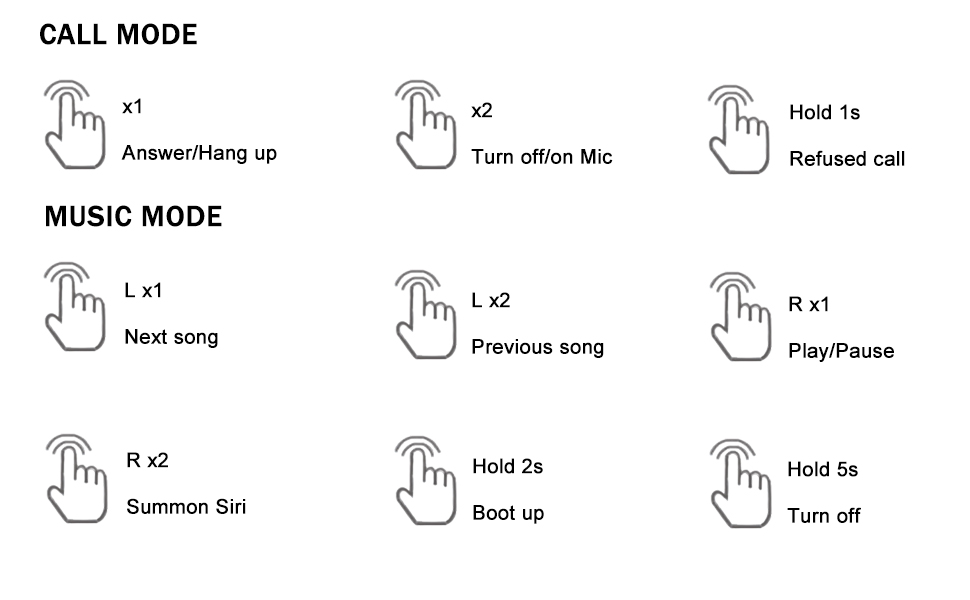
Kuvan kuvaus: A detailed diagram outlining the touch control functions for the headphones, including single, double, and long presses for answering calls, controlling music playback, and activating voice assistants.
- Vastaa/katkaise puhelu: Single tap (x1) on either earbud.
- Hylkää puhelu: Press and hold (1s) on either earbud.
- Turn On/Off Mic: Double tap (x2) on either earbud during a call.
- Toista/keskeytä musiikki: Single tap (R x1) on the right earbud.
- Seuraava kappale: Single tap (L x1) on the left earbud.
- Edellinen kappale: Double tap (L x2) on the left earbud.
- Summon Voice Assistant (Siri, Google Assistant, etc.): Double tap (R x2) on the right earbud.
3. Huolto
3.1 Puhdistus
Säännöllinen puhdistus auttaa ylläpitämään äänenlaatua ja hygieniaa:
- Pyyhi nappikuulokkeet ja latauskotelo varovasti pehmeällä, kuivalla ja nukkaamattomalla liinalla.
- Irrota korvatulpat ja puhdista ne miedolla saippualla ja vedellä. Kuivaa ne huolellisesti ennen takaisin kiinnittämistä.
- Vältä hankaavien materiaalien, alkoholin tai kemiallisten puhdistusaineiden käyttöä.
3.2 Vedenkestävyys (IPX6)
The headphones are rated IPX6 waterproof, meaning they are protected against high-pressure water jets from any direction. This makes them suitable for workouts and use in rainy conditions.
- Älä upota kuulokkeita veteen.
- Varmista, että latausportti on kuiva ennen lataamista.
- Latauskotelo ei ole vedenpitävä.

Kuvan kuvaus: The image depicts the headphones and case with water splashes, emphasizing their IPX6 waterproof rating, which protects them from sweat and rain.
3.3 Varastointi
When not in use, store the headphones in their charging case to protect them from dust, damage, and to keep them charged.
4. Vianmääritys
Jos kuulokkeissasi on ongelmia, katso seuraavat yleiset ratkaisut:
- No Sound or Connection Issues:
1. Varmista, että molemmat nappikuulokkeet on ladattu.
2. Turn off and then turn on Bluetooth on your device.
3. Delete "MS-T20" from your device's Bluetooth list and re-pair.
4. Ensure the earbuds are within the 10-meter Bluetooth range of your device. - Latausongelmat:
1. Verify the USB-C cable is securely connected to both the charging case and the power source.
2. Ensure the charging contacts on the earbuds and inside the case are clean and free of debris.
3. Make sure the charging case itself has power. - Huono äänenlaatu:
1. Try different sizes of ear tips to ensure a proper seal in your ear canal.
2. Ensure the earbuds are correctly positioned in your ears.
3. Clean any earwax or debris from the ear tips and speaker mesh. - Painikkeet eivät vastaa:
1. Ensure you are pressing the correct touch control area.
2. Apply firm but not excessive pressure for touch commands.
5. Tekniset tiedot
| Ominaisuus | Erittely |
|---|---|
| Mallin nimi | Loluka Earbuds with hook |
| Yhteystekniikka | Langaton (Bluetooth) |
| Bluetooth-versio | 5.1 |
| Bluetooth-alue | 10 metriä |
| Vedenkestävyystaso | IPX6 vedenpitävä |
| Akunkesto (nappikuulokkeet) | 6-7 tuntia |
| Akun kokonaiskesto (kotelon kanssa) | 28 tuntia |
| Latausaika (kotelo) | 1-2 Hours (Type-C) |
| Ääniohjaimen tyyppi | Dynaaminen ohjain |
| Melunhallinta | Sound Isolation (Environmental Noise Reduction for calls) |
| Ohjaustyyppi | Kosketus, Ääni |
| Yhteensopivat laitteet | Bluetooth-enabled smartphones, tablets, etc. |
| Tuotteen paino | 2.71 unssia |
| Tuotteen mitat | 3.9 x 2.44 x 1.2 tuumaa |
6. Takuu ja tuki
For warranty information and customer support, please refer to the documentation included with your purchase or contact Loluka customer service through the retailer where the product was purchased. Please retain your proof of purchase for warranty claims.