
PowMr ML2440
PowMr 40A MPPT aurinkolataussäätimen käyttöohje
Malli: ML2440
1. Johdanto
This manual provides essential information for the safe and efficient operation of your PowMr 40A MPPT Solar Charge Controller, model ML2440. Please read this manual thoroughly before installation and use to ensure optimal performance and longevity of the product.
2. Turvallisuusohjeet
- Ensure all wiring is correctly connected and secured to prevent short circuits or damage.
- Always connect the battery to the charge controller first, then the solar panels, and finally the load. Disconnect in the reverse order.
- Do not attempt to repair or modify the controller yourself. Contact qualified personnel for service.
- Asenna ohjain hyvin ilmastoituun tilaan, kauas syttyvistä materiaaleista ja suorasta auringonvalosta.
- Käytä asianmukaisia henkilönsuojaimia (PPE) työskennellessäsi sähköjärjestelmien kanssa.
- Varmista, että järjestelmä voltage matches the controller's specifications (12V/24V auto-detection).
3. Tuote ohiview
The PowMr 40A MPPT Solar Charge Controller is designed to efficiently manage power from your solar panels to charge various battery types, including Lithium, Sealed, Gel, and Flooded batteries. It features Maximum Power Point Tracking (MPPT) technology for optimized solar energy harvesting, automatic 12V/24V system voltage detection, and a clear LCD display for monitoring system status.
Kuva 3.1: Edessä view of the PowMr 40A MPPT Solar Charge Controller.
This image shows the main unit of the PowMr 40A MPPT Solar Charge Controller, highlighting its compact design and integrated LCD screen.
The controller supports a maximum solar input voltage of 100V and a maximum input power of 1100W for a 24V system (550W for 12V). It also includes temperature compensation for accurate charging across varying environmental conditions.

Kuva 3.2: Temperature compensation feature.
This image illustrates the temperature compensation capability of the controller, ensuring optimal battery charging performance in both hot and cold environments.
4. Asennus ja johdotus
Oikea asennus on ratkaisevan tärkeää aurinkolataussäätimen turvallisen ja tehokkaan toiminnan kannalta. Noudata näitä ohjeita huolellisesti.
4.1 Kytkentäkaavio

Kuva 4.1: Wiring diagram for the PowMr MPPT Solar Charge Controller.
This diagram illustrates the correct connection order for the battery, solar panels, DC load, and optional inverter. A temperature sensor is also shown.
4.2 Liitäntävaiheet
- Kytke akku ensin: Connect the battery to the charge controller's battery terminals. Ensure correct polarity. The controller will auto-detect 12V or 24V system voltage.
- Liitä aurinkopaneelit: Connect the solar panels to the PV input terminals. Ensure correct polarity. The controller will begin charging if sufficient sunlight is available.
- Kytke tasavirtakuorma (valinnainen): If using a DC load directly from the controller, connect it to the load terminals.
- Connect Inverter (Optional): If using an inverter, connect it to the battery terminals (not directly to the load terminals of the controller).
- Lämpötila-anturin kytkeminen: For accurate temperature compensation, connect the provided temperature sensor to the designated port on the controller and place the sensor near the battery.
Katkaisujärjestys: To disconnect the system, always follow the reverse order: Disconnect load, then solar panels, then battery.
5. Käyttöohjeet
This section details how to monitor and configure your charge controller using its integrated LCD display and the optional Bluetooth mobile application.
5.1 LCD-näyttö yliview

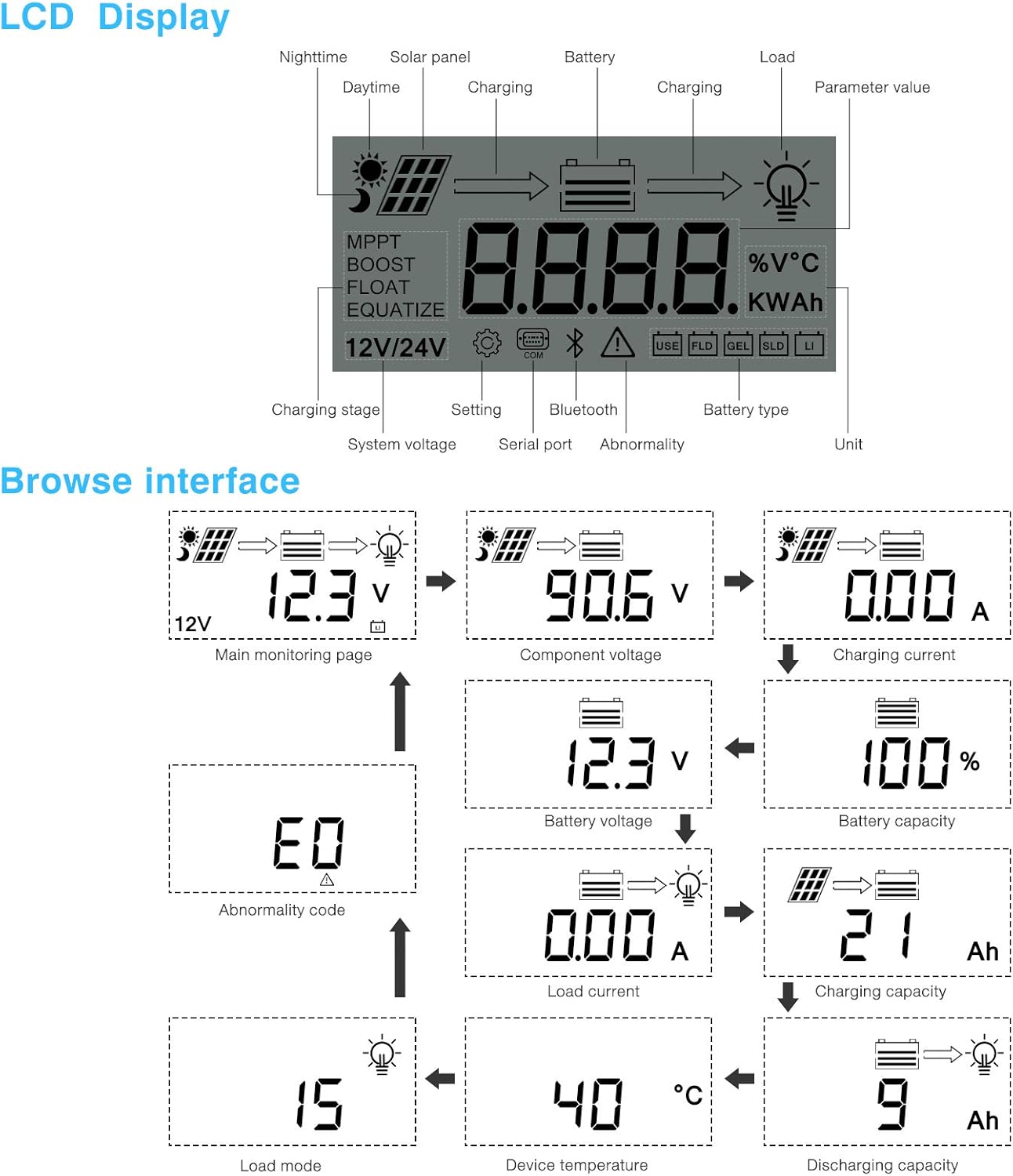
Kuva 5.1: LCD Display and Browse Interface.
This image shows the various icons and parameters displayed on the LCD screen, along with the navigation flow through different monitoring pages.
LCD-näyttö tarjoaa reaaliaikaista tietoa aurinkojärjestelmästäsi. Keskeisiä indikaattoreita ovat:
- Lataus Stage: MPPT, Boost, Float, Equalize.
- System Voltage: 12V/24V auto-detected.
- Akun tyyppi: Icons for Lithium (Li), Sealed (SLD), Gel (GEL), Flooded (FLD).
- Tilan ilmaisimet: Solar panel activity, battery charging, load status, abnormality.
- Parametrin arvo: Näyttää voltage, current, capacity, temperature, etc.
Use the buttons below the LCD to navigate through different screens to view parameters such as main monitoring page, component voltage, latausvirta, akun tilavuustage, battery capacity, load current, charging capacity, device temperature, discharging capacity, abnormality codes, and load mode.
5.2 Bluetooth Mobile Application
The controller supports an optional Bluetooth module (BT-1) for remote monitoring and parameter adjustment via a mobile application (available for Apple iOS and Android devices). The Bluetooth module connects to the RS232 port on the controller.

Kuva 5.2: Controller with optional Bluetooth module.
This image displays the PowMr MPPT Solar Charge Controller alongside its optional BT-1 Bluetooth communication module and connecting cable.

Kuva 5.3: BT-1 Bluetooth module.
Yksityiskohtainen view of the BT-1 Bluetooth module, which enables wireless communication with the solar charge controller for remote monitoring and settings adjustments.

Kuva 5.4: Bluetooth Mobile Interface Display.
This image shows various screens from the mobile application, including real-time monitoring, data records, energy records, and parameter settings.
The mobile application allows you to:
- Monitor real-time system data (voltage, current, power, temperature).
- View historical data and energy records.
- Adjust various charging parameters and battery settings.
- Palauta tehdasasetukset.
6. Huolto
Regular maintenance ensures the longevity and optimal performance of your charge controller.
- Puhdistus: Periodically clean the controller's exterior with a dry cloth to remove dust and debris. Ensure ventilation openings are clear.
- Liitännät: Tarkista vuosittain kaikkien johtojen tiiviys ja korroosio. Löysät liitännät voivat aiheuttaa ylikuumenemista ja heikkoa suorituskykyä.
- Ympäristö: Varmista, että asennusympäristö pysyy määritetyssä käyttölämpötila-alueella eikä siinä ole liiallista kosteutta tai pölyä.
7. Vianmääritys
This section provides guidance for common issues. Refer to the LCD display for abnormality codes.
- Ei näyttöä/ei virtaa:
- Tarkista akun liitännät ja varmista akun varaustasotage on toiminta-alueella.
- Varmista, että akun sulake (jos sellainen on asennettu) on ehjä.
- Ei latausta:
- Varmista, että aurinkopaneelit on kytketty oikein ja että ne saavat riittävästi auringonvaloa.
- Tarkista aurinkopaneeli voltage ja nykyinen.
- Verify that the battery is not fully charged or in a protection state.
- Lataus ei toimi:
- Check load connections and ensure the load current does not exceed the controller's rating.
- Varmista, että akun tilavuustage on matalan volyymin yläpuolellatage-irtikytkentä (LVD) -asetus.
- Check for any abnormality codes on the LCD related to load output.
- Abnormality Codes (e.g., "E0"):
- Refer to the specific abnormality code displayed on the LCD. Consult the full product manual or manufacturer's support for detailed explanations and solutions for each code.
8. Tekniset tiedot
Technical specifications for the PowMr 40A MPPT Solar Charge Controller (Model ML2440).

Kuva 8.1: Product Specifications Table.
This table provides detailed technical parameters for the ML2420, ML2430, and ML2440 models. The ML2440 column is relevant for this 40A controller.
| Parametri | Value (ML2440) |
|---|---|
| Malli | ML2440 |
| System voltage | 12 V / 24 V automaattinen |
| Häviö ilman kuormaa | 0.7 - 1.2 W |
| Akun tilavuustage | 9-35V |
| Max. aurinkopaneelin syöttö voltage | 100 V (25 °C), 90 V (-25 °C) |
| Max. power point voltage valikoima | Akun tilavuustage +2V - 75V |
| Nimellinen latausvirta | 40A |
| Nimellinen kuormitusvirta | 20A |
| Maks. kapasitiivinen kantavuus | 10000 uF |
| Maks. aurinkosähköjärjestelmän tuloteho | 550W/ 12V, 1100W/ 24V |
| Muunnostehokkuus | ≤ 98 % |
| MPPT-seurannan tehokkuus | > 99 % |
| Lämpötilakompensointikerroin | -3.0mv/ °C/ 2V (default) |
| Käyttölämpötila | -35°C - +45°C |
| Suojausaste | IP32 |
| Paino | 2 kg |
| Viestintämenetelmä | RS232 |
| Korkeus | ≤ 3000 m |
| Tuotteen mitat | 238*173*72.5 mm |
9. Takuu ja tuki
For warranty information, please refer to the documentation included with your product packaging or visit the official PowMr website. If you encounter any issues not covered in this manual or require further assistance, please contact PowMr customer support.
PowMr Official Websivusto: Käy PowMr-kaupassa Amazonissa
Asiaan liittyvät asiakirjatML2440


Ask a question about this manual
Ask about setup, troubleshooting, compatibility, parts, safety, or missing instructions. Manuals+ will review the question and use this page’s manual context to help answer it.