
Johdanto
Thank you for choosing the PHEANOO D6 Sound Bar System. This 2.1 channel soundbar with a dedicated wired subwoofer is designed to enhance your audio experience, providing clear dialogue, powerful bass, and immersive sound for your home entertainment. This manual provides detailed instructions for setup, operation, maintenance, and troubleshooting to ensure optimal performance and longevity of your device.
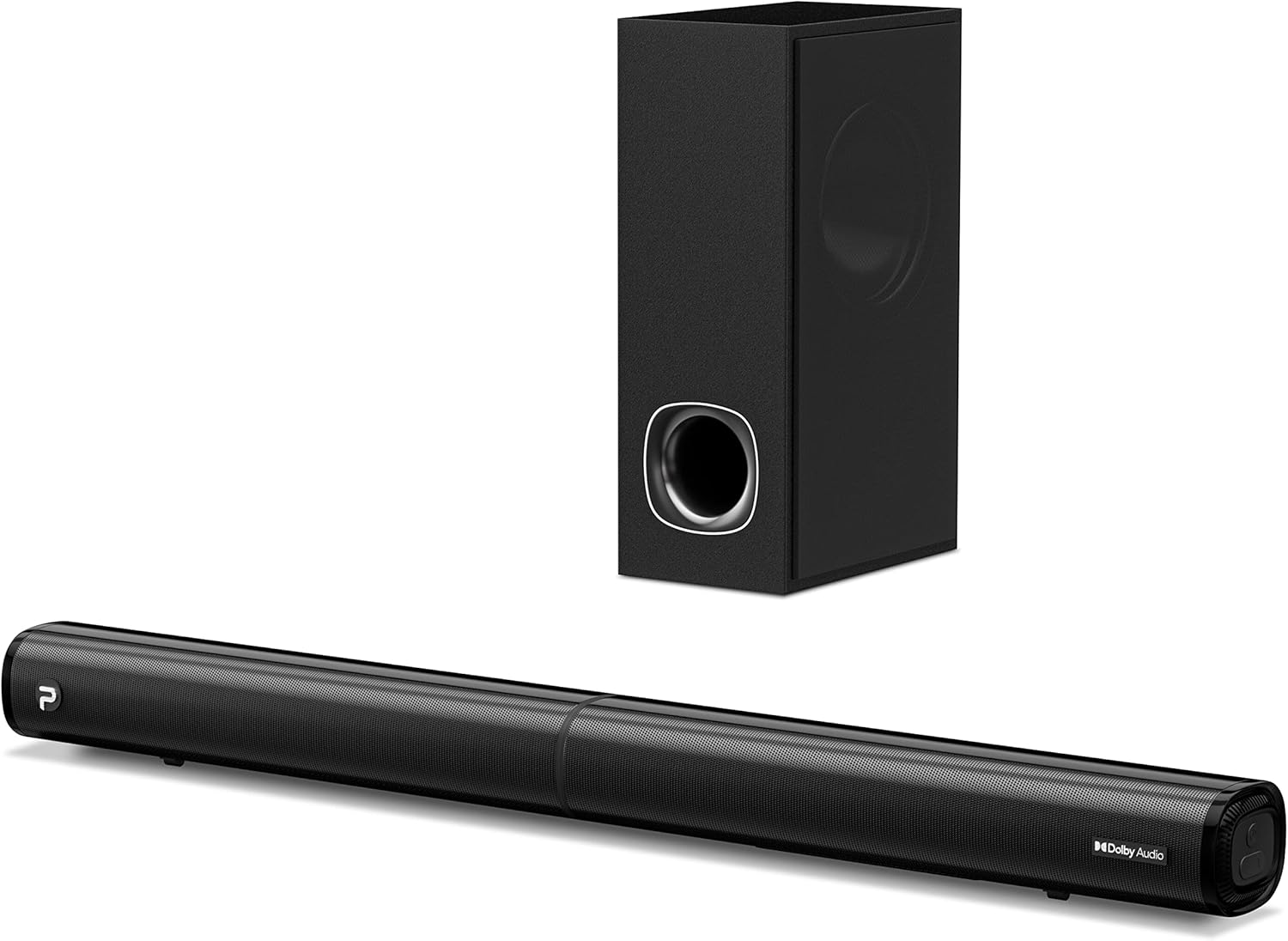
Image: The PHEANOO D6 Sound Bar and its accompanying wired subwoofer, showcasing heidän tyylikäs musta muotoilu.
Mitä laatikossa on
Tarkista pakkauksen sisältö huolellisesti. Jos jokin puuttuu tai on vaurioitunut, ota yhteyttä asiakaspalveluun.
- Soundbar and Wired Subwoofer
- HDMI-kaapeli
- RCA-äänikaapeli
- Wall Mount Kit (screws and anchors)
- Kaukosäädin (paristot eivät sisälly)
- Virtalähde

Image: All components included in the PHEANOO D6 Sound Bar package, laid out for clear identification, including the soundbar, subwoofer, cables, remote, and wall mount kit.
Asennus
1. Assembling the Soundbar (Detachable Design)
The PHEANOO D6 soundbar features a unique detachable design for flexible placement. Follow these steps to assemble it:
- Align the audio connector from one half of the soundbar with the corresponding port on the other half.
- Gently push the two halves together until they click into place.
- Twist the two halves to secure the connection, ensuring the soundbar is firmly assembled.

Image: A three-step visual guide demonstrating how to connect the two halves of the detachable soundbar, ensuring proper alignment and secure locking.
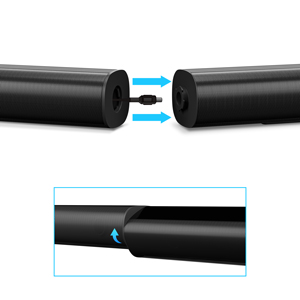
Kuva: Lähikuva view of the soundbar's detachable connection point, showing the male and female connectors.
2. Subwooferin liittäminen
Kytke langallinen subwoofer soundbariin käyttämällä siihen tarkoitettua subwooferin kaapelia. Varmista, että liitäntä on tiukasti kiinni.
3. Sijoitteluvaihtoehdot
You can place the soundbar on a tabletop or mount it on a wall.
- Pöydän sijoittelu: Aseta soundbar suoraan television eteen varmistaen, ettei se peitä television kaukosäätimen tunnistinta.
- Seinäasennus: Use the included wall mount kit. It is recommended to measure and mark the drilling points accurately, rather than relying solely on the paper stencil, to ensure a level installation.
4. Ääniliitännät
The PHEANOO D6 offers multiple connectivity options. Choose the best one for your device:
- HDMI (ARC): For the best audio quality and control, connect an HDMI cable from the soundbar's HDMI (ARC) port to your TV's HDMI (ARC) port. This allows your TV remote to control the soundbar's volume.
- Optinen: Connect an optical cable from the soundbar's Optical port to your TV's Optical Digital Audio Out port.
- AUX: Use the 3.5mm AUX cable to connect to devices with a 3.5mm audio output.
- Bluetooth 5.0: For wireless connection, pair your device via Bluetooth.

Image: The rear panel of the PHEANOO D6 Sound Bar, highlighting the HDMI (ARC), Bluetooth, Optical, and AUX input ports with corresponding icons.

Kuva: Yksityiskohtainen view of the soundbar's input panel, showing the AUX, Optical, and HDMI (ARC) ports clearly labeled.
5. Virtaliitäntä
Connect the power adapter to the soundbar and then plug it into a wall outlet.
Käyttöohjeet
Kaukosäädin
The included remote control allows you to manage all functions of the soundbar. Insert two AAA batteries (not included) into the remote before use.

Image: The remote control for the PHEANOO D6 Sound Bar, showing its buttons and an indicator light.
Virta päälle/pois
Press the power button on the remote or the soundbar to turn the unit on or off.
Tulon valinta
Press the "Input" button on the remote to cycle through available input sources: HDMI (ARC), Optical, AUX, and Bluetooth.
Bluetooth-pariliitos
Bluetooth-laitteen yhdistäminen pariksi:
- Select Bluetooth input on the soundbar. The indicator light will flash.
- Enable Bluetooth on your device (smartphone, tablet, etc.) and search for "PHEANOO D6".
- Select the soundbar from the list to pair. Once connected, the indicator light will be solid.

Image: A smartphone displaying a music app, wirelessly connected to the PHEANOO D6 Sound Bar via Bluetooth, indicated by a Wi-Fi like symbol.
Äänitilat
Soundbar tarjoaa erilaisia äänitiloja kuuntelukokemuksesi optimoimiseksi:
- Dialogitila: Enhances vocal clarity, making speech easier to understand.
- Musiikkitila: Optimoitu musiikin toistoon ja tarjoaa tasapainoisen äänen.
- Elokuvatila: Delivers an immersive cinematic experience with enhanced effects.
- 3D-tila: Creates a wider, more enveloping soundstage.

Image: Icons representing different sound modes: Dialogue, Music, Movie, and 3D, indicating the soundbar's versatility.
Basson säätö
Use the dedicated bass control buttons on the remote to increase or decrease the subwoofer's output level to your preference.

Image: A close-up of the subwoofer, with a visual effect suggesting powerful bass emanating from it.
Dolby Digital Support
The PHEANOO D6 Sound Bar supports Dolby Digital decoding, providing a rich and dynamic audio experience for compatible content.

Image: A living room setup with the soundbar and TV, overlaid with a grid pattern indicating premium 3D surround sound powered by Dolby Audio.

Image: The Dolby Audio logo accompanied by visual representations of sound waves, emphasizing the enhanced audio quality.
Roku TV valmiina
This soundbar is certified to work seamlessly with your Roku TV. Enjoy smooth setup, easy access to sound settings, and compatibility with any Roku TV remote.

Image: A television screen displaying the "Roku TV Ready" setup interface, with the PHEANOO Soundbar and subwoofer positioned below it, illustrating seamless integration.
Huolto
- Puhdistus: Puhdista soundbarin ja subwooferin pinnat pehmeällä, kuivalla liinalla. Älä käytä nestemäisiä puhdistusaineita tai aerosoleja.
- Ilmanvaihto: Varmista soundbarin ja subwooferin ympärillä oleva asianmukainen ilmanvaihto ylikuumenemisen estämiseksi. Älä tuki tuuletusaukkoja.
- Varastointi: Jos laitetta säilytetään pitkään, irrota se virtalähteestä ja säilytä sitä viileässä ja kuivassa paikassa.
Vianetsintä
| Ongelma | Mahdollinen syy | Ratkaisu |
|---|---|---|
| Ei virtaa | Virtajohto ei ole kytketty; pistorasia ei toimi. | Varmista, että virtajohto on kytketty kunnolla. Kokeile toista pistorasiaa. |
| Ei ääntä | Väärä tulosignaali valittu; äänenvoimakkuus liian alhainen; kaapelit eivät ole kunnolla kiinni. | Valitse oikea tulolähde. Lisää äänenvoimakkuutta. Tarkista kaikki äänikaapeliliitännät. |
| Bluetooth-pariliitos epäonnistui | Soundbar ei ole pariliitostilassa; Laite liian kaukana; Häiriöitä. | Ensure soundbar is in Bluetooth input and indicator is flashing. Move device closer. Turn off other Bluetooth devices. |
| Huono äänenlaatu | Incorrect sound mode; Source audio quality is low. | Try different sound modes (Music, Movie, Dialogue). Ensure the audio source is high quality. |
| Kaukosäädin ei toimi | Batteries dead or incorrectly inserted; Obstruction between remote and soundbar. | Vaihda paristot varmistaen oikean napaisuuden. Poista mahdolliset esteet. |
For more detailed troubleshooting, refer to the official Troubleshooting Guide PDF available on the product page or contact PHEANOO customer support.
Tekniset tiedot
| Ominaisuus | Yksityiskohta |
|---|---|
| Malli | D6 |
| Merkki | PHEANOO |
| Kaiuttimen tyyppi | Soundbar langallisella subwooferilla |
| Kanavan asetukset | 2.1 CH |
| Yhteystekniikka | HDMI (ARC), Bluetooth 5.0, Optical, AUX |
| Bluetooth-alue | Jopa 100 metriä (noin 328 jalkaa) |
| Kaiuttimen suurin lähtöteho | 240 wattia |
| Tuotteen mitat (äänipalkki) | 29.5" L x 2.4" K x 2.8" S |
| Tuotteen paino | 11.57 puntaa |
| Ohjaimen tyyppi | Kaukosäädin |
| Erikoisominaisuudet | Dolby Digital Decoding, Dialogue Enhancement, Bass Adjustable, Detachable Design, Roku TV Ready |
Takuu ja tuki
The PHEANOO D6 Sound Bar System comes with a Rajoitettu takuuKatso tarkemmat ehdot pakkauksessa olevasta takuukortista.
For technical support, warranty claims, or further assistance, please visit the official PHEANOO website or contact their customer service department. You can also find additional resources like the Käyttöopas (PDF) ja Vianmääritysopas (PDF) verkossa.