
1. Johdanto
Thank you for choosing the AIYIMA A05 TPA3221 Power Amplifier. This compact 2.0 channel stereo amplifier is designed to deliver high-fidelity audio to passive speakers, featuring both Bluetooth and RCA input options. This manual provides detailed instructions for setup, operation, and maintenance to ensure optimal performance and longevity of your device.
2. Turvallisuusohjeet
- Virtalähde: Use only the specified power adapter (DC 12-32V) to prevent damage. Ensure the power outlet voltage on yhteensopiva.
- Ilmanvaihto: Aseta amplifier in a well-ventilated area. Do not block ventilation openings. Avoid placing it on soft surfaces that may obstruct airflow.
- Kosteus: Keep the device away from water, humidity, and liquids. Do not operate with wet hands.
- Lämpö: Avoid direct sunlight, heat sources, or extreme temperatures.
- Puhdistus: Katkaise virta ennen puhdistamista. Käytä pehmeää, kuivaa liinaa. Älä käytä nestemäisiä tai aerosolipuhdistusaineita.
- Huolto: Do not attempt to repair or disassemble the unit yourself. Refer all servicing to qualified personnel.
- Lapset: Pidä poissa lasten ulottuvilta.
3. Pakkauksen sisältö
Tarkista pakkauksesta seuraavat tuotteet:
- AIYIMA A05 Bluetooth 5.0 Ampnostin x 1
- Bluetooth-antenni x 1
- Käyttöohje x 1
- Takuukortti x 1
- DC 32V virtalähde x 1

Kuva 3.1: Contents of the AIYIMA A05 ampelvytyspaketti, mukaan lukien amplifier unit, Bluetooth antenna, user manual, warranty card, and power adapter.
4. Tuote ohiview
4.1 Etupaneelin säätimet
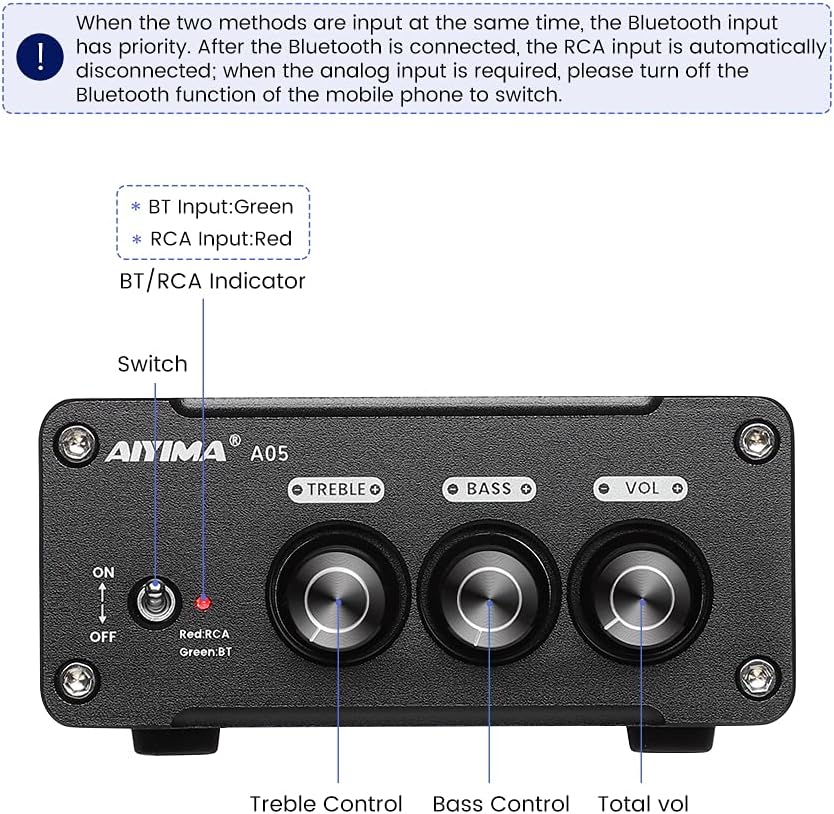
Kuva 4.1: Front panel of the AIYIMA A05 amplifier, showing the power switch, input indicator, treble, bass, and volume controls.
- Virtakytkin (ON/OFF): Vaihtaa ampnostovoimaa.
- BT/RCA Indicator: Displays the active input source. Green indicates Bluetooth (BT) input, Red indicates RCA input.
- Diskantin säätö: Säätää korkeataajuisten äänien lähtöä.
- Basson säätö: Säätää matalataajuisten äänien lähtöä.
- Äänenvoimakkuuden säätö: Säätää äänen kokonaislähtötasoa.

Kuva 4.2: Lähikuva view of the power switch and the BT/RCA input indicator on the front panel.

Kuva 4.3: Lähikuva view of the Treble, Bass, and Volume control knobs.
4.2 Takapaneelin liitännät

Kuva 4.4: Rear panel of the AIYIMA A05 amplifier, showing the Bluetooth antenna port, RCA audio input, speaker outputs, and DC power input.
- ANT (Bluetooth Antenna Port): Connect the included Bluetooth antenna here for wireless audio reception.
- AUDIO IN (RCA Input): Connect audio sources (e.g., CD player, TV, DAC) using RCA cables.
- SPEAKER (Audio Output): Connect passive speakers using speaker wires. Ensure correct polarity (+ to + and - to -).
- DC 24-32V (Power Input): Connect the provided DC power adapter.
5. Asennusohjeet
Asenna AIYIMA A05 seuraavasti: ampelävämpi:
- Yhdistä Bluetooth-antenni: Screw the included Bluetooth antenna into the ANT port on the rear panel.
- Yhdistä kaiuttimet: Connect your passive speakers to the SPEAKER output terminals on the rear panel. Ensure the positive (+) terminal of the amplifier connects to the positive (+) terminal of the speaker, and the negative (-) terminal connects to the negative (-).
- Äänilähteen liittäminen (RCA): If using a wired audio source, connect it to the AUDIO IN (RCA) ports on the rear panel using appropriate RCA cables.
- Liitä virta: Connect the DC power adapter to the DC 24-32V input port on the rear panel, then plug the adapter into a wall outlet.
- Virta päälle: Flip the power switch on the front panel to the "ON" position. The input indicator will light up.

Kuva 5.1: Takapaneeli amplifier with Bluetooth antenna, RCA cables, speaker wires, and power adapter connected.
6. Käyttöohjeet
6.1 Virran kytkeminen päälle/pois
Virran kytkemiseksi päälle amplifier, flip the front panel switch to the "ON" position. To power off, flip the switch to the "OFF" position.
6.2 Bluetooth-yhteys
- Varmista, että amplifier is powered on and the BT/RCA indicator is green, indicating Bluetooth mode. If it's red, ensure no RCA cable is connected or disconnect it.
- Ota mobiililaitteessasi (puhelin, tabletti jne.) käyttöön Bluetooth ja hae käytettävissä olevia laitteita.
- Valitse pariliitettävien laitteiden luettelosta "AIYIMA A05".
- Once paired, the indicator light will remain green, and you can play audio from your device through the ampelävämpi.
6.3 RCA Input Usage
- Connect your audio source to the RCA input ports on the rear panel.
- Varmista, että amplifier is powered on. The BT/RCA indicator should be red, indicating RCA input mode.
- If the indicator is green (Bluetooth mode), ensure Bluetooth is disconnected on any paired device, or turn off Bluetooth on your mobile device to switch to RCA input.
6.4 Adjusting Audio
- Äänenvoimakkuus: Rotate the "VOL" knob clockwise to increase volume and counter-clockwise to decrease.
- Diskantti: Rotate the "TREBLE" knob to adjust high-frequency sounds to your preference.
- Basso: Rotate the "BASS" knob to adjust low-frequency sounds to your preference.
7. Huolto
- Puhdistus: Disconnect the power adapter before cleaning. Use a soft, dry, lint-free cloth to wipe the surface of the amplifier. Do not use harsh chemicals or abrasive materials.
- Varastointi: If not in use for an extended period, store the ampviileässä, kuivassa paikassa, poissa suorasta auringonvalosta ja äärimmäisistä lämpötiloista.
- Liitännät: Tarkista säännöllisesti kaikki kaapeliliitännät varmistaaksesi, että ne ovat tukevasti kiinni ja että niissä ei ole korroosiota.
8. Vianmääritys
If you encounter issues with your AIYIMA A05 amplifier, katso seuraavat yleiset ongelmat ja ratkaisut:
| Ongelma | Mahdollinen syy | Ratkaisu |
|---|---|---|
| Ei äänilähtöä |
|
|
| Distorted or buzzing sound |
|
|
| Bluetooth ei muodosta yhteyttä |
|
|
| Loud noise/ticking on startup |
|
|
If the problem persists after trying these solutions, please contact AIYIMA customer support for further assistance.
9. Tekniset tiedot

Kuva 9.1: Dimensions of the AIYIMA A05 amplifier: 107mm (4.2in) width, 87mm (3.4in) depth, 36mm (1.4in) height.
| Ominaisuus | Erittely |
|---|---|
| Malli | A05 |
| Lähtöteho | 105 Watts (at 4 Ω) |
| Kanavien lukumäärä | 2.0 (Stereo) |
| Bluetooth-versio | QCC3034 APTX Bluetooth 5.0 |
| Piirisarja | TPA3221 |
| Minimitarjonta Voltage | 12 volttia (DC) |
| Suurin tarjonta Voltage | 32 volttia (DC) |
| Tuotteen paino | 500 grammaa |
| Mitat (noin) | 107mm (W) x 87mm (D) x 36mm (H) |
10. Takuu ja tuki
The AIYIMA A05 amplifier comes with a warranty. Please refer to the included Warranty Card for specific terms and conditions. For technical support, troubleshooting assistance, or warranty claims, please contact AIYIMA customer service through the retailer where the product was purchased or visit the official AIYIMA websivusto.
Verkkoresurssit: For additional information and support, you may visit the AIYIMA store page: AIYIMA Official Store