
1. Johdanto
Thank you for choosing the Dacom K6H Pro Bluetooth 5.0 Earphones. This manual provides detailed instructions on how to set up, operate, and maintain your earphones to ensure optimal performance and longevity. Please read this manual thoroughly before using the product.
2. Pakkauksen sisältö
- Dacom K6H Pro Wireless Earbuds (Left and Right)
- Latauskotelo
- Käyttöopas
3. Tuote ohiview
Familiarize yourself with the components of your Dacom K6H Pro earphones and charging case.
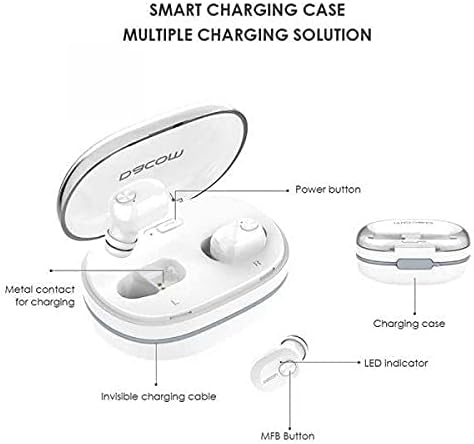
Kuva 3.1: Diagram illustrating the Dacom K6H Pro earphones and charging case components. The image highlights the power button, metal contacts for charging, invisible charging cable, LED indicator, and Multi-Function Button (MFB) on the earbud.
Tärkeimmät komponentit:
- Latauskotelo: Stores and charges the earbuds. Features a power button and metal contacts for earbud charging.
- Invisible Charging Cable: Integrated USB charging cable for convenient power replenishment.
- Earbuds (Left & Right): Each earbud has an LED indicator and a Multi-Function Button (MFB) for control.

Kuva 3.2: The Dacom K6H Pro wireless earphones, showing both the charging case with one earbud inserted and the other earbud removed, ready for use. The case is open, revealing the earbud compartments.
4. Lataus
Ensure your Dacom K6H Pro earphones and charging case are fully charged before first use.
4.1 Kuulokkeiden lataaminen
- Aseta kuulokkeet vastaaviin aukkoihinsa latauskotelossa.
- Close the charging case lid. The earbuds will begin charging automatically.
- The LED indicator on the earbuds will show charging status (refer to LED indicator section for details).
4.2 Kotelon lataaminen
The charging case features a hidden, integrated USB charging cable for convenience.
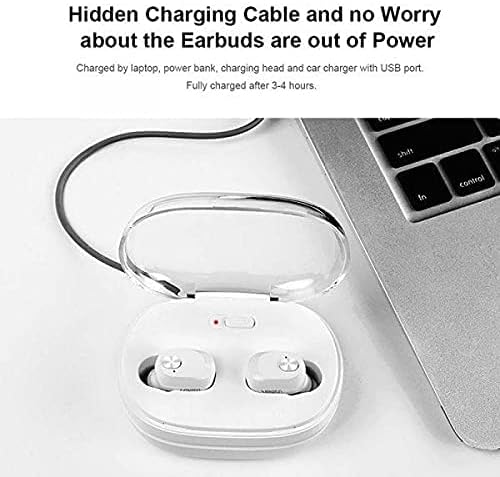
Kuva 4.1: The Dacom K6H Pro charging case connected to a laptop via its integrated USB charging cable. The earbuds are inside the case, and a red LED indicator on the case is visible, signifying charging in progress.
- Locate the integrated USB charging cable on the charging case.
- Connect the USB cable to a power source such as a laptop, power bank, charging head, or car charger with a USB port.
- The charging case LED indicator will illuminate to show charging status.
- Täysi lataus kestää yleensä noin 3–4 tuntia.
5. Asennus ja pariliitos
Follow these steps to pair your Dacom K6H Pro earphones with your device.
5.1 Alkuperäinen pariliitos
- Varmista, että kuulokkeet on ladattu.
- Avaa latauskotelo. Kuulokkeet käynnistyvät automaattisesti ja siirtyvät pariliitostilaan.
- On your smartphone (iPhone or Android) or other Bluetooth-enabled device, go to the Bluetooth settings.
- Etsi available devices and select "Dacom K6H Pro" from the list.
- Kun yhteys on muodostettu, äänikehote vahvistaa pariliitoksen onnistuneen.
5.2 Yhdistäminen uudelleen
After initial pairing, the earbuds will automatically reconnect to the last paired device when removed from the charging case and the device's Bluetooth is active.
6. Käyttösäätimet
The Dacom K6H Pro earphones feature touch controls via the Multi-Function Button (MFB) on each earbud.
- Toista/tauko: Single tap on either MFB.
- Seuraava kappale: Double tap the MFB on the right earbud.
- Edellinen kappale: Double tap the MFB on the left earbud.
- Puhelun vastaaminen/lopetus: Single tap on either MFB during an incoming call.
- Hylkää puhelu: Press and hold either MFB for 2 seconds during an incoming call.
- Aktivoi Voice Assistant: Triple tap on either MFB.
- Äänenvoimakkuuden säätö: Volume is typically controlled via the connected device.
7. Huolto
Kuulokkeiden asianmukainen huolto varmistaa niiden pitkän käyttöiän ja suorituskyvyn.
- Puhdistus: Puhdista nappikuulokkeet ja latauskotelo säännöllisesti pehmeällä, kuivalla ja nukkaamattomalla liinalla. Älä käytä voimakkaita kemikaaleja tai hankaavia materiaaleja.
- Varastointi: Kun kuulokkeita ei käytetä, säilytä niitä latauskotelossa suojataksesi niitä pölyltä ja vaurioilta.
- Vältä vettä: Kuulokkeet eivät ole vedenpitävät. Vältä altistamista vedelle, kosteudelle tai äärimmäisille lämpötiloille.
- Latausyhteystiedot: Ensure the metal charging contacts on both the earbuds and the case are clean and free of debris for effective charging.
8. Vianmääritys
If you encounter issues with your Dacom K6H Pro earphones, refer to the following common solutions.
- Kuulokkeet eivät muodosta pariliitosta:
- Varmista, että molemmat kuulokkeet on ladattu.
- Sammuta laitteesi Bluetooth ja kytke se sitten takaisin päälle.
- Forget/delete "Dacom K6H Pro" from your device's Bluetooth list and attempt to pair again.
- Aseta nappikuulokkeet takaisin koteloon, sulje kansi, odota muutama sekunti ja avaa se sitten siirtyäksesi uudelleen pariliitostilaan.
- Vain yksi kuuloke toimii:
- Varmista, että molemmat kuulokkeet on ladattu.
- Try resetting the earbuds (refer to manufacturer's specific reset instructions if available, otherwise try placing both in case, closing, and reopening).
- Puhdista sekä nappikuulokkeiden että kotelon latauskoskettimet.
- Kuulokkeet eivät lataudu:
- Varmista, että itse latauskotelo on ladattu.
- Varmista, että nappikuulokkeet ovat oikein latauskotelossa.
- Puhdista sekä nappikuulokkeiden että kotelon latauskoskettimet.
- Try a different USB power source for the charging case.
- Huono äänenlaatu:
- Varmista, että nappikuulokkeet ovat kunnolla korvissasi.
- Check the audio source and volume levels on your connected device.
- Siirry lähemmäs yhdistettyä laitetta häiriöiden välttämiseksi.
9. Tekniset tiedot
| Merkki | Dacom |
| Mallinumero | K6H Pro |
| Yhteydet | Langaton, Bluetooth 5.0 |
| Kuulokkeiden tyyppi | Korvassa |
| Mikrofoni | Mukana |
| Melunhallinta | Aktiivinen melunvaimennus |
| Ohjaustyyppi | Median hallinta, kosketus |
| Kaapeliominaisuus | Without Cable (integrated USB for case) |
| Yhteensopivat laitteet | Multi (iPhone & Android) |
| Väri | Valkoinen |
| Pakkauksen mitat | 17.2 x 10.2 x 3.8 cm |
| Tuotteen paino | 120 g |
10. Takuu ja tuki
Dacom products are designed for reliability and performance. For warranty information, please refer to the warranty card included in your product packaging or visit the official Dacom website. For technical support or further assistance, please contact Dacom customer service through the channels provided on their official websivusto.