
1. Johdanto
Thank you for choosing the DynaScan M-6D-V VHF FM Radio. This manual provides detailed instructions for the proper installation, operation, and maintenance of your radio. Please read this manual thoroughly before using the device to ensure optimal performance and safety. The M-6D-V is a robust VHF FM radio designed for reliable communication within the 136-174 MHz frequency range, featuring 200 programmable channels, CTCSS/DCS tones, and various advanced functions.
2. Turvallisuustiedot
Always observe the following safety precautions to prevent fire, injury, or damage to the radio:
- Do not operate the radio in explosive atmospheres (e.g., near flammable gas, dust particles, metallic powders, etc.).
- Älä lähetä ilman kytkettyä antennia.
- Varmista virtalähteen voltage matches the radio's requirements (13.8 Vdc). Incorrect voltagvoi vahingoittaa laitetta.
- Vältä radion altistamista suoralle auringonvalolle pitkiä aikoja tai äärimmäisille lämpötiloille.
- Pidä radio poissa vedestä ja kosteudesta.
- Do not attempt to open or modify the radio. Repairs should only be performed by qualified technicians.
- Käytä vain hyväksyttyjä lisävarusteita.
3. Pakkauksen sisältö
Varmista, että pakkauksessa on kaikki tarvittavat osat:
- DynaScan M-6D-V VHF FM Radio Unit
- Microphone with DTMF keypad
- DC virtajohto
- Asennusteline
- Kiinnitystarvikkeet (ruuvit, aluslevyt)
- Käyttöohje (tämä asiakirja)

Image 3.1: Contents of the DynaScan M-6D-V package, including the radio unit, microphone, power cable, and mounting bracket.
4. Tuote ohiview
The DynaScan M-6D-V is a compact and powerful VHF mobile radio. Familiarize yourself with its main components:
4.1 Radio Unit

Kuva 4.1.1: Edessä view of the DynaScan M-6D-V radio unit with the microphone connected. Shows the display, control knobs, and function buttons.
- Etupaneeli: Features an LCD screen, power button, volume/squelch knob, channel selector, and various function buttons (FUN, SET, CAL, H/L, SQL, POW).
- Takapaneeli: Includes the antenna connector (SO-239 type), DC power input, and external speaker jack (if applicable).
- Jäähdytyselementti: The ribbed metal casing on the top and sides acts as a heat sink to dissipate heat during transmission.

Kuva 4.1.2: Takaosa view of the DynaScan M-6D-V radio unit, highlighting the antenna connector and the extensive heat sink fins.
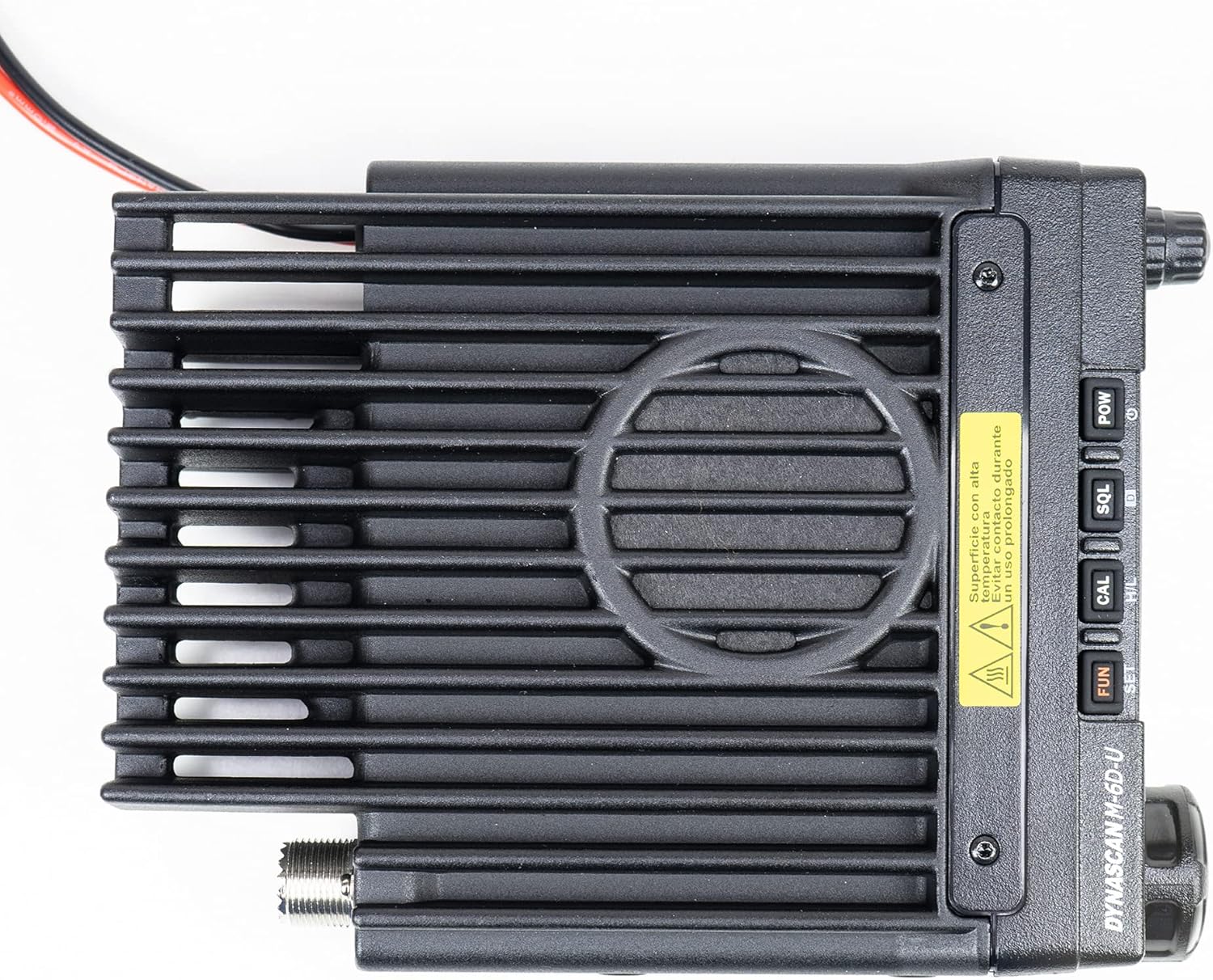
Kuva 4.1.3: Yläosa view of the DynaScan M-6D-V radio unit, emphasizing the heat sink design for thermal management.
4.2 Mikrofoni

Kuva 4.2.1: Lähikuva view of the DynaScan M-6D-V microphone, featuring a full DTMF keypad and function buttons.
The supplied microphone includes a DTMF keypad for direct frequency entry, channel selection, and accessing various functions. It also has a PTT (Push-To-Talk) button on the side.
5. Asennus
Follow these steps for initial setup of your DynaScan M-6D-V radio:
5.1 Radion asennus
- Choose a secure and accessible location for mounting the radio, ensuring adequate ventilation around the heat sink.
- Käytä toimitettua kiinnitystelinettä mallina porauskohtien merkitsemiseen.
- Poraa ohjausreiät ja kiinnitä kiinnitysteline mukana toimitetuilla ruuveilla.
- Slide the radio into the bracket and secure it with the bracket screws.
5.2 Antenniliitäntä
Connect a suitable VHF antenna (136-174 MHz) to the SO-239 connector on the rear of the radio. Ensure the connection is tight to prevent signal loss and potential damage to the radio's final ampelävämpi stage.
5.3 Virtalähteen liitäntä
- Connect the supplied DC power cable to the power input on the rear of the radio.
- Connect the red wire to the positive (+) terminal of a 13.8 Vdc power supply and the black wire to the negative (-) terminal.
- Ensure the power supply can provide sufficient current for the radio's maximum output power (60W).
- Varoitus: Incorrect polarity or insufficient power supply can damage the radio.
5.4 Mikrofoniliitäntä
Plug the microphone's RJ-45 connector into the corresponding jack on the front panel of the radio.
6. Käyttöohjeet
6.1 Virta päälle/pois ja äänenvoimakkuuden säätö
- Virta päälle: Paina ja pidä painettuna POW -painiketta etupaneelissa.
- Virta pois: Paina ja pidä painettuna POW painiketta uudelleen.
- Äänenvoimakkuus: Rotate the outer knob (Volume) on the front panel clockwise to increase volume, counter-clockwise to decrease.
6.2 Kohinasalvan säätö
The squelch function mutes the speaker when no signal is received, eliminating background noise.
- Adjust Squelch: Rotate the inner knob (Squelch) on the front panel. Turn it clockwise until the background noise disappears. Turn it counter-clockwise to open the squelch and hear all signals, including noise.
6.3 Kanavan ja taajuuden valinta
The radio supports both VFO (Variable Frequency Oscillator) mode for direct frequency input and Memory Channel mode for pre-programmed channels.
- Vaihda tiloja: Paina VFO/MR button on the microphone or the corresponding function on the front panel.
- VFO-tila: Use the channel selector knob on the front panel or the microphone keypad to enter frequencies directly.
- Memory Channel Mode: Rotate the channel selector knob to cycle through the 200 programmable channels.
6.4 Frequency Step
The frequency step determines the increment when tuning. Available steps are 12.5 KHz, 20 KHz, and 25 KHz.
- Change Step: Refer to the programming software manual or the radio's menu system for step adjustment.
6.5 CTCSS/DCS-äänet
CTCSS (Continuous Tone-Coded Squelch System) and DCS (Digital Coded Squelch) tones are used to filter unwanted signals and allow private group communication. The radio supports 50 CTCSS and 1024 DCS codes.
- Setting Tones: Access the menu system (usually via the HAUSKAA or SARJA button) to select and set the desired CTCSS or DCS codes for both transmit and receive.
6.6 Skannaus
The scanning function allows the radio to automatically search for active signals across frequencies or memory channels.
- Activate Scan: Paina SCN button on the microphone or the corresponding function on the front panel.
- Stop Scan: Paina SCN again or the PTT button.
6.7 Aikakatkaisuajastin (TOT)
The TOT feature prevents excessively long transmissions by automatically stopping transmission after a pre-set time. This protects the radio from overheating and ensures fair use of the channel.
- Setting TOT: The TOT duration is typically configured via the programming software.
6.8 Varatun kanavan lukitus (BCL)
BCL prevents transmission on a channel that is already in use, avoiding interference with ongoing conversations.
- Enable/Disable BCL: This feature is usually enabled or disabled through the radio's menu or programming software.
6.9 Korkean/matalan tehon valinta
The radio offers selectable transmit power levels (Hi/Low) to conserve battery power and reduce interference when full power is not required.
- Switch Power: Paina H / L button on the front panel or microphone. The display will indicate the current power setting.
6.10 Muut ominaisuudet
- Scrambler: Provides basic voice privacy. Activation is typically via a menu setting or a dedicated function key.
- Keskustele: Allows direct communication between two radios on a repeater output frequency, bypassing the repeater.
- DTMF Lock: Locks the DTMF keypad on the microphone to prevent accidental key presses.
- Kompanderi: Compresses the audio signal during transmission and expands it during reception, improving audio clarity in noisy environments.
- Alphanumeric Display: The LCD screen displays channel names, frequencies, and status icons.
- Programmable by Software: Advanced settings, channel programming, and feature customization are performed using dedicated PC software and a programming cable (sold separately).
7. Huolto
Proper maintenance ensures the longevity and reliable operation of your radio.
- Puhdistus: Puhdista radion ulkopinta pehmeällä, kuivalla liinalla. Pinttyneeseen likaan käytä hieman kuivaa liinaa.amp cloth with mild soap can be used, followed by a dry cloth. Do not use harsh chemicals or solvents.
- Antenni: Regularly check the antenna connection for tightness and ensure the antenna itself is in good condition.
- Sähköjohto: Inspect the power cable for any signs of damage or fraying.
- Varastointi: When not in use for extended periods, store the radio in a dry, cool place, away from direct sunlight and extreme temperatures.
8. Vianmääritys
If you encounter issues with your DynaScan M-6D-V, refer to the following common problems and solutions:
| Ongelma | Mahdollinen syy | Ratkaisu |
|---|---|---|
| Ei virtaa | Power cable disconnected; Blown fuse; Incorrect power supply voltage. | Check power cable connection; Replace fuse (if applicable); Verify power supply is 13.8 Vdc. |
| Ei ääntä kaiuttimesta | Äänenvoimakkuus liian alhainen; Kohinasalpa asetettu liian voimakkaalle; Ulkoinen kaiutin kytketty. | Increase volume; Adjust squelch level; Check external speaker connection or disconnect it. |
| Ei voi lähettää tai vastaanottaa | Antenna not connected; Incorrect frequency/channel; CTCSS/DCS mismatch; BCL enabled. | Connect antenna; Verify frequency/channel; Check CTCSS/DCS settings; Disable BCL. |
| Huono äänenlaatu | Weak signal; Antenna issue; Compander setting. | Check antenna and connections; Adjust squelch; Try enabling/disabling compander. |
If the problem persists after trying these solutions, please contact DynaScan customer support or a qualified service technician.
9. Tekniset tiedot
| Ominaista | Arvo |
|---|---|
| Taajuusalue | 136 - 174 MHz (VHF) |
| Kanavien lukumäärä | 200 |
| Turvakoodit | 1024 DCS / 50 CTCSS |
| Taajuus Vaihe | 12.5 / 20 / 25 KHz |
| Virtalähde | 13.8 Vdc |
| Käyttölämpötila | -20 - +60 astetta |
| Maksimikosteus | 90 % |
| Lähtöteho | 60W |
| Äänen lähtöteho | 2W |
| Paino | 1550 grammaa (1.55 kg) |
| Mitat (L x K x S) | 190 x 145 x 27 mm |
| Näyttö | LCD Alphanumeric |
| Ominaisuudet | Scrambler, Talk Around, Scanning, TOT, BCL, Squelch, Hi/Low Power, Programmable by software, DTMF Lock, Transmit Indicator, Compander |
10. Takuu ja tuki
DynaScan products are manufactured to high-quality standards. For specific warranty terms and conditions, please refer to the warranty card included with your product or visit the official DynaScan website. For technical support, service, or inquiries, please contact your authorized DynaScan dealer or customer service representative.