
Johdanto
This manual provides essential instructions for the safe and efficient operation of your Miroir M600 1080p Battery-Powered Projector. Please read this manual thoroughly before using the device and retain it for future reference.
Mitä laatikossa on
Varmista, että pakkauksessasi on kaikki alla luetellut tuotteet:
- Miroir M600 Projector
- HDMI kaapeli
- AC Adapter and Charger

Image: Contents of the Miroir M600 Projector package.
Tuote loppuview
The Miroir M600 is a compact, portable 1080p projector designed for various projection needs. Familiarize yourself with its components:
Edessä View

Kuva: Edessä view of the Miroir M600 Projector, showing the projection lens and ventilation grille.
Takaosa View ja satamat

Kuva: Takaosa view of the Miroir M600 Projector, highlighting the various input/output ports.
- 3.5 mm äänilähtö: Ulkoisten kaiuttimien tai kuulokkeiden kytkemiseen.
- USB-C Video Port: For video input from compatible USB-C devices.
- HDMI-portti: HDMI-yhteensopivien laitteiden videotuloon.
- USB-latausportti: Ulkoisten laitteiden lataamiseen.
- DC-virransyöttö: For connecting the AC adapter to power and charge the projector.
Asennus
1. Virran kytkeminen ja lataaminen
- Connect the AC adapter to the DC Power Input port on the projector and then to a power outlet. The projector can operate while charging.
- Press and hold the power button (location not specified in data, assume standard placement) for a few seconds until the projector powers on.
- The internal battery provides portable operation. Ensure it is sufficiently charged for use without the AC adapter.
2. Sijoittelu ja heijastaminen
Position the projector on a stable, flat surface or mount it on a compatible stand. Ensure the lens is unobstructed and pointed towards your desired projection surface (wall or screen).

Image: Miroir M600 Projector positioned on a stand for optimal projection.
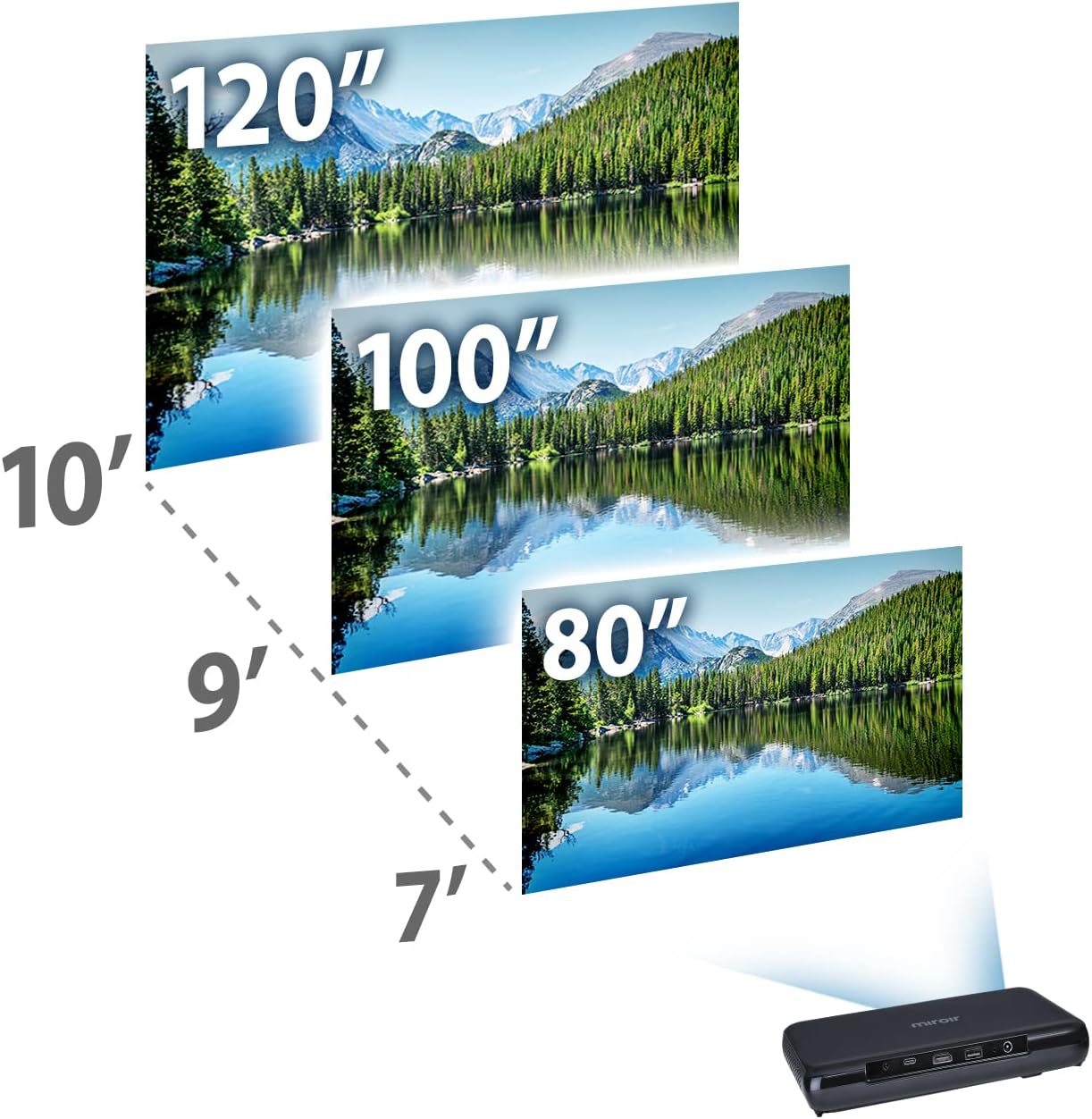
Image: Guide for projection distances to achieve various screen sizes (e.g., 7 feet for 80 inches, 10 feet for 120 inches).
Toiminnassa
1. Syöttölaitteiden kytkeminen
- HDMI: Connect an HDMI cable from your source device (laptop, streaming stick, game console) to the HDMI port on the projector.
- USB-C Video: For compatible devices, connect a USB-C cable from your source to the USB-C Video port on the projector.
2. Adjusting Image and Focus
The Miroir M600 features automatic keystone correction to adjust the image shape. For focus, manual adjustment may be required via a focus wheel (location not specified in data, assume standard placement near lens).
3. Äänilähtö
The projector includes a built-in 5-watt speaker. For enhanced audio, connect external speakers or headphones to the 3.5mm Audio Out jack.
4. Lamp Tilat
LED lamp offers two modes:
- Normaali tila: Jopa 10 000 tuntia käyttöaikaaamp elämää.
- ECO-tila: Jopa 10 000 tuntia käyttöaikaaamp life, providing extended usage and reduced power consumption.
Huolto
1. Projektorin puhdistaminen
- Linssi: Käytä pehmeää, nukkaamatonta liinaa, joka on erityisesti suunniteltu optisille linsseille. Älä käytä hankaavia puhdistusaineita tai liiallista voimaa.
- Ulkopuoli: Pyyhi projektorin ulkopinta pehmeällä, kuivalla liinalla. Vältä nestemäisten puhdistusaineiden käyttöä suoraan laitteessa.
- Ilmanvaihto: Varmista, että tuuletusritilät ovat puhtaat pölystä ja roskista ylikuumenemisen estämiseksi.
2. Akun hoito
- Akun optimaalisen käyttöiän saavuttamiseksi vältä akun usein tapahtuvaa täydellistä tyhjentymistä.
- Säilytä projektoria viileässä ja kuivassa paikassa, kun sitä ei käytetä pitkään aikaan.
Vianetsintä
If you encounter issues with your Miroir M600 projector, refer to the following common solutions:
- Ei kuvaa: Ensure the input source is correctly connected and selected. Check all cable connections.
- Epäselvä kuva: Adjust the focus manually. Ensure the projection surface is flat and the projector is stable.
- Ei ääntä: Verify that the volume is not muted on both the projector and the source device. If using external speakers, ensure they are properly connected and powered.
- Ylikuumeneminen: Varmista riittävä ilmanvaihto projektorin ympärillä. Älä tuki tuuletusaukkoja.
For more detailed troubleshooting steps, please consult the full user manual available for download (see Support section).
Tekniset tiedot
| Ominaisuus | Yksityiskohta |
|---|---|
| Tuotteen mitat | 9 x 5 x 1 tuumaa |
| Tuotteen paino | 1.6 kiloa |
| Tuotteen mallinumero | M600 |
| Paristot | 1 litiumpolymeeriakku (mukana) |
| Valmistaja | Miroir |
| Merkki | Miroir |
| Suositellut käyttötavat | Business |
| Erikoisominaisuus | Pico-kaiuttimet |
| Yhteystekniikka | USB, HDMI |
| Näytön resoluutio | 1920 x 1080 (1080p) |
| Lamp Life (Normal Mode) | Jopa 20,000 tuntia |
| Lamp Life (ECO Mode) | Jopa 30,000 tuntia |
| Sisäänrakennettu kaiutin | 5 wattia |
| Näkyvä näytön diagonaali | 120" / 305 cm |
Takuutiedot
Specific warranty details are not provided in this document. Please refer to the official Miroir website or the warranty card included with your product for comprehensive warranty terms and conditions.
Tuki & Ota yhteyttä
For further assistance, detailed instructions, or to contact customer support:
- Täysi käyttöopas: Kattava PDF-käyttöopas on ladattavissa tässä.
- Valmistaja Websivusto: Visit the official Miroir website for product registration, FAQs, and support resources.