
1. Johdanto
Thank you for choosing the PROXTEND X502 Full HD Webcam. This manual provides detailed instructions to help you set up, operate, and maintain your webcam for optimal performance. The X502 is designed to deliver clear 1080p video at 30 frames per second, featuring an omni-directional microphone and automatic low light correction for various lighting conditions.
2. Pakkauksen sisältö
Varmista, että pakkauksessasi on kaikki tarvittavat osat:
- PROXTEND X502 Full HD Webcam (PX-CAM007)
- Integrated Universal Mounting Clip
- Käyttöopas (tämä asiakirja)
3. Asennus
Follow these steps to set up your PROXTEND X502 Webnokka:
- Asennus Webnokka:
The webcam features an integrated universal mounting clip. You can place the webcam on top of your computer monitor, laptop screen, or a flat surface. Adjust the clip to securely hold the webcam in position. The webcam also supports mini tripod mounting (tripod not included).
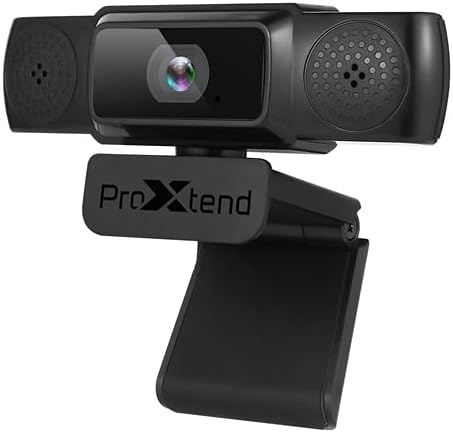
Image: The PROXTEND X502 Full HD Webcam shown with its universal mounting clip, suitable for monitors or flat surfaces.
- Yhdistäminen tietokoneeseen:
Kytke USB-kaapeli laitteen webkamera tietokoneen vapaana olevaan USB-porttiin. webcam is plug-and-play, meaning your operating system should automatically detect and install the necessary drivers. No additional software installation is typically required.
- Driver Installation Verification:
After connecting, allow a few moments for your computer to recognize the device. You can verify successful installation in your operating system's Device Manager (Windows) or System Information (macOS) under 'Cameras' or 'Imaging Devices'.
4. Käyttöohjeet
Kerran webcam is set up, you can begin using it with various applications:
- Valitsemalla Webnokka:
Open your preferred video conferencing, streaming, or recording application (e.g., Zoom, Microsoft Teams, Skype, OBS Studio). Navigate to the application's video and audio settings. Select "PROXTEND X502" as your camera and microphone input device.

Kuva: Edessä view of the PROXTEND X502 Full HD Webcam, highlighting the lens and integrated microphones.
- Videon laatu:
The webcam automatically adjusts for optimal image quality, including auto-focus and auto low light correction. Ensure adequate lighting for the best video performance. The 1920x1080p resolution at 30fps provides clear and smooth video.
- Äänenlaatu:
The integrated omni-directional microphone captures sound from all directions. Position yourself appropriately to ensure your voice is clearly picked up. Most applications allow you to adjust microphone input levels in their audio settings.
5. Ominaisuudet
Key features of the PROXTEND X502 Full HD Webcam include:
- 1 / 2.7 tuuman CMOS-kuvakenno
- 2 megapikseliä
- Resolution: 1920x1080 at 30 frames per second
- Monisuuntainen mikrofoni
- Yleiskäyttöinen kiinnike
- Mini Tripod Support
- Automaattinen heikon valon korjaus
6. Tekniset tiedot
Detailed technical specifications for the PROXTEND X502 Full HD Webnokka:

Image: A visual representation of the PROXTEND X502 Full HD Webcam's key features and technical specifications.
| Ominaisuus | Erittely |
|---|---|
| Kuvan anturi | 1/2.7" CMOS Image Sensor |
| megapikseliä | 2 MP |
| Maksimiresoluutio | 1920x1080 |
| Videon resoluutio | 1920x1080 |
| Suurin FPS | 30 fps |
| Videon dekoodausmuoto | H.264/MJPG |
| Valotustila | Auto |
| Valkotasapaino | Auto |
| Saada | Auto |
| Heikon valon kompensointi | Auto |
| Viewkulma | 77° |
| Polttoväli | 10 cm äärettömään |
| Tarkennustyyppi | Auto |
| Mikrofoni | Ympärisäteilevä |
| Ääni S.ampling korko | 1-kanavainen 16-bittinen 16K 32K 44.1K 48K XNUMXK |
| Äänimuoto | PCM, yhteensopiva UAC 1.0 |
| Käyttöliittymä | USB 2.0 |
| Kaapelin pituus | 1.5 m |
| Yhteensopiva käyttöjärjestelmä | Windows XP, Windows 7 (32bit/64bit), Windows 8, Windows 10, Android V5.0 or higher OS, MAC OS 10.6 or higher |
| Tuotteen mitat | 12.7 x 7.62 x 5.08 cm |
| Tuotteen paino | 453.59 g |
7. Vianmääritys
If you encounter issues with your PROXTEND X502 Webcam, try the following solutions:
- Ei kuvaa/videota:
- Varmista, että USB-kaapeli on kytketty kunnolla molempiin webkamera ja tietokoneesi.
- Kokeile toista tietokoneesi USB-porttia.
- Käynnistä tietokone uudelleen.
- Check your application's settings to ensure the PROXTEND X502 is selected as the video input.
- Verify that no other application is currently using the webnokka.
- Ei ääntä/mikrofoni ei toimi:
- Ensure the PROXTEND X502 is selected as the microphone input in your application's audio settings.
- Tarkista tietokoneesi ääniasetukset ja varmista, että mikrofoni on käytössä eikä mykistetty.
- Adjust the microphone input level in your system or application settings.
- Huono videon laatu:
- Ensure sufficient lighting in your environment.
- Puhdista webcam lens gently with a soft, lint-free cloth.
- Check your internet connection speed if streaming, as bandwidth can affect video quality.
8. Huolto
Varmistaaksesi pitkäikäisyyden ja optimaalisen suorituskyvyn webnokka:
- Puhdistus: Pyyhi varovasti webcam lens with a soft, dry, lint-free cloth. Avoid using harsh chemicals or abrasive materials.
- Varastointi: Kun et käytä sitä, säilytä webkamera puhtaassa, kuivassa paikassa, poissa äärimmäisistä lämpötiloista ja suorasta auringonvalosta.
- Käsittely: Vältä pudottamista webcam or subjecting it to strong impacts.
9. Takuu ja tuki
The PROXTEND X502 Full HD Webkameran mukana tulee 7 vuoden takuu, ensuring peace of mind regarding your purchase. For warranty claims, technical support, or any inquiries not covered in this manual, please refer to the contact information provided with your product packaging or visit the official PROXTEND websivusto.
10. Vaatimustenmukaisuustiedot
This device complies with relevant regulatory standards for electronic equipment. For detailed compliance information, please refer to the product packaging or the official PROXTEND websivusto.