
1. Johdanto
Thank you for choosing the MEDION X64060 Party Speaker. This manual provides essential information for the safe and efficient use of your device. Please read it thoroughly before operating the speaker and keep it for future reference.
The MEDION X64060 is a versatile party speaker designed for various entertainment needs, featuring powerful audio output, integrated DJ and karaoke functions, and dynamic light effects.
2. Turvallisuusohjeet
- Lue kaikki ohjeet huolellisesti ennen käyttöä.
- Pidä kaiutin poissa vedestä, kosteudesta ja äärimmäisistä lämpötiloista.
- Älä tuki tuuletusaukkoja.
- Use only the power cord supplied with the device.
- Älä yritä korjata laitetta itse. Jätä kaikki huoltotyöt pätevän henkilöstön tehtäväksi.
- Varmista, että kaiutin on asetettu vakaalle ja tasaiselle alustalle kaatumisen estämiseksi.
- Vältä pitkäaikaista altistumista suurille äänenvoimakkuuksille kuulovaurioiden estämiseksi.
3. Pakkauksen sisältö
Tarkista pakkauksesta seuraavat tuotteet:
- MEDION X64060 Party Speaker
- 1 x mikrofoni
- Virtajohto
- Käyttöopas (tämä asiakirja)
4. Tuote ohiview
Familiarize yourself with the main components and controls of your MEDION X64060 Party Speaker.

Image: Control Panel Overview
This image displays a close-up of the speaker's top control panel, showing various knobs and buttons for audio adjustments, DJ functions, and input selections.

Image: Speaker Dimensions and Connections
This image illustrates the overall dimensions of the speaker (980mm height, 350mm width, 340mm depth) and highlights the available connection ports: 1x USB, 2x Microphone (6.3 mm), 1x Guitar (6.3 mm), 1x Audio Input (3.5 mm), and 1x Audio Input (RCA).
4.1 Etupaneeli
- Kaiuttimet: Two main speakers with integrated LED lighting.
- Valotehosteet: Dynamic LED lights that synchronize with music.
4.2 Yläohjauspaneeli
- Virtapainike: Kaiuttimen kytkeminen päälle/pois.
- Äänenvoimakkuuden säätimet: Main volume, microphone volume (MIC1 VOL, MIC2 VOL), guitar volume (GUITAR VOL), and echo volume (ECHO VOL).
- Taajuuskorjain (EQ): 5-band equalizer for sound adjustment.
- Tulovalitsimet: Buttons for Bluetooth, USB, AUX.
- DJ Functions: Cross-fader, scratch wheel, drum pads (HI-HAT, SNARE, BASS DRUM, CYMBAL, TOM1, TOM2), and record function.
- USB-portti: USB-toistoa varten.
- Mikrofonitulot: Two 6.3 mm jack inputs.
- Kitaratulo: One 6.3 mm jack input.
- AUX-tulo: 3.5 mm jack input.
4.3 Takapaneeli
- Tehon syöttö: Virtajohdon kytkemistä varten.
- RCA-äänitulo: Additional audio input.
4.4 Liikkuvuusominaisuudet
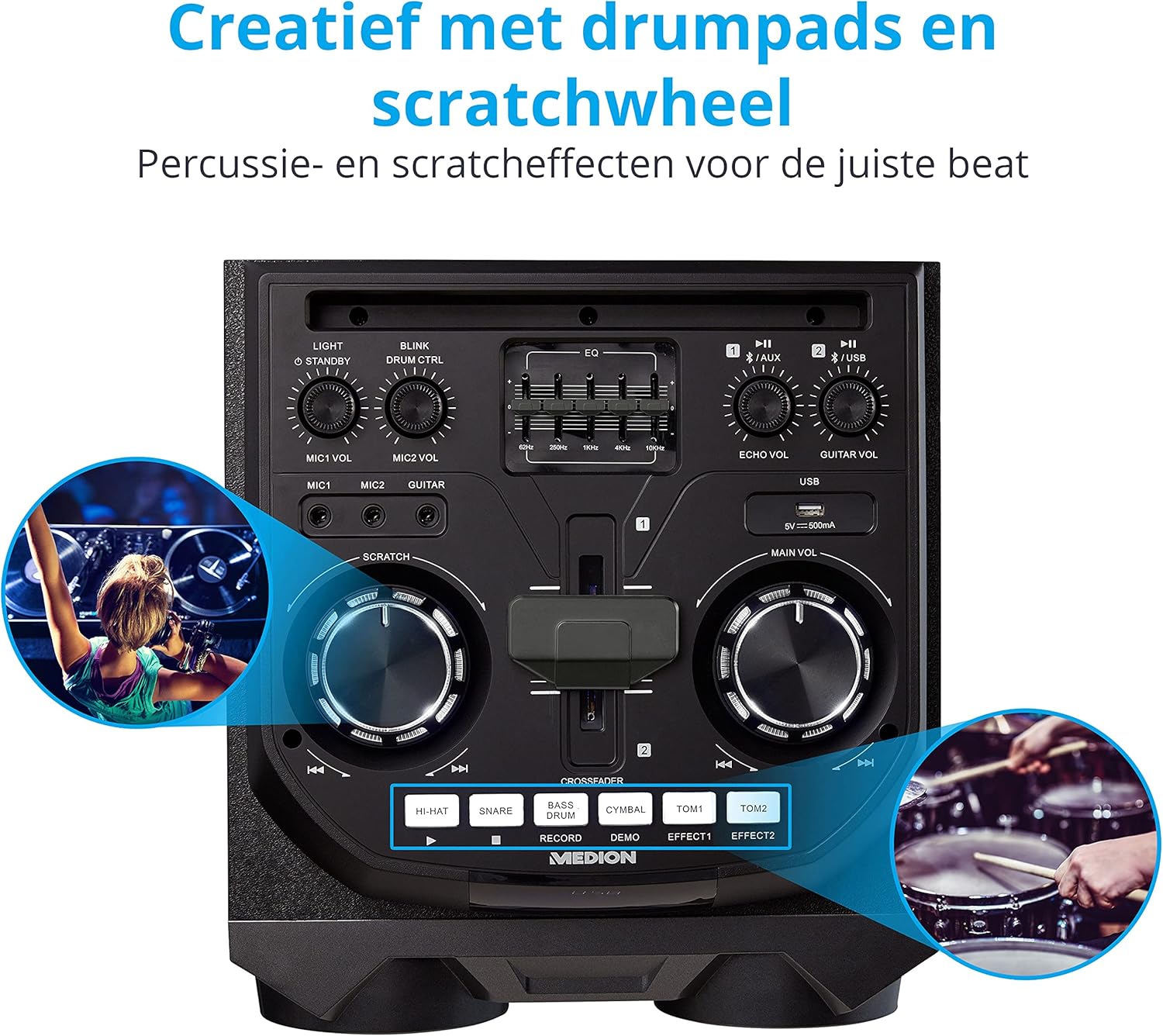
Image: Integrated Wheels for Portability
This image shows the back of the speaker, highlighting the integrated wheels at the bottom, designed for easy transport.
- Integroidut pyörät: For easy transportation of the speaker.
- Kahvat: Ergonomic handles for lifting and moving.
5. Asennus
5.1 Alkuperäinen sijoittelu
Aseta kaiutin vakaalle ja tasaiselle alustalle. Varmista, että laitteen ympärillä on riittävä ilmanvaihto. Vältä sen sijoittamista lämmönlähteiden lähelle tai suoraan auringonvaloon.
5.2 Virtaliitäntä
- Liitä mukana toimitettu virtajohto kaiuttimen takana olevaan virransyöttöön.
- Kytke virtajohdon toinen pää sopivaan pistorasiaan.
- Press the power button on the top control panel to turn on the speaker. The LED lights will illuminate.
5.3 Connecting a Microphone or Guitar
For karaoke or live instrument performance:
- Plug your microphone(s) into the MIC1 or MIC2 6.3 mm jack inputs on the top panel.
- Plug your guitar into the GUITAR 6.3 mm jack input on the top panel.
- Adjust the respective volume knobs (MIC1 VOL, MIC2 VOL, GUITAR VOL) and ECHO VOL to your preference.
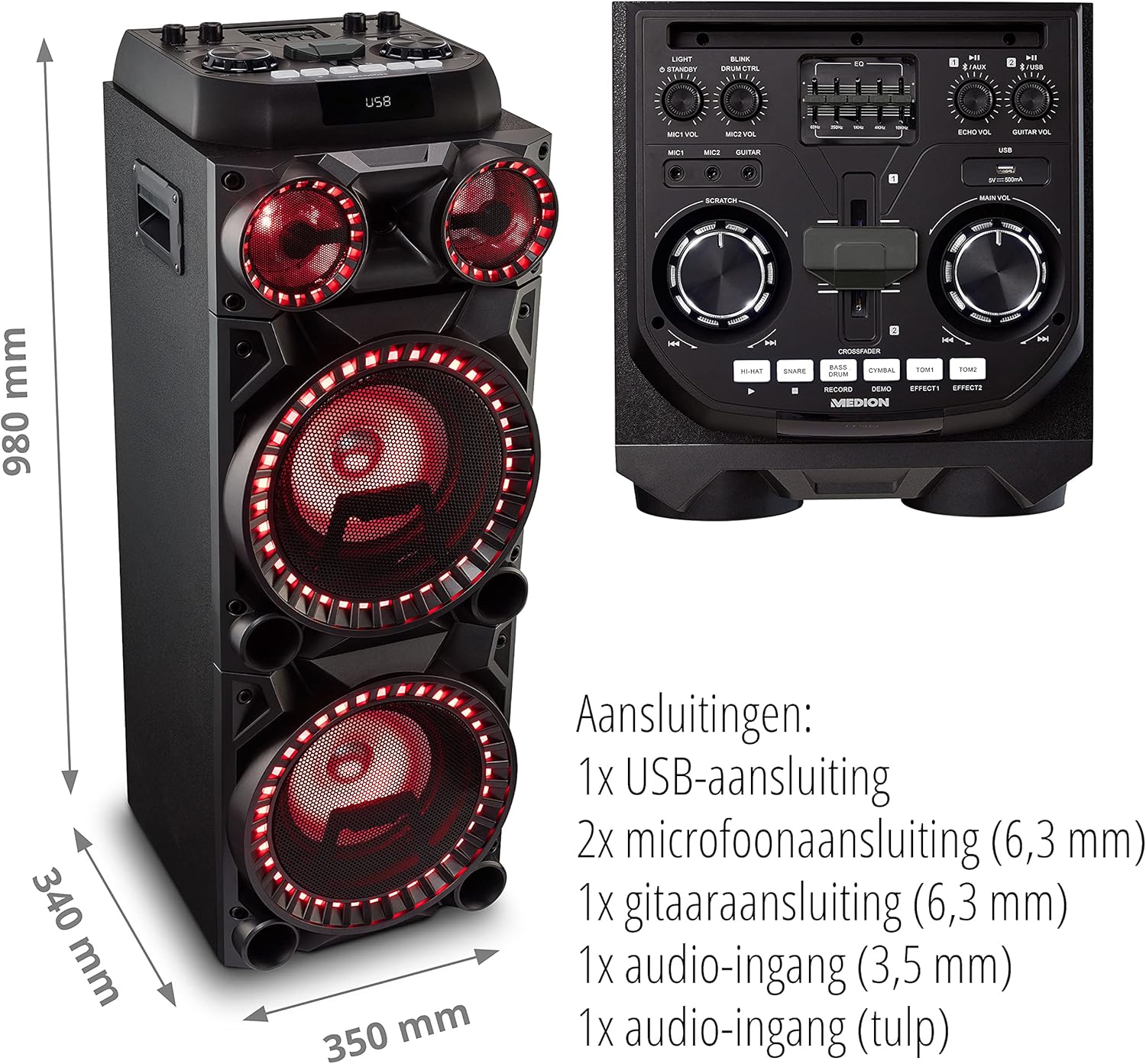
Image: Microphone and Guitar Connection for Karaoke
This image shows individuals enjoying karaoke, demonstrating the use of a microphone connected to the speaker for singing.
6. Käyttöohjeet
6.1 Bluetooth-yhteys
- Paina Bluetooth button on the control panel. The Bluetooth indicator will blink.
- Ota Bluetooth käyttöön älypuhelimellasi, tabletillasi tai muulla äänilaitteellasi.
- Etsi "MEDION X64060" in your device's Bluetooth settings and select it to pair.
- Once connected, the Bluetooth indicator will stop blinking and remain solid. You can now play music wirelessly.

Image: Bluetooth Music Playback
This image shows a smartphone displaying a music application, indicating a wireless Bluetooth connection to the speaker for audio streaming.
6.2 USB-toisto
- Aseta ääntä sisältävä USB-muistitikku files yläpaneelin USB-porttiin.
- Paina USB -painiketta valitaksesi USB-tilan.
- The speaker will automatically detect and begin playing audio files from the USB drive. Use the playback controls (play/pause, skip track) on the control panel.
6.3 AUX-tulo
- Connect an external audio device (e.g., MP3 player, laptop) to the 3.5 mm AUX input or the RCA audio input on the rear panel using an appropriate audio cable (not included).
- Paina AUX -painiketta valitaksesi AUX-tilan.
- Play audio from your connected device. The speaker will output the sound.
6.4 DJ-toiminnot
The MEDION X64060 includes various DJ features for creative sound mixing.

Image: DJ Function Controls
Tämä kuva tarjoaa yksityiskohtaisen view of the DJ control section, including the cross-fader, scratch wheel, and various drum pads.
- Ristihäivytin: Use the cross-fader to smoothly transition between different audio sources or effects.
- Scratch Wheel: Manipulate the scratch wheel for classic DJ scratch effects.
- Rumputyynyt: Paina HEI HATTU, SNARE, BASSORUMPU, SYMBAALI, TOM1, ja TOM2 pads to add drum sound effects to your music.
- Tallennustoiminto: Käytä TALLENTAA button to record your drum pad sequences.
6.5 Karaoke-toiminto
Connect a microphone as described in section 5.3. Play your chosen karaoke track via Bluetooth, USB, or AUX. Adjust the microphone and echo volumes for the desired effect.
6.6 Valotehosteet
The speaker features dynamic LED light effects that respond to the music. These lights automatically activate when the speaker is on. There may be a dedicated button (e.g., "LIGHT" or "BLINK") to control or cycle through different light modes, refer to the control panel for specific options.

Image: Dynamic Blue Light Effects
This image showcases the speaker with its blue LED lights illuminated, demonstrating the atmospheric light effects.

Image: Dynamic Red Light Effects
This image shows the speaker with its red LED lights illuminated, highlighting another color option for the atmospheric light effects.
7. Huolto
7.1 Puhdistus
- Irrota kaiutin aina pistorasiasta ennen puhdistamista.
- Pyyhi ulkopinnat pehmeällä, kuivalla liinalla.
- Älä käytä nestemäisiä puhdistusaineita, aerosoleja tai hankaavia materiaaleja, sillä ne voivat vahingoittaa pintaa tai sisäisiä osia.
7.2 Varastointi
When not in use for extended periods, store the speaker in a cool, dry place, away from direct sunlight and extreme temperatures. Cover the unit to protect it from dust.
8. Vianmääritys
| Ongelma | Mahdollinen syy | Ratkaisu |
|---|---|---|
| Ei virtaa | Power cord not connected properly; Power outlet not working. | Ensure the power cord is securely plugged into both the speaker and a working wall outlet. Test the outlet with another device. |
| Ei ääntä | Volume too low; Incorrect input selected; Device not paired (Bluetooth); Cable not connected (AUX/Guitar/Mic). | Increase the main volume and individual input volumes. Select the correct input source (Bluetooth, USB, AUX). Re-pair Bluetooth device. Check all cable connections. |
| Bluetooth-yhteys epäonnistuu | Kaiutin ei ole pariliitostilassa; Laite liian kaukana; Häiriöitä. | Ensure the speaker is in Bluetooth pairing mode (blinking indicator). Move your device closer to the speaker. Avoid obstacles and other wireless devices. |
| Mikrofoni/kitara ei toimi | Äänenvoimakkuus liian alhainen; Kaapeli viallinen; Väärä syöttö. | Increase MIC/GUITAR VOL. Check microphone/guitar cable. Ensure the instrument is properly connected. |
9. Tekniset tiedot
| Merkki | MEDION |
| Mallinumero | X64060 | MD44060 |
| Lähtöteho | 2 x 100 W RMS (2 x 1000 W max. music output power) |
| Yhteystekniikka | Bluetooth 5.0, USB, AUX (3.5mm, RCA) |
| Äänitulot | 2 x Microphone (6.3 mm), 1 x Guitar (6.3 mm), 1 x AUX (3.5 mm), 1 x RCA |
| Taajuuskorjain | 5-kaistainen |
| Väri | Musta |
| Materiaali | Muovi |
| Tuotteen mitat (P x L x K) | 38.8 x 35 x 101 cm |
| Tuotteen paino | 15 kg |
| Asennustyyppi | Lattia seisoo |
| Virtalähde | Johdollinen sähkö |
| Yhteensopivat laitteet | Kannettava tietokone, älypuhelin |
10. Takuu ja tuki
Takuutietoja ja teknistä tukea varten katso tuotteen mukana toimitettu takuukortti tai käy virallisella MEDION-sivustolla. websivusto. Säilytä ostokuittisi mahdollisten takuuvaatimusten varalta.
MEDIONin asiakaspalvelu: For assistance, please contact MEDION customer support through their official channels. Contact details can typically be found on the MEDION websivustolla tai tuotteen pakkauksessa.


