
Johdanto
Thank you for choosing the Renkforce RF-SBS-500 2D Wired Barcode Scanner. This device is designed for efficient and reliable scanning of both 1D and 2D barcodes from various surfaces, including paper and smartphone screens. Its omnidirectional scanning capability and hands-free operation make it suitable for a wide range of applications. This manual provides essential information for the proper setup, operation, and maintenance of your scanner.
Turvallisuusohjeet
- Älä altista skanneria äärimmäisille lämpötiloille, kosteudelle tai suoralle auringonvalolle.
- Vältä skannerin pudottamista tai sen altistamista voimakkaille iskuille.
- Älä yritä purkaa tai muokata skanneria. Tämä mitätöi takuun.
- Keep the scanning window clean to ensure optimal performance. Use a soft, dry cloth.
- Ensure the USB cable is connected securely to prevent accidental disconnection.
Pakkauksen sisältö
- Renkforce RF-SBS-500 2D Wired Barcode Scanner
- Integrated USB-A Cable
- Käyttöopas (tämä asiakirja)
Asennus
Follow these steps to set up your Renkforce RF-SBS-500 barcode scanner:
- Skannerin purkaminen pakkauksesta: Poista skanneri varovasti pakkauksestaan.
- Yhdistä tietokoneeseen: Plug the integrated USB-A cable from the scanner into an available USB port on your desktop or laptop computer.
- Ohjaimen asennus: The scanner is typically plug-and-play. Your operating system (Windows, macOS, Linux) should automatically detect and install the necessary drivers. Wait for the installation to complete.
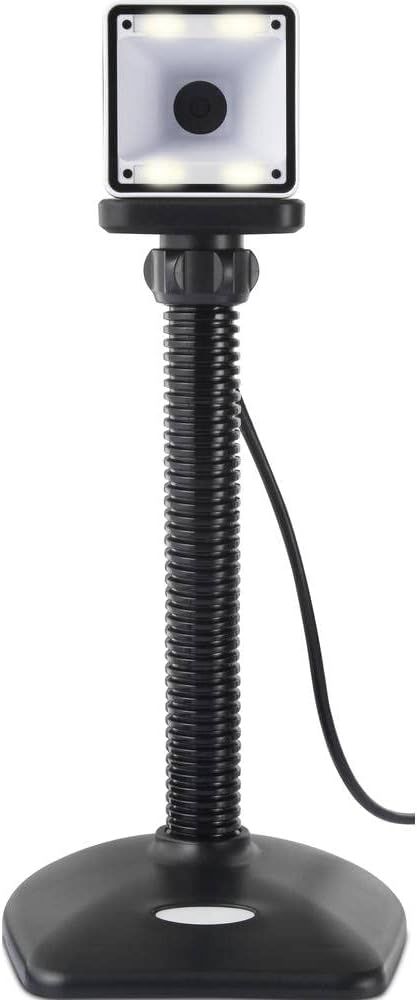
- Sijoitus: Place the scanner on a stable, flat surface. The flexible neck allows for adjustment of the scanning head angle for optimal positioning.

Skannerin käyttö
The Renkforce RF-SBS-500 is designed for ease of use with its omnidirectional and hands-free capabilities.
- Virta päälle: Once connected via USB, the scanner will power on automatically. The LED indicators on the scanner head may illuminate briefly.
- Viivakoodin skannaus: Position the barcode within the scanning area of the scanner head. The scanner will automatically detect and read the barcode.
- Visuaalinen ja kuultava palaute: Upon successful scanning, the integrated buzzer will emit a short beep, and the LED display on the scanner will flash or change color, indicating a successful read.
- Omnidirectional Reading: The scanner can read barcodes regardless of their orientation, eliminating the need to align the barcode precisely.
- Hands-Free Mode (Presentation Mode): The scanner operates continuously in a presentation mode, allowing you to simply pass items with barcodes in front of the scanning window without pressing any buttons. This saves time and improves workflow efficiency.
- Tuetut viivakoodit: The scanner supports both 1D (e.g., EAN, UPC, Code 39) and 2D (e.g., QR Code, Data Matrix, PDF417) barcode types.
Huolto
Asianmukainen huolto varmistaa skannerisi pitkän käyttöiän ja optimaalisen suorituskyvyn.
- Skannausikkunan puhdistaminen: Puhdista skannausikkuna säännöllisesti pehmeällä, nukkaamattomalla liinalla. Pinttyneeseen likaan pyyhi se kevyesti.ampKostuta liina vedellä tai miedolla, hankaamattomalla puhdistusaineella. Älä suihkuta puhdistusainetta suoraan skanneriin.
- Yleinen puhdistus: Pyyhi skannerin ulkopinta kuivalla tai hieman kostealla liinalla.amp kangas. Vältä kovien kemikaalien tai hankaavien materiaalien käyttöä.
- Varastointi: Kun skanneria ei käytetä, säilytä sitä puhtaassa, kuivassa paikassa, poissa suorasta auringonvalosta ja äärimmäisistä lämpötiloista.
Vianetsintä
Jos skannerissasi ilmenee ongelmia, katso seuraavat yleiset ongelmat ja ratkaisut:
| Ongelma | Mahdollinen syy | Ratkaisu |
|---|---|---|
| Skanneri ei käynnisty. | USB cable not connected properly or faulty USB port. | Ensure the USB cable is firmly connected to both the scanner and the computer. Try a different USB port. |
| Skanneri ei lue viivakoodeja. | Barcode damaged, scanning window dirty, or incorrect barcode type. | Check the barcode for damage. Clean the scanning window. Ensure the barcode type is supported (1D/2D). Adjust the distance and angle of the barcode to the scanner. |
| Ei piippausta tai LED-palautetta skannauksen jälkeen. | Barcode not read successfully. | Refer to the "Scanner does not read barcodes" solution. If the issue persists, contact support. |
| Skannatut tiedot näkyvät väärin. | Keyboard layout mismatch or software issue. | Ensure your computer's keyboard layout matches the expected output. Test with a simple text editor. |
If the problem persists after trying these solutions, please contact Renkforce customer support.
Tekniset tiedot
| Ominaisuus | Erittely |
|---|---|
| Mallinumero | RF-4679568 |
| Skannausominaisuus | 1D- ja 2D-viivakoodit |
| Yhteystekniikka | USB-A (langallinen) |
| Skannausnopeus | 60 kuvaa sekunnissa |
| Skannaustila | Omnidirectional, Hands-free (Presentation Mode) |
| Palaute | Integrated Buzzer, LED Display |
| Yhteensopivat laitteet | Desktop Computer, Laptop, Smartphone (via appropriate adapter if needed) |
| Mitat (P x L x K) | 150 x 5.2 x 5.2 cm |
| Tuotteen paino | 102 grammaa |
| Virtalähde | USB Powered |
| Alkuperämaa | Saksa |
Takuu ja tuki
Renkforce products are manufactured to high-quality standards and come with a standard warranty. Please refer to your purchase documentation or the Renkforce official websivustolta löydät alueesi erityiset takuuehdot.
For technical support, troubleshooting assistance, or warranty claims, please contact Renkforce customer service. Contact details can typically be found on the Renkforce websivustolla tai tuotepakkauksessa.