
Johdanto
Thank you for choosing the Newskill Manticore Gaming PC Case. This manual provides essential information for the proper installation, operation, and maintenance of your new PC chassis. Please read these instructions carefully before beginning the assembly process to ensure optimal performance and longevity of your components.
Tuote loppuview
The Newskill Manticore is an ATX mid-tower gaming PC case designed for high-performance builds. It features a mesh front panel for superior airflow, a tempered glass side panel to showcase your components, and four pre-installed 120mm ARGB fans for effective cooling and customizable aesthetics.
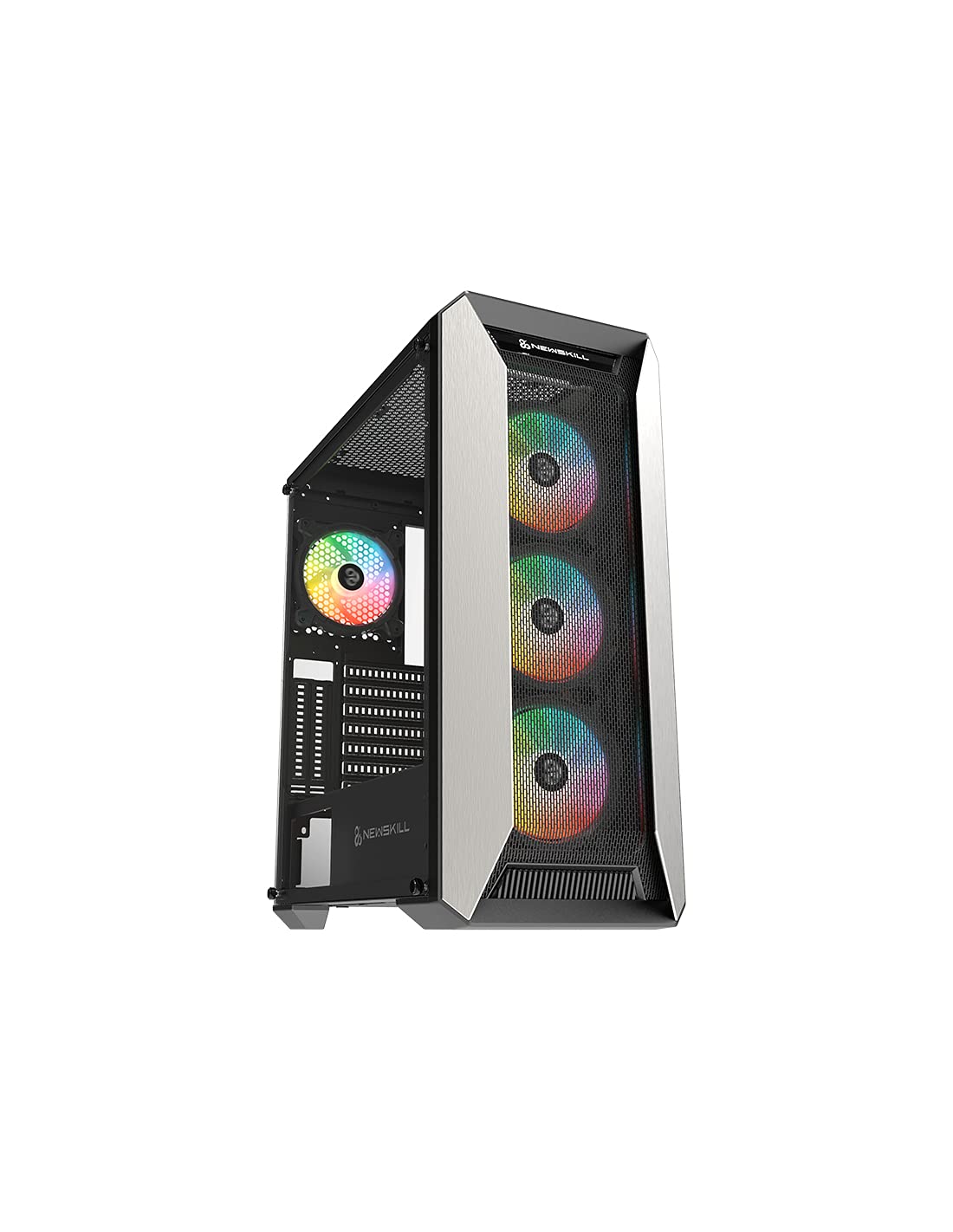
Kuva 1: Etuosa view of the Newskill Manticore Gaming PC Case, highlighting the mesh front and tempered glass side panel.
Tärkeimmät ominaisuudet:
- ATX Mid-Tower compatibility
- Mesh front panel for optimized airflow
- Karkaistu lasi sivupaneeli
- Four pre-installed 120mm ARGB fans
- Two removable dust filters
- USB 3.0 connectivity on the front panel
Asennus ja asennus
1. Purkaminen
Carefully remove the PC case from its packaging. Inspect for any damage that may have occurred during shipping. Retain the packaging for future transport or warranty claims.
2. Komponenttien tunnistaminen
Before installation, familiarize yourself with the case components and included accessories:
- Newskill Manticore PC Case
- Lisävarustelaatikko (ruuvit, nippusiteet, korotuspalat)
- Käyttöopas (tämä asiakirja)
3. Emolevyn asennus
- Irrota karkaistusta lasista valmistettu sivupaneeli irrottamalla siipiruuvit.
- Install the necessary motherboard standoffs into the motherboard tray.
- Carefully place your ATX motherboard onto the standoffs, aligning the screw holes.
- Kiinnitä emolevy mukana toimitetuilla ruuveilla.
4. Virtalähteen (PSU) asennus
- Locate the PSU mounting area at the bottom rear of the case.
- Slide your PSU into position from the rear of the case.
- Secure the PSU with screws from the exterior rear of the case.
5. Tallennusaseman asennus
The case supports various storage configurations. Refer to your specific drive type for mounting instructions (e.g., 2.5" SSDs, 3.5" HDDs).
6. Näytönohjaimen ja laajennuskortin asentaminen
Remove the necessary PCIe slot covers and install your graphics card or other expansion cards, securing them with screws.
7. Etupaneelin liitännät
Connect the front panel cables (USB 3.0, HD Audio, Power Switch, Reset Switch, Power LED, HDD LED) to the corresponding headers on your motherboard. Consult your motherboard manual for exact pin layouts.
8. Kaapelien hallinta
Hyödynnä emolevyn lokeron takana olevia kaapelien reititysaukkoja ja kiinnityspisteitä kaapeleiden hallintaan. Tämä parantaa ilmankiertoa ja ulkonäköä.
Käyttöohjeet
Virran kytkeminen päälle/pois
Press the power button located on the top panel of the case to turn on your system. To shut down, use the operating system's power-off function or press and hold the power button for several seconds for a forced shutdown (not recommended for regular use).
ARGB-valaistuksen ohjaus
The pre-installed ARGB fans can be controlled via your motherboard's ARGB software (if compatible) or a dedicated ARGB controller (if included or purchased separately). Refer to your motherboard or controller manual for specific instructions on changing lighting effects and colors.
Huolto
Pölysuodattimen puhdistus
The Newskill Manticore includes two removable dust filters (typically located on the top and bottom/front). Regularly clean these filters to maintain optimal airflow and prevent dust buildup inside your PC. Gently slide them out, clean with water and mild soap, or use a vacuum cleaner, and ensure they are completely dry before re-inserting.
Ulkopuolen puhdistus
Pyyhi ulkopinnat pehmeällä, damp liinalla. Vältä hankaavia puhdistusaineita tai liuottimia, jotka voivat vahingoittaa pintaa tai karkaistua lasia.
Vianetsintä
Ei Virtaa
- Varmista, että virtalähde on kytketty oikein pistorasiaan ja päällä.
- Verify all power cables from the PSU are correctly connected to the motherboard and components.
- Tarkista etupaneelin virtakytkimen liitännät emolevyyn.
Tuulettimet eivät pyöri / ARGB ei syty
- Confirm fan power cables are securely connected to the motherboard or fan controller.
- Check ARGB connections to the motherboard's ARGB header or dedicated controller.
- Ensure ARGB software or controller settings are correctly configured.
Poor Airflow / Overheating
- Clean dust filters regularly.
- Ensure no obstructions are blocking air intake or exhaust vents.
- Verify all fans are spinning correctly and oriented for optimal airflow.
For further assistance, please contact Newskill support.
Tekniset tiedot
| Ominaisuus | Yksityiskohta |
|---|---|
| Mallin nimi | Manticore |
| Mallinumero | 1102 |
| Asian tyyppi | Mid Tower |
| Emolevyn yhteensopivuus | ATX |
| Mitat (P x L x K) | 60 x 60 x 85 cm |
| Paino | 1 kg |
| Materiaali | Karkaistu lasi, metalli |
| Jäähdytysmenetelmä | Air (4x 120mm ARGB fans included) |
| Edessä olevat I / O-portit | USB 3.0, Audio Jacks, Power, Reset |
| Pölysuodattimet | 2 (irrotettava) |
| Suositeltu käyttö | Pelaaminen |
Takuutiedot
The Newskill Manticore PC Case comes with a 2 vuoden valmistajan takuu. This warranty covers defects in materials and workmanship under normal use. It does not cover damage caused by misuse, accident, modification, or unauthorized repair. Please retain your proof of purchase for warranty claims.
Tuki ja yhteydenotto
For technical support, troubleshooting assistance, or warranty inquiries, please visit the official Newskill website or contact their customer service department. You can find contact information on the Newskill websivusto: www.newskillgaming.com