
1. Johdanto
Thank you for choosing the Caliber HPG318DAB Portable DAB+/FM Radio. This device offers high-quality digital and analog radio reception, a compact design for portability, and convenient alarm functions. This manual provides essential information for the safe and efficient use of your radio.
2. Turvallisuustiedot
- Lue kaikki ohjeet huolellisesti ennen käyttöä ja säilytä ne myöhempää tarvetta varten.
- Älä altista laitetta sateelle, kosteudelle tai äärimmäisille lämpötiloille.
- Vältä sijoittamasta laitetta lämmönlähteiden lähelle tai suoraan auringonpaisteeseen.
- Älä pura tai yritä korjata laitetta itse. Jätä kaikki huoltotyöt pätevän henkilöstön tehtäväksi.
- Käytä ainoastaan mukana toimitettua latauskaapelia ja sovitinta.
- Pidä poissa lasten ulottuvilta.
3. Pakkauksen sisältö
Varmista, että pakkauksessa on kaikki tarvittavat osat:
- Caliber HPG318DAB Portable DAB+/FM Radio Unit
- Käyttöopas
- USB-latauskaapeli
- Virtalähde
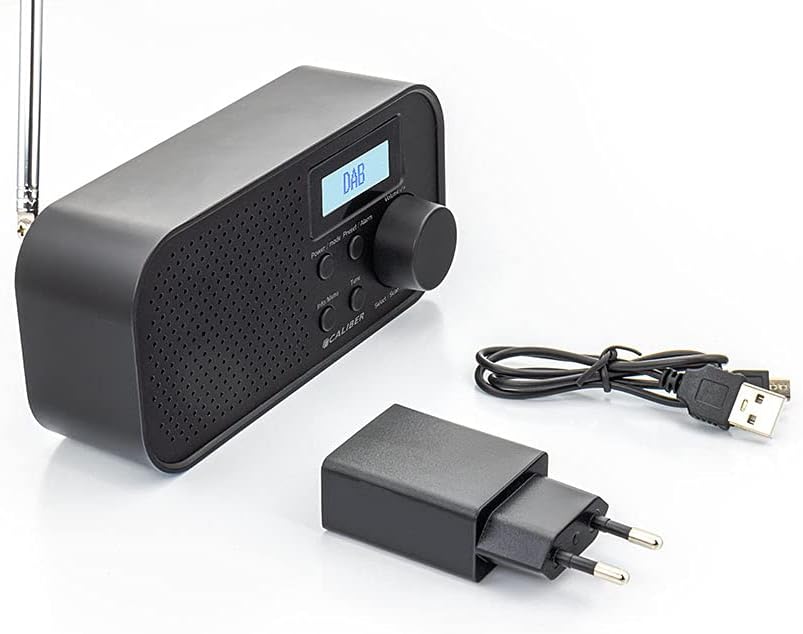
Image: Caliber HPG318DAB radio unit, USB charging cable, and power adapter.
4. Tuote ohiview
4.1 Etupaneelin säätimet
Kuva: Edessä view of the Caliber HPG318DAB radio, highlighting the LCD screen, speaker grille, and control buttons.
- LCD-näyttö: Displays station information, time, and menu options.
- Virta / tila-painike: Turns the radio on/off and switches between DAB+ and FM modes.
- Valikko/Tiedot-painike: Accesses menu settings and displays additional information.
- Preset/Alarm Button: Saves/recalls preset stations and sets alarm functions.
- Select/Scan Button: Confirms selections and initiates station scans.
- Torkkupainike: Vaimentaa hälytyksen tilapäisesti.
- Äänenvoimakkuuden säädin: Säätää äänenvoimakkuutta.
- Kaiuttimen säleikkö: Äänilähtö.
4.2 Takapaneelin liitännät

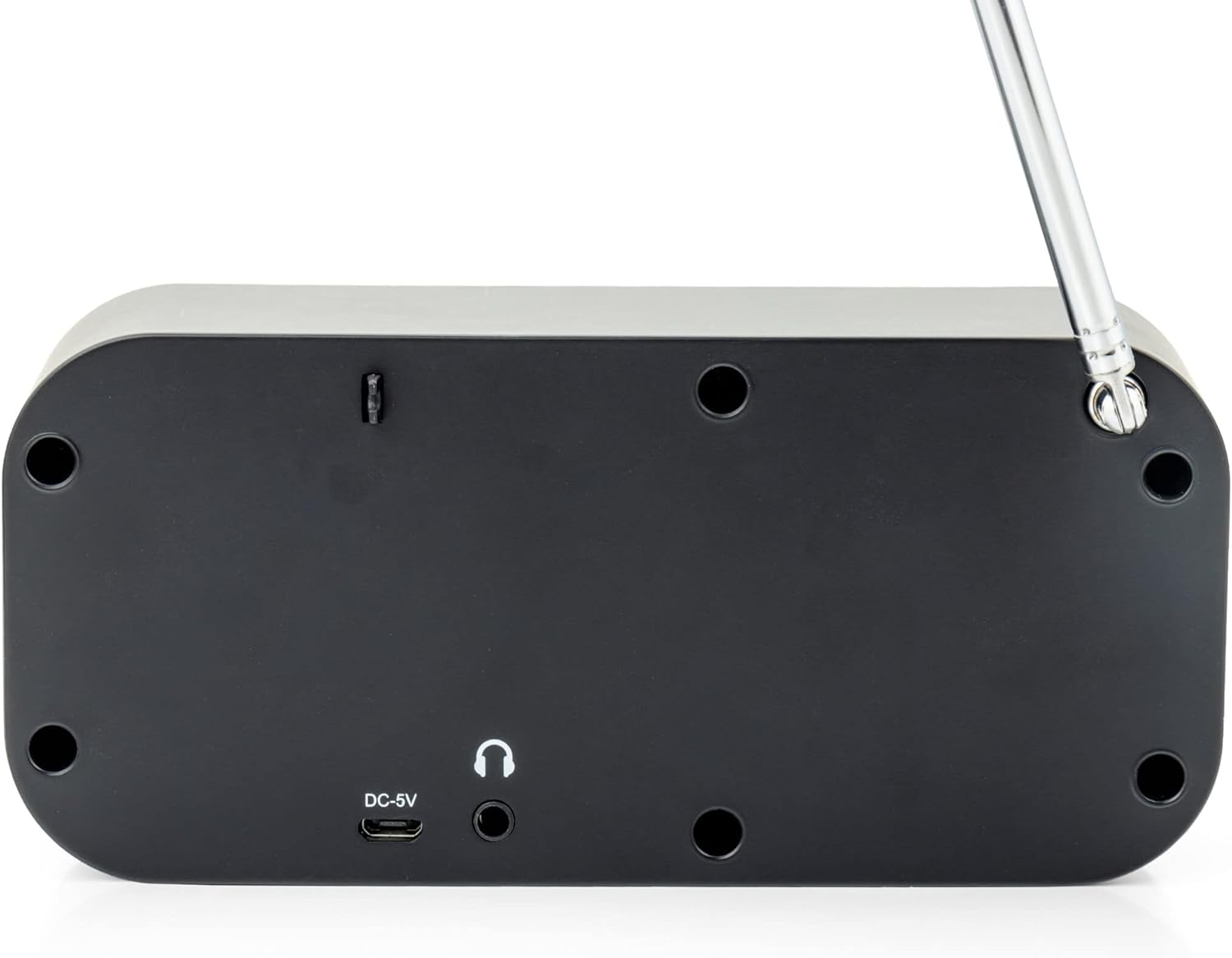
Kuva: Takaosa view of the Caliber HPG318DAB radio, showing the DC-5V charging port, 3.5mm headphone jack, and telescopic antenna.
- DC-5V Input: Liitä USB-latauskaapeli tähän.
- 3.5 mm: n kuulokeliitäntä: For connecting headphones or earphones.
- Teleskooppiantenni: Levitä optimaalisen radiovastaanoton saavuttamiseksi.
5. Asennus
5.1 Akun lataaminen
The Caliber HPG318DAB features a built-in rechargeable battery, providing up to 8 hours of playback on a full charge.
- Connect the small end of the provided USB charging cable to the DC-5V tulo radion takana olevaan porttiin.
- Connect the larger end of the USB cable to the provided power adapter.
- Liitä virtalähde tavalliseen pistorasiaan.
- The charging indicator on the LCD screen will show the charging status. Once fully charged, the indicator will change.
Note: It is recommended to fully charge the battery before first use.
5.2 Antennin säätö
For optimal radio reception, fully extend the telescopic antenna located on the rear of the device. Adjust its position to improve signal strength if reception is poor.
6. Käyttöohjeet
6.1 Virta päälle/pois ja tilan valinta
- Radion kytkemiseksi päälle ON, paina ja pidä painettuna Virta/tila -painiketta.
- Radion kytkemiseksi päälle POIS, paina ja pidä painettuna Virta/tila painiketta uudelleen.
- Vaihtaaksesi välillä DAB+ ja FM modes, short press the Virta/tila button while the radio is on. The current mode will be displayed on the LCD screen.
6.2 DAB+-radion käyttö
- Vaihda DAB+-tilaan käyttämällä Virta/tila -painiketta.
- The radio will automatically perform a full scan for available DAB+ stations upon first use or if no stations are found. To initiate a manual scan, press the Valikko/Tiedot button, navigate to 'Full Scan', and press Select/Scan.
- Käytä Äänenvoimakkuuden nuppi selataksesi saatavilla olevien asemien luetteloa. Paina Select/Scan aseman valitsemiseksi.
- To save a station as a preset (up to 10 presets): While listening to a station, press and hold the Preset/Alarm -painiketta. Käytä Äänenvoimakkuuden nuppi Valitse esiasetetun aseman numero (1–10) ja paina sitten Select/Scan vahvistaaksesi.
- To recall a preset station: Short press the Preset/Alarm -painiketta, käytä Äänenvoimakkuuden nuppi valitaksesi haluamasi esiasetetun numeron ja paina sitten Select/Scan.
- Paina Valikko/Tiedot -painiketta view additional information (e.g., program type, signal strength, time) provided by Radio Data System (RDS).
6.3 FM-radion käyttö
- Vaihda FM-tilaan käyttämällä Virta/tila -painiketta.
- To automatically scan for stations: Press and hold the Select/Scan -painiketta. Radio hakee asemat ja pysähtyy seuraavaan vahvaan asemaan.
- Manuaalinen viritys: Kierrä Äänenvoimakkuuden nuppi to adjust the frequency in small increments.
- To save a station as a preset (up to 10 presets): While listening to a station, press and hold the Preset/Alarm -painiketta. Käytä Äänenvoimakkuuden nuppi Valitse esiasetetun aseman numero (1–10) ja paina sitten Select/Scan vahvistaaksesi.
- To recall a preset station: Short press the Preset/Alarm -painiketta, käytä Äänenvoimakkuuden nuppi valitaksesi haluamasi esiasetetun numeron ja paina sitten Select/Scan.
- Paina Valikko/Tiedot -painiketta view additional information (e.g., station name, program type) provided by Radio Data System (RDS).
6.4 Äänenvoimakkuuden säätö
Kierrä suurta Äänenvoimakkuuden nuppi myötäpäivään äänenvoimakkuuden lisäämiseksi ja vastapäivään äänenvoimakkuuden vähentämiseksi.
6.5 Kuulokkeiden käyttö
Connect any standard 3.5mm headphones or earphones to the 3.5 mm kuulokeliitäntä on the rear of the radio for private listening. The internal speaker will automatically mute when headphones are connected.
6.6 Hälytystoiminnot
The radio includes alarm clock and sleep timer functions.
Herätyskellon asettaminen:
- Paina ja pidä painettuna Preset/Alarm button until the alarm setup menu appears.
- Käytä Äänenvoimakkuuden nuppi to navigate through options like Alarm 1, Alarm 2, Time, Source (Buzzer/DAB/FM), and Volume. Press Select/Scan jokaisen asetuksen vahvistamiseksi.
- Set the desired alarm time, choose your preferred alarm source (buzzer, DAB+ station, or FM station), and set the alarm volume.
- Ensure the alarm is set to 'On' in the menu.
Torkkutoiminnon käyttäminen:
Kun hälytys soi, paina Torkku button to temporarily pause the alarm for a short period (e.g., 9 minutes). The alarm will sound again after the snooze period.
Uniajastimen asettaminen:
- Paina Valikko/Tiedot -painiketta.
- Navigate to the 'Sleep' option using the Äänenvoimakkuuden nuppi ja paina Select/Scan.
- Select the desired sleep timer duration (e.g., 15, 30, 45, 60, 90 minutes, or Off). The radio will automatically turn off after the selected time.
7. Huolto
7.1 Puhdistus
To clean the radio, use a soft, dry cloth. Do not use abrasive cleaners, waxes, or solvents as they may damage the finish.
7.2 Varastointi
When not in use for extended periods, store the radio in a cool, dry place away from direct sunlight and extreme temperatures. Ensure the battery is partially charged before storage to maintain its lifespan.
7.3 Akun hoito
To prolong the life of the built-in Lithium-ion battery, avoid fully discharging it frequently. Charge the radio regularly, even if not in constant use.
8. Vianmääritys
| Ongelma | Mahdollinen syy | Ratkaisu |
|---|---|---|
| Radio ei käynnisty. | Akku on tyhjä. | Connect the radio to power using the USB cable and adapter to charge the battery. |
| Huono radiovastaanotto (DAB+/FM). | Antennia ei ole ojennettuna tai signaalialue on heikko. | Vedä teleskooppiantenni kokonaan ulos ja säädä sen asentoa. Kokeile siirtää radio toiseen paikkaan. |
| Ei ääntä. | Äänenvoimakkuus on liian alhainen tai kuulokkeet on kytketty. | Lisää äänenvoimakkuutta käyttämällä Äänenvoimakkuuden nuppi. Disconnect headphones if you want sound from the speaker. |
| Hälytys ei soi. | Alarm not set correctly or turned off. | Check alarm settings (time, source, volume, 'On' status) in the menu. |
9. Tekniset tiedot
| Ominaisuus | Erittely |
|---|---|
| Mallinumero | HPG318DAB |
| Mitat (P x L x K) | 15 x 4 x 6.5 cm |
| Paino | 255 g |
| Virtalähde | Battery-Powered (1 Lithium-ion battery required) |
| Akun kesto | Jopa 8 tuntia |
| Tuetut radiotaajuusalueet | DAB+, FM |
| Yhteystekniikka | AUX (for headphones), USB (for charging) |
| Maximum Speaker Output | 25 wattia |
| Materiaali | Muovi |
| Väri | Musta |
| Erikoisominaisuudet | Portable, Alarm Function, RDS, LCD Screen |
10. Takuu ja tuki
For warranty information and customer support, please refer to the documentation provided with your purchase or visit the official Caliber websivusto. Säilytä ostokuittisi mahdollisten takuuvaatimusten varalta.