
1. Tuote ohiview
The JENSEN J1CA9 is a single DIN digital multimedia receiver featuring an extra-large 9-inch LCD high-resolution adjustable touchscreen display. It offers seamless integration with Apple CarPlay and Android Auto, providing a smart and safe way to use your smartphone's features while driving. Key functionalities include Bluetooth hands-free calling and music streaming, backup camera input, and USB playback with fast charging capabilities.

Image: JENSEN J1CA9 9-inch Touchscreen Car Stereo Receiver. This image displays the main unit with its large 9-inch screen.
2. Tärkeimmät ominaisuudet
- 9-inch Touch Screen LCD (1024 x 600): High-resolution, responsive, and adjustable display.
- Apple CarPlay: Smarter, safer in-vehicle interface for iPhone, with Siri voice control for navigation, calls, texts, and music.
- Android Auto: Designed for safety, minimizing distractions with intuitive voice-controlled interface for navigation and media.
- Sisäänrakennettu Bluetooth: Hands-free calling with phonebook support and music streaming.
- Peruutuskameran tulo: RCA input for compatible backup cameras (BUCAM100J recommended, sold separately).
- USB-tulot: Edessä 2.1 Amp and Rear 1.5 Amp for fast charging and playback.
- Äänen mukauttaminen: 3 Pairs of 4V RCA preamp lähdöt (etu/taka/subwoofer), 8 taajuuskorjaimen esiasetusta (oletus, mukautettu, klassinen, rock, jazz, sähköinen, pop, pehmeä) ja aikaviiveen kohdistusominaisuudet.
- Teholähtö: 240 Watts (60 W x 4) MOSFET.

Kuva: Yliview of JENSEN J1CA9 features including 240 Watts power, 9-inch touchscreen, USB, Rear Camera Input, 4 Volt Preamp Outputs, and no CD/DVD player.
3. Asennus ja asennus
3.1 Fyysinen asennus
The J1CA9 is designed for single DIN installation. Ensure your vehicle's dash opening is compatible. The adjustable touchscreen allows for flexible positioning to optimize viewja pääsy.

Kuva: Takaosa view of the JENSEN J1CA9 showing connections for CarPlay & Android Auto Input, Power Harness, Radio Antenna, Input/Output Harness, and External Microphone.
3.2 Näytön säätö
The 9-inch screen offers multiple adjustment options to suit your vehicle's dashboard and your viewing preference:
- Screen angle can pivot side to side.
- Screen height adjusts up to 1.5 inches down.
- Screen depth can be adjusted from 0 to 0.5 to 1 inch forward.
- Screen tilts forward and back.

Image: Diagrams illustrating the various screen adjustment options for the JENSEN J1CA9, including pivot, height, depth, and tilt.
3.3 Oheislaitteiden liittäminen
Connect your power harness, radio antenna, and any input/output harnesses as per your vehicle's wiring diagram. An external microphone is included for optimal hands-free calling.
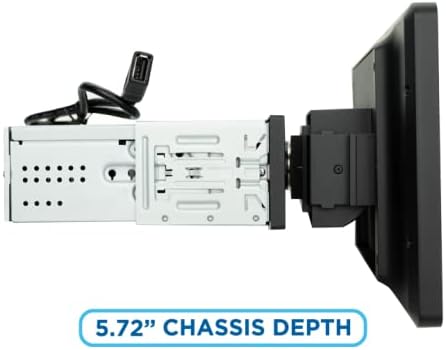
Image: Close-up of a USB port located on the side of the JENSEN J1CA9 screen, labeled 'USB'.
4. Käyttöohjeet
4.1 Apple CarPlay ja Android Auto
Connect your iPhone or Android smartphone via USB to activate Apple CarPlay or Android Auto. The system will mirror your phone's compatible apps onto the 9-inch display, allowing for safe and intuitive control of navigation, music, messaging, and calls.

Image: Graphic indicating 'Certified' status and 'Works with Apple CarPlay' and 'androidauto' logos, emphasizing official compatibility.
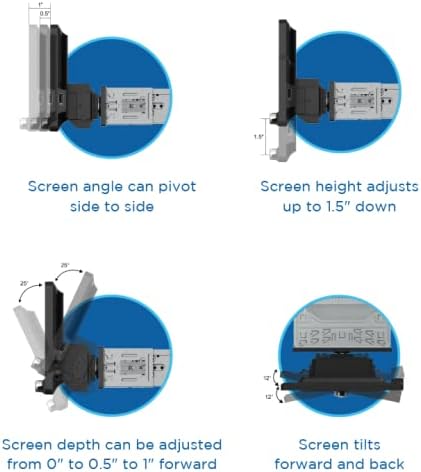
Image: The JENSEN J1CA9 display showing a split screen with Apple CarPlay navigation on one side and music playback on the other.
4.2 Bluetooth-yhteys
Pair your Bluetooth-enabled device with the J1CA9 for hands-free calling and wireless audio streaming. Access your phonebook and manage calls directly from the touchscreen or via voice commands.
4.3 USB-toisto ja -lataus
Utilize the front (2.1 Amp) ja takana (1.5 Amp) USB inputs for playing media files from USB drives or for fast charging your compatible devices.
4.4 Ääniasetukset
Adjust your audio experience using the built-in 8-band graphic equalizer with various presets. The Time Alignment feature allows you to digitally delay audio from specific speakers to ensure sound reaches your ears simultaneously, optimizing the soundstage.
5. Huolto
To ensure optimal performance and longevity of your JENSEN J1CA9, follow these maintenance guidelines:
- Näytön puhdistus: Pyyhi kosketusnäyttö varovasti pehmeällä, nukkaamattomalla liinalla. Pinttyneisiin tahroihin hankaa kevyesti.ampKostuta liina vedellä tai näytönpuhdistusaineella. Vältä voimakkaita kemikaaleja tai hankaavia materiaaleja.
- Ohjelmistopäivitykset: Periodically check the Jensenmobile.com websivustolta saatavilla olevat laiteohjelmistopäivitykset, jotta laitteessasi on uusimmat ominaisuudet ja virheenkorjaukset.
- Yhteyden tarkistukset: Ensure all cables (power, USB, camera, etc.) are securely connected to prevent intermittent issues.
- Lämpötilan säätö: Avoid exposing the unit to extreme temperatures for extended periods, as this can affect performance and lifespan.
6. Vianmääritys
If you encounter issues with your JENSEN J1CA9, refer to the following common troubleshooting steps:
- Ei virtaa: Check the vehicle's fuse box and ensure the power harness is correctly connected. Verify the vehicle's ignition is on.
- Ei ääntä: Check speaker connections, volume levels, and mute settings. Ensure the correct audio source is selected. If using Apple CarPlay/Android Auto, verify phone volume and app settings.
- Bluetooth-pariliitosongelmat: Ensure Bluetooth is enabled on both the J1CA9 and your smartphone. Delete previous pairings on both devices and attempt to re-pair.
- Apple CarPlay/Android Auto ei käynnisty: Ensure your phone is connected via a quality USB cable. Check your phone's settings for CarPlay/Android Auto permissions. Restart both the stereo and your phone.
- Kosketusnäyttö ei reagoi: Perform a soft reset of the unit (refer to the full user manual for specific instructions). Ensure the screen is clean and free of debris.
For more detailed troubleshooting or persistent issues, please contact Jensen customer support or visit Jensenmobile.com.
7. Tekniset tiedot
| Ominaisuus | Erittely |
|---|---|
| Tuotteen mitat | 9 x 12 x 9 tuumaa (9"S x 12"L x 9"K) |
| Tuotteen paino | 5.99 kiloa |
| Tuotteen mallinumero | J1ca9 |
| Näytön tyyppi | 9-inch Touchscreen LCD (1024 x 600) |
| Yhteysteknologiat | Bluetooth, USB |
| Ohjaimen tyyppi | Android, Apple CarPlay |
| Äänilähtötila | Stereo (2.1 Surround-äänikanavakokoonpano) |
| Teholähtö | 240 Watts (60 W x 4) MOSFET |
| USB-lataus | Edessä 2.1 Amp / Takana 1.5 Amp Pikalataus |
| Preamp Lähdöt | 3 Pairs of 4V RCA (Front/Rear/Subwoofer) |
| EQ-esiasetukset | 8 (Default, Custom, Classic, Rock, Jazz, Electric, Pop, Soft) |
8. Takuu ja tuki
The JENSEN J1CA9 comes with a 3 vuoden takuu when you register your product on Jensenmobile.com. A 2-year standard warranty applies if not registered. For technical support, product registration, or warranty claims, please visit the official Jensen websivustolla tai ota yhteyttä heidän asiakaspalveluunsa.
9. Tuotevideot
Jensen J1CA9 Product Overview
Video: This official product video provides a detailed overview of the JENSEN J1CA9 9-inch Touchscreen Media Receiver, highlighting its key features and functionalities.
8-inch Certified Apple CarPlay Android Auto Wired Stereo
Video: This video demonstrates features of a Jensen 8-inch certified Apple CarPlay and Android Auto wired stereo. While the screen size differs, many operational aspects are similar to the J1CA9.