
1. Johdanto
This manual provides detailed instructions for the setup, operation, maintenance, and troubleshooting of your UF-TOOLS 7-Inch LCD Digital Microscope. Please read this manual thoroughly before using the device to ensure proper functionality and to maximize its lifespan.
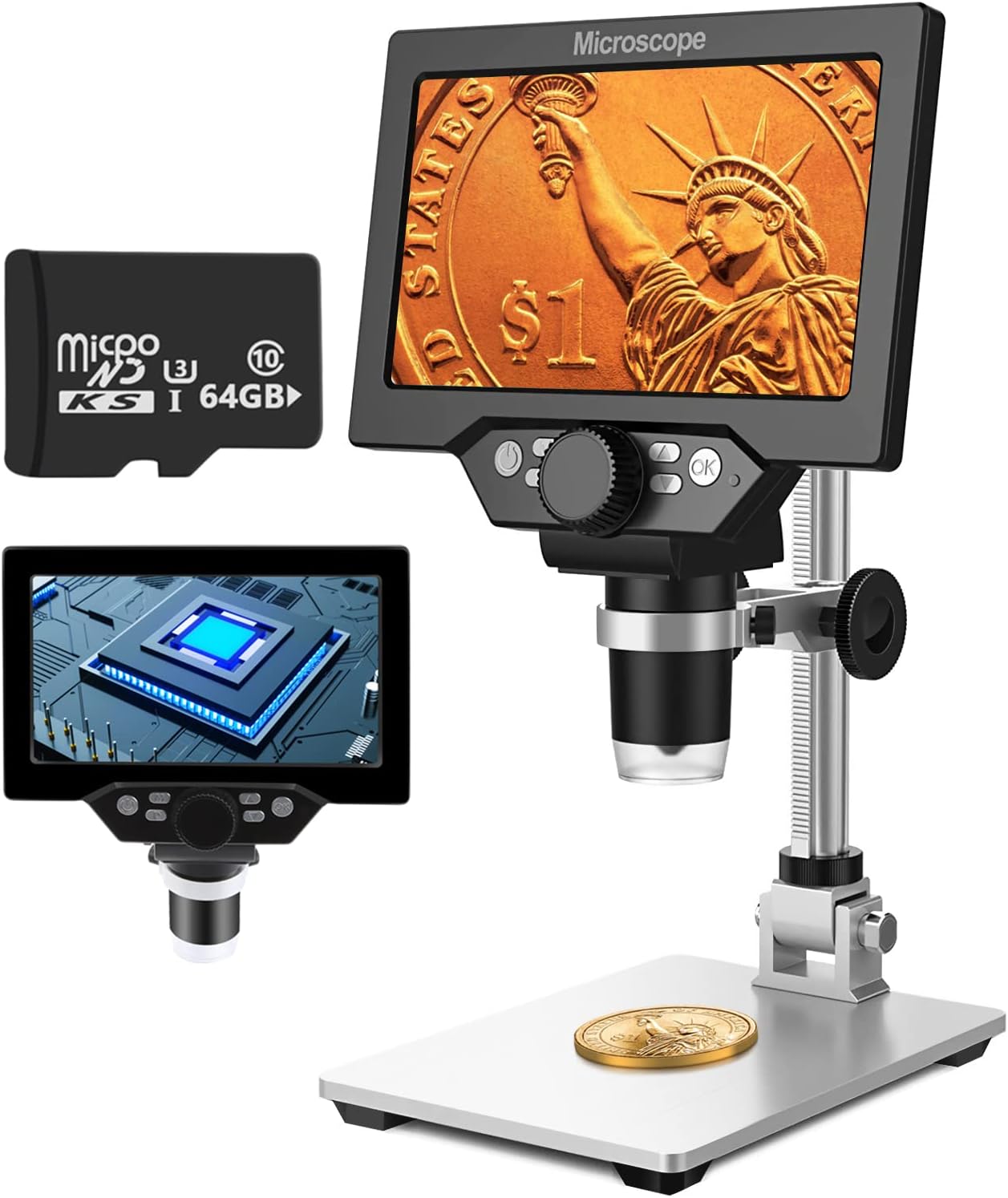
Image 1.1: UF-TOOLS 7-Inch LCD Digital Microscope with included 64GB TF card, showing the main unit and stand.
1.1 Tärkeimmät ominaisuudet
- 7 tuuman LCD-näyttö: Provides a clear, high-definition display for direct viewing without a computer.
- 10X-1200X Magnification: Continuous zoom capability for observing various objects.
- 12 MP kamera: Captures high-resolution images and 1080P video.
- 64GB TF Card: Included for direct storage of photos and videos. Supports up to 128GB.
- 8 säädettävää LED-valoa: Ensures optimal illumination for detailed observation.
- Flexible Aluminum Alloy Stand: Allows for 90° angle adjustment and 2-10cm focus distance adjustment.
- Sisäänrakennettu 3000 mAh akku: Offers portability with up to 6 hours of operation on a full charge.
- PC-liitännät: Compatible with Windows 7/8/10 for larger display and data transfer.
2. Pakkauksen sisältö
Varmista, että pakkauksessasi on kaikki alla luetellut tuotteet:
- UF-TOOLS 7-Inch LCD Digital Microscope Unit
- Adjustable Aluminum Alloy Stand
- 64GB TF-kortti
- USB-kaapeli
- Virtalähde (jos mukana)
- Käyttöopas (tämä asiakirja)

Image 2.1: The microscope package includes a 64GB TF card for storage.
3. Asennusopas
3.1 Assembling the Microscope
- Pura kaikki osat varovasti laatikosta.
- Attach the microscope unit to the adjustable aluminum alloy stand. Ensure it is securely fastened using the provided screws or locking mechanisms.
- Insert the 64GB TF card into the designated slot on the microscope unit.
- Aseta koottu mikroskooppi vakaalle ja tasaiselle alustalle.

Image 3.1: Product dimensions and adjustable stand features, including 270° rotation and height adjustment.
3.2 Akun lataaminen
The microscope has a built-in 3000mAh rechargeable battery. Before first use, fully charge the device.
- Connect the USB cable to the microscope's charge port and the other end to a power adapter or a computer's USB port.
- Latauksen merkkivalo näyttää latauksen tilan.
- Täysi lataus tarjoaa tyypillisesti jopa 6 tuntia jatkuvaa käyttöä.

Image 3.2: The microscope features a long-lasting rechargeable battery, charged via USB.
4. Käyttöohjeet
4.1 Laite ohiview ja säätimet

Kuva 4.1: ohiview of the microscope's controls and ports, including charge port, MicroSD slot, light regulation, fixed knob, lifting adjusting bracket knob, and various function buttons.
- Virta päälle/pois: Käynnistä tai sammuta laite pitämällä virtapainiketta painettuna.
- Video/Camera Playback: Use dedicated buttons to switch between video recording, photo capture, and playback modes.
- System Key Programming: Access menu settings for various configurations.
- Object Distance Adjustment: Säädä linssin ja kohteen välistä etäisyyttä.
- Sivu ylös/alas: Navigate through menus or captured media.
- Confirm Key/Camera Button: Select options or capture photos/videos.
- Light Regulation: Adjust the brightness of the 8 LED lights.
- Fixed Knob: Secures the microscope unit to the stand.
- Lifting Adjusting Bracket Knob: Adjusts the height of the microscope unit on the stand.
4.2 Suurennus- ja tarkennussuhteen säätäminen
- Aseta tarkkailtava kohde pohjalevylle.
- Adjust the height of the microscope unit using the Lifting Adjusting Bracket Knob to get a rough focus.
- Use the focus wheel on the microscope lens to fine-tune the focus until the image on the 7-inch LCD screen is clear.
- The magnification range is 10X to 1200X. Adjust the distance between the lens and the object, along with the focus wheel, to achieve the desired magnification.

Image 4.2: The microscope features an adjustable screen, free length adjustment, and precise focus control.

Image 4.3: Digital magnification from 10X to 1200X, demonstrating the zoom capability on small objects.
4.3 LED-valojen käyttö
The microscope is equipped with 8 adjustable LED lights to illuminate your subject. Use the Light Regulation control to increase or decrease brightness as needed for optimal viewing.

Image 4.4: The 8 LED lights provide adequate illumination for observing objects in various lighting conditions.
4.4 Valokuvien ja videoiden ottaminen
With the included 64GB TF card, you can directly save images and videos.
- In photo mode, press the Confirm/Camera button to capture an image.
- In video mode, press the Confirm/Camera button to start recording, and press again to stop.
- Captured media can be reviewed using the playback function.
4.5 Tietokoneyhteydet
Vastaanottaja view observations on a larger screen or transfer files, connect the microscope to a Windows PC (Windows 7/8/10) using the provided USB cable.
- Connect the microscope to your PC via the USB cable.
- The microscope should be recognized as a storage device or a webcam, depending on the mode selected on the microscope.
- You can then access the stored images/videos or use the microscope as a live camera feed.

Image 4.5: Connect the microscope to a PC for a larger viewing experience and data management.
5. Huolto
5.1 Puhdistus
- Linssi: Käytä pehmeää, nukkaamatonta liinaa, joka on erityisesti suunniteltu optisille linsseille. Pinttyneisiin tahroihin voi levittää pienen määrän linssinpuhdistusliuosta liinaan, ei suoraan linssiin.
- Näyttö: Wipe the LCD screen gently with a microfiber cloth. Avoid harsh chemicals.
- Runko: Clean the microscope body and stand with a soft, dry cloth. Do not use abrasive cleaners or solvents.
5.2 Varastointi
- Säilytä mikroskooppia viileässä, kuivassa paikassa, poissa suorasta auringonvalosta ja äärimmäisistä lämpötiloista.
- Jos säilytät akkua pitkään, varmista, että se on osittain ladattu (noin 50 %) sen käyttöiän pidentämiseksi.
- Keep the lens covered to prevent dust accumulation.
5.3 Akun hoito
- Vältä akun usein toistuvaa täydellistä tyhjentymistä.
- Lataa akku säännöllisesti, vaikka sitä ei käytettäisikään, pitääksesi sen kunnossa.
- Älä altista akkua korkeille lämpötiloille.
6. Vianmääritys
- Ei virtaa:
- Varmista, että akku on ladattu. Kytke mikroskooppi virtalähteeseen ja yritä uudelleen.
- Tarkista virtajohdon liitäntä.
- Epäselvä kuva:
- Adjust the focus wheel carefully.
- Adjust the height of the microscope unit on the stand.
- Ensure the object is properly illuminated by adjusting the LED lights.
- Puhdista linssi, jos siinä on tahroja tai pölyä.
- Valokuvia/videoita ei voi tallentaa:
- Ensure a TF card is inserted and properly formatted.
- Tarkista, onko TF-kortissa riittävästi tallennustilaa.
- Verify the device is in the correct photo or video capture mode.
- PC Not Recognizing Device:
- Ensure the USB cable is securely connected to both the microscope and the PC.
- Kokeile toista tietokoneesi USB-porttia.
- Restart both the microscope and the PC.
- Ensure your PC is running Windows 7/8/10.
7. Tekniset tiedot
| Ominaisuus | Yksityiskohta |
|---|---|
| Mallin nimi | SUGON-Digital Microscope |
| Näytön koko | 7 tuuman LCD |
| Suurennus | 10X-1200X |
| Kameran resoluutio | 12 MP |
| Videon resoluutio | 1080p |
| Varastointi | 64GB TF Card (Max 128GB supported) |
| Valaistus | 8 LED-valoa |
| Akun kapasiteetti | 3000 mAh litiumpolymeeri |
| Akun kesto | Jopa 6 tuntia (noin) |
| PC-yhteensopivuus | Windows 7/8/10 |
| Materiaali | Metallia, Muovia |
| Tuotteen paino | 2.44 puntaa (1.11 kg) |
| Pakkauksen mitat | 9.8 x 8.19 x 3.35 tuumaa |
8. Takuu ja tuki
UF-TOOLS provides the following warranty and support for this product:
- Palautusaika: 45 days limited product return period.
- Vaihtokäytäntö: 18 months exchange for product defects.
For technical support or warranty claims, please contact UF-TOOLS customer service through the retailer where the product was purchased or visit the official UF-TOOLS websivustolta yhteystiedot.
Huomautus: Takuuehdot voivat vaihdella alueittain ja jälleenmyyjistä riippuen. Säilytä ostokuitti.