
Johdanto
The Seagate Expansion Portable Hard Drive provides an easy-to-use solution for instantly adding storage to your computer. This portable hard drive is designed for simple drag-and-drop file saving and offers automatic recognition with both Windows and Mac computers. It features a sleek, compact design, making it ideal for carrying your photos, movies, music, and other important files on the go. The device connects via USB 3.0, ensuring fast data transfer speeds and power directly from the USB port.
Mitä sisältyy
Varmista, että pakkauksessa on kaikki tarvittavat osat:
- Seagate Expansion portable hard drive
- 18 tuuman (45.72 cm) USB 3.0 -kaapeli
- Pika-aloitusopas
- Limited Warranty: APAC - 3 years
- Rescue Data Recovery Services information
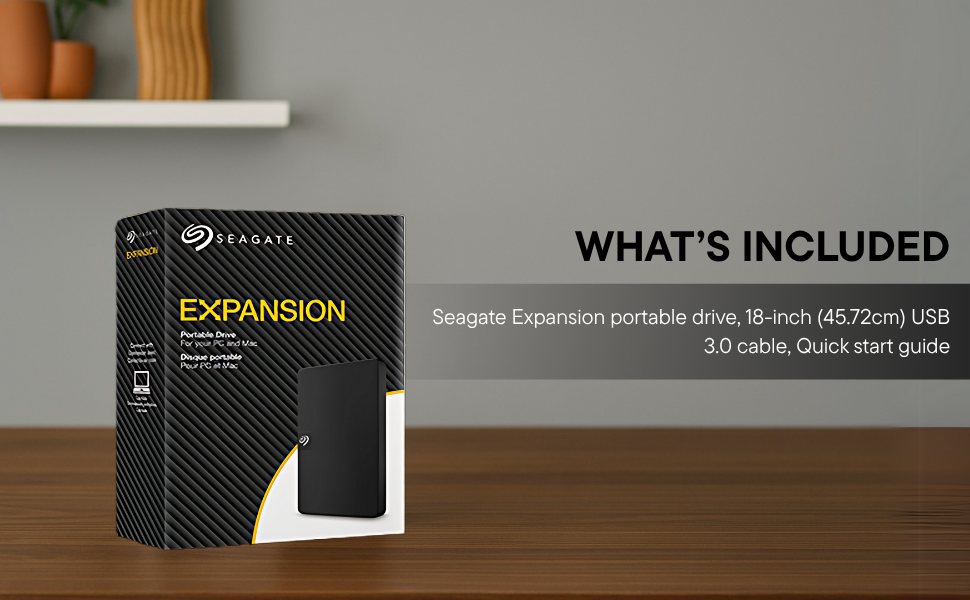
Image: Contents of the Seagate Expansion portable hard drive package, including the drive, USB cable, and documentation.
Asennus
- Liitä USB-kaapeli: Plug the small end of the included USB 3.0 cable into the Seagate Expansion portable hard drive.
- Yhdistä tietokoneeseen: Plug the larger end of the USB 3.0 cable into an available USB port on your computer. The drive is USB 3.0 powered, so no external power adapter is needed.
- Automaattinen tunnistus: The drive will be automatically recognized by your Windows or Mac operating system. No software installation is typically required for basic functionality.
- For Mac Users (Time Machine): If you intend to use the drive with Apple Time Machine for backups, reformatting the drive is required. Refer to your Mac's documentation for instructions on how to reformat and set up Time Machine.

Image: A Seagate Expansion portable hard drive connected to a laptop via a USB cable, demonstrating the plug-and-play setup.

Image: A hand holding the Seagate Expansion drive, with Windows and Mac compatibility logos displayed next to it.
Käyttöohjeet
Once connected, the Seagate Expansion drive functions like any other external storage device on your computer.
- Aseman käyttö: On Windows, the drive will appear under 'This PC' or 'My Computer'. On Mac, it will appear on the desktop or in Finder under 'Locations'.
- Tallennetaan Files: säästääksesi files, simply drag and drop them from your computer's internal storage to the Seagate Expansion drive's icon or open folder. You can also use the 'Copy' and 'Paste' functions.
- Järjestäminen Files: Create folders on the drive to organize your data efficiently.
- Turvallinen poisto: Always safely eject the drive before disconnecting it to prevent data corruption. On Windows, right-click the drive icon in the system tray and select 'Eject'. On Mac, drag the drive icon to the Trash or click the Eject button next to the drive in Finder.

Image: A hand demonstrating the drag-and-drop method to transfer files from a laptop to the Seagate Expansion portable hard drive.
Huolto
Proper maintenance ensures the longevity and optimal performance of your Seagate Expansion drive.
- Fyysinen hoito: Handle the drive with care. Avoid dropping it or exposing it to extreme temperatures, moisture, or strong magnetic fields.
- Puhdistus: Puhdista aseman ulkopinta pehmeällä, kuivalla ja nukkaamattomalla liinalla. Älä käytä nestemäisiä puhdistusaineita tai liuottimia.
- Tietojen varmuuskopiointi: While the drive is designed for storage, it is always recommended to maintain backups of critical data on multiple devices or cloud services.
- Laiteohjelmistopäivitykset: Tarkista Seagate-tuki säännöllisesti websivustolta löydät kaikki mallillesi saatavilla olevat laiteohjelmistopäivitykset optimaalisen suorituskyvyn ja yhteensopivuuden varmistamiseksi.
Vianetsintä
If you encounter issues with your Seagate Expansion drive, consider the following steps:
- Asemaa ei havaittu:
- Varmista, että USB-kaapeli on kytketty kunnolla sekä asemaan että tietokoneeseen.
- Kokeile kytkeä asema tietokoneen toiseen USB-porttiin.
- Testaa asemaa toisella USB-kaapelilla, jos sellainen on saatavilla.
- Käynnistä tietokone uudelleen.
- Hidas suorituskyky:
- Ensure you are using a USB 3.0 port for optimal speeds. USB 2.0 ports will result in slower transfers.
- Sulje kaikki taustalla käynnissä olevat tarpeettomat sovellukset.
- Check your computer's disk management or disk utility to ensure the drive is healthy.
- Pääsy Files: Jos et pääse käsiksi files, ensure the drive is properly mounted and not in use by another application.
Tarkempia vianmääritysohjeita varten katso virallinen Seagate Troubleshooting Guide (PDF).
Tekniset tiedot
| Mallinumero | STKM1000400 |
| Digitaalinen tallennuskapasiteetti | 1 TB |
| Kiintolevyn käyttöliittymä | USB 2.0/3.0 |
| Yhteystekniikka | USB |
| Merkki | Seagate |
| Erikoisominaisuus | Data Recovery Service, Portable |
| Kiintolevyn muotokerroin | 2.5 tuumaa |
| Kiintolevyn kuvaus | Mekaaninen kiintolevy |
| Yhteensopivat laitteet | Pöytätietokone, kannettava tietokone |
| Asennustyyppi | Ulkoinen kovalevy |
| Väri | Musta |
| Kiintolevyn kiertonopeus | 5400 RPM |
| Lukunopeus | 120 megatavua sekunnissa |
| Mitat P x L x Paksuus | 11.7P x 8L x 1.5S senttimetriä |
| Tuotteen paino | 0.4 puntaa |
| Kotelon materiaali | Muovi |
Takuu ja tuki
Your Seagate Expansion portable hard drive comes with comprehensive support and warranty coverage.
- Rajoitettu takuu: The product includes a 3-year limited warranty. This covers device replacement or repair for manufacturing defects.
- Pelastustietojen palautuspalvelut: For added peace of mind, your purchase includes 3 years of Rescue Data Recovery Services. This service covers data loss due to accidents, mechanical errors, or natural disasters, providing a chance to recover your valuable data.

Image: The 'Rescue Services' logo, indicating the inclusion of 3 years of data recovery services.
Yhteystiedot
For warranty claims, technical support, or inquiries regarding Rescue Data Recovery Services, please contact Seagate Customer Care:
- Seagate Technology (Thailand) Limited. India Customer Care No: 18003092525
Please have your product model number (STKM1000400) and proof of purchase ready when contacting support.