Johdanto
This manual provides comprehensive instructions for the installation, operation, and maintenance of your Generic X550-T2 Dual Port 10GB Ethernet Adapter. Please read this manual thoroughly before installation and retain it for future reference.
Turvallisuustiedot
- Ensure your computer is powered off and unplugged from the wall outlet before installing or removing the adapter.
- Pura kehostasi mahdollinen staattinen sähkö koskettamalla maadoitettua metalliesinettä ennen sovittimen käsittelyä.
- Handle the adapter by its edges to avoid touching components on the circuit board.
- Älä altista sovitinta kosteudelle tai äärimmäisille lämpötiloille.
Pakkauksen sisältö
Varmista, että pakkauksessa on kaikki tarvittavat osat:
- Generic X550-T2 Dual Port 10GB Ethernet Adapter
- Matala profile bracket (if applicable, for small form factor PCs)
- Driver CD (or instructions for driver download)
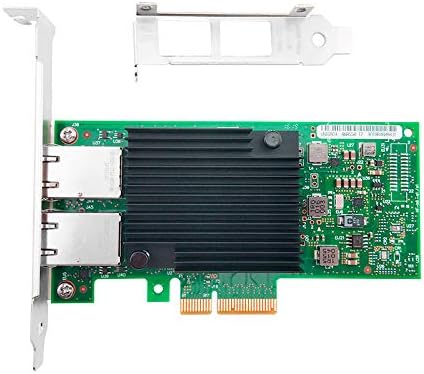
Image 1: The X550-T2 Dual Port 10GB Ethernet Adapter, showing the main board and included brackets.
Asennus ja asennus
- Virrankatkaisujärjestelmä: Sammuta tietokone kokonaan ja irrota virtajohto pistorasiasta.
- Avaa tietokoneen kotelo: Irrota tietokoneen kotelon sivupaneeli päästäksesi käsiksi emolevyyn.
- Paikanna PCI-E-paikka: Identify an available PCI Express (PCI-E) x4 or larger slot on your motherboard.
- Irrota korttipaikan kansi: Carefully remove the metal slot cover corresponding to the chosen PCI-E slot on the back of your computer case.
- Asenna sovitin: Align the adapter with the PCI-E slot and firmly press it down until it is securely seated. Ensure the bracket is flush with the case opening.
- Suojattu sovitin: Use a screw to secure the adapter's bracket to the computer case.
- Sulje tapaus: Vaihda tietokoneen kotelon sivupaneeli.
- Kytke virta uudelleen: Kytke virtajohto takaisin pistorasiaan ja käynnistä tietokone.
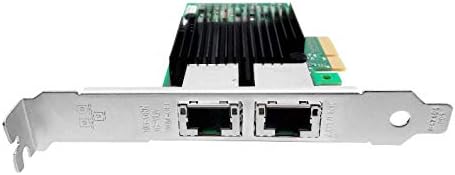
Kuva 2: Lähikuva view of the dual RJ45 ports on the adapter, ready for network cable connection.
Käyttöohjeet
Ohjaimen asennus
Upon first boot after installation, your operating system (e.g., Windows) may automatically detect and install the necessary drivers. If not, follow these steps:
- Aseta ajuri-CD asemaan: If provided, insert the driver CD into your computer's optical drive and follow the on-screen instructions.
- Lataa ajurit: If no CD is provided or for updated drivers, visit the manufacturer's website (or a reputable driver download site for Generic products) and download the appropriate drivers for the X550-T2 adapter and your operating system.
- Asenna ajurit: Run the downloaded driver installer and follow the prompts. Restart your computer if prompted.
Verkkoyhteys
Once drivers are installed, connect your network cables:
- Connect one end of a standard RJ45 Ethernet cable to one of the ports on the X550-T2 adapter.
- Connect the other end of the Ethernet cable to your network switch, router, or directly to another 10GB Ethernet device.
- Repeat for the second port if dual connectivity is desired.
- Verify network connectivity through your operating system's network settings.
Huolto
- Keep the computer case clean and free of dust to ensure proper airflow and prevent overheating of the adapter.
- Periodically check for updated drivers on the manufacturer's websivuston optimaalisen suorituskyvyn ja yhteensopivuuden varmistamiseksi.
- Avoid physical impact or bending of the adapter.
Vianetsintä
- No network connectivity after installation:
- Varmista, että sovitin on kokonaan paikallaan PCI-E-paikassa.
- Verify that the network cables are securely connected to both the adapter and the network device.
- Check if the drivers are correctly installed in your operating system's Device Manager. Reinstall drivers if necessary.
- Confirm that the network switch/router is powered on and functioning correctly.
- Hitaat verkkonopeudet:
- Ensure you are using CAT6a or CAT7 Ethernet cables for 10GB speeds.
- Verify that your network switch/router supports 10GB Ethernet.
- Update the network adapter drivers to the latest version.
- Tarkista verkossasi olevat muut verkon ruuhkat tai ongelmat.
- Adapter not detected by the system:
- Reseat the adapter in the PCI-E slot.
- Kokeile asentaa sovitin toiseen PCI-E-paikkaan, jos sellainen on saatavilla.
- Ensure your motherboard's BIOS/UEFI settings are configured to enable PCI-E slots.
Tekniset tiedot
| Ominaisuus | Yksityiskohta |
|---|---|
| Mallinumero | 902867-001 |
| Laitteistorajapinta | Ethernet, PCI Express x4 |
| Data Link Protocol | Ethernet |
| Tiedonsiirtonopeus | 10 gigabittiä sekunnissa |
| Portit | Kaksois RJ45 |
| Yhteensopivat laitteet | Pöytätietokoneet |
| Compatible OS Family | Windows (and likely Linux/macOS with appropriate drivers) |
| Tuotteen paino | 7 unssia |
| Pakkauksen mitat | 8.93 x 5.78 x 1.33 tuumaa |
Takuu ja tuki
For warranty information and technical support, please refer to the documentation provided with your purchase or contact the retailer. As this is a Generic product, specific warranty terms may vary by seller.


