
Johdanto
This user manual provides comprehensive instructions for the installation, operation, and maintenance of your wansview W9 Outdoor Security Camera. Please read this manual carefully before using the product to ensure proper functionality and safety. Keep this manual for future reference.
Mitä laatikossa on
Varmista, että pakkauksessa on kaikki osat:
- wansview W9 ulkovalvontakamera
- 5dBi WiFi Antenna
- USB-virtalähde
- Asennustelinesarja
Tuote loppuview
Familiarize yourself with the key components of your wansview W9 camera.

Figure 1: wansview W9 Outdoor Security Camera and Live View on Smartphone.
This image shows the wansview W9 outdoor security camera mounted on a wall, alongside a smartphone displaying a live feed from the camera. The camera is white with a black lens area, and the phone screen shows a dog in a grassy yard, illustrating the live monitoring capability.
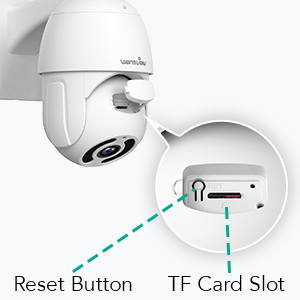
Figure 2: Reset Button and TF Card Slot Location.
This diagram highlights the location of the reset button and the TF (microSD) card slot on the wansview W9 camera, essential for initial setup and local storage.
Asennusopas
1. Kytke kameraan virta
Connect the USB power supply to the camera and plug it into a power outlet. The camera will power on and initiate its self-test sequence.
2. Sovelluksen asennus
Download the "Wansview Cloud" app from your smartphone's app store (available on iOS and Android). Register for a new account or log in if you already have one.
3. Verkkoyhteys
Wangitview W9 camera supports both Wi-Fi (2.4GHz only) and Ethernet connections.
Wi-Fi-yhteys:
- Avaa Wansview Cloud app and tap the "+" icon to add a new device.
- Select your camera model (W9) and follow the on-screen instructions.
- Ensure your phone is connected to a 2.4GHz Wi-Fi network. The camera does not support 5GHz Wi-Fi.
- Skannaa puhelimesi näytöllä näkyvä QR-koodi kameran linssillä.
- Wait for the camera to connect to your Wi-Fi network.

Figure 3: Wi-Fi Compatibility (2.4GHz only).
This image illustrates the wansview W9 camera with its upgraded 5dBi antenna, emphasizing its compatibility with 2.4GHz Wi-Fi networks for extended signal range and faster connection speeds. It explicitly shows that 5GHz Wi-Fi is not supported.
Ethernet-yhteys:
- Liitä reitittimen Ethernet-kaapeli kameran RJ45-porttiin.
- The camera will automatically connect to the network.
- Lisää kamera tilillesi noudattamalla sovelluksen ohjeita.
4. Kameran asentaminen
Wangitview W9 camera is designed for wall mounting and outdoor use (IP65 waterproof).
- Valitse sopiva asennuspaikka varmistaen esteettömän view ja vakaa kiinnityspinta.
- Use the provided mounting bracket set to securely attach the camera to the wall.
- Adjust the camera's angle as needed after mounting.
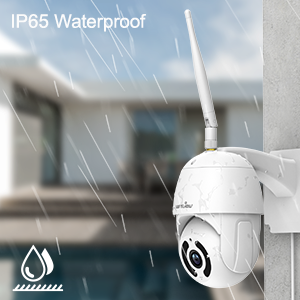
Kuva 4: IP65-vedenpitävyysominaisuus.
This image depicts the wansview W9 camera outdoors with rain falling on it, visually confirming its IP65 waterproof rating, making it suitable for various weather conditions.
Käyttöohjeet
1. Pan-Tilt Control
The camera features a 350° horizontal pan and 90° vertical tilt range, allowing you to monitor a wide area.
- In the Wansview Cloud app, access the live view kamerastasi.
- Use the directional controls on the screen to remotely adjust the camera's pan and tilt angles.

Figure 5: 2K FHD PTZ Coverage.
This image demonstrates the wansview W9 camera's 2K FHD resolution and its Pan-Tilt-Zoom (PTZ) capabilities, showing a 350° pan and 95° tilt range for comprehensive area coverage, with a house in the background to illustrate its outdoor application.
2. Night Vision
The camera is equipped with 12pcs 850nm infrared LED lights, providing clear night vision up to 50 feet.
- Kamera siirtyy automaattisesti yönäkötilaan heikossa valaistuksessa.
- Voit view the night vision feed in real-time through the Wansview Pilvisovellus.

Figure 6: Excellent Night Vision Capability.
This image presents a split view comparing the daytime and night vision performance of the wansview W9 camera. The night vision segment clearly shows objects up to 50 feet away in darkness, highlighting the camera's effective infrared capabilities.
3. Kaksisuuntainen ääni
Kommunikoi vierailijoiden kanssa tai torju tunkeilijoita sisäänrakennetun mikrofonin ja kaiuttimen avulla.
- Livenä view in the Wansview Cloud app, tap the microphone icon to speak.
- Napauta kaiutinkuvaketta kuunnellaksesi ääntä kameran sijainnista.

Figure 7: Two-Way Audio in Action.
This image illustrates the two-way audio feature of the wansview W9 camera, showing a person communicating with a delivery driver through the camera via a smartphone app. Speech bubbles indicate the conversation, demonstrating real-time interaction.

Figure 8: Deterring Intruders with Two-Way Audio.
This image shows the wansview W9 camera being used to deter an intruder. Speech bubbles indicate a command from the camera ("Move away from my house") and the intruder's response ("arrgg, no, I'm off"), demonstrating the camera's ability to act as a deterrent.
4. Liiketunnistus ja hälytykset
The camera uses motion sensors to detect activity and sends instant alerts to your phone.
- Customize sensor sensitivity and detection areas within the Wansview Pilvisovellus.
- Receive 10-second video alerts when motion is detected.

Figure 9: Instant Detection and Alerts.
This image shows a smartphone displaying a "Motion alarm" notification from the Wansview Cloud app, indicating that the wansview W9 camera has detected activity and sent an immediate alert to the user's phone.
5. Storage Options (SD Card & Cloud)
Wangitview W9 camera offers flexible storage solutions for recorded footage.
- SD-kortin tallennustila: Supports up to 128GB microSD cards. Insert the card into the TF card slot (refer to Figure 2). Recorded video and images can be stored locally for preview.
- Pilvitallennus: Subscribe to the paid Cloud service via the Wansview Cloud app to save and upload videos securely to the cloud. This provides an additional layer of security against camera theft or damage.

Figure 10: Dual Storage Choices.
This image highlights the dual storage options for the wansview W9 camera: secure TF (microSD) card storage and encrypted cloud storage, providing users with flexible ways to back up recorded footage.
6. Alexa-integraatio
Control your wansview W9 camera and view live feeds using Amazon Alexa.
- Ota Wans käyttöönview taito Alexa-sovelluksessa.
- Link your Wansview Cloud account with Alexa.
- Use voice commands such as "Alexa, show me the [camera name]" to display the live video on compatible Alexa devices (e.g., Echo Show).
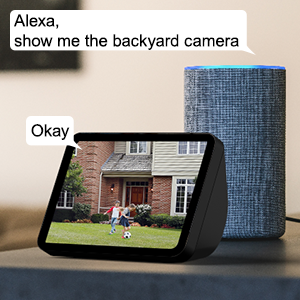
Figure 11: Alexa Integration.
This image shows an Amazon Echo Show displaying a live video feed from a wansview camera, with speech bubbles indicating a user's voice command ("Alexa, show me the backyard camera") and Alexa's response ("Okay"), demonstrating seamless integration with Alexa for voice control.
7. Multiple Family Members Sharing
Share access to your camera's live feed with up to 4 users simultaneously.
- Generate an invitation link within the Wansview Pilvisovellus.
- Share the link with family members to grant them access.
Huolto
- Puhdistus: Pyyhi kameran linssi ja runko varovasti pehmeällä, kuivalla liinalla. Älä käytä voimakkaita kemikaaleja tai hankaavia puhdistusaineita.
- Laiteohjelmistopäivitykset: Regularly check for and install firmware updates via the Wansview Cloud app to ensure optimal performance and security.
- Virtalähde: Varmista, että virtalähde on kytketty kunnolla ja ettei siinä ole vaurioita.
- Verkkoyhteys: Verify a stable Wi-Fi or Ethernet connection for uninterrupted monitoring.
Vianetsintä
| Ongelma | Mahdollinen syy | Ratkaisu |
|---|---|---|
| Kamera offline-tilassa | No power; Wi-Fi signal weak/disconnected; Router issue. | Check power connection; Move camera closer to router or use Ethernet; Restart router. |
| Ei voi muodostaa yhteyttä Wi-Fi-verkkoon | Incorrect Wi-Fi password; Connecting to 5GHz network; Too far from router. | Double-check password; Ensure connection to 2.4GHz Wi-Fi; Relocate camera or router. |
| Liikehälytyksiä ei vastaanotettu | Motion detection disabled; App notifications off; Sensitivity too low. | Ota liiketunnistus käyttöön sovelluksessa; Tarkista puhelimen ilmoitusasetukset; Säädä herkkyyttä. |
| Huono yönäön laatu | Obstruction in front of lens; Infrared LEDs blocked. | Clear any obstructions; Ensure lens is clean. |
| Kaksisuuntaisen äänen ongelmat | Mikrofoni/kaiutin estetty; Sovelluksen käyttöoikeudet. | Ensure clear path for audio; Check app permissions for microphone. |
Tekniset tiedot
| Mallinumero | W9-W |
| Videon sieppaustarkkuus | 1080p (2K HD) |
| Panorointi/kallistusalue | 350° panorointi, 90° kallistus |
| Yhteystekniikka | Wireless (Wi-Fi 2.4GHz), Ethernet |
| Langaton viestintätekniikka | Wi-Fi |
| Virtalähde | Johdollinen sähkö |
| Yönäköalue | 50 jalkaa |
| Kansainvälinen turva-arviointi | IP65 (vedenpitävä) |
| Tallennusvaihtoehdot | SD-kortti (jopa 128 Gt), pilvitallennustila |
| Audio | 2-Way Audio (Built-in Microphone & Speaker) |
| Yhteensopivat laitteet | Smartphone (iOS, Android), Alexa Echo Show |
| Asennustyyppi | Seinäteline |
| Mitat (P x L x K) | 6.3 x 6.1 x 3.94 tuumaa |
| Tuotteen paino | 1.6 puntaa |
Takuu ja tuki
For warranty information and technical support, please refer to the wansview virallinen website or contact their customer service directly. Details are typically available on the product packaging or the wansview brand store on Amazon.
Vieraile osoitteessa wansview Store saadaksesi lisätietoja.