
KIINNITYS MU0034
MOUNTUP MU0034 yhden näytön pöytäkiinnityksen käyttöohje
Merkki: MOUNTUP | Malli: MU0034
1. Johdanto
This manual provides detailed instructions for the installation, operation, and maintenance of your MOUNTUP MU0034 Single Monitor Desk Mount. Please read this manual thoroughly before installation to ensure correct setup and safe operation. This monitor mount is designed to enhance your workspace ergonomics by providing adjustable positioning for a single monitor.
2. Turvallisuustiedot
- Varmista, että kaikki osat ovat mukana ja vahingoittumattomia ennen asennusta. Älä käytä laitetta, jos jokin osa puuttuu tai on viallinen.
- This product is intended for monitors weighing up to 17.6 lbs (8 kg) and screen sizes from 17 to 32 inches. Do not exceed the maximum weight capacity.
- Compatible VESA patterns are 75x75mm and 100x100mm. Verify your monitor's VESA pattern before proceeding.
- Ensure the desk surface is stable and strong enough to support the combined weight of the mount and monitor.
- Kiristä kaikki ruuvit tiukasti, mutta älä kiristä liikaa, jotta kierteet eivät kulu tai osat eivät vaurioidu.
- Pidä lapset ja lemmikkieläimet loitolla asennuksen aikana.
- Jos sinulla on epäilyksiä asennusprosessista, ota yhteyttä pätevään ammattilaiseen.
3. Pakkauksen sisältö
Varmista, että pakkauksessa on kaikki osat:
- Näytön varren kokoonpano
- Työpöytä Clamp Pohja
- Grommet Base Components
- VESA-levy
- Tarvikesarja (ruuvit, aluslevyt, kuusiokoloavaimet)
- Käyttöohje
4. Tekniset tiedot
| Ominaisuus | Erittely |
|---|---|
| Mallinumero | MU0034 |
| Materiaali | Kiillotettu alumiini |
| Näytön koon yhteensopivuus | 17" to 32" (flat or curved) |
| Paino Kapasiteetti | Jopa 17.6 paunaa (8 kg) |
| VESA-yhteensopivuus | 75x75mm, 100x100mm |
| Korkeuden säätö | Up to 11" (16.3" total height adjustment range) |
| Kallistusalue | +45° - -45° |
| Kääntöalue | 360° (arm), 180° (monitor plate) |
| Kierto | 360° (landscape to portrait) |
| Pöydän enimmäispaksuus (C-clamp) | 3.35" |
| Läpivientireiän halkaisija | 0.39" - 3.1" |
5. Asennus ja asennus
The MOUNTUP MU0034 offers two installation options: C-clamp mounting and Grommet mounting. Choose the method suitable for your desk.
5.1. C-Clamp Asennus
This method is for desks without existing grommet holes, or if you prefer clamping to the edge of your desk. Ensure your desk thickness is no more than 3.35 inches.
- Kiinnitä C-clamp: Assemble the C-clamp components to the base of the monitor arm. Position the base on the edge of your desk and tighten the clamp screw until it is secure.
- Kiinnitä VESA-levy näyttöön: Secure the VESA plate to the back of your monitor using the appropriate screws from the hardware kit. Ensure the screws are tightened securely.
- Slide Monitor onto Arm: Carefully slide the monitor (with the attached VESA plate) onto the monitor arm's VESA head. Ensure it clicks into place or is secured with the provided locking mechanism.
- Säädä jännitystä: Refer to Section 6.1 for adjusting the gas spring tension to match your monitor's weight.

Figure 1: Illustration of C-clamp and Grommet mounting options. The C-clamp is shown securing the mount to the desk edge, while the grommet mount uses a desk hole.
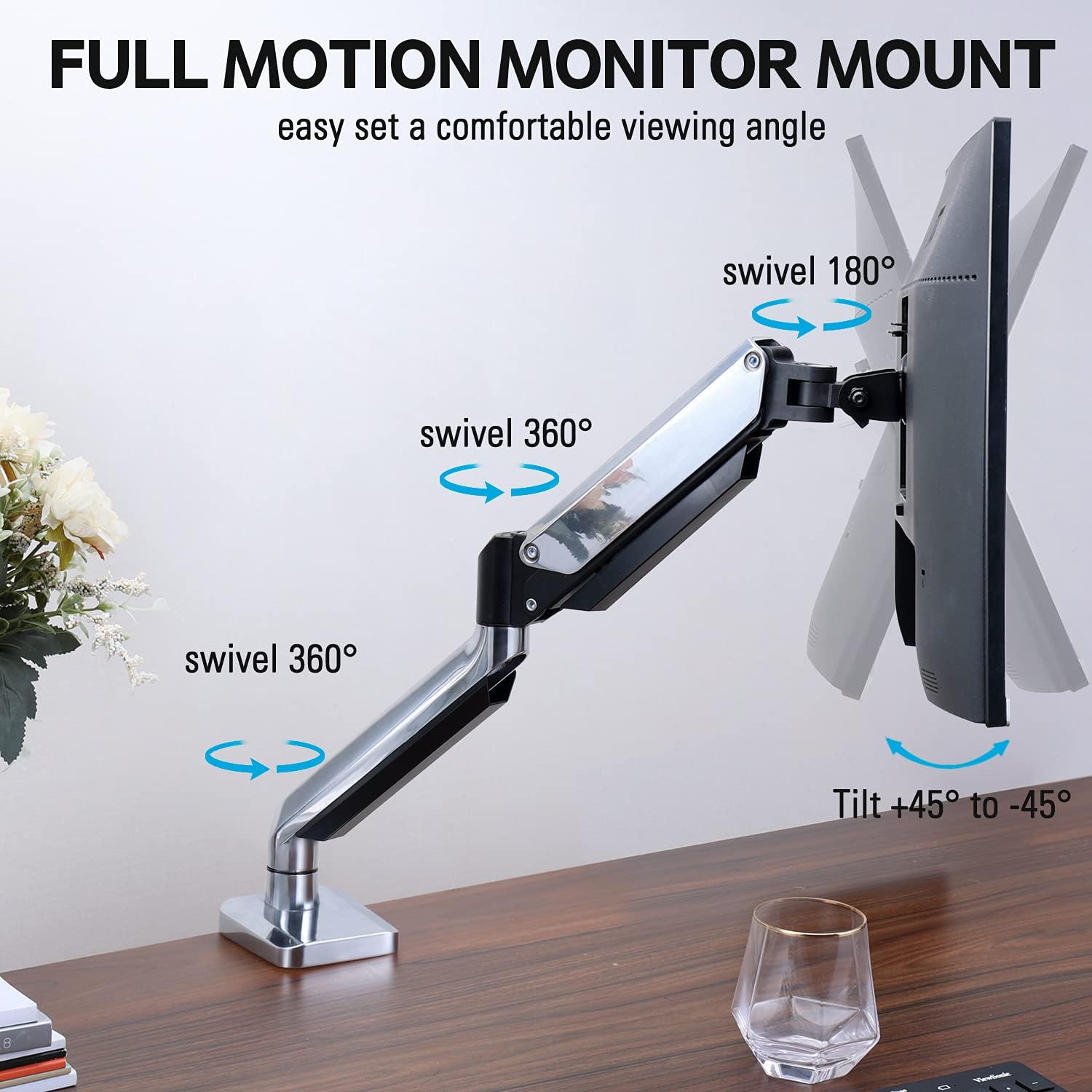
Figure 2: The removable VESA plate being attached to the back of a monitor, then sliding onto the monitor arm for easier installation.
5.2. Läpivientikiinnitys
This method utilizes an existing hole in your desk. Ensure your desk thickness is no more than 3.35 inches and the grommet hole diameter is between 0.39 and 3.1 inches.
- Kokoa läpivientipohja: Insert the grommet base components through the desk hole and secure them from underneath the desk using the provided plate and nut.
- Kiinnitä VESA-levy näyttöön: Secure the VESA plate to the back of your monitor using the appropriate screws from the hardware kit. Ensure the screws are tightened securely.
- Slide Monitor onto Arm: Carefully slide the monitor (with the attached VESA plate) onto the monitor arm's VESA head. Ensure it clicks into place or is secured with the provided locking mechanism.
- Säädä jännitystä: Refer to Section 6.1 for adjusting the gas spring tension to match your monitor's weight.
6. Käyttö ja säädöt
The MOUNTUP MU0034 monitor arm offers various adjustments for optimal viewmukavuutta.
6.1. Kaasujousen jännityksen säätö
The gas spring tension needs to be adjusted to match the weight of your monitor. This ensures the monitor stays in position once adjusted.
- If the monitor drifts down, turn the adjustment screw (usually located on the arm joint) clockwise ("+") to increase tension.
- If the monitor floats up, turn the adjustment screw counter-clockwise ("-") to decrease tension.
- Adjust gradually until the monitor remains stable at any height.
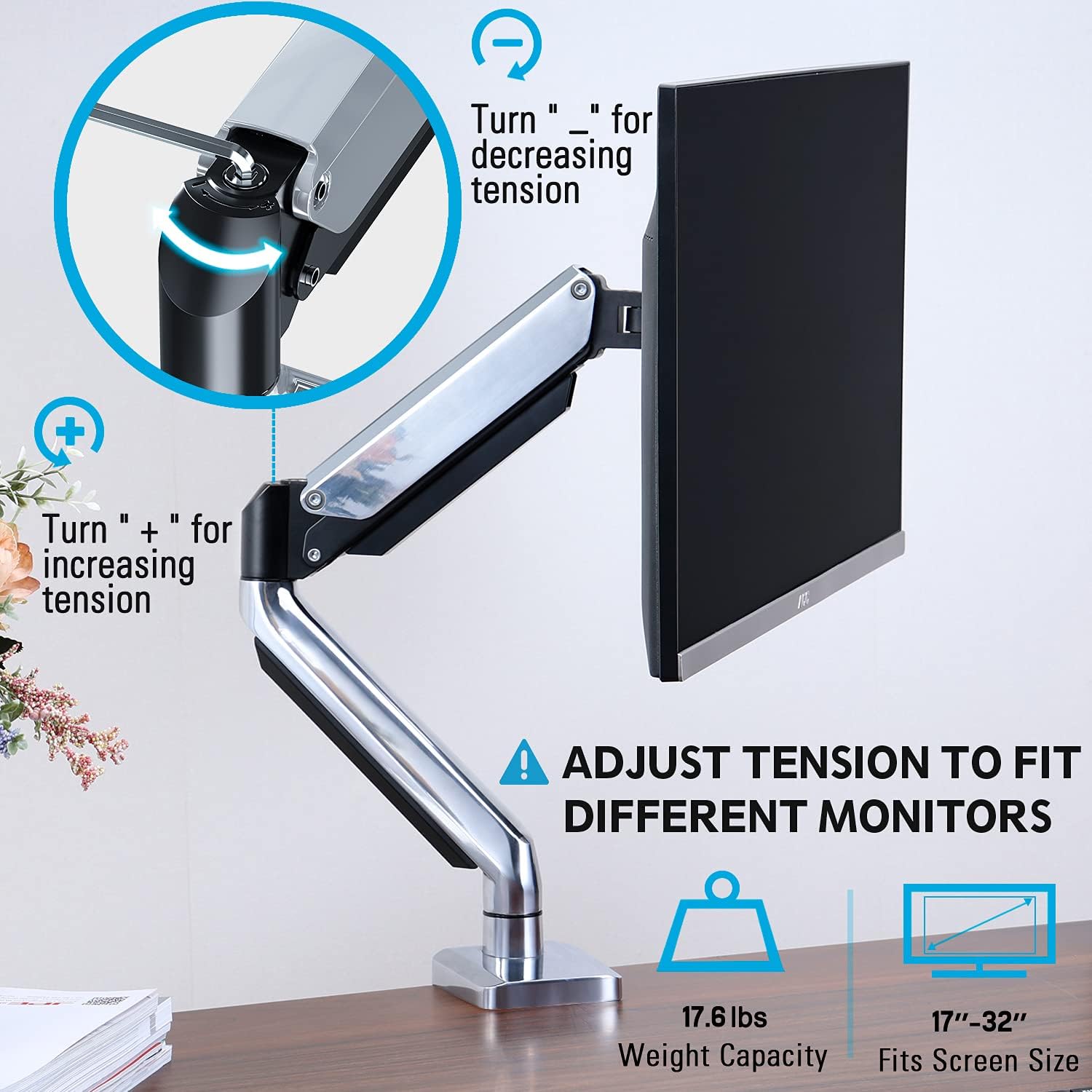
Figure 3: Instructions for adjusting the gas spring tension using an Allen key. Turning clockwise increases tension, counter-clockwise decreases it.
6.2. Korkeuden säätö
Once the gas spring tension is correctly set, you can easily raise or lower your monitor to your desired ergonomic height. The arm allows for up to 11 inches of vertical adjustment.

Figure 4: Diagram illustrating the maximum height adjustment of 11 inches and maximum extension of 17.5 inches.
6.3. Tilt, Swivel, and Rotation
The monitor arm provides full motion capabilities:
- Kallistaa: Adjust the monitor screen +45° to -45° to reduce glare or find a comfortable viewkulma.
- Kääntyvä: The arm can swivel 360° at the base and 360° at the middle joint. The monitor plate itself can swivel 180°. This allows for easy screen sharing or repositioning.
- Kierto: Käännä näyttöä 360° vaihtaaksesi vaaka- ja pystysuuntaisen suunnan välillä.

Figure 5: Visual representation of the monitor arm's full motion capabilities, including 360° swivel, 180° swivel at the monitor plate, and +45° to -45° tilt.

Figure 6: An image demonstrating the monitor's ability to rotate 360 degrees, allowing for both landscape and portrait viewtiloja.
7. Kaapelien hallinta
The MOUNTUP MU0034 features integrated cable management to keep your workspace tidy.
- Vedä näyttökaapelit (virta, video jne.) varren alapuolta pitkin.
- Use the provided cable clips or covers to secure the cables within the arm channels.
- Varmista, että vaijereissa on riittävästi löysää, jotta ne voivat liikkua kokonaan ilman jännitystä.

Figure 7: Illustration of how cables are routed and organized through the integrated channels on the monitor arm, keeping the desk clear.
8. Huolto
- Tarkista säännöllisesti kaikki ruuvit ja liitokset varmistaaksesi, että ne ovat tiukasti kiinni.
- Puhdista kiinnike pehmeällä, d:lläamp liinalla. Vältä hankaavia puhdistusaineita tai liuottimia.
- Älä voitele kaasujousimekanismia.
9. Vianmääritys
| Ongelma | Mahdollinen syy | Ratkaisu |
|---|---|---|
| Monitor sags or won't stay up | Kaasujousen kireys on liian alhainen näytön painoon nähden. | Increase gas spring tension by turning the adjustment screw clockwise ("+"). |
| Näyttö kelluu ylös tai sitä on vaikea painaa alas | Kaasujousen jännitys on liian suuri näytön painoon nähden. | Decrease gas spring tension by turning the adjustment screw counter-clockwise ("-"). |
| Monitor is wobbly | Mount not securely fastened to desk or VESA plate not tight. | Check and tighten all clamp/grommet screws and VESA plate screws. |
| Difficulty rotating/tilting monitor | Nivelet ovat liian tiukat. | Loosen the corresponding joint screws slightly (do not remove). |
10. Takuu ja tuki
The MOUNTUP MU0034 Single Monitor Desk Mount is backed by a 3-year support period. For technical assistance, missing parts, or warranty claims, please contact MOUNTUP customer support through their official channels or the retailer where the product was purchased.
Säilytä ostokuittisi takuun voimassaoloa varten.
Ask a question about this manual
Ask about setup, troubleshooting, compatibility, parts, safety, or missing instructions. Manuals+ will review the question and use this page’s manual context to help answer it.