
Cooler Master MasterFan MF120 Halo White Edition PC Case Fan Instruction Manual
Model: MFL-B2DW-183PA-R1
Merkki: Cooler Master
1. Tuote ohiview
The Cooler Master MasterFan MF120 Halo White Edition is a 120mm PC case fan designed for efficient cooling and vibrant Addressable Gen2 RGB lighting. This fan features dual-loop ARGB illumination, silent cooling technology, and a hybrid fan blade design for optimal airflow and air pressure. It is compatible with various ARGB motherboard software for synchronized lighting effects.

Image 1: Cooler Master MasterFan MF120 Halo White Edition PC Case Fan (3-pack shown with controller).
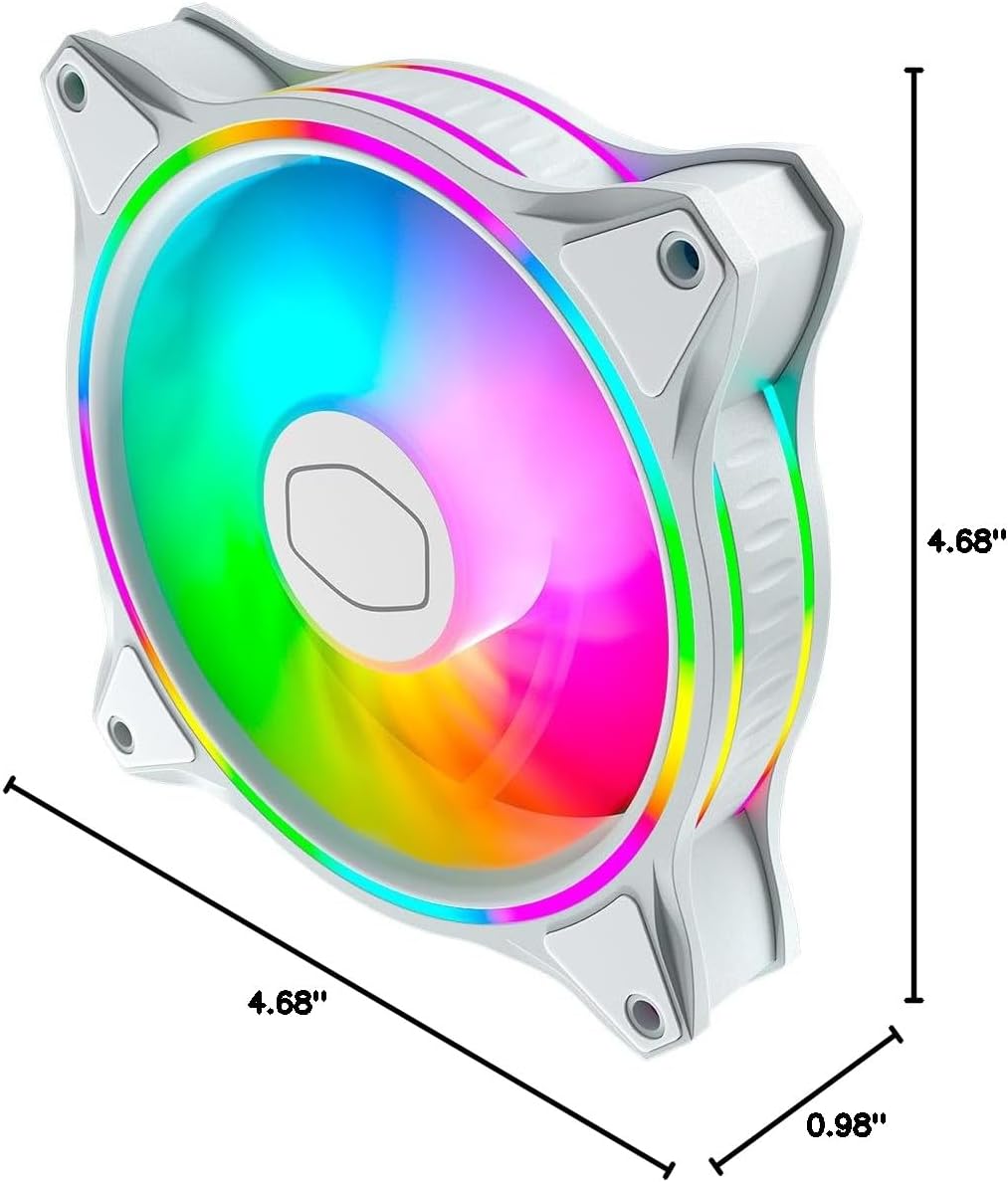
Image 2: Dimensions of the MasterFan MF120 Halo White Edition PC Case Fan, measuring 4.72 inches (L) x 4.72 inches (W) x 0.98 inches (H).
2. Asennus ja asennus
2.1 Laatikon purkaminen ja komponentit
Carefully unpack the fan and its accessories. Ensure all components are present:
- MasterFan MF120 Halo White Edition PC Case Fan(s)
- Mounting screws or vibration-free mounts
- ARGB connector clips (if included with multi-pack)
- Adapter cables (if included for daisy-chaining)
2.2 Asennusopas
Follow these steps to properly install your Cooler Master MasterFan MF120 Halo:
- Ilmavirran suunnan määrittäminen: Before mounting, identify the desired airflow direction. The fan blade side typically indicates the direction of airflow into the fan, while the fan frame side indicates airflow out.
- Tuulettimen asennus: Secure the fan to your PC case or radiator using the provided screws or vibration-free mounts. For vibration-free mounts, pull the end through the fan mounting holes and secure it to the case. For screws, use a screwdriver to fasten the fan to the case.
- Yhdistä emolevyyn: Connect the fan's 4-pin header to an available fan socket on your motherboard. For ARGB lighting, connect the ARGB connector to a compatible 3-pin ARGB header on your motherboard or an ARGB controller. Use any included ARGB connector clips to ensure a secure connection.
Video 1: A detailed tutorial demonstrating the installation process for a case fan, including identifying airflow direction, using vibration-free mounts, and securing with screws. This video is provided by THERMALRIGHT.EUR.
Video 2: A general PC build video showcasing the installation of various components, including case fans, within a Cooler Master Elite 301 Panda case. This video is provided by Cooler Master.
3. Käyttöohjeet
3.1 ARGB-valaistuksen ohjaus
The MasterFan MF120 Halo features dual-loop Addressable Gen2 RGB lighting. Once connected to a compatible ARGB header on your motherboard or an ARGB controller, you can customize the lighting effects using your motherboard's software (e.g., ASUS Aura, ASRock RGB, MSI RGB) or Cooler Master's MasterPlus+ software if using a compatible hub.
Video 3: An official video from Cooler Master showcasing the various ARGB lighting effects and customization options of the Halo series fans within a PC build.
3.2 Tuulettimen nopeuden säätö
The fan speed can be controlled via your motherboard's BIOS settings or dedicated fan control software. The MF120 Halo supports PWM (Pulse Width Modulation) for precise speed adjustments, allowing for a balance between cooling performance and noise levels.
4. Huolto
Säännöllinen huolto varmistaa tuulettimen optimaalisen suorituskyvyn ja pitkän käyttöiän:
- Puhdistus: Puhdista tuulettimen lavat ja runko säännöllisesti pölystä. Käytä pehmeää harjaa tai paineilmaa. Varmista, että tuuletin on sammutettu ennen puhdistamista.
- Kaapelin hallinta: Ensure all cables are neatly routed and secured using the provided clips or cable ties to prevent interference with fan operation or other components.
5. Vianmääritys
If you encounter issues with your MasterFan MF120 Halo, refer to the following common troubleshooting steps:
- Tuuletin ei pyöri:
- Check if the 4-pin fan header is securely connected to the motherboard.
- Verify that the fan power settings in your motherboard's BIOS are correctly configured.
- RGB Not Working or Flickering:
- Ensure the 3-pin ARGB connector is properly seated on the motherboard's ARGB header or controller.
- Confirm compatibility with your motherboard's ARGB software and that the software is up-to-date.
- Check for any loose ARGB connector clips.
- Liiallinen melu:
- Varmista, että tuuletin on tukevasti kiinni eikä tärise koteloa vasten.
- Tarkista, ettei tuulettimen lapojen tiellä ole kaapeleita tai esteitä.
- Puhdista tuulettimen lapoihin kertynyt pöly.
6. Tekniset tiedot
| Ominaisuus | Erittely |
|---|---|
| Tuotteen mitat | 4.72 cm P x 4.72 cm L x 0.98 cm K |
| Merkki | Viileämpi mestari |
| Virtaliittimen tyyppi | 4-nastainen |
| Voitage | 110 volttia |
| Wattage | 3 wattia |
| Jäähdytysmenetelmä | ilmaa |
| Yhteensopivat laitteet | Työpöytä |
| Melutaso | 30 desibeliä |
| Materiaali | Laatta |
| Suurin pyörimisnopeus | 2000 RPM |
| Ilmavirran kapasiteetti | 47.2 kuutiojalkaa minuutissa |
| Tuotteen mallinumero | MFL-B2DW-183PA-R1 |
| Tuotteen paino | 6.8 unssia |
7. Takuu ja tuki
The Cooler Master MasterFan MF120 Halo White Edition comes with a 5-year EU Spare Part Availability Duration. For specific warranty terms, technical support, or service inquiries, please refer to the official Cooler Master websivustolta tai ota yhteyttä suoraan heidän asiakastukeen.