
1. Johdanto
Kiitos ostoksestasiasing the QFX E-B3 Bluetooth Professional High-Power Speaker. This manual provides essential information for the safe and efficient operation of your speaker. Please read it thoroughly before use and retain it for future reference.
The QFX E-B3 is designed to deliver powerful audio with features including Bluetooth connectivity, FM radio, USB/SD card playback, LED party lights, and a 250W power amplifier. It also supports True Wireless System (TWS) for stereo pairing with another compatible speaker.
2. Turvallisuustiedot
- Virtalähde: Connect the speaker only to the specified power supply as indicated on the unit.
- Ilmanvaihto: Varmista riittävä ilmanvaihto kaiuttimen ympärillä. Älä tuki tuuletusaukkoja.
- Vesi ja kosteus: This speaker is not waterproof. Do not expose it to rain, moisture, or any liquids to prevent electric shock or fire.
- Lämpö: Pidä kaiutin poissa lämmönlähteistä, kuten pattereista, lämmittimistä, liesistä tai muista lämpöä tuottavista laitteista.
- Puhdistus: Irrota kaiutin pistorasiasta ennen puhdistamista. Käytä puhdistukseen kuivaa liinaa. Älä käytä nestemäisiä puhdistusaineita tai aerosolipuhdistusaineita.
- Huolto: Älä yritä huoltaa tätä tuotetta itse. Anna kaikki huoltotoimenpiteet pätevän huoltohenkilöstön tehtäväksi.
- Sijoitus: Aseta kaiutin vakaalle ja tasaiselle alustalle, jotta se ei putoa.
3. Pakkauksen sisältö
Varmista, että pakkauksessa on kaikki tarvittavat osat:
- QFX E-B3 High-Power Speaker
- Mikrofoni
- Kaukosäädin
- Vaihtovirtajohto
- Käyttöopas (tämä asiakirja)
4. Tuote ohiview
The QFX E-B3 speaker features dual 15-inch woofers and a 1-inch tweeter, protected by a metal grill. It includes integrated handles and wheels for portability.

Kuva 4.1: Etuosa view of the QFX E-B3 Speaker.
Takapaneelin säätimet ja portit
The rear panel houses all input/output connections and control knobs.
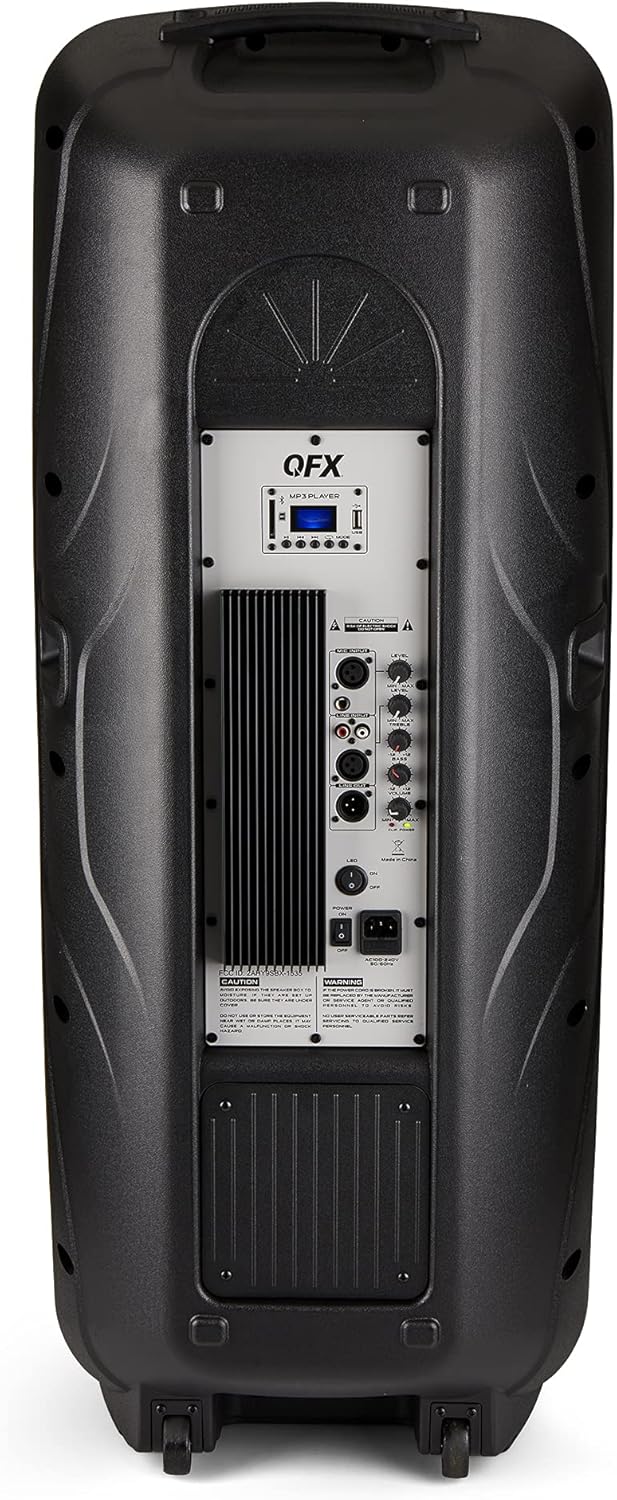
Figure 4.2: Rear panel with controls and ports.
- Virtakytkin: Kytkee kaiuttimen päälle/pois.
- AC-tulo: Connects the AC power cable.
- USB/SD Card Ports: Äänen toistamiseen fileUSB-asemilta tai SD-korteilta.
- Näyttö: Näyttää nykyisen tilan ja kappaleen tiedot.
- Tilapainike: Switches between input modes (Bluetooth, FM, USB, SD, RCA).
- Toisto/tauko-painike: Controls playback for USB/SD/Bluetooth.
- Edellinen/seuraava kappale -painikkeet: Navigoi kappaleita tai FM-asemia.
- Päääänenvoimakkuuden nuppi: Säätää kokonaisvoimakkuutta.
- Bass/Treble Control Knobs: Säätää matalia ja korkeita taajuuksia.
- XLR-mikrofonitulo: Connects a wired microphone.
- Microphone Volume/Echo Knobs: Adjusts microphone volume and echo effect.
- RCA-tulo (V/O): Connects external audio devices via RCA cables.
- XLR Line Input/Output: Muiden äänilaitteiden liittämistä varten.
5. Asennus
Alkuperäinen sijoittelu
Place the speaker on a stable, flat surface. For optimal sound, position it in a central location within the listening area. The integrated wheels and handle allow for easy transport.

Figure 5.1: Speaker being moved with handle and wheels.
Virtaliitäntä
- Varmista, että kaiuttimen virtakytkin on OFF-asennossa.
- Connect the AC power cable to the AC input on the rear panel of the speaker.
- Kytke verkkovirtajohdon toinen pää tavalliseen pistorasiaan.
- Flip the power switch to the ON position. The display screen will illuminate.
6. Käyttöohjeet
Bluetooth-pariliitos
- Turn on the QFX E-B3 speaker.
- Paina MODE button on the speaker or remote control until "BLUE" appears on the display screen, indicating Bluetooth mode.
- Ota Bluetooth käyttöön mobiililaitteessasi (älypuhelin, tabletti jne.).
- Etsi available Bluetooth devices and select "QFX E-B3" from the list.
- Once paired, the speaker will emit a confirmation sound. You can now play audio from your device through the speaker.
True Wireless System (TWS) Pairing
TWS allows two QFX E-B3 speakers to connect wirelessly for a stereo sound experience. This feature works only in Bluetooth mode.
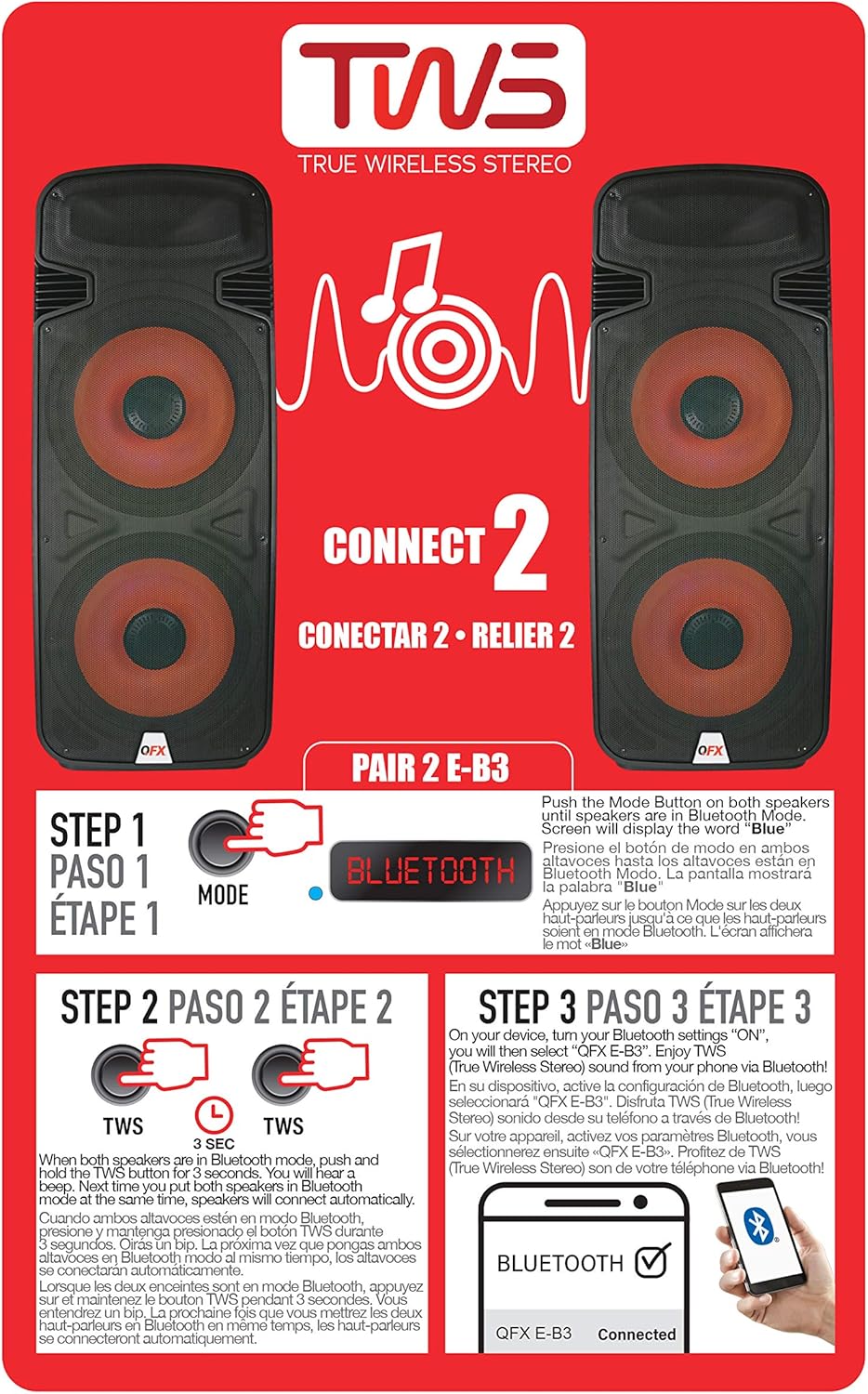
Figure 6.1: TWS Pairing Instructions.
- Ensure both QFX E-B3 speakers are powered on and in Bluetooth mode. The display on both speakers should show "BLUE".
- Pidä painettuna yhden kaiuttimen (tämä on ensisijainen kaiutin) -painiketta TWS button for approximately 3 seconds. The speakers will attempt to connect to each other.
- Once successfully paired, you will hear a confirmation sound, and the display on the primary speaker will show "BLUE" while the secondary speaker will show "BLUE" as well.
- On your Bluetooth-enabled device, search for and select "QFX E-B3". The two speakers will now play audio in stereo.
FM-radion toiminta
- Paina MODE button to switch to FM radio mode. The display will show the FM frequency.
- Paina ja pidä painettuna Toista/Tauko button to initiate an automatic scan for FM stations. The speaker will save all found stations.
- Käytä Edellinen/seuraava kappale -painikkeita selataksesi tallennettuja FM-asemia.
USB/SD-kortin toisto
- Aseta USB-muistitikku tai SD-kortti (yhteensopivalla äänilaitteella) files) takapaneelin vastaavaan porttiin.
- Kaiutin siirtyy automaattisesti USB/SD-tilaan ja alkaa toistaa ääntä files. Jos ei, paina MODE -painiketta valitaksesi USB- tai SD-tilan.
- Käytä Toista/Tauko ja Edellinen/seuraava kappale painikkeita toiston ohjaamiseen.
Mikrofonin sisääntulo
- Connect a microphone to the XLR Microphone Input on the rear panel.
- Adjust the Microphone Volume and Echo knobs to achieve the desired sound.
RCA-tulo
- Connect an external audio source (e.g., CD player, mixer) to the RCA Input (L/R) ports using appropriate RCA cables.
- Paina MODE button to select RCA input mode.
- Adjust the master volume on the speaker and the volume on your external audio source.
LED juhlavalot
The speaker features integrated LED party lights that activate automatically when the speaker is powered on. There are no specific controls for the LED lights mentioned; they are designed to enhance the audio experience.
7. Huolto
Puhdistus
- Always unplug the speaker before cleaning.
- Pyyhi kaiuttimen ulkopinnat pehmeällä, kuivalla liinalla.
- Älä käytä hankaavia puhdistusaineita, vahoja tai liuottimia, sillä ne voivat vahingoittaa pintaa.
- Pidä tuuletusaukot vapaina pölystä ja roskista.
Varastointi
When not in use for extended periods, store the speaker in a cool, dry place, away from direct sunlight and extreme temperatures. Cover the speaker to protect it from dust.
8. Vianmääritys
If you encounter issues with your QFX E-B3 speaker, refer to the following common problems and solutions:
| Ongelma | Mahdollinen syy | Ratkaisu |
|---|---|---|
| Ei virtaa | Power cable not connected; Power outlet not active; Speaker power switch off. | Ensure AC cable is securely connected to speaker and outlet. Check if outlet is working. Turn speaker power switch ON. |
| Ei ääntä | Äänenvoimakkuus liian alhainen; Väärä syöttötila valittu; Äänilähde ei toistu. | Increase master volume. Press MODE button to select correct input. Ensure audio source is playing and its volume is up. |
| Bluetooth ei muodosta yhteyttä | Speaker not in Bluetooth mode; Device Bluetooth off; Speaker already paired to another device; Device too far. | Ensure speaker is in Bluetooth mode ("BLUE" on display). Turn on device Bluetooth. Disconnect from other devices. Move device closer to speaker (within 30 feet). |
| TWS-pariliitos epäonnistui | Kaiuttimet eivät ole Bluetooth-tilassa; TWS-painiketta ei painettu tarpeeksi kauan. | Ensure both speakers are in Bluetooth mode. Press and hold the TWS button on one speaker for 3 seconds. |
| USB/SD-toisto ei toimi | Väärä tila; Yhteensopimaton file format; Corrupted USB/SD card. | Press MODE to select USB/SD. Ensure audio files are in a compatible format (e.g., MP3). Try a different USB/SD card. |
9. Tekniset tiedot
| Ominaisuus | Erittely |
|---|---|
| Merkki | QFX |
| Mallinumero | E-B3 |
| Kaiuttimen suurin lähtöteho | 250 wattia |
| Yhteystekniikka | USB, Bluetooth |
| Äänilähtötila | Stereot |
| Asennustyyppi | Pistokkeen kiinnitys, pyörän kiinnitys |
| Kaiuttimen tyyppi | Woofer (Dual 15 Inches) |
| Ohjaimen tyyppi | Kaukosäädin |
| Väri | Party LED |
| On vedenpitävä | Väärä |
| Valvontamenetelmä | Kauko |
| Bassokaiuttimen halkaisija | 15 tuumaa |
| Äänikanavien määrä | 2.0 |
| Langaton tekniikka | Bluetooth |
| Yhteysprotokolla | Bluetooth |
| Virtalähde | Johdollinen sähkö |
| Ääniohjaimen tyyppi | Dynaaminen ohjain |
| Ääniohjaimen koko | 15 tuumaa |
| Tuotteen mitat (S x L x K) | 16.77" S x 13.98" L x 23.74" K |
| Tuotteen paino | 13.2 puntaa |
| Yhteensopivat laitteet | Kannettava tietokone, MP3-soitin, älypuhelin, tabletti, televisio |
| UPC | 606540039618 |
10. Takuutiedot
This product is covered by a limited warranty. For specific details regarding warranty coverage and terms, please refer to the warranty information provided at the point of purchase or contact QFX customer support directly. The warranty is typically per contract with the retailer.
11. Tukea
For technical assistance, troubleshooting beyond this manual, or inquiries about your QFX E-B3 speaker, please contact QFX customer support or your retailer. Contact information can usually be found on the manufacturer's websivustolla tai ostokuittisi perusteella.


