
Logitech C505/C505e
Logitech C505/C505e HD Wired Business Webnokan käyttöopas
Model: C505/C505e
1. Yliview
The Logitech C505/C505e HD Wired Business Webcam is designed to enhance your video communication experience. It provides crisp, smooth, and colorful widescreen HD 720p video with a 60° diagonal field of view. The webcam features fixed focus and automatic light correction, adapting to various lighting conditions. Its single, omnidirectional microphone incorporates noise-reduction technology, supporting clear conversations up to 3 meters away, even in noisy environments. The extra-long USB-A cable and universal clip offer flexible placement options on your computer or up to 7 feet away.
2. Asennusohjeet
Setting up your Logitech C505/C505e webcam is a straightforward plug-and-play process. No additional software installation or charging is required.
- Yhdistä Webnokka: Kytke USB-A-kaapeli laitteen webkamera pöytätietokoneen tai kannettavan tietokoneen vapaaseen USB-porttiin.
- Sijoita Webnokka: Use the universal clip to securely mount the webcam on your monitor, laptop screen, or place it on a flat surface. The extra-long cable allows for flexible positioning.
- Valitse Webnokka: Tietokoneesi pitäisi tunnistaa automaattisesti webcam. If you have multiple cameras or microphones, you may need to select the "Logitech C505/C505e" in your application's settings (e.g., video conferencing software, recording applications) or your operating system's device settings.

Image: The Logitech C505/C505e webcam easily clips onto a monitor for convenient placement.
3. Käyttö Webnokka
Once connected, the Logitech C505/C505e is ready for use with most video conferencing and recording applications.
- Videon laatu: The webcam delivers HD 720p video at 30 frames per second, providing clear visuals for your calls and recordings.
- Kenttä View: 60 °: n lävistäjäkenttä view ensures you are framed appropriately without capturing excessive background.
- Kiinteä tarkennus: The fixed focus lens maintains sharpness for subjects within its optimal range, simplifying operation.
- Automaattinen valonkorjaus: The webcam automatically adjusts to the lighting conditions of your environment, helping to ensure you appear well-lit even in varying light. Optimal lighting conditions will yield the best video quality.
- Mikrofoni: The integrated omnidirectional microphone with noise-reduction technology is designed to capture your voice clearly from up to 3 meters away, minimizing background distractions.

Image: The Logitech C505/C505e provides HD 720p widescreen video for clear communication.
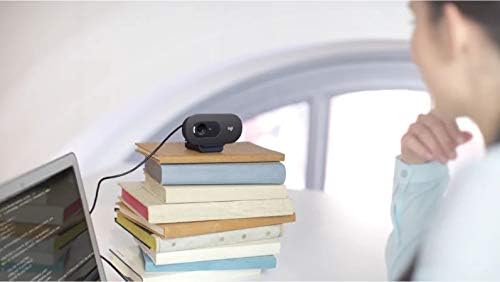
Image: Flexible placement options allow the webcam to be positioned on various surfaces.
4. Huolto
To ensure optimal performance and longevity of your Logitech C505/C505e webnokka-akseli, noudata näitä yksinkertaisia huolto-ohjeita:
- Linssin puhdistus: Pyyhi varovasti webcam lens with a soft, lint-free cloth. Avoid using harsh chemicals or abrasive materials that could scratch the lens.
- Varastointi: Kun et käytä sitä, säilytä webkamera puhtaassa, kuivassa paikassa, poissa äärimmäisistä lämpötiloista ja suorasta auringonvalosta.
- Kaapelihuolto: Avoid sharply bending or crimping the USB cable to prevent internal damage.
5. Vianmääritys
If you encounter issues with your Logitech C505/C505e webkamera, kokeile seuraavia vianmääritysohjeita:
- Ei videota/ääntä:
- Varmista, että USB-kaapeli on kytketty kunnolla molempiin webkamera ja tietokoneesi.
- Kokeile kytkeä webkamera toiseen USB-porttiin.
- Check your application's settings (e.g., Zoom, Microsoft Teams) to confirm the Logitech C505/C505e is selected as the active camera and microphone.
- Verify your operating system's privacy settings allow applications to access the camera and microphone.
- Huono videon laatu:
- Varmista riittävä valaistus ympäristössäsi. webcam performs best with good illumination.
- Puhdista webkameran linssi pehmeällä liinalla.
- Tarkista, onko linssin edessä esteitä.
- Huono äänenlaatu:
- Varmista, että webcam's microphone is selected in your application and system audio settings.
- Vähennä taustamelua ympäristössäsi.
- Ensure you are within the 3-meter optimal range of the microphone.
- Webcam Not Recognized:
- Käynnistä tietokone uudelleen.
- Tarkista tietokoneesi Laitehallinnasta (Windows) tai Järjestelmätiedoista (macOS), onko webcam is listed. You may need to update or reinstall drivers, though typically the webcam is plug-and-play.
6. Tekniset tiedot
| Merkki | Logitech |
| Mallinumero | Logitech C505/C505e |
| Videon sieppaustarkkuus | 720p |
| Videon resoluutio | 720p |
| Yhteystekniikka | Langallinen (USB-A) |
| Tarkennustyyppi | Kiinteä tarkennus |
| Viewkulma | 60 astetta |
| Mikrofoni | Omnidirectional with Noise-Reduction |
| Käyttöjärjestelmä | Multiple (Windows 8 or later, macOS 10.10 or later, ChromeOS) |
| Sisäänrakennettu media | USB Cable, Universal Clip |
| Ominaisuudet | Automatic Light Correction, Low Light Performance |
7. Takuu ja tuki
Saat yksityiskohtaiset takuutiedot ja teknisen tuen Logitechin viralliselta tukisivustolta. websivusto. Löydät sieltä ajurit, usein kysytyt kysymykset ja asiakaspalvelun yhteystiedot.