
1. Johdanto
This instruction manual provides detailed guidance for the proper use and maintenance of your Zeerkeer Electronic Automatic Pill Dispenser. This device is designed to assist with timely medication management through timed reminders and organized storage. Please read this manual thoroughly before operating the device to ensure safe and effective use.
2. Tuotteen ominaisuudet
- Ajastetut muistutukset: Features timed vibration and audible reminders for medication.
- Digitaalinen näyttö: Clear digital display shows time and timer settings.
- Kestävä rakenne: Made from high-quality, food-grade ABS and PP materials, ensuring safety and durability.
- Osioitu tallennustila: Multiple compartments for easy classification and organization of different medications.
- Kosteus- ja pölysuojaus: Designed to protect medication from moisture, dust, and deterioration.
- Kompakti ja kannettava: Slim and lightweight design for easy carrying in a pocket or bag.
- Clock and Timer Function: Displays time in 12-hour or 24-hour format and includes a countdown timer function.
3. Pakkauksen sisältö
Avattuasi pakkauksen tarkista, että kaikki osat ovat mukana ja vahingoittumattomia:
- Zeerkeer Electronic Automatic Pill Dispenser (1 unit)
Note: Batteries may not be included and might need to be purchased separately.
4. Tuote ohiview
Familiarize yourself with the main components of your pill dispenser:
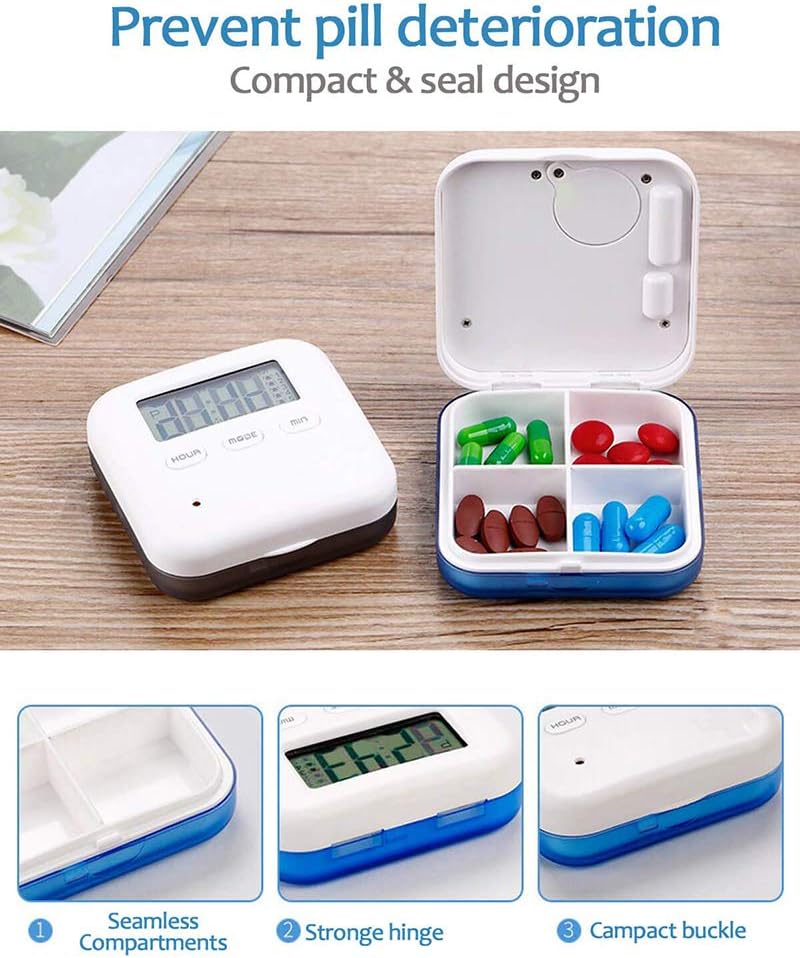
Image: This image displays the Zeerkeer Electronic Automatic Pill Dispenser. On the left, the main unit with a digital display showing time and control buttons (HOUR, MODE, MIN). On the right, the pill dispenser is open, revealing four internal compartments, each containing different colored pills. Below, three detailed close-up images highlight key features: (1) "Seamless Compartments" showing the smooth, easy-to-clean interior, (2) "Strong Hinge" illustrating the durable connection between the lid and base, and (3) "Compact Buckle" demonstrating the secure closing mechanism.
The device consists of a main unit with a digital display and control buttons, and a hinged lid that opens to reveal four internal compartments for medication storage. It features a secure buckle and a robust hinge for durability.
5. Asennus
5.1. Akun asennus
The pill dispenser requires batteries for operation. Locate the battery compartment, usually on the back or bottom of the device. Insert the required batteries, ensuring correct polarity (+/-). Close the battery compartment securely.
5.2. Alkuperäinen aika-asetus
After battery installation, the display may show a default time or be blank. To set the current time:
- Paina MODE button to enter time setting mode. The hour digits will likely flash.
- Käytä TUNNIN -painiketta säätääksesi tuntia.
- Käytä MIN -painiketta minuuttien säätämiseksi.
- Paina MODE again to confirm the time and exit time setting mode.
- Select 12-hour or 24-hour format if available, typically by pressing MODE or TUNNIN while in time display mode.
6. Käyttöohjeet
6.1. Setting Medication Reminders (Alarms)
The device supports up to 5 daily medication reminders. To set an alarm:
- Paina pääaikanäytössä -painiketta MODE button repeatedly until "ALARM 1" (or similar indicator) appears.
- The hour digits for the alarm will flash. Use the TUNNIN -painiketta halutun hälytysajan asettamiseksi.
- Käytä MIN -painiketta asettaaksesi halutut hälytysminuutit.
- Paina MODE to save "ALARM 1" and proceed to "ALARM 2" if needed, or exit alarm setting mode.
- Repeat for up to 5 alarms.
- To activate or deactivate an alarm, there may be a dedicated switch or a combination of button presses (refer to on-screen indicators).
6.2. Ajastimen käyttö
The device includes a countdown timer function (up to 23 hours 59 seconds).
- From the main time display, press MODE until the countdown timer display appears (e.g., "00:00").
- Käytä TUNNIN ja MIN painikkeita halutun lähtölaskennan keston asettamiseksi.
- Paina MODE or a dedicated START/STOP button to begin the countdown.
- When the countdown reaches zero, an alarm will sound or vibrate.
6.3. Lokeroiden täyttö
Open the lid of the pill dispenser. Carefully place your medications into the four separate compartments. Ensure the lid closes securely to protect the contents.

Image: This image shows the Zeerkeer Electronic Automatic Pill Dispenser with its lid open, revealing four distinct compartments. Each compartment is filled with different types and colors of pills, demonstrating its organizational capacity. Above the dispenser, two icons are visible: one representing "Vibration" (a battery with vibration waves) and another representing "Voice" (an alarm clock), indicating the reminder features of the device.
7. Huolto
7.1. Puhdistus
To clean your pill dispenser:
- Ensure all medication is removed from the compartments.
- Pyyhi ulko- ja sisäpinnat pehmeällä, d:lläamp kangas.
- For stubborn spots, use a mild soap solution, then wipe clean with a damp liinalla ja kuivaa huolellisesti.
- Do not immerse the device in water or use harsh chemical cleaners, as this can damage the electronic components.
7.2. Pariston vaihto
When the display dims or the alarms become weak, it is time to replace the batteries. Follow the battery installation steps (Section 5.1) to replace old batteries with new ones.
8. Vianmääritys
| Ongelma | Mahdollinen syy | Ratkaisu |
|---|---|---|
| Device does not power on or display is blank. | Ei paristoja, paristot on asennettu väärin tai paristot ovat tyhjiä. | Check battery installation, ensure correct polarity, or replace batteries. |
| Alarms are not sounding/vibrating. | Alarms not set, alarms deactivated, or low battery. | Verify alarm settings, ensure alarms are activated, or replace batteries. |
| Aikanäyttö on virheellinen. | Time not set correctly or battery removed/replaced. | Nollaa nykyinen aika kohdan 5.2 mukaisesti. |
| Kansi ei sulkeudu kunnolla. | Obstruction in hinge or buckle area, or overfilled compartments. | Check for debris, ensure compartments are not overfilled, and inspect hinge/buckle for damage. |
9. Tekniset tiedot
- Malli: 9A03088
- Merkki: Zeerkeer
- Materiaali: ABS + PP (Acrylonitrile Butadiene Styrene + Polypropylene)
- Väri: Sininen
- Mitat: 6.5 cm (P) x 6.5 cm (L) x 2 cm (K)
- Paino: Noin 60 grammaa
- Toiminnot: 12/24 hour time display, 5-time 24-hour timing vibration reminder, 23-hour 59-second countdown reminder.
- UPC: 699900277805

Image: This image provides a top-down view of the Zeerkeer Electronic Automatic Pill Dispenser, clearly showing its digital display and control buttons. Overlaid on the image are precise dimensions: 6.5 cm (2.55 inches) for both length and width, and 2 cm (0.78 inches) for height, illustrating the compact size of the device.
10. Turvallisuustiedot
- Pidä laite poissa lasten ja lemmikkien ulottuvilta.
- Älä altista laitetta äärimmäisille lämpötiloille, suoralle auringonvalolle tai kosteudelle.
- Älä yritä purkaa tai korjata laitetta itse. Ota yhteyttä asiakastukeen, jos ongelmia ilmenee.
- Hävitä vanhat paristot vastuullisesti paikallisten määräysten mukaisesti.
- This device is intended for organizing and reminding about medication. It is not a substitute for professional medical advice. Always consult with a healthcare professional regarding your medication regimen.
11. Takuu ja tuki
For warranty information or technical support, please refer to the contact details provided with your purchase or visit the official Zeerkeer website. Please have your model number (9A03088) and purchase date available when contacting support.