
1. Johdanto
This manual provides essential information for the safe and efficient operation of your iProda 2 in 1 Laptop, Model M1169YM. Please read this manual thoroughly before using the device and retain it for future reference. This convertible laptop features an 11.6-inch touchscreen, powered by an Intel N4100 processor, and runs on Windows 10 Pro.

Image: The iProda 2 in 1 Laptop can be used in multiple configurations, including traditional laptop, tent, stand, and tablet modes, showcasing sen monipuolisuutta.
2. Turvallisuustiedot
Noudata seuraavia turvaohjeita laitteen vahingoittumisen tai itsesi loukkaantumisen välttämiseksi:
- Älä altista laitetta äärimmäisille lämpötiloille, suoralle auringonvalolle tai korkealle kosteudelle.
- Vältä laitteen pudottamista tai altistamista voimakkaille iskuille.
- Use only the provided or approved power adapter for charging.
- Pidä laite poissa vedestä ja muista nesteistä.
- Älä yritä purkaa tai korjata laitetta itse. Ota yhteyttä pätevään huoltohenkilöstöön.
3. Pakkauksen sisältö
Varmista, että pakkauksessasi on kaikki tarvittavat osat:
- iProda 2 in 1 Laptop (Model M1169YM)
- Virtalähde
- Käyttöopas (tämä asiakirja)
4. Tuote ohiview
The iProda 2 in 1 Laptop is designed for versatility, offering multiple usage modes and essential connectivity options.
4.1. Tärkeimmät ominaisuudet
- 11.6 tuuman IPS-kosketusnäyttö: A responsive 10-point precision touchscreen with 1920x1080 resolution for interactive use.
- Avoauton suunnittelu: 360-degree hinge allows seamless transition between laptop, tablet, tent, and stand modes.
- Intel N4100 -prosessori: Provides efficient performance for daily tasks.
- Windows 10 Pro: Pre-installed operating system for productivity and security.
- Laajennettava tallennustila: Supports M.2 2242 SSD for additional storage capacity.

Image: Key features of the iProda laptop, including its touchscreen, operating system, display specifications, and camera resolution.

Image: The laptop's 360-degree hinge allows it to convert into a tablet, enabling direct interaction via its precision touchscreen.
4.2. Portit ja painikkeet
Familiarize yourself with the various ports and buttons on your laptop:
- C-tyypin portti: Used for power supply and data transfer.
- Mikro HDMI: Ulkoisten näyttöjen liittämistä varten.
- Mikro-USB: USB-laitteiden liittämiseen.
- TF-korttipaikka: For expanding storage with a TF (MicroSD) card.
- Virtapainike: Laitteen kytkeminen päälle/pois tai sen laittaminen lepotilaan.
- Äänenvoimakkuuspainikkeet: Äänen ulostulon säätämiseen.
- Kuulokepistoke: Kuulokkeiden tai ulkoisten kaiuttimien kytkemiseen.

Kuva: Yksityiskohtainen view of the laptop's side panels, indicating the location and function of each port and button for easy identification.
5. Asennus
5.1. Akun lataaminen
Before first use, fully charge the laptop's battery. Connect the provided power adapter to the Type-C port on the laptop and plug it into a power outlet. The charging indicator light will illuminate.
5.2. Ensimmäinen käynnistys ja Windowsin asennus
- Paina virtapainiketta ja pidä sitä painettuna, kunnes näyttö käynnistyy.
- Suorita Windows 10 Pron alkuasennus loppuun noudattamalla näytön ohjeita, mukaan lukien kielen valinta, verkkoyhteyden muodostaminen ja käyttäjätilin luominen.
6. Kannettavan tietokoneen käyttö
6.1. Kosketusnäytön käyttäminen
The 10-point precision touchscreen allows for intuitive interaction with Windows 10 Pro. Use gestures such as tapping, swiping, pinching, and stretching to navigate, zoom, and interact with applications.
6.2. Näppäimistö ja kosketuslevy
The integrated keyboard and touchpad provide traditional input methods. The touchpad supports multi-touch gestures for scrolling, zooming, and switching applications.

Image: The laptop's full-size American keyboard and responsive touchpad, designed for comfortable typing and navigation.
6.3. Muunneltavat tilat
The 360-degree hinge allows you to switch between various modes:
- Kannettava tietokone -tila: Vakiokokoonpano kirjoittamista ja tuottavuutta varten.
- Tablettitila: Taita näyttö kokonaan taakse saadaksesi tablettikokemuksen, joka sopii erinomaisesti selaamiseen tai piirtämiseen.
- Telttatila: Position the laptop like a tent for media consumption or presentations.
- Taittotila: Flip the keyboard face down to use the screen as a display, suitable for watching videos.

Image: The laptop configured in tent mode, demonstrating its flexibility for viewing content without the keyboard in the way.
7. Tallennustilan laajentaminen
The laptop comes with 64GB eMMC storage. You can expand the storage capacity by installing an M.2 2242 SSD (128GB/256GB/512GB, not included).
7.1. Installing an M.2 2242 SSD
To install an M.2 2242 SSD:
- Power off the laptop and disconnect the power adapter.
- Carefully open the back cover of the laptop.
- Paikanna M.2-paikka.
- Insert the M.2 2242 SSD into the slot and secure it with the appropriate screw (if provided).
- Aseta takakansi takaisin paikalleen.
- Upon booting, you may need to initialize and format the new SSD through Windows Disk Management.
Note: If you are unsure about this procedure, it is recommended to seek professional assistance.

Image: Visual representation of the M.2 SSD slot, illustrating how additional storage can be integrated into the laptop.
8. Yhteydet
8.1. Wi-Fi-yhteys
The laptop supports dual-frequency 2.4GHz/5GHz Wi-Fi. To connect to a wireless network:
- Napsauta ilmaisinalueella olevaa Wi-Fi-kuvaketta.
- Valitse haluamasi verkko luettelosta.
- Anna verkon salasana, jos sitä pyydetään, ja napsauta "Yhdistä".
8.2. External Display (Micro HDMI)
Connect an external monitor or TV using a Micro HDMI to HDMI cable. Once connected, you can configure display settings (duplicate, extend, second screen only) through Windows display settings.
8.3. USB-laitteet
Use the Micro USB port or the Type-C port (with an appropriate adapter) to connect peripherals such as a mouse, keyboard, or external storage devices.
9. Huolto
9.1. Puhdistus
To clean the laptop, power it off and disconnect the power adapter. Use a soft, lint-free cloth slightly dampvedellä tai näytönpuhdistusaineella. Vältä voimakkaita kemikaaleja tai hankaavia materiaaleja.
9.2. Akun hoito
Pidennä akun käyttöikää seuraavasti:
- Vältä akun usein toistuvaa täydellistä tyhjentymistä.
- Älä altista kannettavaa tietokonetta korkeille lämpötiloille.
- If storing the laptop for an extended period, ensure the battery is charged to around 50-70%.
10. Vianmääritys
Tässä on ratkaisuja yleisiin ongelmiin, joita saatat kohdata:
| Ongelma | Ratkaisu |
|---|---|
| Kannettava tietokone ei käynnisty. | Ensure the battery is charged. Connect the power adapter and try again. If still unresponsive, perform a hard reset by holding the power button for 10-15 seconds. |
| Näyttö on tyhjä tai välkkyy. | Restart the laptop. Check if an external display is connected and interfering. Update display drivers if possible. |
| Wi-Fi-yhteysongelmat. | Varmista, että Wi-Fi on käytössä. Käynnistä reititin ja kannettava tietokone uudelleen. Tarkista verkkoasetukset Windowsissa. |
| Kosketusnäyttö ei reagoi. | Restart the laptop. Ensure the screen is clean. Check for any pending Windows updates or driver updates for the touchscreen. |
11. Tekniset tiedot
Technical specifications for the iProda 2 in 1 Laptop (Model M1169YM):
| Ominaisuus | Yksityiskohta |
|---|---|
| Merkki | iProda |
| Mallinumero | M1169YM |
| Käyttöjärjestelmä | Windows 10 Pro |
| Näytön koko | 11.6 tuumaa |
| Näytön resoluutio | 1920 x 1080 pikseliä (1080p) |
| Prosessori | Intel N4100 (up to 2.4 GHz Burst Frequency) |
| RAM | 4GB DDR4 |
| Kiintolevy | 64 Gt eMMC |
| Näytönohjain | Integrated (UHD 600 Graphics) |
| Langaton tyyppi | 2.4 GHz / 5 GHz Dual-frequency Wi-Fi |
| Keskimääräinen akun käyttöikä | 8 Hours (3500mAh, 27Wh) |
| Tuotteen paino | 3.63 kiloa |
| Tuotteen mitat | 11.99 x 11.6 x 0.5 tuumaa |
| Yhteystekniikka | HDMI, USB Type-C, Micro USB |
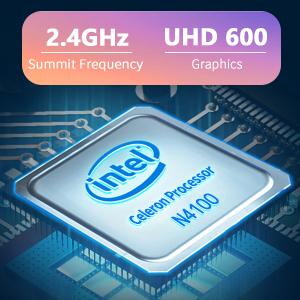
Image: The Intel Celeron N4100 processor, central to the laptop's performance, highlighting its clock speed and integrated graphics capabilities.

Image: The laptop's battery specifications, indicating its power capacity for extended use.
12. Takuu ja tuki
For warranty information and technical support, please refer to the documentation included with your purchase or visit the official iProda website. Contact information for customer service can typically be found on the manufacturer's support page.