
1. Johdanto
The Carrera RC Mario Kart Yoshi Quad (Model 370200997X) is a remote-controlled vehicle designed for users aged 6 and up. This manual provides essential information for the safe and optimal use of your RC Yoshi Quad, ensuring an enjoyable experience. Please read all instructions carefully before operating the product.
2. Mitä laatikossa on
Pura kaikki osat huolellisesti pakkauksesta ja varmista, että seuraavat osat ovat mukana:
- Carrera RC Yoshi Quad Vehicle
- Kaukosäädin
- 3.2V 700 mAh LiFePo4 Battery (for vehicle)
- USB-latauskaapeli
- Käyttöohje

Image: The Carrera RC Mario Kart Yoshi Quad shown in its original retail packaging, indicating included components.
3. Asennus
3.1. Ajoneuvon akun lataaminen
Before first use, fully charge the vehicle's 3.2V 700 mAh LiFePo4 battery. The charging process typically takes approximately 50 minutes.
- Connect the USB charging cable to the vehicle's charging port.
- Plug the other end of the USB cable into a compatible USB power source (e.g., computer, USB wall adapter, power bank).
- The charging indicator light on the vehicle or cable will show the charging status (refer to specific indicator behavior in the quick start guide if available).
- Kun lataus on valmis, irrota kaapeli.

Image: The Yoshi Quad vehicle, ready for battery charging via its USB cable.
3.2. Kaukosäätimen paristojen asennus
The remote control requires batteries for operation. Please ensure you use the correct type and polarity.
- Paikanna paristolokero kaukosäätimen takana.
- Avaa paristolokeron kansi.
- Insert the required batteries (e.g., AA or AAA, typically 2x) according to the polarity markings (+/-).
- Sulje paristolokeron kansi kunnolla.
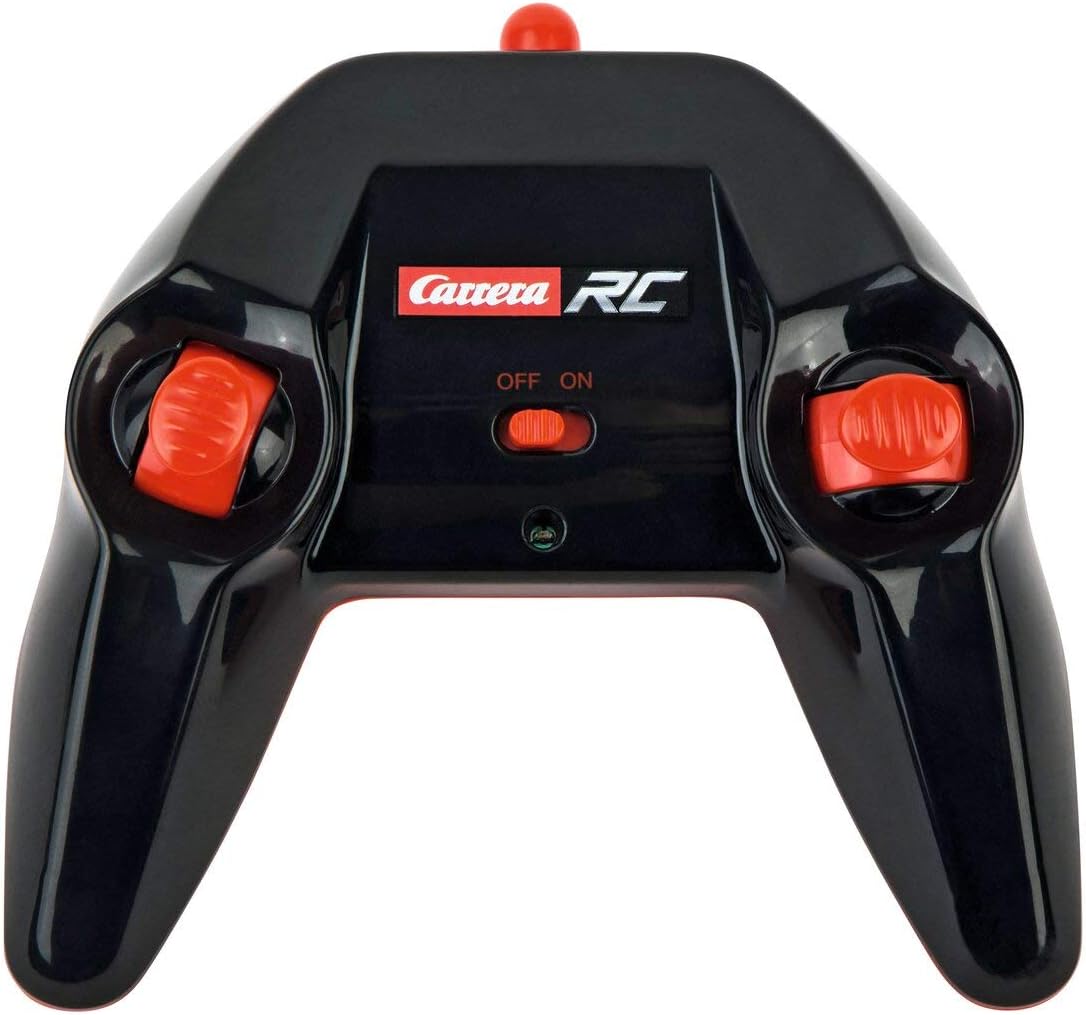
Image: The Carrera RC remote control, showing its design and controls.
3.3. Ajoneuvon ja kaukosäätimen parittaminen
To establish a connection between the vehicle and the remote control, follow these steps:
- Varmista, että sekä ajoneuvossa että kaukosäätimessä on uudet tai täyteen ladatut paristot.
- Käynnistä ajoneuvo sen virtakytkimellä.
- Kytke kaukosäädin päälle sen virtakytkimellä.
- The vehicle and remote control should automatically pair. A successful connection is usually indicated by a solid light on both devices (refer to your quick start guide for specific light indicators).
Video: This video demonstrates the unboxing, battery installation, and initial pairing process for the Carrera RC Mario Kart Yoshi Quad.
4. Käyttöohjeet
Once paired, you can begin operating your Carrera RC Yoshi Quad.
- Eteen/taakse: Use the throttle trigger or joystick on the remote control to move the vehicle forward or backward.
- Ohjaus: Use the steering wheel or directional controls on the remote control to turn the vehicle left or right.
- Nopeus: The Yoshi Quad can reach speeds of up to 9 km/h. Adjust your control input for desired speed.
- Alue: Operate the vehicle within the specified range of the remote control to maintain connection and avoid loss of control.
Turvallisuusohjeet:
- Always operate in open areas, away from people, pets, and obstacles.
- Älä käytä veden lähellä tai märissä olosuhteissa.
- Avoid operating on public roads or near traffic.
- Supervise younger children during operation.
5. Huolto
5.1. Puhdistus
To maintain the appearance and functionality of your RC Yoshi Quad:
- Wipe the vehicle and remote control with a soft, dry cloth after each use.
- Do not use harsh chemicals or solvents, as these can damage the plastic.
- Vältä veden joutumista elektronisiin komponentteihin.
5.2. Akun hoito ja säilytys
- Always remove batteries from the remote control if not in use for extended periods.
- Store the vehicle's LiFePo4 battery in a cool, dry place, away from direct sunlight and extreme temperatures.
- Älä ylilataa akkua tai tyhjennä sitä kokonaan.
6. Vianmääritys
If you encounter issues with your RC Yoshi Quad, refer to the following common problems and solutions:
| Ongelma | Mahdollinen syy | Ratkaisu |
|---|---|---|
| Ajoneuvo ei liiku. | Low or uncharged vehicle battery. Kaukosäätimen paristot ovat tyhjät tai asennettu väärin. Ajoneuvoa ja kaukosäädintä ei ole yhdistetty pariksi. | Charge vehicle battery. Replace/install remote control batteries correctly. Re-pair vehicle and remote control. |
| Poor control range or intermittent connection. | Interference from other RC devices or electronics. Toimii tehokkaan kantaman ulkopuolella. Paristot vähissä. | Siirry eri paikkaan. Operate closer to the vehicle. Lataa/vaihda akut. |
| Vehicle moves slowly or erratically. | Ajoneuvon akun varaus on heikko. Tukos pyörissä/akseleissa. | Charge vehicle battery. Tarkista ja poista mahdolliset esteet. |
7. Tekniset tiedot
| Merkki | Carrera |
| Mallin nimi | 370200997X |
| Merkki | Yoshi |
| Ajoneuvon tyyppi | Quad |
| Materiaali | Muovi |
| Väri | Multicolor (predominantly Green) |
| Ikäryhmä (kuvaus) | 6+ vuotta |
| Max nopeus | 9 kilometriä tunnissa |
| Virtalähde | Paristokäyttöinen |
| Vehicle Battery Type | 1 Lithium-ion (3.2V 700 mAh LiFePo4) - included |
| Latausaika | Noin 50 minuuttia |
| Toiminta-aika | Jopa 30 minuuttia |
| Kaukosäätimen tyyppi | Radio-ohjaus (2.4 GHz) |
| Mitat (tuote) | 36.5 x 20.5 x 23 cm |
| Paino (tuote) | 1.06 kiloa |
| Erikoisominaisuus | Vilkkuva valo |
| Alkuperämaa | Kiina |
8. Takuu ja tuki
8.1. Valmistajan takuu
This Carrera RC product is covered by a 2 vuoden valmistajan takuuSäilytä ostokuittisi mahdollisia takuuvaatimuksia varten. Takuu kattaa materiaali- ja valmistusvirheet normaalissa käytössä.
8.2. Asiakastuki
For technical assistance, spare parts, or warranty inquiries, please contact Carrera customer support. Refer to the contact information provided on the product packaging or the official Carrera websivusto.