
Soufyuane TK303F
Soufyuane GPS Tracker User Manual
Model: TK303F
1. Johdanto
The Soufyuane Coban TK303F is a professional-grade GPS tracking device designed for real-time vehicle and asset monitoring. It combines Location Based Service (LBS) and GPS for accurate double real-time tracking. This device supports data transmission via SMS, GSM, GPRS, and Internet networks, offering versatile tracking and security features. Its robust design includes waterproof capabilities and multiple alarm functions to enhance vehicle safety and management.
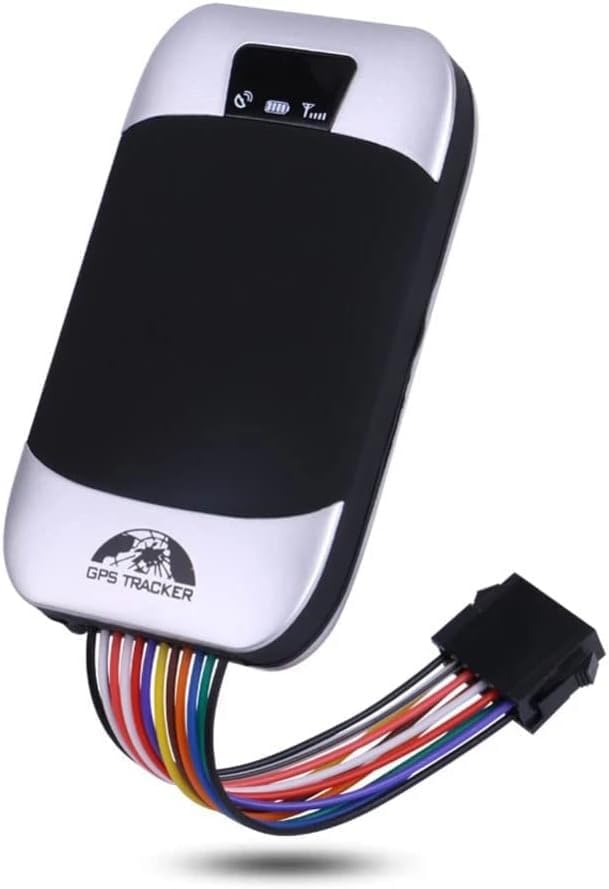
Image: The Soufyuane Coban TK303F GPS Tracker, showcasing its compact design and integrated wiring harness for installation.
2. Pakkauksen sisältö
Varmista, että pakkauksessasi on kaikki alla luetellut tuotteet:
- GPS-pääyksikkö
- 12Pin Harness
- Rele
- Mikrofoni
- Ruuvimeisseli
- Englanninkielinen käyttöopas
- SIM Card (Note: SIM card is not included with the device and must be purchased separately.)

Image: A visual representation of the complete package contents for the TK303F GPS Tracker.
3. Asennus ja asennus
Proper installation is crucial for the optimal performance of your GPS tracker. It is recommended that installation be performed by a qualified professional.
3.1. SIM-kortin asettaminen
Before installation, ensure a valid GSM SIM card (not included) with GPRS data plan is inserted into the device. The SIM card should have sufficient balance for SMS and data services.
3.2. Johdotusliitännät
The device comes with a 12-pin harness for connection to your vehicle's power supply and other components. Key connections include:
- Virtalähde: Connect the red wire to the positive terminal of the vehicle's battery (9-40V DC) and the black wire to the negative terminal.
- ACC Ignition: Connect the orange wire to the vehicle's ACC ignition wire to detect ignition status.
- Oil/Power Cut-off Relay: Connect the relay as per the wiring diagram provided in the full user manual (not included here) to enable remote fuel/power cut-off functionality. This feature allows you to remotely disable the vehicle's engine via SMS commands.
- Mikrofoni: Connect the external microphone for remote voice monitoring inside the vehicle.

Image: Illustration of the remote oil and power cut-off feature, demonstrating its application within a vehicle's system.
4. Käyttöohjeet
4.1. Tracking Methods
The TK303F offers multiple ways to track your vehicle:
- SMS Tracking: Send a specific SMS command to the tracker's phone number. The device will reply with a text message containing a Google Maps link showing the vehicle's real-time location.
- Web Server Tracking: Käytä omistettua web platform for real-time tracking, historical route playback, and device management. The official web server is http://www.gpstrackerxy.com.
- Mobile Phone App: Download the official mobile application for iOS and Android devices for convenient tracking and control on the go. The Android app can be found at https://play.google.com/store/apps/details?id=com.coban.en.
- PC Tracking Software: Utilize the PC-based tracking software for more advanced monitoring and reporting features.

Image: The mobile application and web server interface for accessing the tracker's real-time location and data.
4.2. Kaukosäätimen toiminnot
- Remote Oil/Power Cut-off: To remotely stop the engine, send the SMS command
stop+passwordto the tracker. The device will execute the command and reply with "Stop engine Succeed". The vehicle will remain immobile until a resume command is sent. To execute immediately, sendquickstop+password. - Voice Monitoring: Call the device's phone number. After changing it to monitoring mode, you can listen to the sounds inside the vehicle through the external microphone.

Image: A visual representation of the remote engine cut-off function via SMS command.
4.3. Geo-fence Setup
Set up a geo-fence to restrict the tracker's movements within a defined district. If the unit moves outside this pre-set area, it will send an SMS alert to the authorized numbers.

Kuva: Ilmakuva view illustrating the geo-fence feature, where a virtual boundary is set for the vehicle.
5. Hälytystoiminnot
The TK303F is equipped with a comprehensive suite of alarm functions to alert you to various events:
- Oven auki -hälytys: Alerts when a vehicle door is opened.
- ACC Alarm: Triggers when the ignition is turned on without authorization.
- Alhaisen akun hälytys: Notifies when the device's internal battery is low.
- External Power Off Alarm: Alerts if the external power supply to the device is disconnected.
- GPS Blind Spot Alert: Informs when the device enters an area with no GPS signal.
- SOS-hälytys: Activated manually in case of emergency.
- Multi-area Management: Allows setting up multiple geo-fences for different areas.
- Liikehälytys: Alerts if the vehicle moves from its parked location.
- Ylinopeushälytys: Triggers if the vehicle exceeds a pre-set speed limit.
- Fuel Alarm: Detects and alerts about abnormal fuel consumption or theft.

Image: A visual summary of the various alarm types supported by the TK303F GPS Tracker.

Image: Detailed illustration of alarms triggered when the device is in armed status.
6. Huolto
To ensure the longevity and optimal performance of your GPS tracker, follow these maintenance guidelines:
- Pidä laite kuivana ja poissa äärimmäisistä lämpötiloista.
- Tarkista säännöllisesti kaikki johtoliitännät varmistaaksesi, että ne ovat tukevasti kiinni ja että niissä ei ole korroosiota.
- Ensure the SIM card is properly seated and has an active plan.
- The built-in 3.7V 500mAh Li-ion battery is rechargeable. Ensure it is adequately charged for continuous operation, especially if external power is interrupted.
- Vältä laitteen altistamista voimakkaille iskuille tai tärinälle.
7. Vianmääritys
If you encounter issues with your TK303F GPS tracker, consider the following common problems and solutions:
- Laite ei vastaa: Check if the device is properly powered. Ensure the SIM card is correctly inserted and has sufficient balance and an active data plan.
- Epätarkka sijainti: Ensure the device has a clear line of sight to the sky for GPS signal reception. If in an underground garage or dense urban area, GPS signal may be weak, and LBS (Location Based Service) will be used, which is less precise.
- No SMS Reply: Verify the SIM card has SMS capabilities and sufficient credit. Check if the SMS command format is correct.
- Platform/App Offline: Ensure the device has GPRS data connectivity. Check the web platform or app server status.
- Hälytykset eivät laukea: Confirm that the alarm functions are enabled and correctly configured via SMS commands or the tracking platform. Check sensor connections (e.g., ACC, door sensor).
8. Tekniset tiedot
| Ominaisuus | Yksityiskohta |
|---|---|
| Malli | TK303F |
| Pakkauksen mitat | 5.71 x 3.98 x 2.72 tuumaa |
| Tuotteen paino | 11.7 unssia |
| Paristot | 1 litiumioniakku vaaditaan (mukana) |
| Yhteysteknologiat | Mobiili |
| Erikoisominaisuudet | Vedenpitävä |
| Muut näytön ominaisuudet | Langaton |
| Valmistaja | BCVD |
| Alkuperämaa | Kiina |
| Päivämäärä ensimmäinen saatavilla | 5. joulukuuta 2020 |
| Tuettu sovellus | GPS |
| Tuotteen erityiskäyttö | Vehicle Tracking, Personal Tracking, Asset Tracking |
9. Takuu ja tuki
For information regarding product warranty, please refer to the documentation provided at the time of purchase or contact your seller directly. For technical support or further assistance, please reach out to the retailer or manufacturer through their official contact channels.
Ask a question about this manual
Ask about setup, troubleshooting, compatibility, parts, safety, or missing instructions. Manuals+ will review the question and use this page’s manual context to help answer it.