
Johdanto
This manual provides essential instructions for the proper use and maintenance of your Vikefon Type C Charging and Data Cable. This 1-meter cable is designed for efficient charging and high-speed data transfer between your Type C enabled devices and compatible power sources or computers.

Image: The Vikefon Type C Charging and Data Cable, featuring a standard USB-A connector on one end and a reversible USB-C connector on the other.
Tuotteen ominaisuudet
- USB Connector Quality: Ensures reliable charging and high-speed data transmission.
- Teholähtö: Supports up to 5V, 3 Amp nopeaa latausta varten.
- Yleinen yhteensopivuus: Fully compatible with all Type C mobile devices for fast charging and syncing.
- Reversible USB Type-C Connector: Allows for quick and easy connections in any orientation.
- Kestävä muotoilu: Features intricate nylon braiding for enhanced durability and longevity, outlasting standard cables.
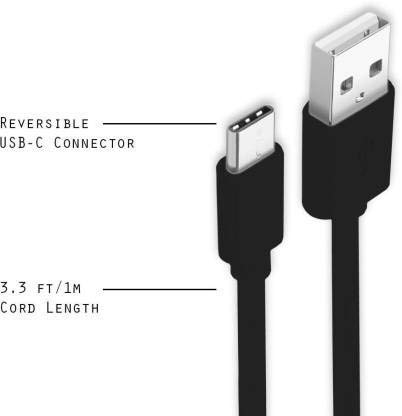
Image: A diagram illustrating the reversible nature of the USB-C connector and the cable's 1-meter (3.3 ft) cord length.
Asennus
- Tunnista liittimet: The cable has a standard USB-A connector on one end and a smaller, oval-shaped USB Type-C connector on the other.
- Connect to Power Source/Computer: Insert the USB-A end of the cable into a compatible USB port on a wall adapter, power bank, car charger, or computer.
- Yhdistä laitteeseen: Insert the USB Type-C end into the charging/data port of your smartphone, tablet, or other Type C enabled device. The USB Type-C connector is reversible, so it can be inserted in either orientation.
- Tarkista yhteys: Varmista, että molemmat päät on kytketty kunnolla. Laitteen pitäisi ilmoittaa, että se latautuu tai on yhdistetty tiedonsiirtoa varten.
Käyttöohjeet
Laitteen lataaminen
- Connect the USB-A end of the cable to a compatible USB power adapter (e.g., wall charger, car charger, power bank).
- Connect the USB Type-C end to your device's charging port.
- Ensure the power adapter is plugged into a live power outlet. Your device should begin charging.
Tietojen siirtäminen
- Liitä kaapelin USB-A-pää tietokoneen USB-porttiin.
- Connect the USB Type-C end to your device.
- On your device, you may receive a prompt asking to allow data access or to select a USB connection mode (e.g., "File Transfer," "MTP"). Select the appropriate option to enable data transfer.
- Your device should appear as a removable drive or media device on your computer, allowing you to transfer files.
Huolto
- Oikea käsittely: Tartu aina liittimen päähän kytkettäessä tai irrotettaessa kaapelia. Vältä vetämistä suoraan itse kaapelista, jotta sisäiset johdot eivät vahingoitu.
- Vältä taipumista: Do not excessively bend or crimp the cable, especially near the connectors, as this can cause internal wire breakage.
- Varastointi: Store the cable in a clean, dry place away from extreme temperatures and direct sunlight. Avoid tangling the cable.
- Puhdistus: If necessary, gently wipe the cable and connectors with a dry, soft cloth. Do not use liquids or abrasive cleaners.

Kuva: Lähikuva view highlighting the durable metal heads of the Vikefon Type C cable connectors, designed for anti-oxidation and corrosion resistance.
Vianetsintä
- Laite ei lataudu:
- Varmista, että kaapelin molemmat päät on liitetty kunnolla.
- Varmista, että virtalähde toimii oikein ja on kytketty pistorasiaan.
- Kokeile toista virtalähdettä tai USB-porttia.
- Check your device's charging port for any debris or damage.
- Hidas lataus:
- Ensure you are using a power adapter that supports fast charging (e.g., 3A output).
- Sulje kaikki tarpeettomat taustalla toimivat sovellukset laitteellasi.
- Ei tiedonsiirtoa:
- Confirm the cable is properly connected to both your device and computer.
- On your device, check the notification panel for USB options and select "File Transfer" or "MTP."
- Yritä yhdistää tietokoneesi toiseen USB-porttiin.
- Käynnistä sekä laite että tietokone uudelleen.
Tekniset tiedot
| Ominaisuus | Yksityiskohta |
|---|---|
| Merkki | Vikefon |
| Mallin nimi | Tyyppi C |
| Mallinumero | Tyyppi C 0129 |
| Liittimen tyyppi | USB Type C (uros-uros) |
| Kaapelin tyyppi | USB |
| Yhteensopivat laitteet | Laptop, PC, Smartphone (e.g., Xiaomi Redmi 8A, Poco M2, Poco M2 Pro, Samsung, Motorola, Lenovo, Lava, Sony, HTC, LG, Karbonn, Maxx) |
| Erikoisominaisuudet | Charging Wire, Durable, High Data Transfer Rate, High Quality, Long Length |
| Tiedonsiirtonopeus | Up to 0.48 Gigabits Per Second (480 Mbps) |
| Yhteystekniikka | USB |
| Erittely Met | ISO |
| Väri | Musta |
| Kohteen muoto | Pyöristää |
| Outer Material Type | Rubber (with Nylon Braiding) |
| Kaapelin pituus | 1 metri |
Takuu ja tuki
Specific warranty details for the Vikefon Type C Charging and Data Cable are not provided in this manual. For information regarding warranty coverage, returns, or technical support, please refer to the product packaging or contact the manufacturer directly through their official channels.