
SUNMI TF700
SUNMI M2 MAX -teollisuustabletin käyttöohje
Malli: TF700
Johdanto
This manual provides comprehensive instructions for the safe and efficient use of your SUNMI M2 MAX Industrial Tablet, model TF700. Please read this manual thoroughly before operating the device and retain it for future reference.

Kuva 1: Etuosa view of the SUNMI M2 MAX Industrial Tablet, showing its display with various application icons.
Asennus
1. Pakkauksen purkaminen ja alkutarkastus
Poista kaikki osat varovasti pakkauksesta. Varmista, että kaikki alla luetellut osat ovat mukana ja vahingoittumattomia:
- SUNMI M2 MAX Industrial Tablet (TF700)
- Virtalähde
- C-tyypin USB-kaapeli
- Hand Strap (optional, if included with your model)
2. Laitteen lataaminen
Before first use, fully charge the tablet. Connect the USB Type-C cable to the tablet's charging port and the other end to the power adapter. Plug the power adapter into a wall outlet. The charging indicator will illuminate.
The tablet is equipped with an 8360mAh non-removable lithium polymer battery. A full charge can provide over 12 hours of continuous operation.
3. Installing SIM Card and MicroSD Card (Optional)
The device supports MicroSIM or NanoSIM cards (Config 1) and an eSIM (Config 2). It also supports MicroSD cards up to 128GB for expanded storage.
- Paikanna SIM-/MicroSD-korttipaikka tabletin sivussa.
- Avaa lokero käyttämällä mukana toimitettua SIM-kortin poistotyökalua (jos sellainen on) tai pientä paperiliitintä.
- Carefully place the SIM card(s) and/or MicroSD card into the tray according to the diagram on the tray.
- Työnnä lokeroa varovasti takaisin lokeroon, kunnes se napsahtaa paikalleen.

Kuva 2: Takaosa view of the SUNMI M2 MAX, highlighting the camera, pogo pin charging interface, and the location of the SIM/MicroSD card slot.
4. Attaching the Hand Strap (Optional)
If your model includes a hand strap, attach it to the designated points on the back of the tablet for secure handling during mobile operations.
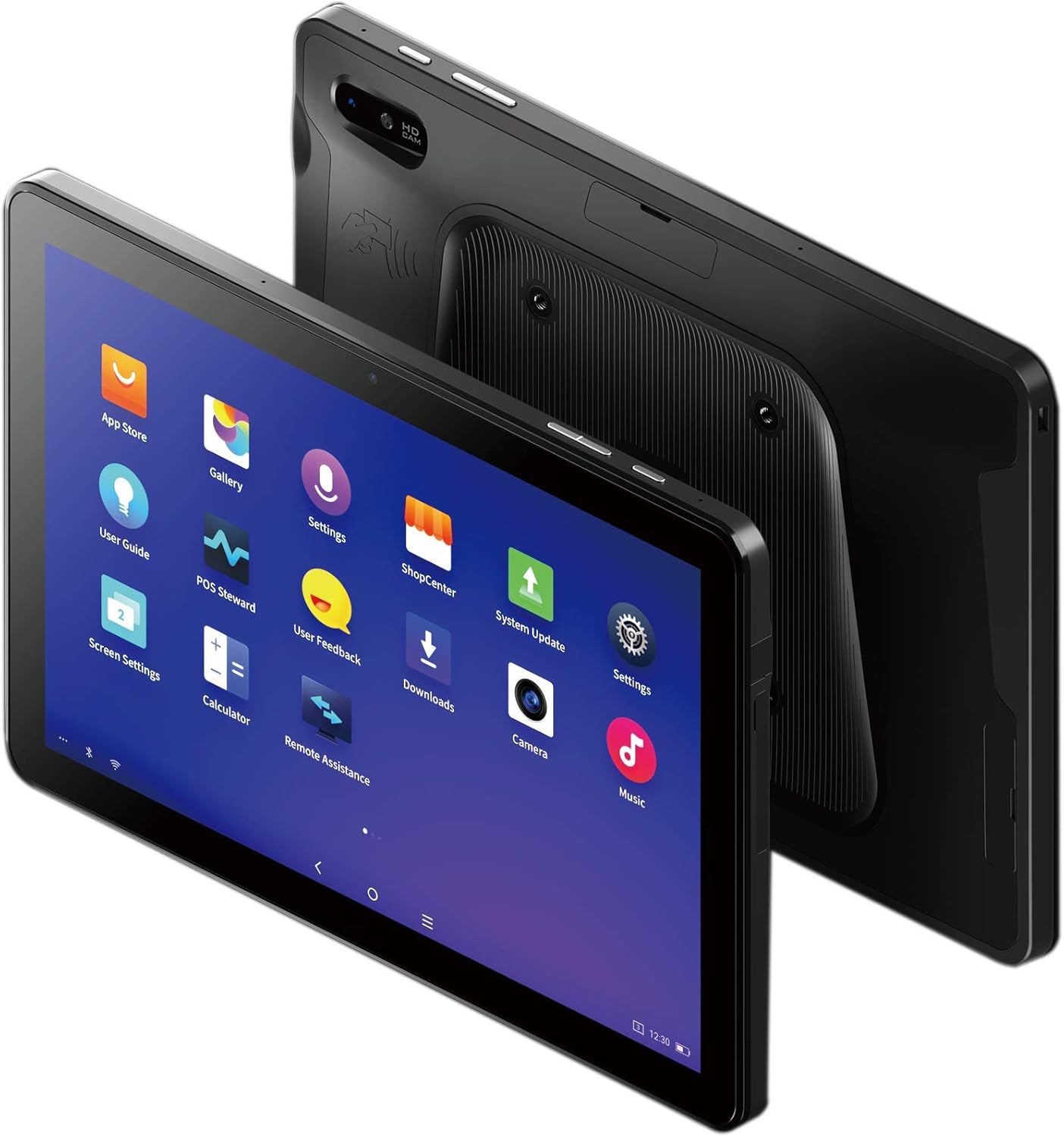
Figure 3: The SUNMI M2 MAX Industrial Tablet being held with an optional hand strap, demonstrating enhanced portability and secure grip.
Laitteen käyttö
1. Virta päälle/pois
- Virta päälle: Press and hold the Power button (located on the side) until the SUNMI logo appears on the screen.
- Virta pois: Press and hold the Power button until a power-off menu appears. Select "Power Off" and confirm.
- Käynnistä uudelleen: Käynnistä laite uudelleen valitsemalla virrankatkaisuvalikosta "Käynnistä uudelleen".
2. Perusnavigointi
The SUNMI M2 MAX runs on the Android operating system. Navigation is primarily touch-based:
- Napauta: Kohteen valitseminen tai sovelluksen avaaminen.
- Pyyhkäise: Listojen selaaminen tai näyttöjen vaihtaminen.
- Nipistämällä zoomaaminen: Kuvien lähentäminen tai loitontaminen tai web sivuja.
- Koti näppäin: Palaa aloitusnäyttöön.
- Takaisin-painike: Palaa edelliseen näyttöön.
- Viimeaikaiset sovellukset -painike: Näyttää äskettäin käytetyt sovellukset.
3. Yhteyden muodostaminen verkkoihin
The tablet supports Wi-Fi (2.4GHz/5GHz, 802.11 a/b/g/n/ac) and cellular networks (2G, 3G, 4G).
- Wi-Fi: Siirry osoitteeseen Asetukset > Verkko ja internet > Wi-Fi. Ota Wi-Fi käyttöön, valitse haluamasi verkko ja anna tarvittaessa salasana.
- Mobiilidata: Ensure a valid SIM card is inserted. Go to Asetukset > Verkko ja internet > Mobiiliverkko to enable mobile data and configure APN settings if necessary.
- Bluetooth: Siirry osoitteeseen Asetukset > Yhdistetyt laitteet > Bluetooth to pair with Bluetooth devices (supports Bluetooth 5.0).
4. Using NFC
The SUNMI M2 MAX is equipped with NFC (Near Field Communication) for contactless transactions and data exchange. To use NFC, ensure it is enabled in settings and hold the tablet near a compatible NFC reader or device.
5. Kameran käyttö
The tablet features a 13 MP rear camera with flash and autofocus, and a 5 MP front camera. Open the "Camera" application to capture photos or record videos.
Huolto
1. Laitteen puhdistaminen
Käytä pehmeää, nukkaamatonta liinaa hieman dampened with water or a screen cleaner to wipe the display and exterior. Avoid using harsh chemicals, abrasive cleaners, or excessive moisture.
2. Akun hoito
- Vältä tabletin altistamista äärimmäisille lämpötiloille (alle -20 °C tai yli 70 °C).
- Älä anna akun tyhjentyä kokonaan usein.
- Use only the original or certified compatible power adapter and cable.
3. Ohjelmistopäivitykset
Tarkista ja asenna järjestelmäpäivitykset säännöllisesti varmistaaksesi optimaalisen suorituskyvyn ja suojauksen. Siirry osoitteeseen Asetukset > Järjestelmä > Järjestelmäpäivitys.
4. Ympäristönsuojelu
The SUNMI M2 MAX is designed with IP68 protection and a 1m drop specification, making it suitable for demanding environments. However, avoid intentional drops or prolonged submersion in water.
Vianetsintä
| Ongelma | Mahdollinen syy | Ratkaisu |
|---|---|---|
| Laite ei käynnisty. | Akun varaus vähissä; ohjelmisto kaatuu. | Lataa laitetta vähintään 30 minuuttia. Pakota uudelleenkäynnistys painamalla virtapainiketta 10–15 sekuntia. |
| Ei voi muodostaa yhteyttä Wi-Fi-verkkoon. | Incorrect password; Wi-Fi disabled; router issue. | Verify password. Ensure Wi-Fi is enabled in settings. Restart router. Forget and reconnect to the network. |
| Kosketusnäyttö ei reagoi. | Väliaikainen ohjelmistohäiriö. | Pakota laite uudelleenkäynnistykseen pitämällä virtapainiketta pohjassa. |
| Applications crashing. | Insufficient RAM; app bug. | Close background apps. Clear app cache/data (Settings > Apps). Update the app. |
Tekniset tiedot
The following table outlines the key technical specifications of the SUNMI M2 MAX Industrial Tablet (Model: TF700).

Figure 4: Comprehensive technical specifications for the SUNMI M2 MAX Industrial Tablet.
- Malli: TF700
- Käyttöjärjestelmä: Android 9.0 (SUNMI OS)
- Prosessori: Kryo-260, Octa-core 2.2GHz (Qualcomm)
- Muisti: 3GB RAM + 32GB ROM (eMMC)
- Näyttö: 10.1-inch FHD, 1920x1200, Capacitive multitouch, Corning Gorilla Glass 3
- Kamerat: Front: 5MP FF; Rear: 13MP AF + Flashlight, supports 1D/2D barcode recognition
- NFC: Type-A&B card, Mifare card, Felica card, ISO/IEC 14443 and ISO/IEC 15693 compliant
- Speaker/MIC: 1W Speaker, 2x MIC
- PSAM-korttipaikka: 1x PSAM
- SIM-korttipaikka: 1x MicroSD (TF), 1x MicroSIM or 1x NanoSIM (TF700 Config 1), eSIM (TF700 Config 2)
- Verkko: 2G & 3G & 4G
- Wi-Fi: 2.4GHz/5GHz, 802.11 a/b/g/n/ac
- Bluetooth: Supports Bluetooth 2.1/3.0/4.2/5.0 (BLE)
- GPS: Supports AGPS, GPS, GLONASS, Beidou (Config 2)
- Anturi: Gravity sensor, light sensor, compass, Hall
- Painikkeet: 1x Power (lock screen), 2x Volume (+/-)
- Portit: 1x Type-C (supports OTG), 1x Audio Jack, 1x MicroSD (up to 128GB expansion)
- Akku: Non-removable Lithium Polymer battery, 8360mAh
- Virtalähde: Input: AC 100-240V, Output: DC 5V/2A
- Mitat (PxLxK): 249.8 x 160 x 9.9 mm (0.39 x 6.3 x 9.84 tuumaa)
- Kokonaispaino: 673 g (1.48 kiloa)
- Suojaus: IP68, 1m drop spec
- Käyttölämpötila: -20 °C - 55 °C
- Varastointilämpötila: -40 °C - 70 °C
Takuu ja tuki
For warranty information and technical support, please refer to the documentation provided with your purchase or visit the official SUNMI websivusto. Säilytä ostokuitti takuuvaatimuksia varten.
SUNMI Official Websivusto: www.sunmi.com
Ask a question about this manual
Ask about setup, troubleshooting, compatibility, parts, safety, or missing instructions. Manuals+ will review the question and use this page’s manual context to help answer it.