
Johdanto
The Fostex 6301DT is a compact and versatile 4-inch powered studio monitor, designed for broadcast, production facilities, mobile setups, project studios, and home recording environments. Building upon the legacy of the 6301-series, this model incorporates a D-class power amplifier and a new driver unit, featuring an energy-saving auto stand-by function. The 6301DT integrates Dante network audio capabilities, allowing playback of any two channels of Dante network audio signals, alongside traditional 1/4-inch TS analog inputs. Its ultra-rugged die-cast aluminum enclosure ensures durability for professional use.
Turvallisuustiedot
- Virtalähde: Liitä laite ainoastaan määritettyyn virtalähteeseentage. Ensure the power cord is securely connected.
- Ilmanvaihto: Älä tuki tuuletusaukkoja. Varmista riittävä ilmankierto laitteen ympärillä ylikuumenemisen estämiseksi.
- Kosteus: Älä altista laitetta sateelle, kosteudelle tai liialliselle ilmankosteudelle. Vältä nestettä sisältävien esineiden asettamista laitteen päälle.
- Ulkomaiset esineet: Älä työnnä mitään esineitä laitteen aukkoihin.
- Huolto: Jätä kaikki huoltotyöt pätevän huoltohenkilöstön tehtäväksi. Älä yritä avata tai korjata laitetta itse.
- Sijoitus: Place the monitor on a stable surface. Avoid locations with excessive vibration, dust, or direct sunlight.
Pakkauksen sisältö
Varmista, että pakkauksessa on kaikki tarvittavat osat:
- Fostex 6301DT Active Monitor Speaker
- IEC-virtajohto
Tuote loppuview
Etupaneeli

Kuva 1: Etupaneelin säätimet
- Virtapainike: Press to turn the unit ON or OFF. An LED indicator shows the power status.
- Äänenvoimakkuuden säädin: Adjusts the output level of the monitor.
Takapaneeli
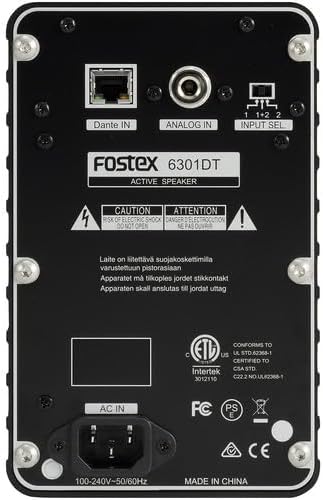
Kuva 2: Takapaneelin liitännät
- Dante IN (RJ45): Connects to a Dante network for digital audio input.
- Analog IN (1/4" TS): Connects to an analog audio source using a 1/4-inch TS cable.
- Tulosignaalin valintakytkin: Selects the audio input channel for monitoring (1, 2, or 1+2 mixed).
- AC IN: Yhdistää mukana toimitetun IEC-virtajohdon.
Asennus
Sijoitus
Place the Fostex 6301DT on a stable, flat surface. For optimal sound reproduction, position the monitor at ear level and equidistant from your listening position. An optional EB-6301 mounting bracket (not included) allows for easy surface-mounting at various angles.

Kuva 3: Esimample Sovelluksen asetukset
Virtaliitäntä
- Ensure the monitor's power button is in the OFF position.
- Connect the supplied IEC power cord to the AC IN port on the rear panel of the monitor.
- Liitä virtajohdon toinen pää sopivaan vaihtovirtapistorasiaan.
Ääniliitännät
The 6301DT supports both analog and Dante network audio inputs.
- Analoginen tulo: Connect your analog audio source (e.g., mixer, audio interface) to the 1/4" TS Analog IN port on the rear panel using a 1/4-inch TS cable.
- Dante Network Input: Connect an RJ45 Ethernet cable from your Dante network switch or device to the Dante IN port on the rear panel.
Toiminnassa
Virran kytkeminen päälle/pois
Press the Power button on the front panel to turn the monitor ON. The power indicator LED will illuminate. Press the button again to turn the monitor OFF.
Äänenvoimakkuuden säätö
Rotate the Volume knob on the front panel clockwise to increase the output level and counter-clockwise to decrease it. Start with a low volume setting and gradually increase it to a comfortable listening level.
Tulon valinta
Use the Input Select switch on the rear panel to choose the desired audio source:
- Analoginen: Selects the 1/4" TS analog input.
- Dante Channel 1: Monitors the first Dante audio channel.
- Dante Channel 2: Monitors the second Dante audio channel.
- Dante Channel 1+2 (Mixed): Monitors a mix of both Dante channels.
Dante-verkon konfigurointi
For Dante network operation, you will need to use Audinate's Dante Controller software on a computer connected to the same Dante network. This software allows you to route audio signals to the Fostex 6301DT and configure its network settings. The 6301DT supports sampling frequencies of 44.1 kHz, 48 kHz, 88.2 kHz, and 96 kHz.
Huolto
- Puhdistus: Use a soft, dry cloth to clean the exterior of the monitor. Do not use abrasive cleaners, waxes, or solvents.
- Varastointi: Jos laitetta säilytetään pitkään, irrota se virtalähteestä ja säilytä sitä viileässä, kuivassa paikassa, poissa suorasta auringonvalosta ja äärimmäisistä lämpötiloista.
- Ilmanvaihto: Varmista, että tuuletusaukot pysyvät vapaina pölystä ja roskista.
Vianetsintä
| Ongelma | Mahdollinen syy | Ratkaisu |
|---|---|---|
| Ei äänilähtöä |
|
|
| Vääristynyt ääni |
|
|
| Dante-yhteysongelmat |
|
|
Tekniset tiedot

Kuva 4: Tuotteen mitat
| Ominaisuus | Erittely |
|---|---|
| Mallinumero | AMS-6301DT |
| Kaiuttimen tyyppi | Virtakäyttöinen Studio-näyttö |
| Kaiuttimen koko | 4 tuumaa |
| Bassokaiuttimen halkaisija | 4 tuumaa |
| Ampelävämpi tyyppi | D-luokan |
| Suurin lähtöteho | 20 wattia |
| Äänilähtötila | Stereot |
| Äänikanavien määrä | 2.0 |
| Yhteystekniikka | RJ45 (Dante), 1/4" TS (Analog) |
| Yhteysprotokolla | Dante |
| Tuettu Sampling-taajuudet | 44.1/48/88.2/96 kHz |
| Signaali-kohinasuhde | 85 dB |
| Virtalähde | Johdollinen sähkö |
| Kotelon materiaali | Valettu alumiini |
| Väri | Musta |
| Tuotteen mitat (S x L x K) | 4.7 cm x 7.5 cm x 4.7 cm |
| Tuotteen paino | 5.1 puntaa |
| Lisäominaisuudet | Auto stand-by function, Recessed front-panel controls |
Takuu ja tuki
Takuutiedot
The Fostex 6301DT is covered by a 1 vuoden valmistajan rajoitettu takuuSäilytä ostokuittisi takuuvaatimuksia varten.
Asiakastuki
For technical assistance, troubleshooting, or warranty service, please contact American Music and Sound, the manufacturer, or your authorized Fostex dealer. Refer to the Fostex official websivustolta ajantasaisimmat tukiyhteystiedot.