
1. Johdanto
The Dynascan R-400 is a professional-grade PMR-446 transceiver designed for license-free use. This device operates on the 446 MHz frequency band, offering reliable two-way communication. This manual provides essential information for the proper setup, operation, maintenance, and troubleshooting of your Dynascan R-400 transceiver to ensure optimal performance and longevity.
2. Turvallisuustiedot
- Lue kaikki ohjeet: Before operating the transceiver, thoroughly read and understand all instructions in this manual.
- Akun turvallisuus: Use only the specified Lithium-Ion battery and charging equipment. Do not short-circuit, incinerate, or disassemble the battery.
- Antenni: Do not operate the radio with a damaged antenna. If a damaged antenna comes into contact with your skin, a minor burn may result.
- Häiriöt: Turn off the transceiver in areas where radio use is prohibited or when interference may occur, such as near medical equipment or aircraft.
- Veden- ja pölynkestävyys: The device has an IP55 rating, providing protection against dust and splashes of water. It is not designed for submersion.
- Huolto: Do not attempt to service the transceiver yourself. Refer all servicing to qualified personnel.
3. Pakkauksen sisältö
Varmista, että pakkauksessa on kaikki tarvittavat osat:
- Dynascan R-400 PMR-446 Transceiver
- Litiumioniakku
- Latausalusta
- Latausalustan virtalähde
- Vyöklipsi
- Käsihihna
- Käyttöopas
4. Tuote ohiview
Familiarize yourself with the main components of your Dynascan R-400 transceiver.

Kuva 4.1: Edessä view of the Dynascan R-400 transceiver, showing the speaker, microphone, and display area.
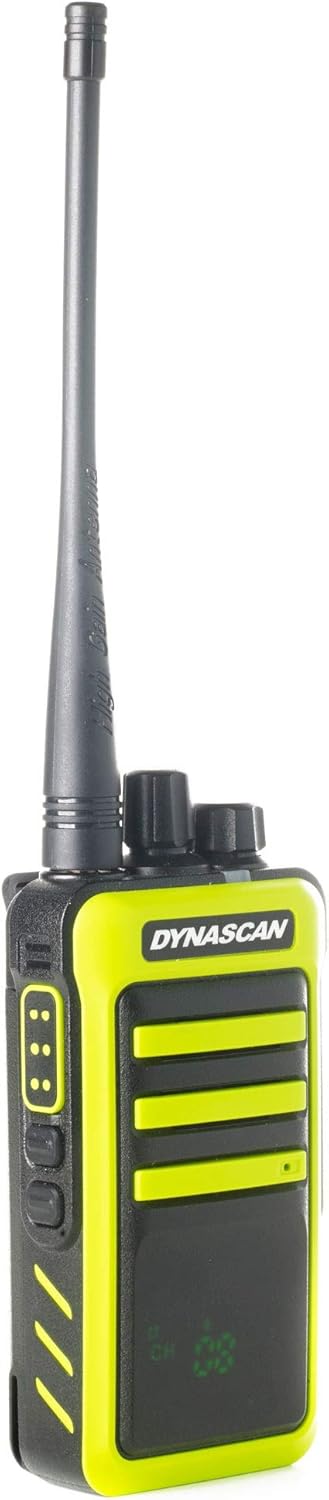
Kuva 4.2: Sivu view of the transceiver, highlighting the Push-To-Talk (PTT) button and two programmable function buttons.

Kuva 4.3: Sivu view showing the attachment point for the belt clip, allowing for convenient carrying.

Kuva 4.4: Vastakkainen puoli view, typically featuring the accessory port for external audio devices or programming cables.
5. Asennus
5.1. Akun asennus
- Varmista, että lähetin-vastaanotin on sammutettu.
- Align the Lithium-Ion battery pack with the battery compartment on the back of the transceiver.
- Työnnä akkua varovasti paikalleen, kunnes se napsahtaa tukevasti.
- If applicable, secure the battery latch.
5.2. Akun lataaminen
Before first use, fully charge the battery. The transceiver charges via its dedicated charging base.
- Kytke virtalähde lataustelineeseen ja kytke se tavalliseen pistorasiaan.
- Place the transceiver (with battery installed) into the charging base. Ensure the charging contacts align.
- The charging indicator light on the base will illuminate, typically red for charging and green for fully charged.
- A full charge usually takes several hours. Do not overcharge the battery for extended periods.
5.3. Antennin kiinnitys
- Screw the antenna clockwise onto the connector on the top of the transceiver until it is finger-tight. Do not overtighten.
6. Käyttöohjeet
6.1. Virta päälle/pois ja äänenvoimakkuuden säätö
- To power on the transceiver, rotate the top-left knob (Power/Volume knob) clockwise until you hear a click and the display illuminates.
- Jatka nupin kiertämistä myötäpäivään lisätäksesi äänenvoimakkuutta ja vastapäivään vähentääksesi sitä.
- Sammuta virta kääntämällä nuppia vastapäivään, kunnes kuulet napsahduksen.
6.2. Kanavan valinta
The Dynascan R-400 features 8 PMR-446 channels.
- Rotate the top-right knob (Channel Selector knob) to choose your desired channel from 1 to 8.
- Ensure all transceivers you wish to communicate with are set to the same channel.
6.3. Lähetys ja vastaanotto
- Vastaanottaja vastaanottaa a transmission, simply ensure the transceiver is powered on and set to the correct channel. The speaker will output incoming audio.
- Vastaanottaja lähettää, press and hold the Push-To-Talk (PTT) button located on the side of the transceiver. Speak clearly into the microphone.
- Lopeta lähetys ja palaa vastaanottotilaan vapauttamalla PTT-painike.
6.4. VOX-toiminto (ääniohjattu lähetys)
The VOX function allows hands-free transmission by detecting your voice.
- Refer to the full programming software (requires optional cable) for enabling and adjusting VOX sensitivity.
- When VOX is active, the radio will automatically transmit when you speak and stop when you cease speaking.
6.5. CTCSS/DCS Tones (Subtones)
The R-400 supports 50 CTCSS and 104 DCS subtones. These tones help filter out unwanted conversations on the same channel.
- To use CTCSS/DCS, all transceivers in your group must be programmed with the same channel and sub-tone.
- Programming of CTCSS/DCS tones typically requires the optional programming cable and software.
7. Huolto
7.1. Puhdistus
- Pyyhi lähetin-vastaanotin pehmeällä,amp kangas. Älä käytä voimakkaita kemikaaleja tai hankaavia puhdistusaineita.
- Ensure the charging contacts on both the radio and the base are clean and free of debris.
7.2. Akun hoito
- Akun käyttöiän maksimoimiseksi vältä akun usein tapahtuvaa täydellistä tyhjentämistä.
- Säilytä akkua viileässä ja kuivassa paikassa, kun sitä ei käytetä pitkään aikaan.
- If the battery will not be used for a long time, charge it to about 50% before storage.
7.3. Varastointi
- Store the transceiver in a dry, dust-free environment away from direct sunlight and extreme temperatures.
- Poista akku, jos säilytät sitä yli kuukauden.
8. Vianmääritys
| Ongelma | Mahdollinen syy | Ratkaisu |
|---|---|---|
| Transceiver does not power on | Akku tyhjentynyt tai väärin asennettu | Lataa akku. Asenna akku takaisin oikein. |
| Ei voi lähettää tai vastaanottaa | Väärä kanava valittu; Kantaman ulkopuolella; Akku vähissä | Verify channel setting. Move closer to other transceivers. Charge battery. |
| Huono äänenlaatu tai staattista ääntä | Weak signal; Interference; Antenna loose | Move to an open area. Check for sources of interference. Ensure antenna is securely attached. |
| Latausilmaisin ei toimi | Charging base or adapter faulty; Poor contact | Check power connections. Clean charging contacts. Try a different outlet. |
9. Tekniset tiedot
| Ominaisuus | Erittely |
|---|---|
| Malli | R 400 |
| Taajuusalue | 446.00625–446.09375 MHz |
| Kanavien lukumäärä | 8 |
| Max. Radiated Power | 500mW |
| Akun tyyppi | Lithium-Ion (7.4 Volts) |
| Mitat (K x L x S) | 12.4 x 5.9 x 3.7 cm |
| Paino | 218 g |
| Veden/pölynkestävyys | IP55 (Water/Dust Resistant) |
| Erikoisominaisuudet | Voice Operated Transmission (VOX), Encrypted Channels (programmable) |
| Alaäänet | CTCSS 50 / DCS 104 |
| Laitteistorajapinta | USB (ohjelmointia varten) |
10. Takuutiedot
The Dynascan R-400 transceiver is covered by a manufacturer's warranty. For specific warranty terms, conditions, and duration, please refer to the warranty card included with your product or contact Dynascan customer support directly. Keep your proof of purchase for warranty claims.
11. Tukea
For technical assistance, troubleshooting beyond this manual, or inquiries about accessories, please contact Dynascan customer support. You can typically find contact information on the manufacturer's official websivustolla tai tuotepakkauksessa.
Please visit the official Dynascan websivustolta löydät uusimmat tukiresurssit ja yhteystiedot.