
Johdanto
Thank you for choosing the Docooler HXSJ A876 Wired Gaming Mouse. This manual provides detailed instructions for setting up, operating, and maintaining your new gaming mouse. Please read this manual carefully before use to ensure optimal performance and longevity of your device.
Tuotteen ominaisuudet
- Säädettävä DPI: Supports 800, 1600, 3200, and 6400 DPI settings for precise control.
- 7-Color Breathing Light: Synchronized lighting provides a dynamic visual effect.
- Ergonominen muotoilu: Engineered for comfort during extended use, fitting naturally in the palm.
- Kestävät kytkimet: Equipped with high-performance mechanical micro-switches rated for 10 million clicks.
- Anti-slip Scroll Wheel: Designed for smooth and precise scrolling.
- Langallinen USB-yhteys: Ensures stable and reliable performance.
Pakkauksen sisältö
- 1 x Docooler HXSJ A876 Wired Gaming Mouse
- 1 x Käyttöohje
Asennus
- Unpack the Docooler HXSJ A876 Wired Gaming Mouse and its accessories from the packaging.
- Etsi tietokoneeltasi (PC tai kannettava) vapaa USB-portti.
- Kytke hiiren USB-liitin USB-porttiin.
- Hiiri on plug-and-play-valmis ja käyttöjärjestelmäsi pitäisi tunnistaa se automaattisesti. Lisäohjaimia ei yleensä tarvita.
Käyttöohjeet
DPI-säätö
The HXSJ A876 mouse features adjustable DPI settings, allowing you to switch sensitivity on the fly. Use the dedicated DPI buttons (DPI Loop + and DPI Loop -) located near the scroll wheel to cycle through the available DPI levels.
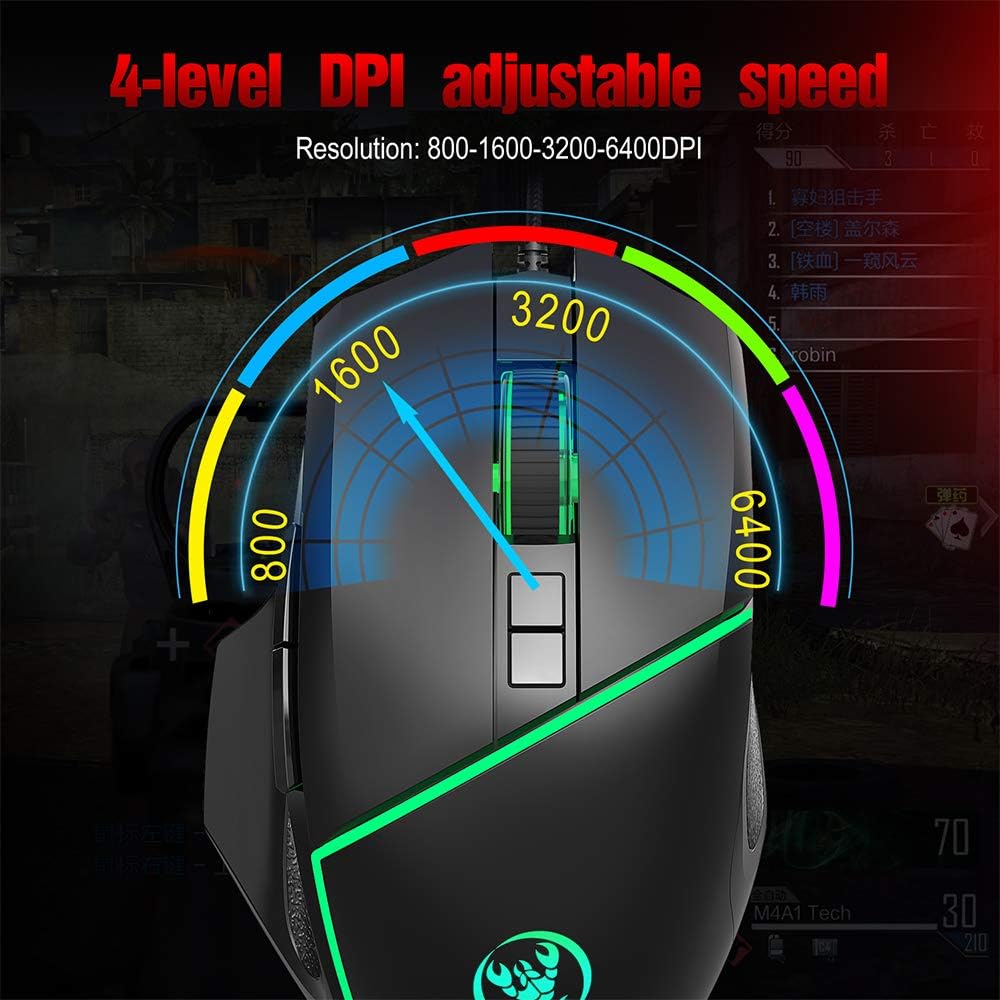
Visual representation of the 4-level adjustable DPI settings on the HXSJ A876 gaming mouse. The graphic indicates how the DPI can be cycled through different resolutions for varied gaming and work needs.
- 800 DPI: Suitable for precise tasks.
- 1600 DPI: A balanced setting for general use.
- 3200 DPI: Lisääntynyt herkkyys nopeampaa kursorin liikettä varten.
- 6400 DPI: High sensitivity for rapid movements in gaming.
DPI Indicator Feedback
The mouse provides visual feedback for the current DPI setting:

This image demonstrates the HXSJ A876 gaming mouse on a desk, detailing how to turn the lights on and off by pressing the Mid button + DPI +. It also explains the DPI indicator feedback: red light flashes once for 800 DPI, twice for 1600 DPI, three times for 3200 DPI, and four times for 6400 DPI.
- When 800 DPI is selected, the DPI indicator flashes red once.
- When 1600 DPI is selected, the DPI indicator blinks red twice.
- When 3200 DPI is selected, the DPI indicator blinks red three times.
- When 6400 DPI is selected, the DPI indicator flashes red four times.
Painikkeiden toiminnot
The HXSJ A876 mouse features a seven-button design for enhanced functionality:

A clear diagram labeling the seven buttons on the HXSJ A876 gaming mouse: Left Button, Right Button, Mid Button (scroll wheel), DPI Loop +, DPI Loop -, Forward Button, Backward Button, and Fire Key. This helps users identify each control.
- Vasen painike: Ensisijainen napsautustoiminto.
- Oikea painike: Toissijainen napsautustoiminto (kontekstivalikko).
- Keskipainike (vierityspyörä): Scrolls pages up/down; click for middle-click function.
- DPI Loop +: Lisää DPI-herkkyyttä.
- DPI Loop -: Vähentää DPI-herkkyyttä.
- Eteenpäin-painike: Navigoi eteenpäin kohdassa web selaimet tai file tutkimusmatkailijoita.
- Taaksepäin-painike: Navigoi taaksepäin web selaimet tai file tutkimusmatkailijoita.
- Paloavain: Programmable button, often used for rapid firing in games.
Valon ohjaus
To toggle the synchronized 7-color breathing light on or off, press the Keskipainike ja DPI + -painike samanaikaisesti.

This image displays the HXSJ A876 wired gaming mouse, emphasizing its 6400 DPI high precision capability for stable transmission and accurate analysis. The mouse features a sleek black design with red accents.
Huolto
- Puhdistus: Use a soft, dry cloth to clean the surface of the mouse. For stubborn dirt, slightly dampKostuta liina vedellä. Vältä voimakkaiden kemikaalien tai hankaavien materiaalien käyttöä.
- Varastointi: Säilytä hiirtä puhtaassa, kuivassa paikassa, poissa äärimmäisistä lämpötiloista ja suorasta auringonvalosta.
- Kaapelihuolto: Vältä USB-kaapelin liiallista taivuttamista tai kiertämistä, jotta se ei vaurioidu.
Vianetsintä
- Hiiri ei vastaa:
- Varmista, että USB-kaapeli on kytketty tukevasti toimivaan USB-porttiin.
- Kokeile kytkeä hiiri tietokoneen toiseen USB-porttiin.
- Käynnistä tietokone uudelleen.
- DPI ei muutu:
- Varmista, että painat oikeita DPI-säätöpainikkeita.
- Check if the DPI indicator light provides feedback when buttons are pressed.
- Valot eivät toimi:
- Varmista, että hiiri on kytketty oikein tietokoneeseen.
- Try toggling the lights using the Mid button + DPI + combination.
Tekniset tiedot
| Merkki | Docooler |
| Malli | A876 |
| Tyyppi | Langallinen pelihiiri |
| Materiaali | ABS |
| Valaistustila | 7-color synchronized breathing light |
| DPI-asetukset | 800-1600-3200-6400DPI (Adjustable) |
| Vaihda elämää | 10 miljoonaa jaksoa |
| Kaapelin pituus | Noin 150 cm |
| Käyttö Voltage/Nykyinen | DC 5V/100mA |
| Mitat (P x L x K) | 12.5 x 8 x 4 cm |
| Tuotteen paino | Noin 138 g |
| Yhteystekniikka | USB |
| Liiketunnistustekniikka | Optinen |
| Käsien suuntautuminen | Molempikätinen |
| Suositeltu käyttö | Office, Video Gaming |
| Yhteensopivat laitteet | Henkilökohtainen tietokone, kannettava tietokone |

This image shows a hand comfortably gripping the HXSJ A876 gaming mouse, highlighting its ergonomic design. The text indicates that the design is made for a better fit in the palm, ensuring comfort and reducing fatigue during long-term use.

An image depicting the HXSJ A876 gaming mouse in use on a desk, with an overlay indicating a '10,000,000 Times Click Test'. This illustrates the mouse's durability and the longevity of its mechanical switches.
Takuu ja tuki
Jos tarvitset takuutietoja tai teknistä tukea, katso ostohetkellä toimitettuja asiakirjoja tai ota yhteyttä jälleenmyyjään. Säilytä ostokuittisi mahdollisten takuuvaatimusten varalta.