
JLB7tech LB55955T*2/R
JLB7tech 5-tuumainen jaetun näytön vauvamonitori käyttöohje
Model: LB55955T*2/R
1. Johdanto
Welcome to the JLB7tech 5-inch Split Screen Baby Monitor. This device is designed to provide a secure and reliable way to monitor your baby, offering features such as a large display, two-way audio, night vision, and temperature sensing. Please read this manual thoroughly before use to ensure proper operation and safety.
2. Turvallisuustiedot
- Kuristumisvaara: Keep the adapter cords out of reach of children (at least 3 feet / 1 meter away). Never place the camera or cords within the crib or playpen.
- Tukehtumisvaara: Tämä tuote sisältää pieniä osia. Pitää poissa lasten ulottuvilta.
- Lämpöaltistus: Do not place the monitor or camera near heat sources such as radiators, heat registers, stoves, or other appliances that produce heat.
- Vesi ja kosteus: Älä altista tuotetta vedelle tai kosteudelle.
- Virtalähde: Use only the AC power adapters provided. Using other adapters may damage the device.
- Ilmanvaihto: Älä tuki tuuletusaukkoja. Varmista riittävä ilmankierto yksiköiden ympärillä.
- Akun turvallisuus: The monitor contains a rechargeable battery. Do not attempt to replace it yourself. Dispose of batteries properly.
3. Pakkauksen sisältö
Paketti sisältää seuraavat tuotteet:
- Parent Unit (LCD Monitor) X 1
- Baby Unit (Camera) X 1
- Power Adapter X 2 (Input 100-240V)
- Wall mount screw pack X 2
4. Tuote ohiview
The JLB7tech baby monitor system consists of a parent unit (monitor) and one or two baby units (cameras).

Image 4.1: JLB7tech 5-inch Split Screen Baby Monitor with two camera units.
4.1 Vanhemman yksikkö (näyttö)
The parent unit features a 5-inch LCD screen for clear video display. It includes controls for volume, two-way talk, VOX mode, and menu navigation. The monitor is equipped with a rechargeable battery for portable use.
4.2 Vauvan yksikkö (kamera)
The baby unit is equipped with a camera, microphone, speaker, and temperature sensor. It features automatic infrared night vision for clear viewing in low light conditions. The camera can be manually adjusted for pan (360 degrees) and tilt (100 degrees) to achieve the desired viewkulma.

Image 4.2: The baby unit camera allows for manual pan (360°) and tilt (100°) adjustments.
5. Asennus
5.1 Virran kytkeminen päälle
- Connect the small plug of the power adapter to the baby unit and the other end to a power outlet.
- Connect the small plug of the power adapter to the parent unit and the other end to a power outlet.
- Käynnistä vanhemman yksikkö painamalla virtapainiketta ja pitämällä sitä painettuna.
5.2 Kameran sijoittelu
Aseta vauvan yksikkö (kamera) paikkaan, josta on esteetön yhteys view of your baby. Ensure the camera is at least 3 feet (1 meter) away from the baby's crib or play area to prevent cord entanglement. The monitor offers an extra-long transmission range of up to 1000 feet in an open area, allowing you to monitor your baby from various locations within your home.

Image 5.1: The baby monitor offers an extended range of up to 1000 feet.
6. Käyttöohjeet
6.1 Pairing Cameras
The baby unit(s) and parent unit are pre-paired at the factory. If you need to re-pair or add an additional camera (sold separately), refer to the pairing instructions in the monitor's menu settings.
6.2 VOX Mode (Voice Activation)
VOX mode conserves battery power by turning off the monitor screen when no sound is detected. The screen will automatically activate when the baby unit detects sound, such as your baby crying. This feature helps extend the monitor's operating time.

Image 6.1: VOX Mode activates the screen upon detecting sound, saving battery.
6.3 Kaksisuuntainen keskustelu
To talk to your baby, press and hold the microphone button on the parent unit. Release the button to listen to your baby. This feature allows for clear two-way audio communication.
6.4 kehtolaulua
The monitor includes built-in lullabies to help soothe your baby. Access the lullaby function through the parent unit's menu to play calming sounds.
6.5 Huonelämpötilan valvonta
The baby unit is equipped with a temperature sensor that displays the room temperature on the parent unit's screen. This helps ensure your baby's environment remains comfortable.
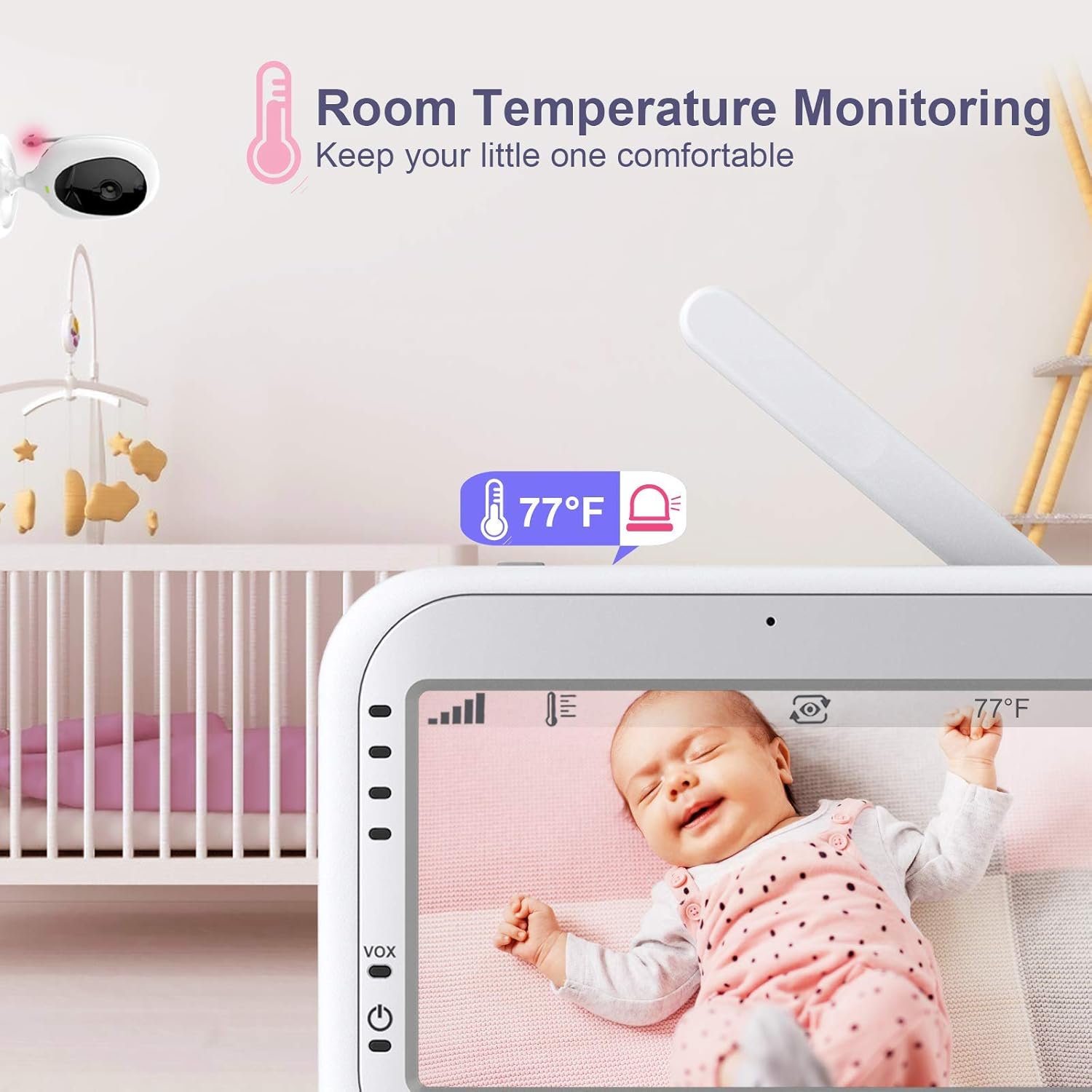
Image 6.2: The monitor displays the room temperature detected by the baby unit.
6.6 Feeding Alarm Reminding
You can set a feeding alarm on the parent unit to remind you when it's time to feed your baby. This feature helps maintain a consistent feeding schedule.

Image 6.3: Set a feeding alarm to receive reminders on the parent unit.
6.7 Jaettu näyttö View
If you are using two cameras, the 5-inch LCD screen supports a split-screen view, allowing you to monitor two rooms simultaneously. This feature is particularly useful for monitoring multiple children or different areas of a room.
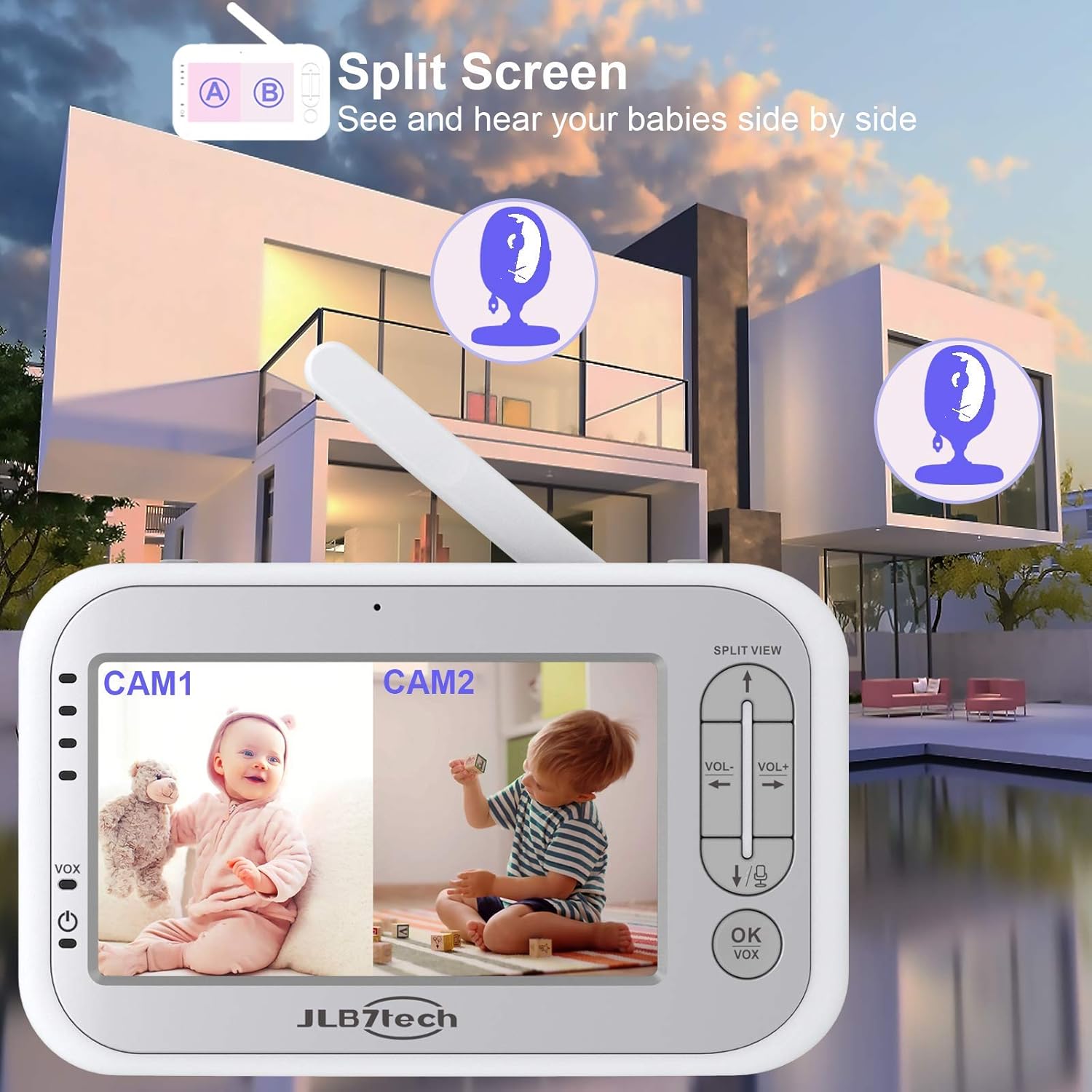
Image 6.4: The split screen feature allows simultaneous viewing from two cameras.
6.8 Auto Infrared Night Vision
The baby unit automatically activates infrared night vision in low light conditions, providing a clear black and white image of your baby even in a dark room. This ensures continuous monitoring day or night.

Image 6.5: Automatic infrared night vision provides clear images in the dark.
7. Huolto
7.1 Puhdistus
Wipe the monitor and camera units with a soft, dry cloth. Do not use abrasive cleaners or solvents. Ensure the devices are unplugged before cleaning.
7.2 Akun hoito
The parent unit has a built-in rechargeable battery. For optimal battery life, avoid fully discharging the battery frequently. Charge the unit when the low battery indicator appears. The 3000mAh battery provides extended usage, with approximately 9 hours of screen-on time and 12 hours in audio-only mode.

Image 7.1: Battery life indicators for screen-on and audio-only modes.
8. Vianmääritys
8.1 No Image/Sound on Monitor
- Ensure both the parent unit and baby unit are powered on and connected to a power source.
- Check if the camera is within range of the monitor. Move them closer if necessary.
- Verify that the camera is properly paired with the monitor. Refer to the pairing section if needed.
- Säädä äänenvoimakkuutta vanhemman yksiköstä.
8.2 "Camera Lost Link" Message
This message indicates that the parent unit has lost connection with the baby unit. This can happen if the camera is too far from the monitor, there are too many obstructions (walls, furniture) between them, or if the camera is powered off.
- Siirrä vanhempayksikkö lähemmäksi vauvan yksikköä.
- Ensure there are no large metal objects or other electronic devices causing interference.
- Check if the baby unit is powered on.
8.3 Huono kuvanlaatu
- Varmista, että kameran linssi on puhdas.
- Check for adequate lighting in the room during daytime.
- For night vision, ensure the room is dark enough for the infrared to activate.
8.4 Lyhyt akunkesto
- Varmista, että vanhemman yksikkö on ladattu täyteen ennen käyttöä.
- Frequent use of the screen will consume more battery. Consider using VOX mode to extend battery life.
- Akun suorituskyky voi heikentyä ajan myötä säännöllisessä käytössä.
9. Tekniset tiedot
| Ominaisuus | Erittely |
|---|---|
| Merkki | JLB7tech |
| Mallin nimi | 5" Split Screen Video Baby Monitor with 2 Cameras |
| Tuotteen mallinumero | LB55955T*2/R |
| Näytön koko | 5 tuuman LCD |
| Videon sieppaustarkkuus | 720p |
| Yhteystekniikka | Wireless (No WiFi required for local operation) |
| Virtalähde | Paristokäyttöinen (vanhempien yksikkö), verkkovirtakäyttöinen (vauvan yksikkö) |
| Akku (vanhempien yksikkö) | 1 litiummetalliparisto (mukana) |
| Erikoisominaisuudet | Night Vision, Temperature Detection, 2-Way Talk, VOX Mode, Lullabies, Feeding Alarm, Split Screen |
| Kamera Viewkulma | 60 degrees (manual pan 360°, tilt 100°) |
| Wireless Range | Jopa 1000 metriä (avoin alue) |
| Materiaali | Muovi |
| Tuotteen mitat P x L x K | 9.3 x 7.5 x 5 tuumaa |
| Tuotteen paino | 1.98 kiloa |
10. Takuu ja tuki
JLB7tech stands behind its products. This baby monitor comes with a 24 MONTHS product warranty. For any inquiries or technical assistance, please contact our customer service team, available 24/7. We offer lifetime technical support to ensure your satisfaction.
Ask a question about this manual
Ask about setup, troubleshooting, compatibility, parts, safety, or missing instructions. Manuals+ will review the question and use this page’s manual context to help answer it.